


Microsoft allows individuals, who switch mailer services from Gmail and Yahoo, to import a copy of all emails into their Microsoft 365 account or connect their old email account to Outlook.
First, you need to prepare Gmail for connecting to Outlook;
Step 1: Sign into your Gmail or Google Workspace account.
Step 2: Click on the gear icon located at the top right corner and click on the settings menu.
Step 3: Head to the ‘forwarding and POP/IMAP’ tab.
Step 4: Scroll down to the IMAP access, enable it and save changes.
Step 5: Enable two-step verification in your Gmail account.
Step 6: Then, create an “app password” through the Google account, which will be used in Gmail.
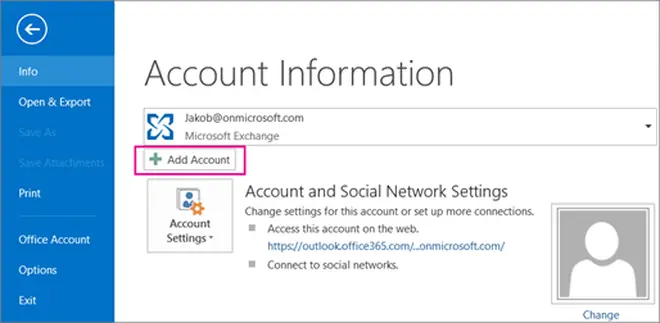
Step 1: Open the Outlook app and select the file option.
Step 2: Click to add an account under the file section.
Step 3: On the Auto Account Setup page, enter your name, Gmail address, and Gmail password (or the app password).
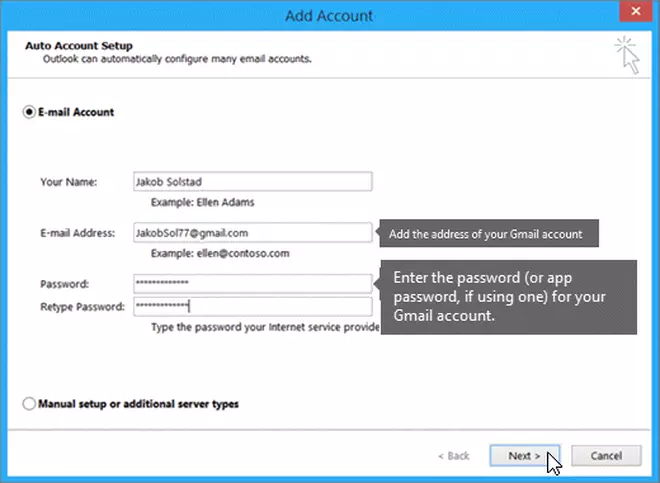
Step 4: Click Finish.
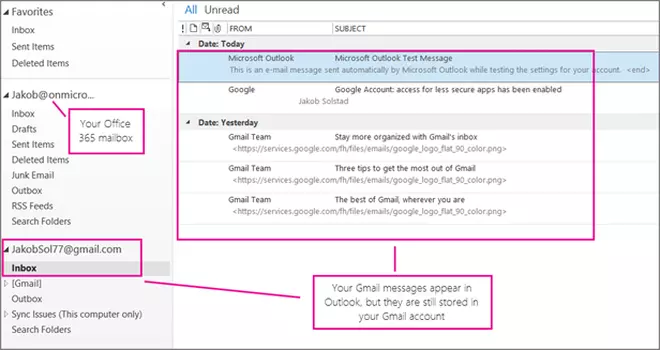
Now, Outlook will sync with your Gmail account.
Google has stepped up to delete inactive Google accounts, including Google Workspace (Gmail, Docs, Drive, Meet, and Calendar), YouTube, and Google Photos, without any activity for at least two years.
Published on May 22, 2023
此内容由惯性聚合(RSS阅读器)自动聚合整理,仅供阅读参考。 原文来自 — 版权归原作者所有。