








Modernizing a .NET application is rarely a single step. It requires understanding the current state of the codebase, evaluating dependencies, identifying potential breaking changes, and sequencing updates carefully.
Until recently, GitHub Copilot modernization for .NET ran primarily inside Visual Studio. That worked well for teams standardized on the IDE, but many teams build elsewhere. Some use VS Code. Some work directly from the terminal. Much of the coordination happens on GitHub, not in a single developer’s local environment.
The modernize-dotnet custom agent changes that. The same modernization workflow can now run across Visual Studio, VS Code, GitHub Copilot CLI, and GitHub. The intelligence behind the experience remains the same. What’s new is where it can run. You can modernize in the environment you already use instead of rerouting your workflow just to perform an upgrade.
The modernize-dotnet agent builds on the broader GitHub Copilot modernization platform, which follows an assess → plan → execute model. Workload-specific agents such as modernize-dotnet, modernize-java, and modernize-azure-dotnet guide applications toward their modernization goals, working together across code upgrades and cloud migration scenarios.
What the agent produces
Every modernization run generates three explicit artifacts in your repository: an assessment that surfaces scope and potential blockers, a proposed upgrade plan that sequences the work, and a set of upgrade tasks that apply the required code transformations.
Because these artifacts live alongside your code, teams can review, version, discuss, and modify them before execution begins. Instead of a one-shot upgrade attempt, modernization becomes traceable and deliberate.
GitHub Copilot CLI
For terminal-first engineers, GitHub Copilot CLI provides a natural entry point.
You can assess a repository, generate an upgrade plan, and run the upgrade without leaving the shell.
- Add the marketplace:
/plugin marketplace add dotnet/modernize-dotnet - Install the plugin:
/plugin install modernize-dotnet@modernize-dotnet-plugins - Select the agent:
/agentto selectmodernize-dotnet - Then prompt the agent, for example:
upgrade my solution to a new version of .NET
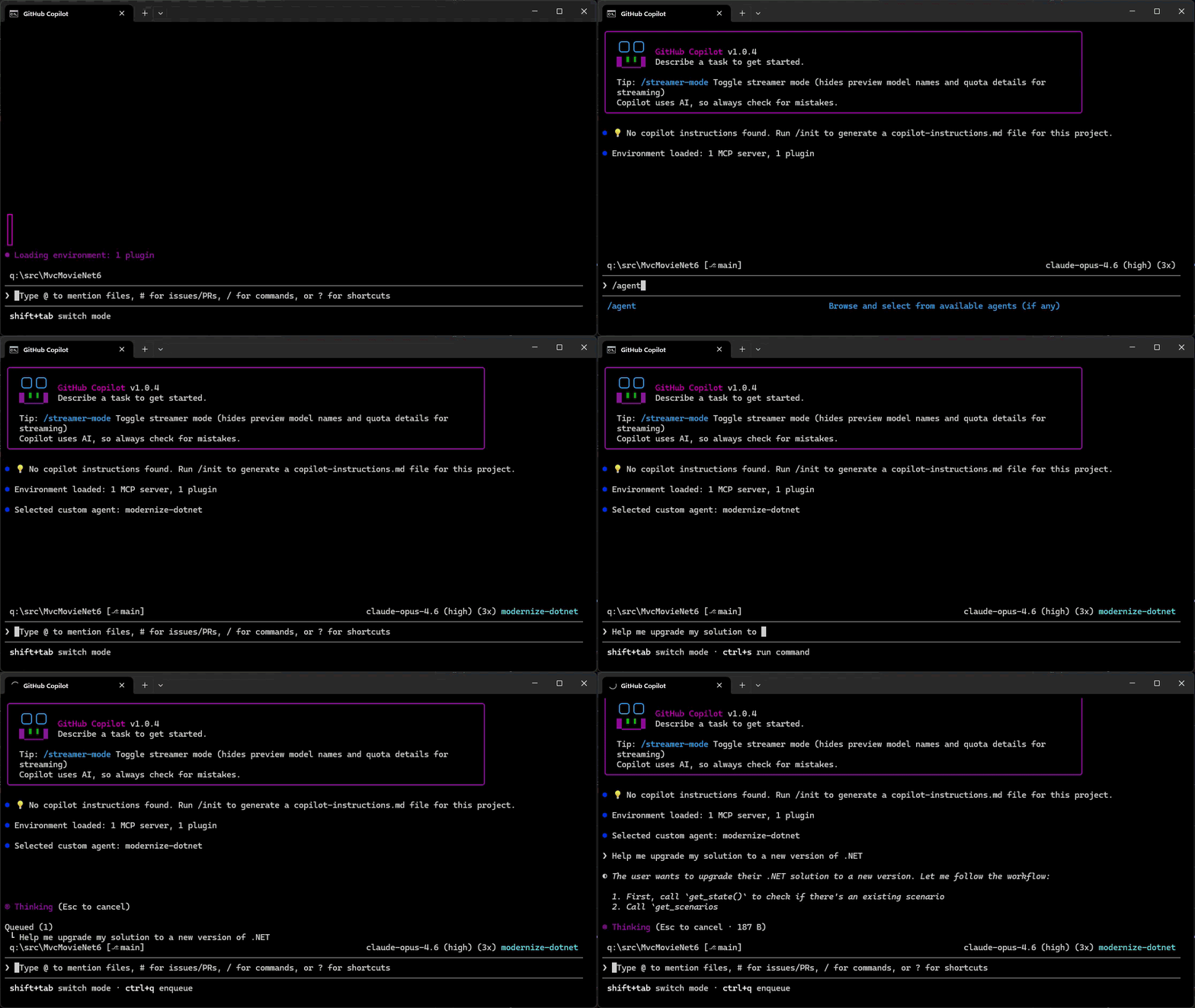
The agent generates the assessment, upgrade plan, and upgrade tasks directly in the repository. You can review scope, validate sequencing, and approve transformations before execution. Once approved, the agent automatically executes the upgrade tasks directly from the CLI.
GitHub
On GitHub, the agent can be invoked directly within a repository. The generated artifacts live alongside your code, shifting modernization from a local exercise to a collaborative proposal. Instead of summarizing findings in meetings, teams review the plan and tasks where they already review code. Learn how to add custom coding agents to your repo, then add the modernize-dotnet agent by following the README in the modernize-dotnet repository.
VS Code
If you use VS Code, install the GitHub Copilot modernization extension and select modernize-dotnet from the Agent picker in Copilot Chat. Then prompt the agent with the upgrade you want to perform, for example: upgrade my project to .NET 10.
Visual Studio
If Visual Studio is your primary IDE, the structured modernization workflow remains fully integrated.
Right-click your solution or project in Solution Explorer and select the Modernize action to perform an upgrade.
Supported workloads
GitHub Copilot modernization supports upgrades across common .NET project types, including ASP.NET Core (MVC, Razor Pages, Web API), Blazor, Azure Functions, WPF, class libraries, and console applications.
Migration from .NET Framework to modern .NET is also supported for application types such as ASP.NET (MVC, Web API), Windows Forms, WPF, and Azure Functions, with Web Forms support coming soon.
The CLI and VS Code experiences are cross-platform. However, migrations from .NET Framework require Windows.
Custom skills
Skills are a standard part of GitHub Copilot’s agentic platform. They let teams define reusable, opinionated behaviors that agents apply consistently across workflows.
The modernize-dotnet agent supports custom skills, allowing organizations to encode internal frameworks, migration patterns, or architectural standards directly into the modernization workflow. Any skills added to the repository are automatically applied when the agent performs an upgrade.
You can learn more about how skills work and how to create them in the Copilot skills documentation.
Give it a try
Run the modernize-dotnet agent on a repository you’re planning to upgrade and explore the modernization workflow in the environment you already use.
If you try it, we’d love to hear how it goes. Share feedback or report issues in the modernize-dotnet repository.
