Today is launch day for Ubuntu 26.04 (Resolute Raccoon). Congratulations on the release to our friends at Canonical. Each new Ubuntu LTS comes with the latest .NET LTS so that you can develop and run .NET apps easily. Ubuntu 26.04 comes with .NET 10. You can also install .NET 8 and 9 via a separate PPA/feed. Installation instructions are demonstrated later in the post. .NET is one of the officially supported toolchains on Ubuntu. The two companies work together to ensure that .NET works well on Ubuntu.
To install .NET 10:
sudo apt update
sudo apt install dotnet-sdk-10.0
Ubuntu 26.04 container images are also available for .NET 10+, released earlier this month. They use the resolute tag. You can update -noble tags to -resolute to upgrade to the new OS.
Ubuntu 26.04 release notes describe many changes. The most relevant changes are Linux 7.0, post-quantum cryptography, and removal of cgroup v1 (container-related). We will start Linux 7.0 testing once we get Ubuntu 26.04 VMs in our lab, shortly. We added support for post-quantum cryptography in .NET 10. We added support for cgroup v2 many years ago so cgroup v1 removal should be a non-event.
We’ve been on the “road to next Ubuntu LTS” since early 2025 when we started testing Debian 13 and Ubuntu 24.10 in CI. We started testing 26.04 in late 2025. Every PR in dotnet/runtime runs validation on Ubuntu 26.04. It’s possible that our repo is one of the biggest users of Ubuntu 26.04 container images, at least up until today. Ubuntu standard releases (24.10, 25.04, …) invariably require some level of change on our part, which is all part of being ready for GA day.
Installing .NET 10
I’ll demonstrate installing .NET 10 in an ubuntu:resolute container image.
$ docker run --rm -it ubuntu:resolute
$ apt update
$ apt install -y dotnet-sdk-10.0
$ dotnet --version
10.0.105
Let’s run some C#.
$ dotnet run - << 'EOF'
using System.Runtime.InteropServices;

Console.WriteLine($"Hello {RuntimeInformation.OSDescription} from .NET {RuntimeInformation.FrameworkDescription}");
EOF
Hello Ubuntu Resolute Raccoon (development branch) from .NET .NET 10.0.5
“Run some C#”. That’s funny wording. The example above is file-based app constructed via a heredoc and passed to dotnet run via stdin. Standard unix patterns at play. If you watch closely, AI agents love to do the same thing in Python. Don’t hesitate to tell them that it works great with C# as well!
Containers
The new resolute images will be much the same as noble ones. There is no change in the image flavors we offer, like Chiseled. Recall that containers rely on the kernel of the host. For example, a 26.04 container hosted on a 24.04 host (as is the case in my examples) will be using Linux kernel 6.x.
Let’s try running our aspnetapp sample.
We first need to migrate the sample.
$ grep dotnet/ Dockerfile.chiseled
# https://github.com/dotnet/dotnet-docker/blob/main/samples/README.md
FROM --platform=$BUILDPLATFORM mcr.microsoft.com/dotnet/sdk:10.0-noble AS build
FROM mcr.microsoft.com/dotnet/aspnet:10.0-noble-chiseled
$ sed -i "s/noble/resolute/g" Dockerfile.chiseled
And now to build and run it, with resource limits.
docker build --pull -t aspnetapp -f Dockerfile.chiseled .
docker run --rm -it -p 8000:8080 -m 50mb --cpus .5 aspnetapp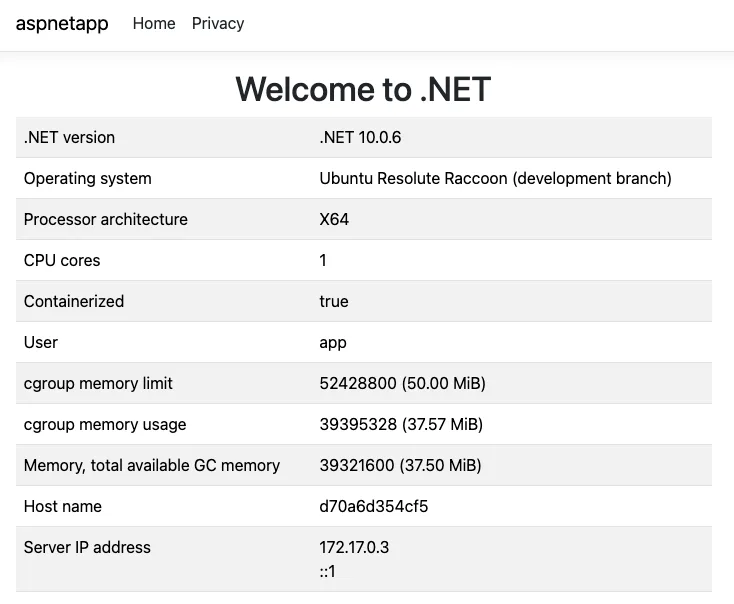
Native AOT
Native AOT (NAOT) is a great choice when you want a fast to start self-contained native binary. The -aot variant package gives you most of what you need. I publish all my tools as RID-specific tools. That’s outside the scope of this post. Let’s focus on the basics. I’ll use ubuntu:resolute again.
Here’s the dotnet-sdk-aot-10.0 package, among the other SDK packages:
$ apt list dotnet-sdk*
dotnet-sdk-10.0-source-built-artifacts/resolute 10.0.105-0ubuntu1 amd64
dotnet-sdk-10.0/resolute,now 10.0.105-0ubuntu1 amd64 [installed,automatic]
dotnet-sdk-aot-10.0/resolute,now 10.0.105-0ubuntu1 amd64 [installed]
dotnet-sdk-dbg-10.0/resolute 10.0.105-0ubuntu1 amd64
We need the AOT package + clang (.NET uses LLD for linking):
apt install -y dotnet-sdk-aot-10.0 clangI’ll publish the same hello world app (written to a file this time) as NAOT (the default for file-based apps).
$ dotnet publish app.cs
$ du -h artifacts/app/*
1.4M    artifacts/app/app
3.0M    artifacts/app/app.dbg
The binary is 1.4 MB. The .dbg file is a native symbols file, much like Windows PDB. The minimum NAOT binary is about 1.0 MB. The use of the RuntimeInformation class brings in more code.
Let’s check out the startup performance.
$ time ./artifacts/app/app
Hello Ubuntu Resolute Raccoon (development branch) from .NET .NET 10.0.5

real    0m0.003s
user    0m0.001s
sys     0m0.001s
Pretty good! That’s 3 milliseconds.
NAOT works equally well for web services. Let’s take a look at our releasesapi sample.
$ grep Aot releasesapi.csproj
    <PublishAot>true</PublishAot>
$ dotnet publish
$ du -h bin/Release/net10.0/linux-x64/publish/*
4.0K    bin/Release/net10.0/linux-x64/publish/NuGet.config
4.0K    bin/Release/net10.0/linux-x64/publish/appsettings.Development.json
4.0K    bin/Release/net10.0/linux-x64/publish/appsettings.json
13M     bin/Release/net10.0/linux-x64/publish/releasesapi
32M     bin/Release/net10.0/linux-x64/publish/releasesapi.dbg
4.0K    bin/Release/net10.0/linux-x64/publish/releasesapi.staticwebassets.endpoints.json
$ ./bin/Release/net10.0/linux-x64/publish/releasesapi
info: Microsoft.Hosting.Lifetime[14]
      Now listening on: http://localhost:5000
info: Microsoft.Hosting.Lifetime[0]
      Application started. Press Ctrl+C to shut down.
info: Microsoft.Hosting.Lifetime[0]
      Hosting environment: Production
info: Microsoft.Hosting.Lifetime[0]
      Content root path: /dotnet-docker/samples/releasesapi
In another terminal:
$ curl -s http://localhost:5000/releases | jq '[.versions[] | select(.supported == true) | {version, supportEndsInDays}]'
[
  {
    "version": "10.0",
    "supportEndsInDays": 942
  },
  {
    "version": "9.0",
    "supportEndsInDays": 207
  },
  {
    "version": "8.0",
    "supportEndsInDays": 207
  }
]
Note: jq is an excellent tool that is basically “LINQ over JSON”. It takes JSON and enables generating new JSON with the analog of anonymous types.
That’s a 13 MB self-contained web service including a lot of source-generated System.Text.Json metadata and code.
Installing .NET 8 and 9
Our partners at Canonical make a hard separation between support and availability. .NET 8 and 9 are provided via the dotnet-backports PPA feed. These sometimes older, sometimes newer, versions are offered with “best-effort support”. We expect that .NET 11 will be added to this same PPA at GA.
The software-properties-common package is required to configure the feed. It is typically pre-installed on desktop versions of Ubuntu.
apt install -y software-properties-commonConfigure the feed:
$ add-apt-repository ppa:dotnet/backports
PPA publishes dbgsym, you may need to include 'main/debug' component
Repository: 'Types: deb
URIs: https://ppa.launchpadcontent.net/dotnet/backports/ubuntu/
Suites: resolute
Components: main
'
Description:
The backports archive provides source-built .NET packages in cases where a version of .NET is not available in the archive for an Ubuntu release.

Currently available Ubuntu releases and .NET backports:

Ubuntu 26.04 LTS (Resolute Raccoon)
├── .NET 8.0 (End of Life on November 10th, 2026) [amd64 arm64]
└── .NET 9.0 (End of Life on November 10th, 2026) [amd64 arm64 s390x ppc64el]

Ubuntu 24.04 LTS (Noble Numbat)
├── .NET 6.0 (End of Life on November 12th, 2024) [amd64 arm64]
├── .NET 7.0 (End of Life on May 14th, 2024)      [amd64 arm64]
└── .NET 9.0 (End of Life on November 10th, 2026) [amd64 arm64 s390x ppc64el]

Ubuntu 22.04 LTS (Jammy Jellyfish)
├── .NET 9.0 (End of Life on November 10th, 2026) [amd64 arm64 s390x ppc64el]
└── .NET 10.0 (End of Life on November 14th, 2028) [amd64 arm64 s390x ppc64el]

Canonical provides best-effort support for packages contained in this archive, which is limited to the upstream lifespan or the support period of the particular Ubuntu version. See the upstream support policy [1] for more information about the upstream support lifespan of .NET releases or the Ubuntu Releases Wiki entry [2] for more information about the support period of any Ubuntu version.

[1] https://dotnet.microsoft.com/en-us/platform/support/policy/dotnet-core
[2] https://wiki.ubuntu.com/Releases
More info: https://launchpad.net/~dotnet/+archive/ubuntu/backports
Adding repository.
Press [ENTER] to continue or Ctrl-c to cancel.
You can see that the support statement for the feed is included.
Once the feed is registered, new dotnet and aspnetcore packages will show up. You can filter them by version or see all of them. Whichever you want.
$ apt list dotnet-*8.0
dotnet-apphost-pack-8.0/resolute 8.0.26-0ubuntu1~26.04.1~ppa1 amd64
dotnet-host-8.0/resolute 8.0.26-0ubuntu1~26.04.1~ppa1 amd64
dotnet-hostfxr-8.0/resolute 8.0.26-0ubuntu1~26.04.1~ppa1 amd64
dotnet-runtime-8.0/resolute 8.0.26-0ubuntu1~26.04.1~ppa1 amd64
dotnet-runtime-dbg-8.0/resolute 8.0.26-0ubuntu1~26.04.1~ppa1 amd64
dotnet-sdk-8.0/resolute 8.0.126-0ubuntu1~26.04.1~ppa1 amd64
dotnet-sdk-dbg-8.0/resolute 8.0.126-0ubuntu1~26.04.1~ppa1 amd64
dotnet-targeting-pack-8.0/resolute 8.0.26-0ubuntu1~26.04.1~ppa1 amd64
dotnet-templates-8.0/resolute 8.0.126-0ubuntu1~26.04.1~ppa1 amd64
$ apt list aspnetcore-runtime-*
aspnetcore-runtime-10.0/resolute 10.0.5-0ubuntu1 amd64
aspnetcore-runtime-8.0/resolute 8.0.26-0ubuntu1~26.04.1~ppa1 amd64
aspnetcore-runtime-9.0/resolute 9.0.15-0ubuntu1~26.04.1~ppa1 amd64
aspnetcore-runtime-dbg-10.0/resolute 10.0.5-0ubuntu1 amd64
aspnetcore-runtime-dbg-8.0/resolute 8.0.26-0ubuntu1~26.04.1~ppa1 amd64
aspnetcore-runtime-dbg-9.0/resolute 9.0.15-0ubuntu1~26.04.1~ppa1 amd64
And the packages that are actually installed on my machine.
apt list --installed 'aspnetcore*' 'dotnet*'
aspnetcore-runtime-10.0/resolute,now 10.0.5-0ubuntu1 amd64 [installed,automatic]
aspnetcore-targeting-pack-10.0/resolute,now 10.0.5-0ubuntu1 amd64 [installed,automatic]
dotnet-apphost-pack-10.0/resolute,now 10.0.5-0ubuntu1 amd64 [installed,automatic]
dotnet-host-10.0/resolute,now 10.0.5-0ubuntu1 amd64 [installed,automatic]
dotnet-hostfxr-10.0/resolute,now 10.0.5-0ubuntu1 amd64 [installed,automatic]
dotnet-runtime-10.0/resolute,now 10.0.5-0ubuntu1 amd64 [installed,automatic]
dotnet-sdk-10.0/resolute,now 10.0.105-0ubuntu1 amd64 [installed,automatic]
dotnet-sdk-aot-10.0/resolute,now 10.0.105-0ubuntu1 amd64 [installed]
dotnet-targeting-pack-10.0/resolute,now 10.0.5-0ubuntu1 amd64 [installed,automatic]
dotnet-templates-10.0/resolute,now 10.0.105-0ubuntu1 amd64 [installed,automatic]
Summary
It’s that time again, another Ubuntu LTS. I wrote a similar post two years ago for Ubuntu 24.04. Much is the same. This time around, we put in more effort to ensure that preparing for the next Ubuntu LTS was central to the distro versions we chose for CI testing in dotnet/runtime in the intervening two years. Day-of Ubuntu 26.04 support just “falls out” of that. Enjoy!