惯性聚合 高效追踪和阅读你感兴趣的博客、新闻、科技资讯
阅读原文 在惯性聚合中打开

推荐订阅源

小众软件
小众软件
量子位
博客园 - 叶小钗
Apple Machine Learning Research
U
Unit 42
IT之家
IT之家
F
Fortinet All Blogs
GbyAI
GbyAI
MongoDB | Blog
MongoDB | Blog
H
Hackread – Cybersecurity News, Data Breaches, AI and More
大猫的无限游戏
大猫的无限游戏
freeCodeCamp Programming Tutorials: Python, JavaScript, Git & More
The Register - Security
NISL@THU
NISL@THU
Webroot Blog
Webroot Blog
A
Arctic Wolf
钛媒体:引领未来商业与生活新知
钛媒体:引领未来商业与生活新知
V
Visual Studio Blog
Recent Announcements
Threat Intelligence Blog | Flashpoint
Blog — PlanetScale
Blog — PlanetScale
L
LangChain Blog
P
Palo Alto Networks Blog
Y
Y Combinator Blog
WordPress大学
WordPress大学
让小产品的独立变现更简单 - ezindie.com
AWS News Blog
AWS News Blog
有赞技术团队
有赞技术团队
Engineering at Meta
Engineering at Meta
C
Cybersecurity and Infrastructure Security Agency CISA
aimingoo的专栏
aimingoo的专栏
Know Your Adversary
Know Your Adversary
Cyberwarzone
Cyberwarzone
Martin Fowler
Martin Fowler
The Hacker News
The Hacker News
P
Privacy International News Feed
T
Threat Research - Cisco Blogs
G
GRAHAM CLULEY
宝玉的分享
宝玉的分享
博客园 - 聂微东
cs.CL updates on arXiv.org
Cyber Security Advisories - MS-ISAC
奇客Solidot–传递最新科技情报
奇客Solidot–传递最新科技情报
The GitHub Blog
The GitHub Blog
S
Securelist
T
The Exploit Database - CXSecurity.com
T
Threatpost
Microsoft Azure Blog
The Cloudflare Blog
F
Full Disclosure

NetBird - Networking Knowledge Hub - RSS Feed

NetBird Is Now on the Vultr Marketplace Native NetBird on the GL.iNet Comet Pro (GL-RM10) NetBird v0.71 - IPv6 Overlay Addressing NetBird Exit Nodes - Appear at Home, or Anywhere Else Reporting Bugs and Requesting Features in NetBird Setup and Use Local AdGuard Home Anywhere with NetBird DNS How to Set Up NetBird on PiKVM for Secure Remote KVM Access NetBird v0.69 - CrowdSec IP Reputation for the Reverse Proxy Cloudflare Mesh vs NetBird vs Tailscale: Performance Compared Self-Hosting Nextcloud with Docker and NetBird Implementing Zero Trust with NetBird NetBird v0.67 - Layer 4 Proxy Support for TCP, UDP, and TLS Solwr Enhances Remote Connectivity with NetBird Jellyfin Media Server - Self-Host Your Movies, TV, and Music Cloudflare Tunnels vs. NetBird Reverse Proxy INFITX Builds Zero-Touch Kubernetes Networking with NetBird NetBird v0.66 - Expose Local Services to the Internet from the CLI Pangolin vs. NetBird Home Assistant Setup Guide with EASY Remote Access NetBird v0.65 - Built-in Reverse Proxy with Custom Domains Docker for Beginners - Everything You Need to Get Started NetBird for SOC 2 Compliance NetBird v0.63 - Custom DNS Zones for Private Network Resolution Vibecode This in a Weekend and Take 5% of the Company NetBird v0.62 - Built-in Local Users with Optional IdP Integration NetBird v0.61.0 - Granular SSH Access Control and Automatic Updates Top 5 Alternatives to OpenVPN Top 5 Open Source Alternatives to Tailscale Top 5 Alternatives to ZeroTier How to Set Up ZeroByte and REST Server for Backups with NetBird How to Install n8n v2.0 with NPM and PM2 ZeroTier vs. NetBird The Ultimate Immich Guide - Ditch Google and Amazon Photos for Good NetBird as Your Help with ISO 27001 Compliance NetBird and Huntress - Secure Network Access for MSPs How to Access Windows Shares from Anywhere with NetBird netgo Relies on Modern ZTNA with NetBird Connect to Your Homelab from Anywhere with a Raspberry Pi NetBird SSH - A New, Identity-Aware Approach The AI Mega Mesh: How to Connect 30+ GPU Cloud Providers Connect Multiple Ollama GPUs to OpenWebUI with NetBird Top 5 Tailscale Alternatives SSH and RDP, now in your browser NetBird–Acronis Integration: Empowering MSPs for Advanced Ransomware and Threat Defense Introducing the Control Center - Remote Access, Beautifully Visualized NetBird at MSP Global 2025 Understanding Overlay Networks - The Basics NetBird and SentinelOne Singularity™ - Automate Threat Response NetBird and Microsoft Intune - Enforcing Device Compliance for Zero Trust Rethinking Zero Trust Security with NetBird and pfSense Improving Unidirectional Access Control Proxmox VE for Beginners Guide with NetBird LXC Stronger Security: NetBird + GitHub Secure Open Source Fund NetBird's MSP Partner Program Signicat Enhances Cross-Cloud Accessibility with NetBird SonicWall SSL VPN NetExtender vs. NetBird NetBird Is Embracing the AGPLv3 License NetBird Profiles Have Landed - Manage Multiple Accounts Effortlessly Rethinking Access Control to Secure Your On-Premises SharePoint Servers Sport Alliance Increases Efficiency with Zero Trust Networking at Scale Rethinking Network Access: qwertiko Goes Zero Trust with NetBird Optimizing Network Efficiency with NetBird's Lazy Connections Use Port Ranges in Access Control Policies Generic HTTP Endpoint for Network Events Streaming NetBird’s Response to Spear-Phishing Campaign Targeting Financial Executives Zero-Trust Access to Internal Resources Without Installing Agents Enhance Network Visibility with NetBird’s Traffic Events Logging TrueNAS Made Easy - Install, Set Up, and Access From Anywhere Top 5 Alternatives for WireGuard Jump Hosts. Gateways for Remote Access NetBird Network Routes and Exit Nodes Security for All - SSO and MFA for Free Enhancing Network Access Control with NetBird's Identity Provider Feature Twingate vs. NetBird Limit Network Access Based on Running Applications FortiClient ZTNA vs. NetBird OpenVPN vs. NetBird Tailscale vs. NetBird Getting Started with an Azure Site-to-Site VPN Getting Started with an On-premise-to-AWS Site-to-Site VPN Secure Remote Access to VPCs, LANs, and Offices regreSSHion - A New OpenSSH Server Remote Code Execution Vulnerability Evolve Bank & Trust Data Breach. What Happened? What Is a Site-to-Site VPN? IPSec Tunneling Demystified. Enhancing Data Security Across Networks Understanding IPSec Tunnel and Transport Modes Understanding the Differences Between IKEv1 and IKEv2 Understanding the IKEv1 Protocol in IPSec ZeroTier versus NetBird - Which Should You Choose? AWS Lambda Serverless Security. Mistakes, Oversights, and Potential Vulnerabilities Using NetBird for Kubernetes Access Serverless Security Vulnerabilities and Best Practices to Mitigate Them Security Best Practices for Serverless Azure Functions A Guide to Remote Access Security for SMEs IoT Security Essentials. How to Achieve Secure Remote Access Open Source Zero Trust Networking Using SSH for Secure Remote Access How We Integrated Rosenpass in NetBird The First Quantum-Resistant Mesh VPN Using eBPF and XDP to Share Default DNS Port Between Multiple Resolvers
Self-Hosting NetBird with Authentik
Written byBrandon Hopkins · 2026-03-19 · via NetBird - Networking Knowledge Hub - RSS Feed

Self-Hosting NetBird with Authentik

NetBird is an open-source zero trust networking platform that lets you build secure private networks using the WireGuard protocol. The self-hosting experience has improved significantly — a single script handles the full setup, including Traefik as a reverse proxy with automatic TLS and a built-in local user system right out of the box.

For production deployments, pairing NetBird with an external identity provider gives you SSO, multi-factor authentication, and centralized user management. In this guide we'll use Authentik a powerful open-source identity provider, as our IdP. We'll also run a NetBird client alongside Authentik in the same Docker network and use NetBird's built-in reverse proxy to expose it securely — no separate proxy stack required.

Heads up: Don't put CrowdSec or geo-restrictions in front of your IdP domain when exposing it through the internal network — it'll block NetBird's own auth callbacks and lock you out. More on this below.

Prerequisites

A Linux VPS with at least 2 CPU cores and 4 GB of RAM works well here (Authentik needs a minimum of 2 cores and 2 GB on its own). The server needs to be publicly accessible on TCP ports 80 and 443 and UDP port 3478.

You'll need a public domain with two DNS records pointing to your VPS. If you're using Cloudflare, make sure both records are set to DNS only — not proxied.

TypeNameContentProxy Status
ADNS only
CNAMEDNS only

The A record is for the NetBird management dashboard. The wildcard CNAME ensures all service subdomains (e.g., ) resolve to your server, which is what the built-in reverse proxy uses to expose Authentik.
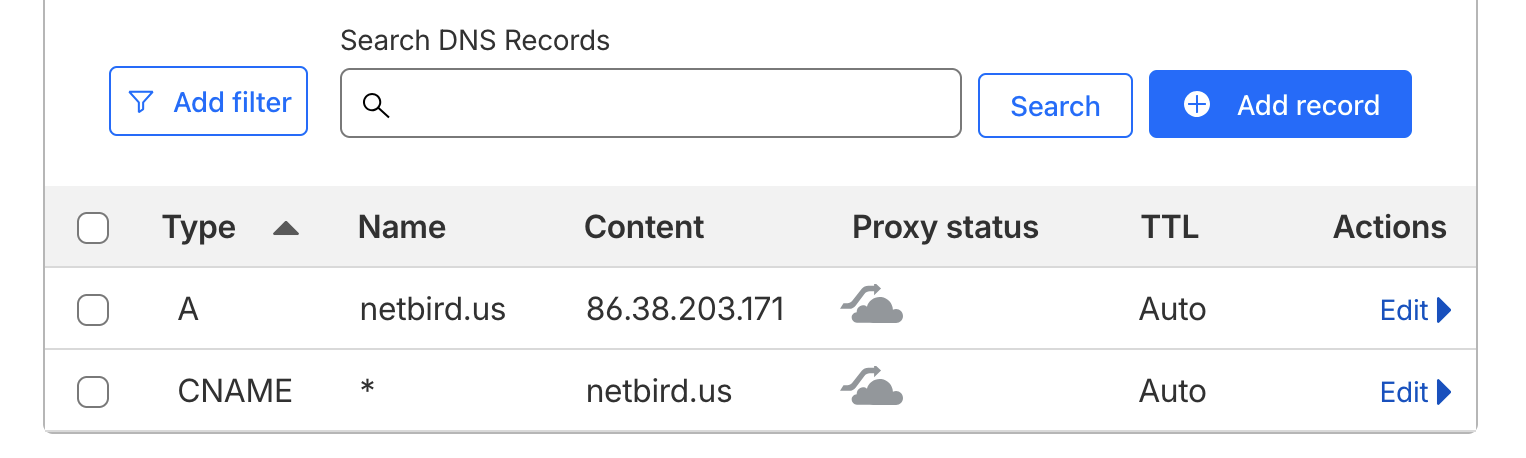
Cloudflare DNS records showing A and wildcard CNAME entries set to DNS only

Make sure Docker is installed on your VPS along with and . The Docker convenience script is the easiest way to get everything set up:


NetBird Setup

Create a directory and run the install script:


The script will walk you through a few prompts. Enter your domain (e.g., ) and select the reverse proxy option:


Press Enter to go with Traefik. It handles TLS via Let's Encrypt automatically. When prompted to enable the NetBird Proxy service, type :


This is the built-in reverse proxy feature we'll use later to expose Authentik without needing Nginx, Caddy, or a separate proxy stack.
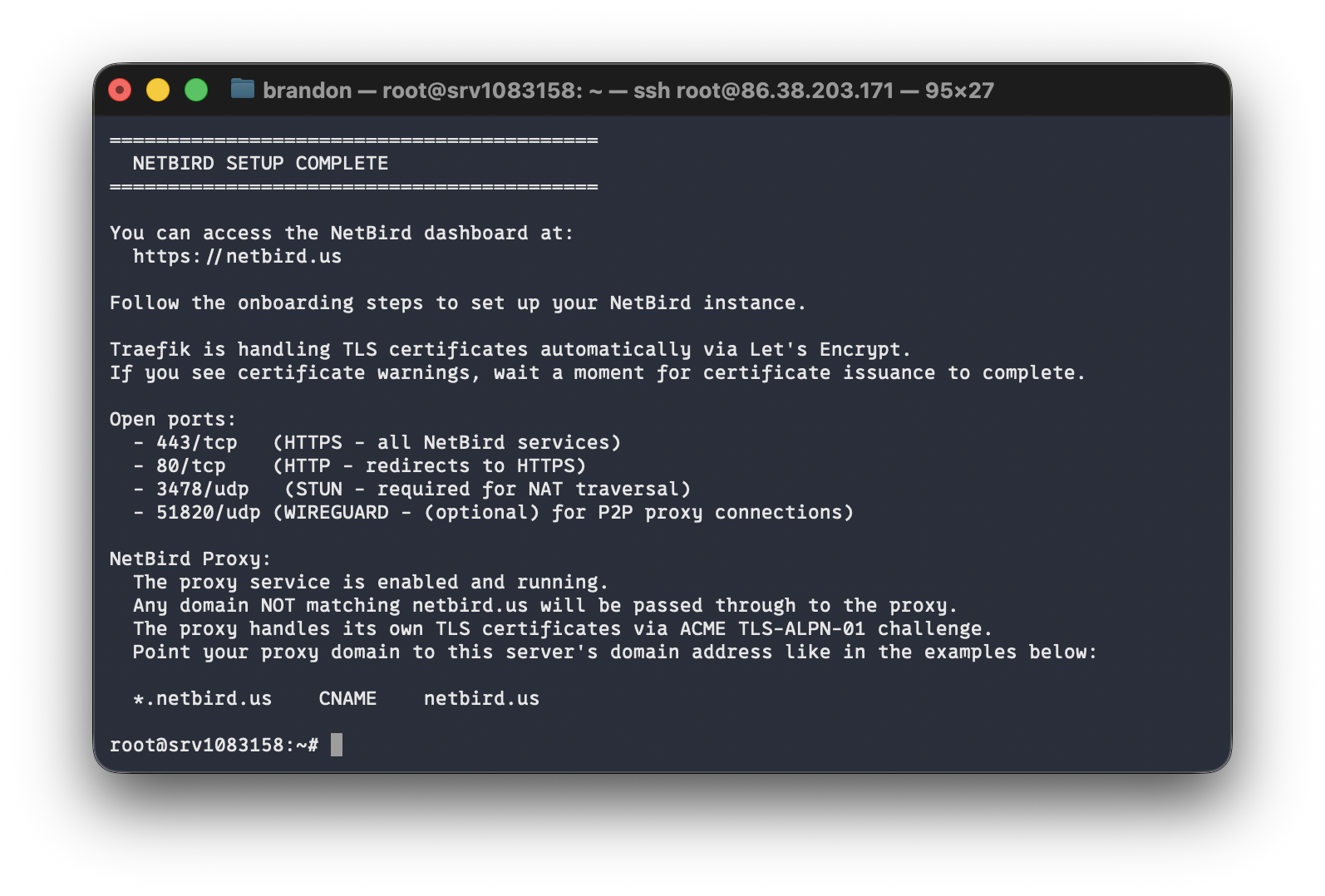
NetBird install script completing successfully in the terminal

Initial Login

Navigate to your NetBird dashboard at . You'll land on a setup page — create your local admin account here. This account uses NetBird's embedded IdP and is temporary. We'll replace it with Authentik later.
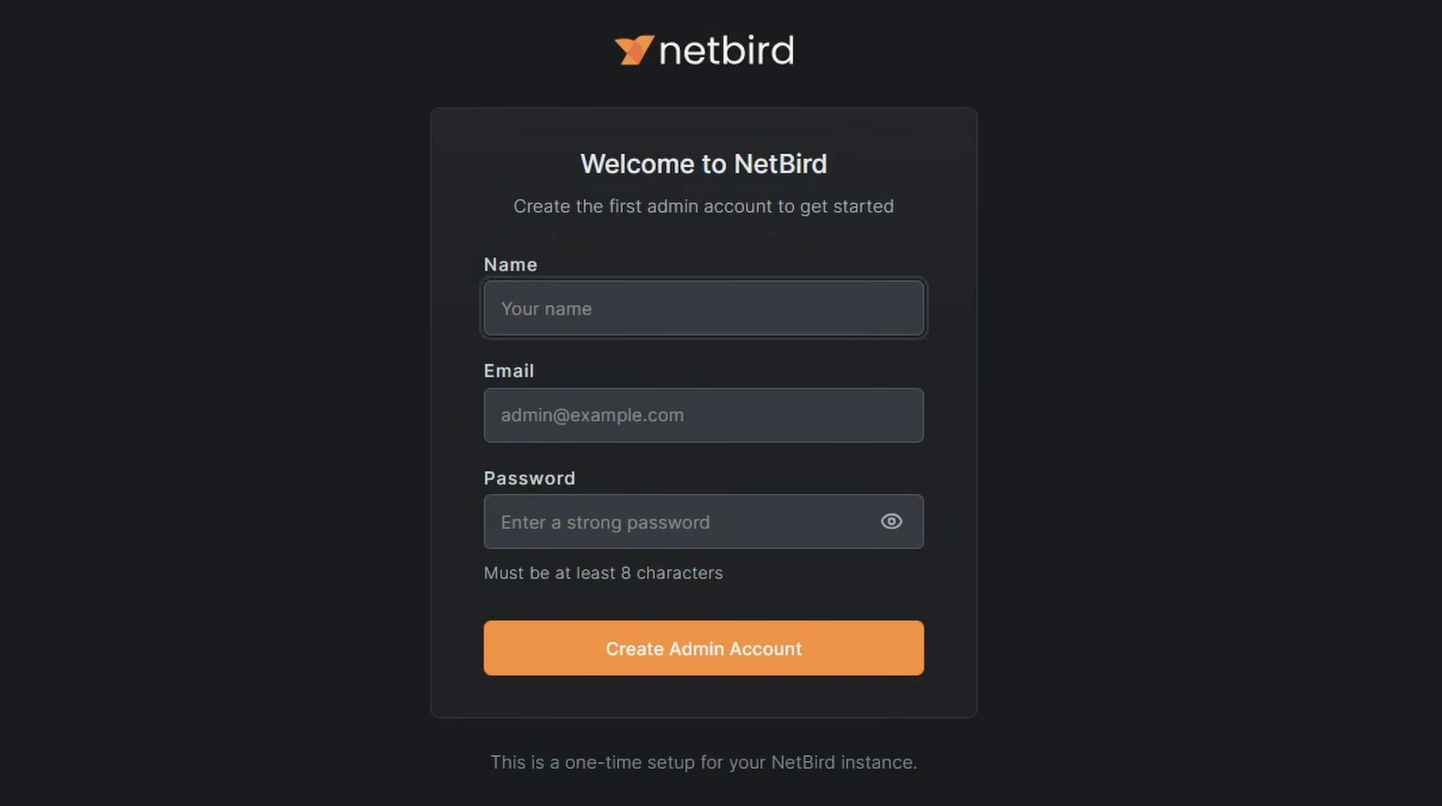
NetBird dashboard after first login

Authentik

Authentik is a full-featured identity management platform. Beyond just being an IdP for NetBird, it supports a wide range of integrations — anything that speaks OAuth2, OIDC, or SAML will work with it. We're going to run it in the same Docker stack as a NetBird client container. That client acts as a routing peer, which means NetBird can reach anything on that Docker network. The reverse proxy then uses that routing peer to expose Authentik under your domain with automatic TLS.

Install Authentik

Create a directory for the Authentik stack:


Download the official Docker Compose file:


Generate Credentials

Authentik requires a PostgreSQL password and a secret key. Generate both and write them to a file:


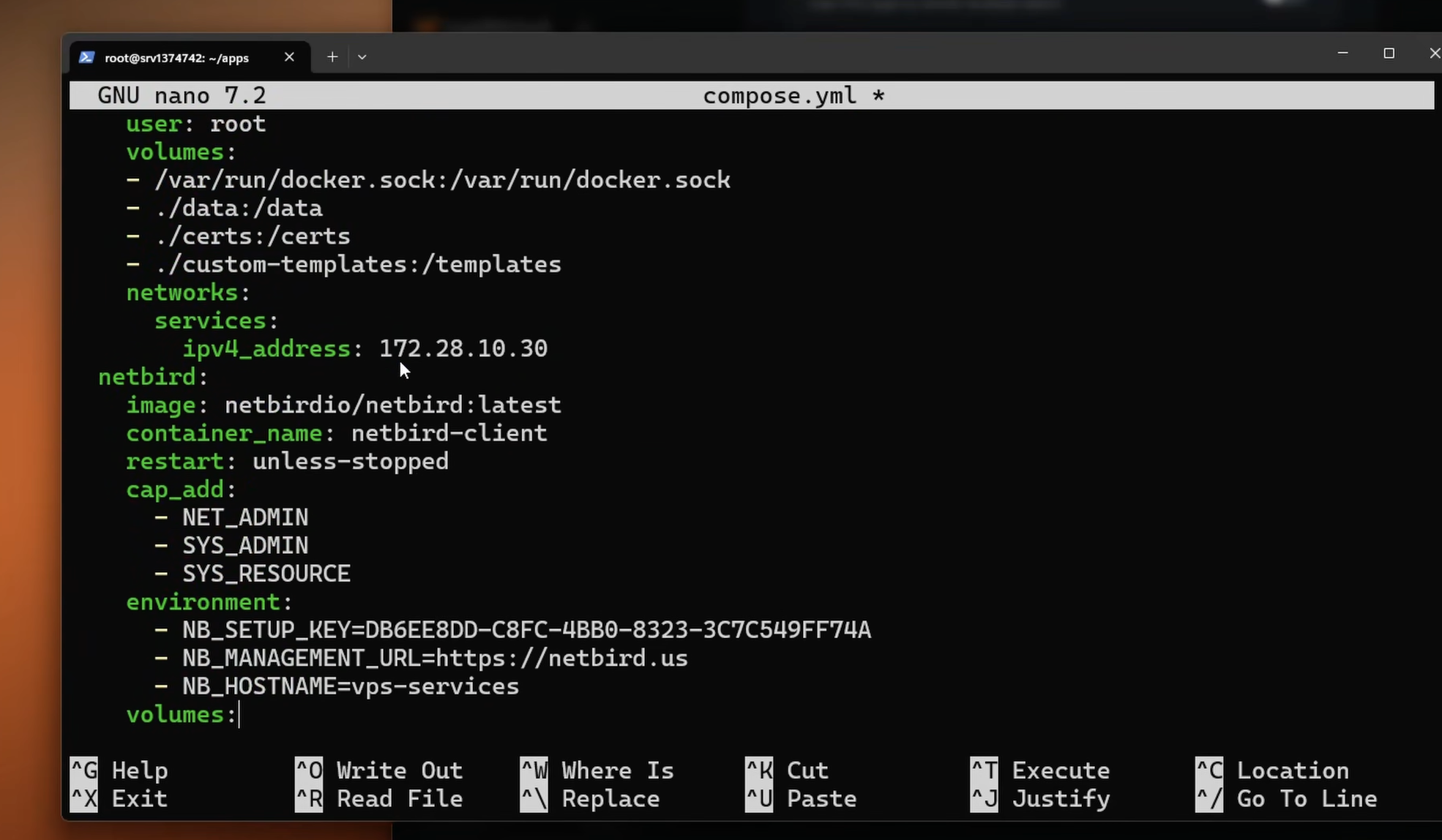
Add the NetBird Sidecar

We'll add a shared Docker network with static IPs to the downloaded compose file, then append a NetBird client container to the stack. The static IPs are important — the reverse proxy needs to know exactly where to find the Authentik server container.

First, generate a setup key in the NetBird dashboard. Go to Setup Keys > Add Setup Key, give it a name like "VPS Services", and copy the key.
Creating a setup key in the NetBird dashboard

Open and add a stanza to each of the three existing services:

postgresql — add inside the service block:


server — add inside the service block:


worker — add inside the service block:


Then append the NetBird service to the block and add the top-level definition at the end of the file:


Replace with the key you just copied, and update to match your NetBird domain. The Authentik server sits at on port 9000 — that's what we'll point the reverse proxy at.

Start the stack:


Give it a minute to pull images and initialize. Once it's up, you should see the vps-services peer appear in your NetBird dashboard under Peers.

Initial Authentik Setup

Navigate to to create your Authentik admin account. This is a one-time setup and the page won't be accessible after the admin password is set.
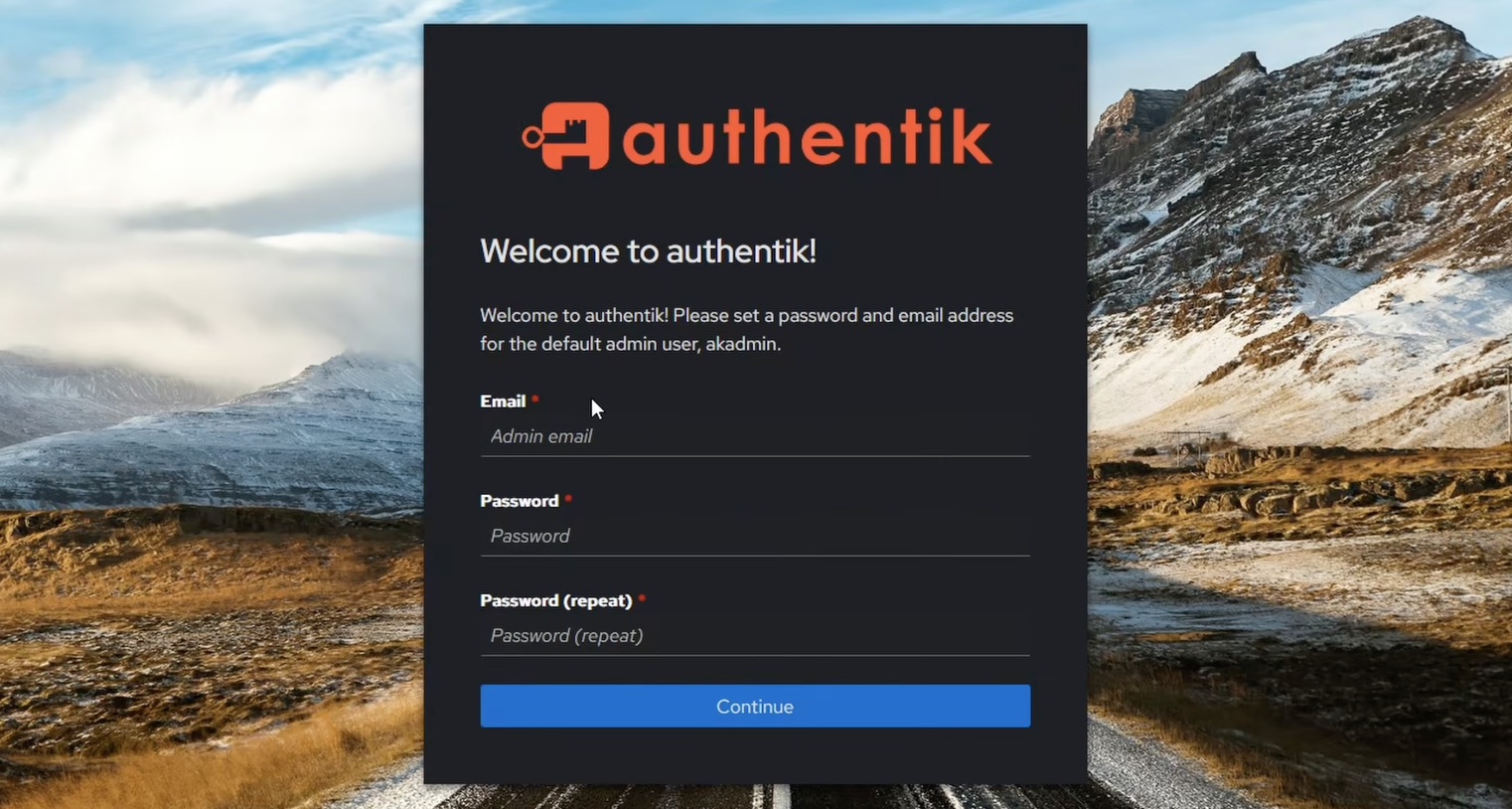
Authentik first-run setup page to create the admin account

Note: Once Authentik is exposed through the NetBird reverse proxy, you can close port 9000 on your firewall. Until then, keep it open so you can complete the initial setup.

Set Up the Network and Routing Peer

Now tell NetBird that the peer can route traffic to the Authentik Docker subnet:
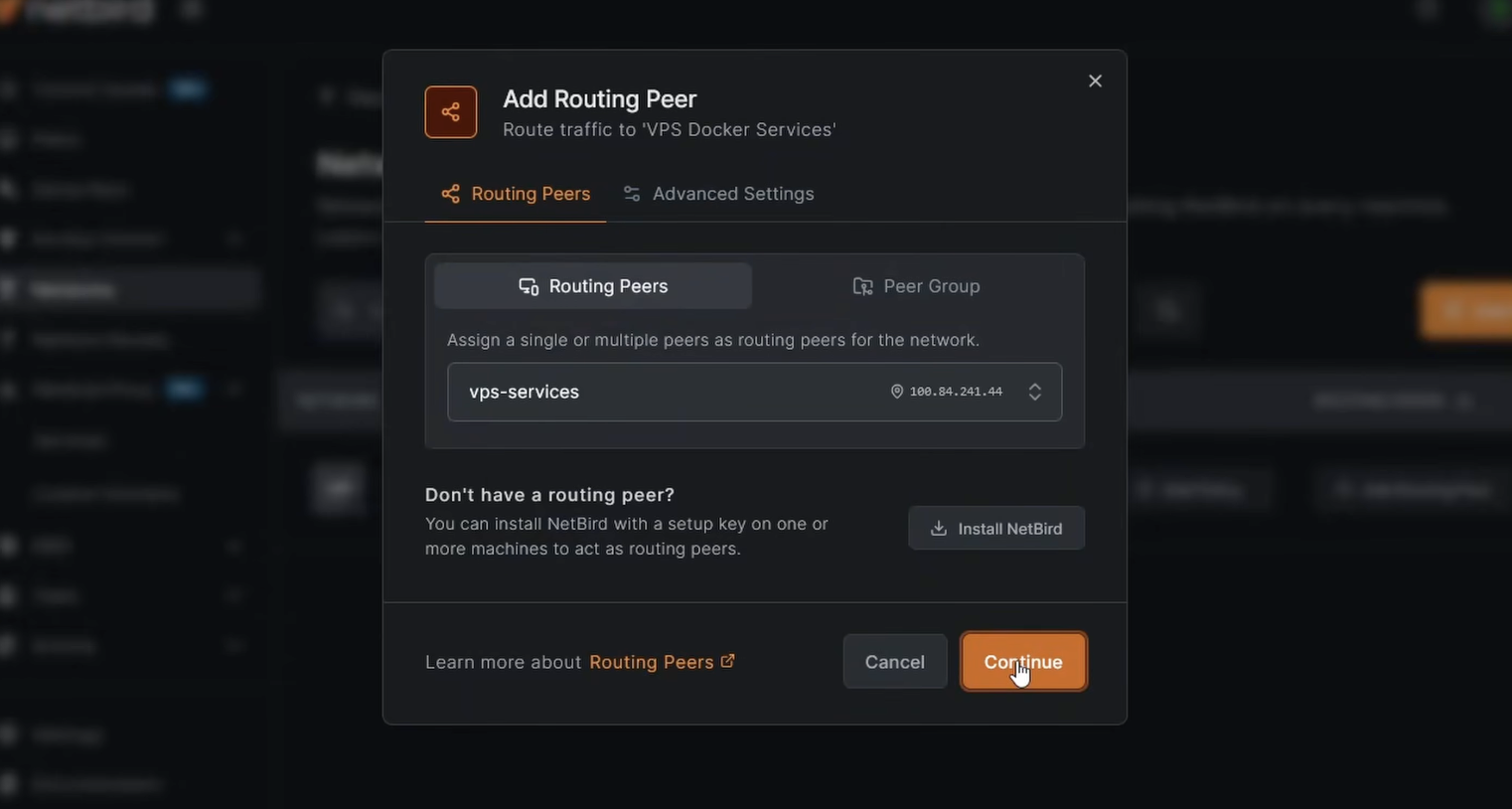
  1. In the NetBird dashboard, go to Networks > Add Network
  2. Name it something like "VPS Services"
  3. Add a network resource with the subnet
  4. Assign vps-services as the routing peer
  5. Create a policy to control which peers can access this network (e.g., restrict to an admin group)

NetBird Networks page showing the VPS Services network with routing peer configured

With that saved, any container on is reachable through the NetBird network via the routing peer. If you add more services to this stack later, assign them an IP in this range and the same NetBird client routes traffic to all of them.

Expose Authentik with the NetBird Reverse Proxy

Instead of opening Authentik to the public internet directly, we'll use NetBird's built-in reverse proxy to expose it under your domain with automatic TLS.
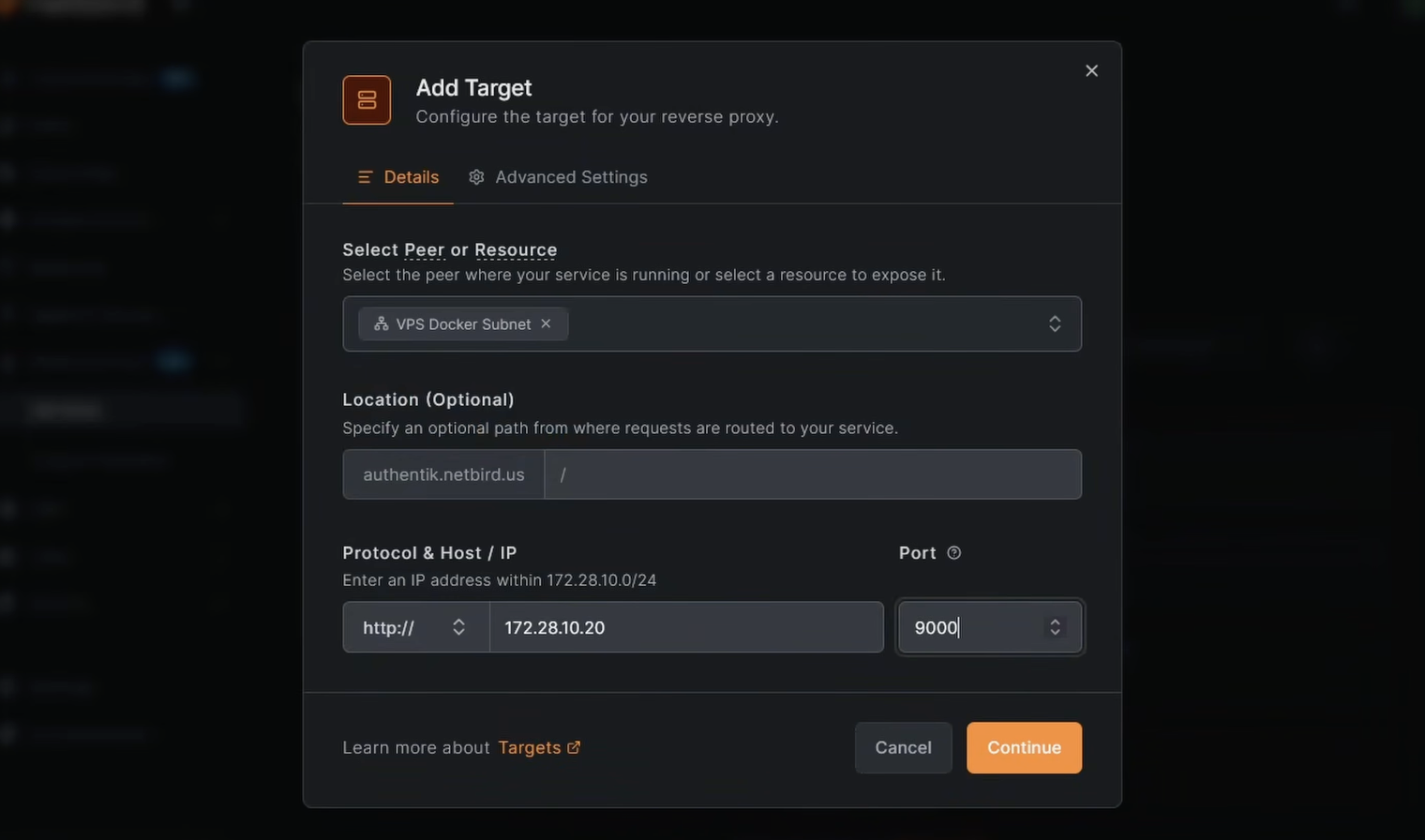
  1. In the NetBird dashboard, go to Reverse Proxy > Services > Add Service
  2. Enter a subdomain like and select your domain — the full URL will be
  3. Click Add Target, select the VPS Services network resource, enter the Authentik server IP , set protocol to HTTP and port to 9000
  4. Under the Authentication tab, leave all methods disabled — Authentik handles its own auth
  5. Enable Pass Host Header and click Add Service

Adding Authentik as a service in the NetBird reverse proxy

NetBird provisions a TLS certificate and establishes the tunnel. Once the service shows as active, navigate to — Authentik should load over HTTPS through your NetBird network. At this point you can close port 9000 on your server's firewall.

Warning: If you're running CrowdSec IP reputation on the reverse proxy, do not apply it (or geo-restrictions) to your Authentik / IdP service when it's exposed via an internal network like this. The management server's auth callbacks come from inside the NetBird network, and a country/IP block will reject those internal calls and break login. If you've already done this and are locked out, see Issue 3: Geo-restrictions block internal traffic from the management server for the fix.

Configure Authentik as the NetBird IDP

With Authentik accessible, we can configure it as the identity provider for NetBird. This involves creating an OAuth2 provider and application in Authentik, then wiring it up in NetBird settings.

Create an OAuth2/OIDC Provider in Authentik

  1. Log into Authentik at and go to the Admin Interface
  2. Navigate to Applications > Providers > Create
  3. Select OAuth2/OpenID Provider and click Next
  4. Set the Name to
  5. For Authorization flow, select
  6. Set Client type to Confidential
  7. Leave the Signing Key as the Authentik self-signed certificate
  8. Click Finish

Once created, open the provider and note the Client ID and Client Secret — you'll need these shortly.
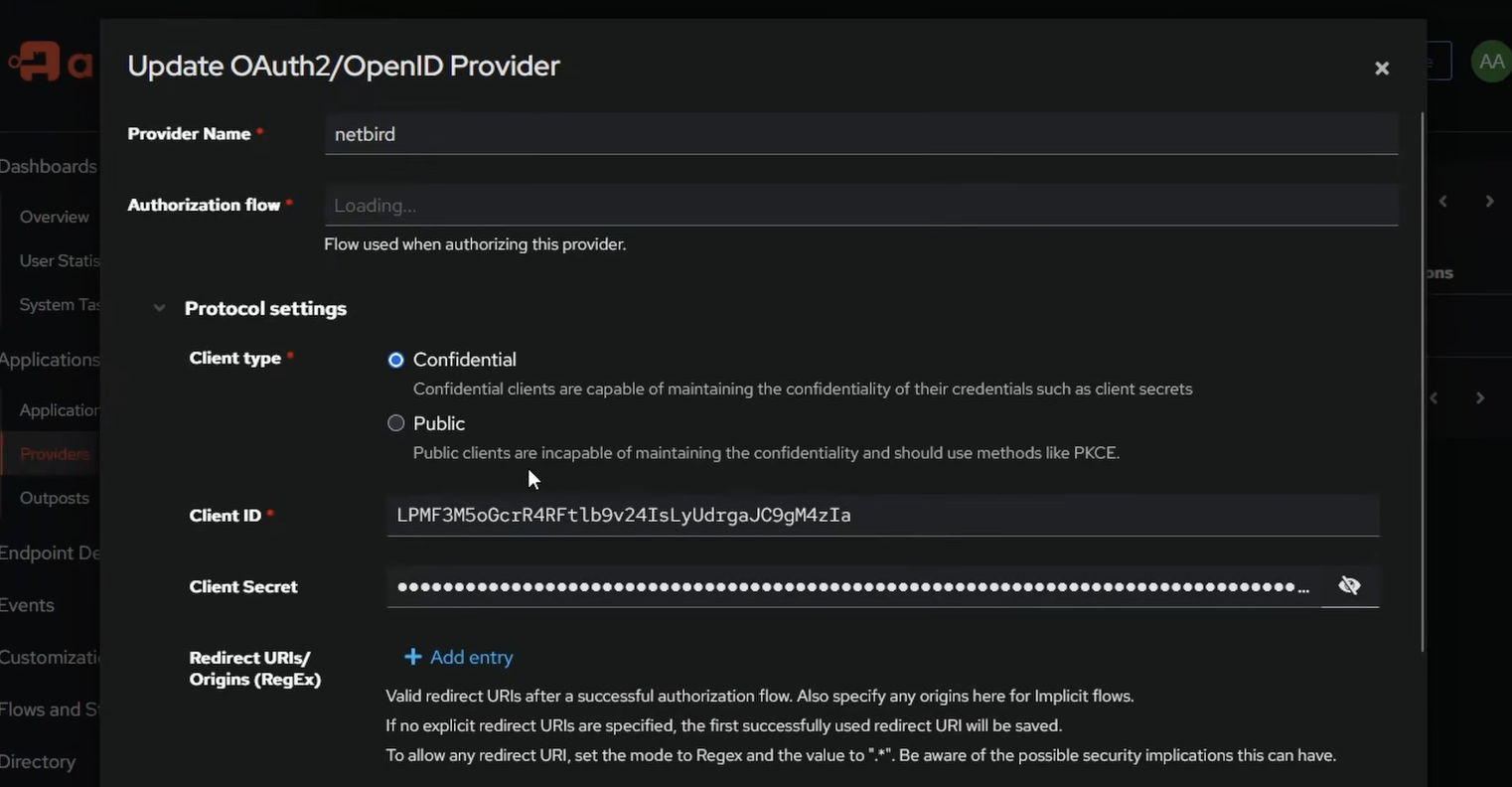
Authentik OAuth2 provider showing the Client ID and Client Secret

Create an Application in Authentik

  1. Go to Applications > Applications > Create
  2. Set the Name to and the Slug to
  3. Select the provider you just created
  4. Click Create

Add Authentik as an Identity Provider in NetBird

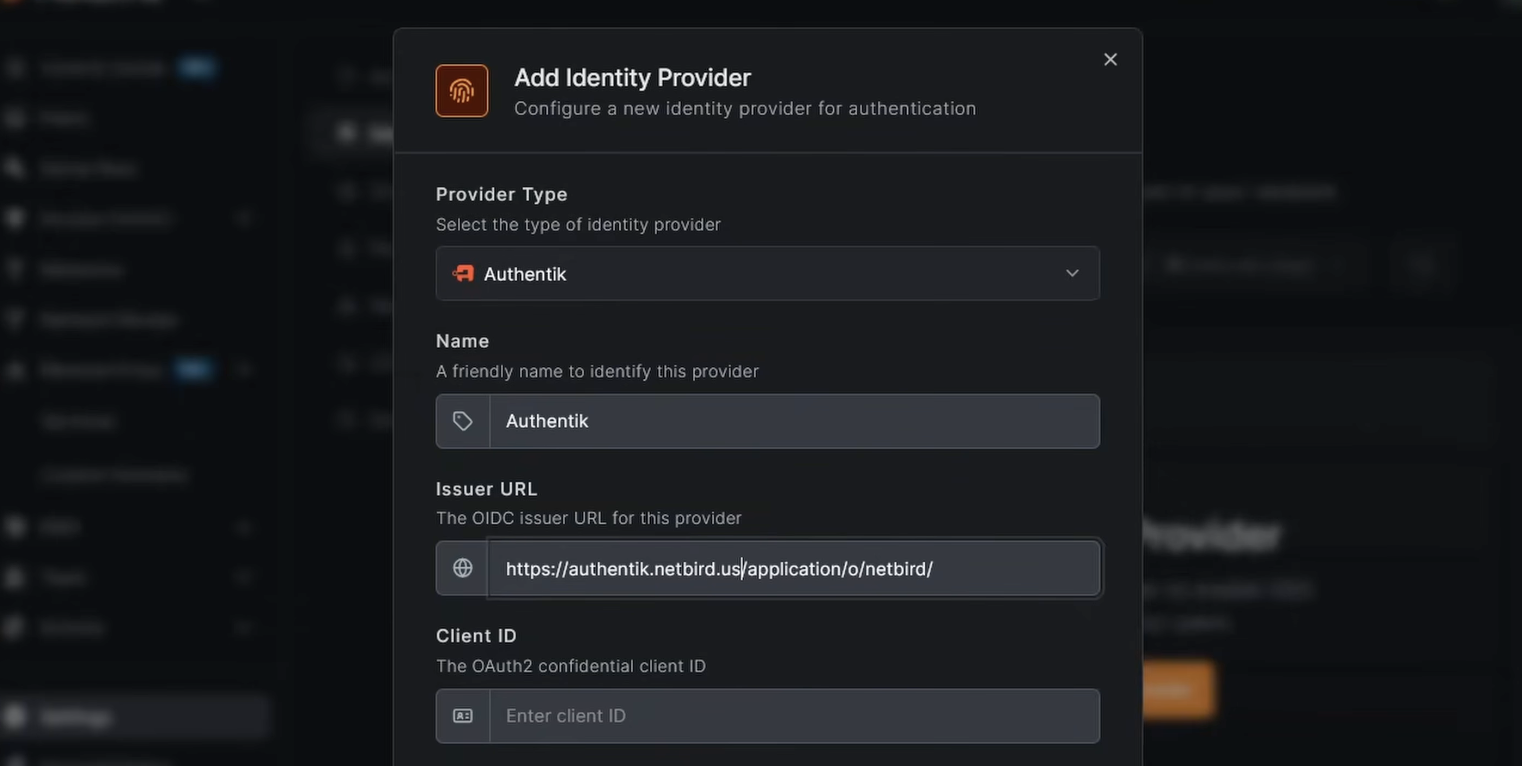
  1. In the NetBird dashboard, go to Settings > Identity Providers > Add Identity Provider
  2. Select Authentik
  3. Fill in the fields:
    • Issuer URL:
    • Client ID: paste from Authentik
    • Client Secret: paste from Authentik
  4. Click Add Provider
  5. Copy the Redirect URL that NetBird displays

Adding Authentik as an identity provider in NetBird settings

Add the Redirect URI in Authentik

  1. Back in Authentik, go to Applications > Providers and edit the NetBird provider
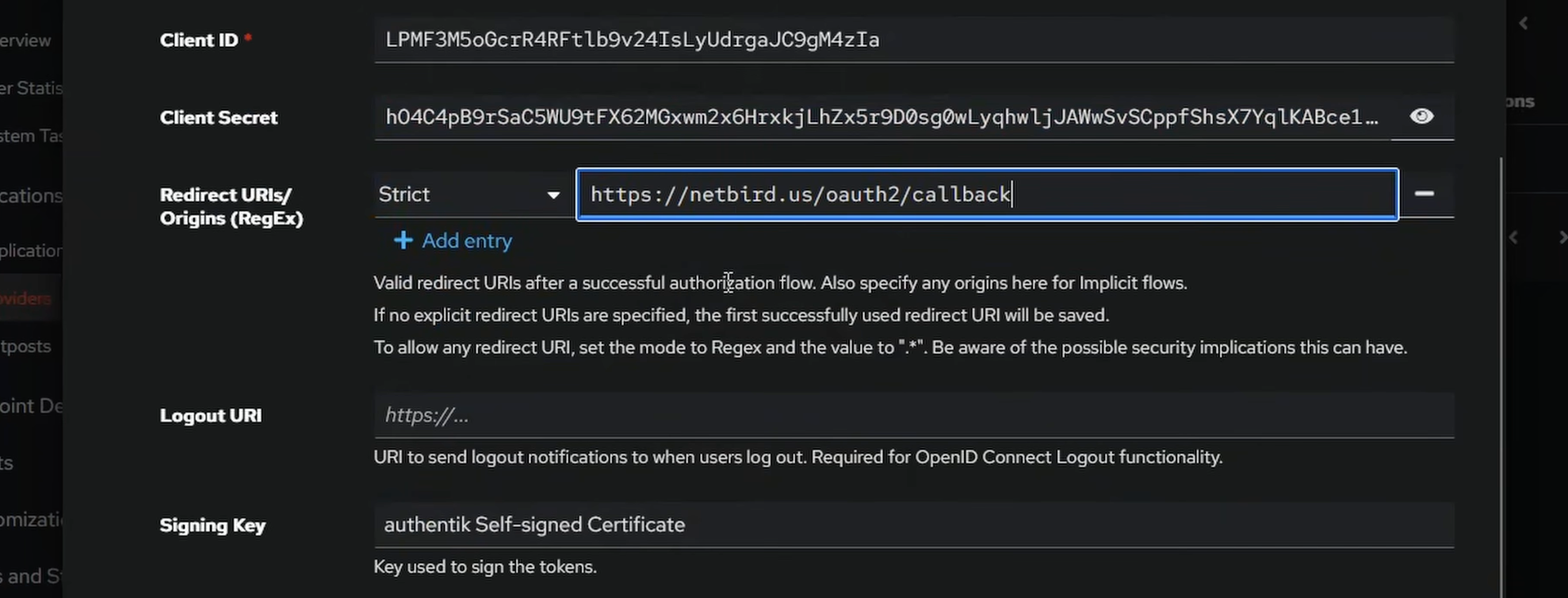
  2. Under Redirect URIs, click Add, set the mode to Strict, and paste in the redirect URL from NetBird
  3. Click Update

Redirect URI added to the Authentik provider

Authentik is now configured as the NetBird identity provider.

User Management

Test the Login Flow

Open a new browser window or incognito tab and navigate to your NetBird dashboard. You should see an Authentik option on the login page. Click it — you'll be redirected to Authentik to authenticate.
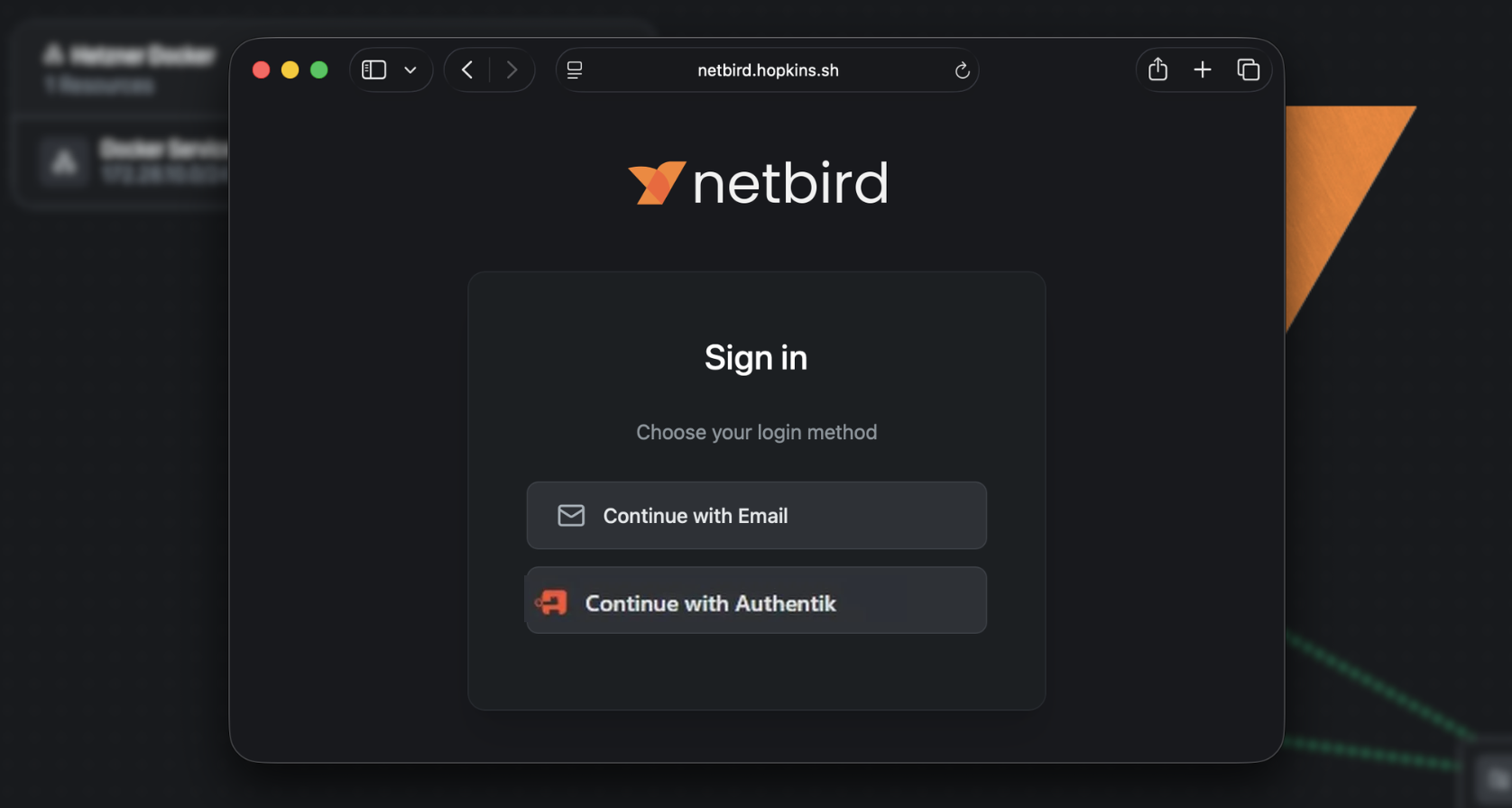
NetBird login page showing the Authentik sign-in option

After logging in, NetBird will show a User approval pending message for the new Authentik-managed user. Head back to the NetBird dashboard, go to Team > Users, and approve the pending user.

Transfer Ownership and Remove the Local Account

Once the Authentik user is approved and working:
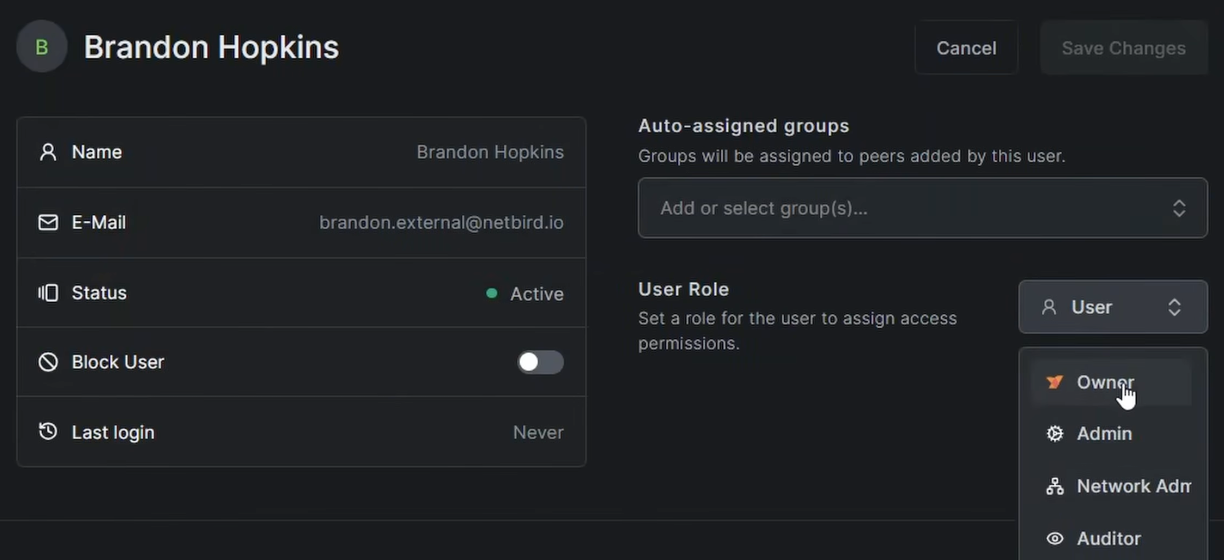
  1. In Team > Users, find the Authentik-managed user and change their role to Owner
  2. Log out of the local account and log back in using Authentik to confirm everything works
  3. Delete the original local user account — you no longer need it

NetBird Users page after transferring ownership to the Authentik-managed user

Warning: Confirm you can successfully log in via Authentik before removing the local account. Losing access to both accounts at once would lock you out of the dashboard.

Managing Users

To add users in Authentik, go to Directory > Users > Create. You can also create groups under Directory > Groups and use them for access control. If you want NetBird to automatically sync Authentik group memberships, see the JWT group sync documentation — Authentik includes a claim in the ID token by default through the scope.
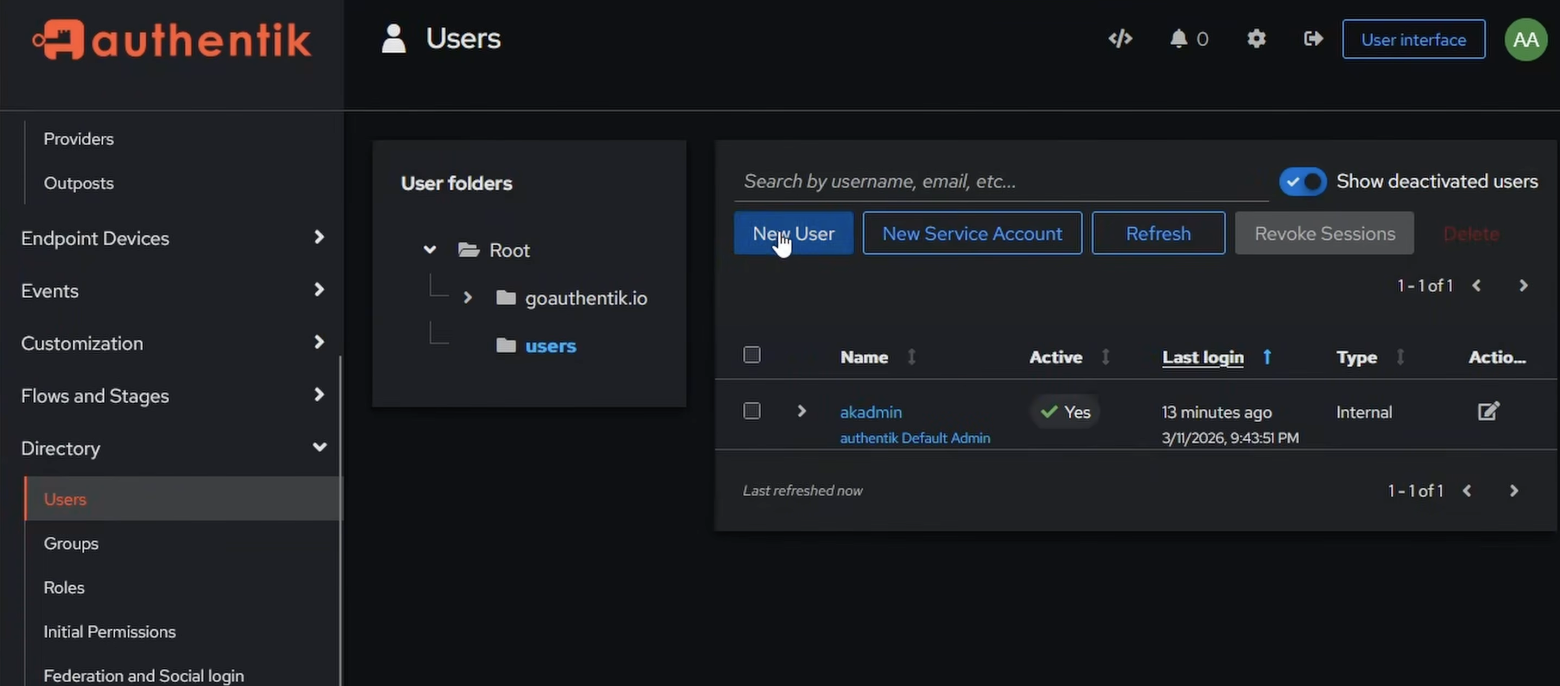
Authentik directory showing users and groups management

Conclusion

You now have a fully self-hosted NetBird instance with Authentik handling authentication. Authentik gives you SSO, MFA, and a full user directory — and because it's running as a sidecar in the same Docker network, it's exposed securely through an encrypted WireGuard tunnel via the NetBird reverse proxy. No extra proxy stack, no open ports beyond what NetBird needs. Any additional services you add to the Docker network are immediately routable through the same NetBird client.