



惯性聚合 高效追踪和阅读你感兴趣的博客、新闻、科技资讯
阅读原文 在惯性聚合中打开

推荐订阅源

博客园 - 【当耐特】
Scott Helme
Scott Helme
Google Online Security Blog
L
LINUX DO - 最新话题
O
OpenAI News
S
Secure Thoughts
Cisco Talos Blog
Cisco Talos Blog
Forbes - Security
Forbes - Security
V
Visual Studio Blog
有赞技术团队
有赞技术团队
Jina AI
Jina AI
H
Hackread – Cybersecurity News, Data Breaches, AI and More
Microsoft Azure Blog
博客园_首页
C
CXSECURITY Database RSS Feed - CXSecurity.com
T
Troy Hunt's Blog
Recent Commits to openclaw:main
S
Schneier on Security
雷峰网
雷峰网
The Cloudflare Blog
量子位
Last Week in AI
Last Week in AI
T
Tor Project blog
V
Vulnerabilities – Threatpost
C
Cisco Blogs
B
Blog RSS Feed
S
Security @ Cisco Blogs
T
Threat Research - Cisco Blogs
G
GRAHAM CLULEY
MyScale Blog
MyScale Blog
C
Cybersecurity and Infrastructure Security Agency CISA
Schneier on Security
Martin Fowler
Martin Fowler
Help Net Security
Help Net Security
J
Java Code Geeks
人人都是产品经理
人人都是产品经理
G
Google Developers Blog
S
Security Affairs
A
Arctic Wolf
T
Tenable Blog
PCI Perspectives
PCI Perspectives
Spread Privacy
Spread Privacy
AI
AI
L
LangChain Blog
Latest news
Latest news
博客园 - 叶小钗
博客园 - Franky
T
Threatpost
MongoDB | Blog
MongoDB | Blog
Hugging Face - Blog
Hugging Face - Blog

Adactio: Links

Who Will Save the Internet From Disappearing? From human hands. HTMX and Web Components Instead of React Your ‘App’ Could Have Been a Webpage (so I fixed it for you…) The Descent — What Happened to the Frontend While You Weren't Watching Abject Praise - Infrequently Noted Talk: Let Jeffrey Zeldman Presents - Memories Can’t Wait—or, How I Learned to Keep Worrying About the Web - State of the Web The AI Resist List Notes & Narratives Show your hands honor for the strange power they bring you The golden rule of Customizable Select Storied Colors How building an HTML-first site doubled our users overnight The Field Guide to CSS Grid Lanes Happy Monday everyone, and let's talk about gender and ethnicity ratios at tech events. AI and the Rise of Mediocrity The value is in the difficulty - Annotated Tito as Gaeilge Three things about data Native Apps Should Be Avoided Whenever Possible — No One's Happy WebKit Features for Safari 26.5 I knew my writing students were using AI. Their confessions led to a powerful teaching moment | Micah Nathan Better Browser Caching with No-Vary-Search Google’s Prompt API The Boring Internet Netizen | Derek Sivers Anti-work Let’s Use the Nonexistent ::nth-letter Selector Now | CSS-Tricks Two Paradigms for Enhancing HTML Tags It's Not AI. It's FOMOnetization. The end of responsive images Alistair Davidson / validation-enhancer · GitLab Never Lose Form Progress Again :: Aaron Gustafson Expansion artifacts No-stack web development Design and Engineering, As One · Matthias Ott Conference organising in 2026 AI Might Be Our Best Shot At Taking Back The Open Web | Techdirt The AI Great Leap Forward they told me the internet was forever Web Day Out - 12 March 2026 Bruce Lawson's personal site Progressive Web Components What we think is a decline in literacy is a design problem | Aeon Essays The End : Focal Curve Flood fill vs. the magic circle Web of State of the Browser Day Out SXSW 02006 Working with agents doesn't feel like flow — Bill de hÓra HTML Video Poster Image: Enable Responsive Images and ALT Text for Poster
Reminder: You Can Stitch Together Lots of Little HTML Pages With Navigations For Interactions
Jim Nielsen · 2026-05-04 · via Adactio: Links

I wrote about building websites with LLMs — (L)ots of (L)ittle ht(M)l page(s) — and I think it’s time for a post-mortem on that approach:

I like it.

I’ve tweaked a few things from that original post but the underlying idea is still the same, which I would describe as:

Avoid in-page interactions that require JavaScript in favor of multi-page navigations that rely on HTML and are enhanced with CSS view transitions (and a dash of JS if/where prudent).

As an example, on my blog I have a “Menu”. It doesn’t “expand” or “slide out” or “pop in” or whatever else you can do with JS. Instead, it navigates to an entirely-new page that is focused on just the menu options of my site.

I say “navigates” because it’s just a link — <a href="/menu/"> — and it functions like a link, but the navigation interaction is enhanced by CSS view transitions.

Have a newer device with a modern browser? Great, you get a nicer effect.

Have an older device, or an older browser, or JS disabled, Et al.? It’ll still work.

If you can follow a link — which is the most fundamental thing a browser can do — it will work.

So how’s it all work under the hood? In essence, all the pages have a link to the menu (except the menu page). When you navigate to the menu, that link is changed to an “X” which “closes” the menu. The closing is still just a link (back to /) but it’s enhanced with JS to actually do a “back” in the browser history. This makes it so “opening/closing” the menu doesn’t add an entry to your browser history.
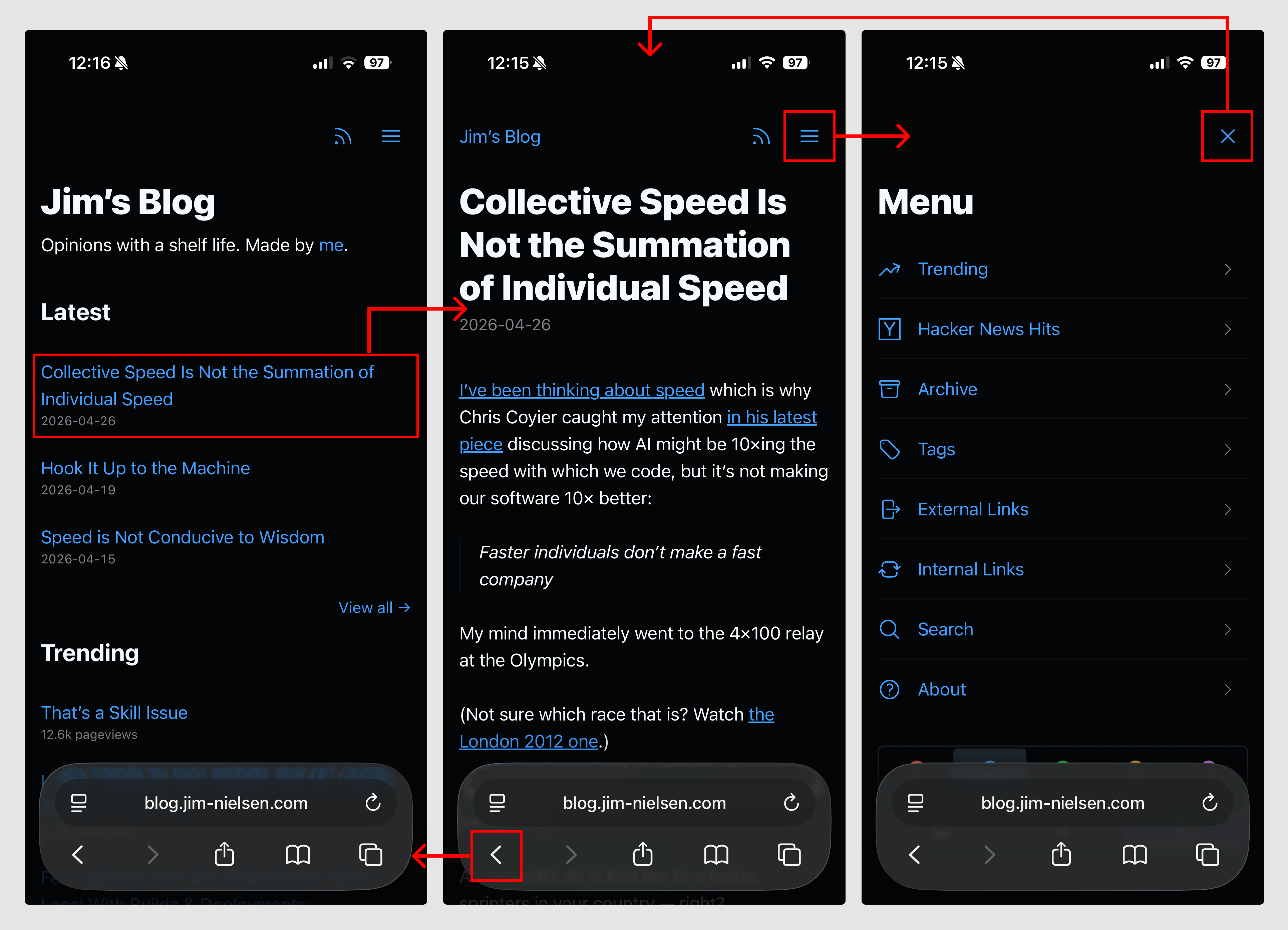
Screenshot of three mobile screenshots of blog.jim-nielsen.com with highlighted sections indicating where navigational clicks can happen and how they link between eachother.

As a simplified example, the code looks like this:

<!-- Normal page -->
<nav>
  <a href="/menu/">
    <svg>...</svg>
  </a>
</nav>

<!-- Menu page -->
<nav>
  <a href="/" onclick="document.referrer ? history.back() : window.location.href = '/'; return false;">
    <svg>...</svg>
  </a>
</nav>

The document.referrer checks whether we came to this page as a navigation (mostly likely from within the blog itself) or via a direct visit (i.e. somebody typed it into the URL bar, unlikely but possible) which is how I suss out whether there’s a meaningful history.back() run or not.

Here’s a video of how it all works, if that’s your thing:

While this solution seems simplistic, it was not a simple thing to arrive at. It required me to spend time thinking about what was essential to navigation, how that interaction could work across multiple pages, and how I could ensure page size stayed small so the interaction was both fast and robust while remaining intuitive to use.

In other words, the approach shaped the design.

Turns out, if you have a website and you think of the browser as a way to navigate documents — rather than a runtime to execute arbitrary code and fetch, compile, and present them — things can be a lot simpler than our tools often prime us to make them.