



惯性聚合 高效追踪和阅读你感兴趣的博客、新闻、科技资讯
阅读原文 在惯性聚合中打开

推荐订阅源

G
GRAHAM CLULEY
S
Security @ Cisco Blogs
P
Proofpoint News Feed
Cisco Talos Blog
Cisco Talos Blog
D
Darknet – Hacking Tools, Hacker News & Cyber Security
C
Cyber Attacks, Cyber Crime and Cyber Security
T
Tor Project blog
WordPress大学
WordPress大学
Project Zero
Project Zero
S
Schneier on Security
P
Proofpoint News Feed
小众软件
小众软件
P
Privacy International News Feed
美团技术团队
L
LangChain Blog
Know Your Adversary
Know Your Adversary
J
Java Code Geeks
奇客Solidot–传递最新科技情报
奇客Solidot–传递最新科技情报
The Register - Security
N
Netflix TechBlog - Medium
Microsoft Security Blog
Engineering at Meta
Engineering at Meta
I
InfoQ
量子位
Vercel News
Vercel News
博客园 - 三生石上(FineUI控件)
Spread Privacy
Spread Privacy
D
DataBreaches.Net
Threat Intelligence Blog | Flashpoint
U
Unit 42
P
Privacy & Cybersecurity Law Blog
C
Cybersecurity and Infrastructure Security Agency CISA
T
The Blog of Author Tim Ferriss
Latest news
Latest news
K
Kaspersky official blog
MongoDB | Blog
MongoDB | Blog
L
LINUX DO - 热门话题
Simon Willison's Weblog
云风的 BLOG
云风的 BLOG
S
Securelist
AWS News Blog
AWS News Blog
F
Fortinet All Blogs
T
Threat Research - Cisco Blogs
Stack Overflow Blog
Stack Overflow Blog
Scott Helme
Scott Helme
Help Net Security
Help Net Security
Y
Y Combinator Blog
宝玉的分享
宝玉的分享
CTFtime.org: upcoming CTF events
T
Tenable Blog

Google Chrome

Chrome is bringing advanced autofill capabilities to your phone with Google Wallet We’re expanding Gemini in Chrome to users in Latin America, Africa, the Middle East and more. Bringing the best of Gemini in Chrome to Android Approximate location sharing gives you more control over your location data in Chrome. We’re expanding Gemini in Chrome to users in Asia Pacific. A new way to explore the web with AI Mode in Chrome Turn your best AI prompts into one-click tools in Chrome Get more done with new vertical tabs and immersive reading mode in Chrome Expanding Chrome’s AI experiences to India, New Zealand and Canada The latest AI news we announced in January The new era of browsing: Putting Gemini to work in Chrome 60 of our biggest AI announcements in 2025 Take the web for a fresh spin with GenTabs, built with Gemini 3 4 new ways Chrome autofill will simplify your holidays Our favorite Chrome extensions in 2025 AI Mode in Chrome is easier to use on iOS and Android. Chrome now helps you fill in passport, driver’s license, vehicle information and more. The latest AI news we announced in September Chrome: The browser you love, reimagined with AI
New features in Chrome for work, life and everything in between
Alex Tsu · 2026-02-20 · via Google Chrome

Your browser does not support the audio element.

Listen to article

This content is generated by Google AI. Generative AI is experimental

[[duration]] minutes

Whether you're looking for ways to move through your to-do list faster, working hard to get your side gig off the ground, or just spending most of your day in the browser, Chrome’s got your back. We’re constantly listening to your feedback and thinking about how we can make browsing more helpful and intuitive.

We also know your time is valuable, which is why we obsess about all the tiny details to make your Chrome experience as helpful as possible. Today, we're announcing three new Chrome features designed to give you a productivity boost: split view, PDF annotations and Save to Google Drive. These tools, developed for both everyday and enterprise users, are built to help you focus, collaborate and get things done more quickly.

Split view lets you multitask smarter

Have you ever found yourself juggling multiple windows or constantly switching between the same two tabs? It's a common frustration that can interrupt your flow and slow you down.

Split view is designed to help. It allows you to view two tabs at the same time, providing a more streamlined, flexible way to work. Split view is a built-in, intuitive tool that helps you create a single, organized space, saving you time and reducing some back-and-forth tab fatigue.

Our work with early testers has shown that split view is already helping people multitask and get more done on the web. One teacher told us they use split view to more easily grade papers in the classroom, others love using it to take notes on YouTube videos, and developers are even using it to reference documentation while they code.
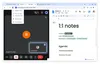
Take notes during your weekly meetings with split view

PDF annotations let you annotate on the fly

The Chrome PDF Viewer is already a favorite for viewing documents, and now we're adding your most-requested feature: annotations!

You can now highlight text and add notes to a PDF right from your browser. This eliminates the need to download the file and open a separate application just to make a quick note. This feature is perfect for quick digital signatures, reviewing a work report, making notes on a class syllabus or simply highlighting a key section of a personal document.

Send downloads to one place

We’ve all been there. You find an important PDF, download it and then forget where it went.

With the new "Save to Google Drive" feature, we’re making it easy to know exactly where to find your downloads. You can now save PDFs directly to your Drive from Chrome without downloading and re-uploading them. It’s automatically organized into a dedicated “Saved from Chrome” folder in your Drive. This keeps your important documents backed up, organized and easy to search for later, from any of your devices.

These are just a few ways Chrome continues to help you work faster and stay more organized on the web.