






说明:我们很多人喜欢用VPS做离线下载,不过由于有的服务器硬盘太小了,装不了太多电影资源啥的,我们就需要想办法了,之前说过可以通过挂载FTP来增大空间,参考:Linux VPS通过安装CurlFtpFS来挂载FTP,这里再说个挂载Google Drive网盘的方法,毕竟Google Drive有15G免费的空间,有的也有无限空间,都可以利用上去。
本教程只适用Debian/Ubuntu系统,如果你是CentOS或者其它Linux系统,请使用以下命令安装rclone:
curl https://rclone.org/install.sh | sudo bash初始化配置和挂载方法和下面一样,开机自启可参考该教程→传送门。
1、安装rclone
wget https://www.moerats.com/usr/shell/rclone_debian.sh && bash rclone_debian.sh
2、初始化配置
rclone config会出现以下信息:
n) New remote
s) Set configuration password
q) Quit config
n/s/q> n
name> Rats  #配置名称,随便填
Type of storage to configure.
Enter a string value. Press Enter for the default ("").
Choose a number from below, or type in your own value
 1 / 1Fichier
   \ "fichier"
 2 / Alias for an existing remote
   \ "alias"
 3 / Amazon Drive
   \ "amazon cloud drive"
 4 / Amazon S3 Compliant Storage Provider (AWS, Alibaba, Ceph, Digital Ocean, Dreamhost, IBM COS, Minio, etc)
   \ "s3"
 5 / Backblaze B2
   \ "b2"
 6 / Box
   \ "box"
 7 / Cache a remote
   \ "cache"
 8 / Dropbox
   \ "dropbox"
 9 / Encrypt/Decrypt a remote
   \ "crypt"
10 / FTP Connection
   \ "ftp"
11 / Google Cloud Storage (this is not Google Drive)
   \ "google cloud storage"
12 / Google Drive
   \ "drive"
13 / Google Photos
   \ "google photos"
14 / Hubic
   \ "hubic"
15 / JottaCloud
   \ "jottacloud"
16 / Koofr
   \ "koofr"
17 / Local Disk
   \ "local"
18 / Mega
   \ "mega"
19 / Microsoft Azure Blob Storage
   \ "azureblob"
20 / Microsoft OneDrive
   \ "onedrive"
21 / OpenDrive
   \ "opendrive"
22 / Openstack Swift (Rackspace Cloud Files, Memset Memstore, OVH)
   \ "swift"
23 / Pcloud
   \ "pcloud"
24 / Put.io
   \ "putio"
25 / QingCloud Object Storage
   \ "qingstor"
26 / SSH/SFTP Connection
   \ "sftp"
27 / Union merges the contents of several remotes
   \ "union"
28 / Webdav
   \ "webdav"
29 / Yandex Disk
   \ "yandex"
30 / http Connection
   \ "http"
31 / premiumize.me
   \ "premiumizeme"
Storage> 12  #选择12,Google Drive,注意该序列号会随时变化,看清楚再填
Google Application Client Id - leave blank normally.
client_id>  #留空
Google Application Client Secret - leave blank normally.
client_secret>  #留空
Service Account Credentials JSON file path - needed only if you want use SA instead of interactive login.
service_account_file>  #留空
Choose a number from below, or type in your own value
 1 / Full access all files, excluding Application Data Folder.
   \ "drive"
 2 / Read-only access to file metadata and file contents.
   \ "drive.readonly"
   / Access to files created by rclone only.
 3 | These are visible in the drive website.
   | File authorization is revoked when the user deauthorizes the app.
   \ "drive.file"
   / Allows read and write access to the Application Data folder.
 4 | This is not visible in the drive website.
   \ "drive.appfolder"
   / Allows read-only access to file metadata but
 5 | does not allow any access to read or download file content.
   \ "drive.metadata.readonly"
scope> 1
ID of the root folder
Leave blank normally.
Fill in to access "Computers" folders. (see docs).
Enter a string value. Press Enter for the default ("").
root_folder_id>
Service Account Credentials JSON file path
Leave blank normally.
Needed only if you want use SA instead of interactive login.
Enter a string value. Press Enter for the default ("").
service_account_file>
Edit advanced config? (y/n)
y) Yes
n) No
y/n> n  #输入n
Remote config
Use auto config?
 * Say Y if not sure
 * Say N if you are working on a remote or headless machine
y) Yes
n) No
y/n> n  #输入n
If your browser doesn't open automatically go to the following link: https://accounts.google.com/o/  #打开该地址获取code
Log in and authorize rclone for access
Enter verification code>hjdd  #输入你获取到的code
Configure this as a team drive?
y) Yes
n) No
y/n> n  #输入n
--------------------
[Rats]
type = drive
client_id = 85042871
client_secret = D72gPc
scope = drive
token = {"access_token":"y902Z"}
--------------------
y) Yes this is OK
e) Edit this remote
d) Delete this remote
y/e/d> y  #输入y
Current remotes:

Name                 Type
====                 ====
Rats                 drive

e) Edit existing remote
n) New remote
d) Delete remote
r) Rename remote
c) Copy remote
s) Set configuration password
q) Quit config
e/n/d/r/c/s/q> q  #输入q保存退出
3、挂载为磁盘
#新建本地文件夹,路径自己定,即下面的LocalFolder
mkdir /root/GoogleDrive
#挂载为磁盘,下面的DriveName、Folder、LocalFolder参数根据说明自行替换
rclone mount DriveName:Folder LocalFolder --copy-links --no-gzip-encoding --no-check-certificate --allow-other --allow-non-empty --umask 000DriveName为初始化配置填的name,Folder为Google Drive里的文件夹,LocalFolder为VPS上的本地文件夹。
挂载成功后,输入df -h命令查看即可!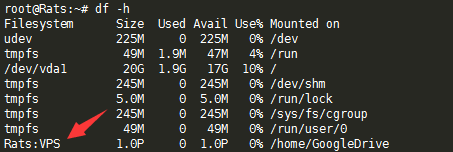
4、卸载磁盘
fusermount -qzu LocalFolder
先新建systemd配置文件,适用CentOS 7、Debian 8+、Ubuntu 16+。
再使用命令:
#将后面修改成你上面手动运行命令中,除了rclone的全部参数
command="mount DriveName:Folder LocalFolder --copy-links --no-gzip-encoding --no-check-certificate --allow-other --allow-non-empty --umask 000"
#以下是一整条命令,一起复制到SSH客户端运行
cat > /etc/systemd/system/rclone.service <<EOF
[Unit]
Description=Rclone
After=network-online.target

[Service]
Type=simple
ExecStart=$(command -v rclone) ${command}
Restart=on-abort
User=root

[Install]
WantedBy=default.target
EOF
开始启动:
systemctl start rclone
设置开机自启:
systemctl enable rclone
其他命令:
重启:systemctl restart rclone
停止:systemctl stop rclone
状态:systemctl status rclone如果你想挂载多个网盘,那么将systemd配置文件的rclone.service改成rclone1.service即可,重启动什么的同样换成rclone1。
#解决Rclone挂载Google Drive时上传失败和内存占用高等问题
https://www.moerats.com/archives/877/
版权声明:本文为原创文章,版权归 Rat's Blog 所有,转载请注明出处!
本文链接:https://www.moerats.com/archives/481/
如教程需要更新,或者相关链接出现404,可以在文章下面评论留言。
此内容由惯性聚合(RSS阅读器)自动聚合整理,仅供阅读参考。 原文来自 — 版权归原作者所有。