








Scala Plugin for IntelliJ IDEA and Android Studio
IntelliJ Scala Plugin 2026.2 Is Out!
Hello everyone,
The new release of IntelliJ IDEA introduces a few new features for Scala developers that we’ve been working on for some time, as well as a number of fixes and improvements. We hope that they will make your Scala experience even better than before.
Build tool support
The logic behind sbt tasks in run/debug configurations has been reworked and now allows for a wider range of sbt commands. This enabled us to fix an issue where passing multiple parameters to an sbt command was either interpreted as a single parameter or caused the command name to be treated as an additional parameter. To work around this, developers had to run the task in the sbt shell instead. The new logic is much simpler: We no longer modify the user input. Instead, the input is expected to be a valid sbt command, e.g. tasks must be separated with semicolons, and we do not unquote the input.
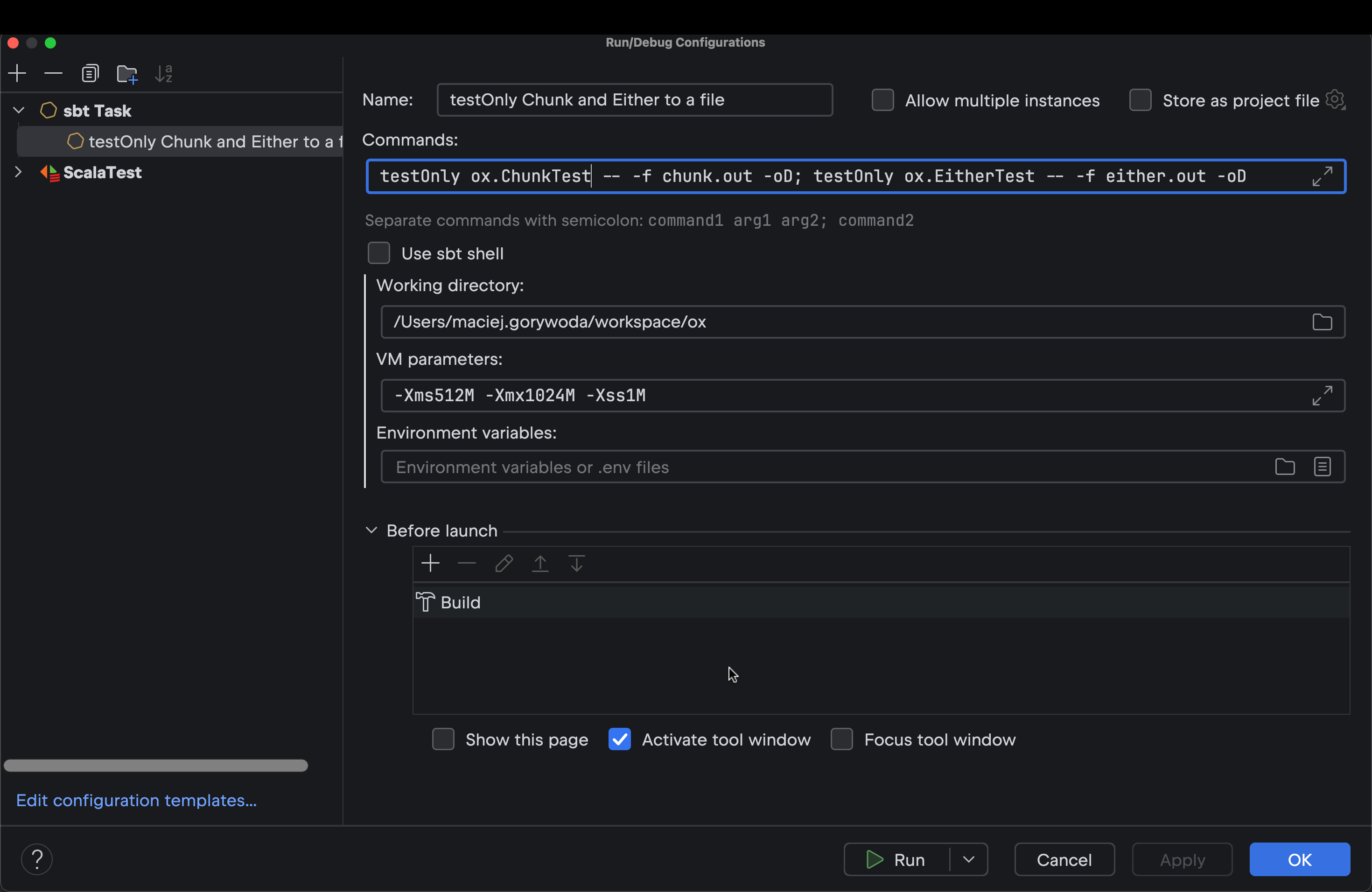
Additionally, we’ve fixed a bug in the sbt shell where sync failed after waiting for user input. Also, previously, sbt import would not work if the .jvmopts file contained key-value pairs separated by a whitespace, such as --add-exports java.base/sun.nio.ch=ALL-UNNAMED – we’ve fixed this, too.
Separate ScalaTest tests can now be run through Bazel. Previously, this functionality was implemented on the Bazel side, but with the introduction of the new official JetBrains Bazel plugin, it made more sense to move it to the Scala plugin. And, by the way, this is an external contribution from one of our users!
WSL and Docker
Starting with IntelliJ IDEA 2026.2, WSL and Docker support covers not only sbt projects, but also BSP projects and projects built with other BSP-based tools, such as Mill, Scala CLI, and Bloop. On top of that, we’ve stabilized WSL support and fixed several bugs where sbt imports and re-running tests used to fail in WSL.
Scala 3
The new release includes full support for Clause Interleaving (SIP-47), which is a standard feature as of Scala 3.6. This allows IntelliJ IDEA to support previously impossible combinations of type parameters and regular parameters. This is illustrated in the getOrElse method declaration below, where it is necessary to know the instance of the key parameter to properly calculate the type bound of the default parameter:
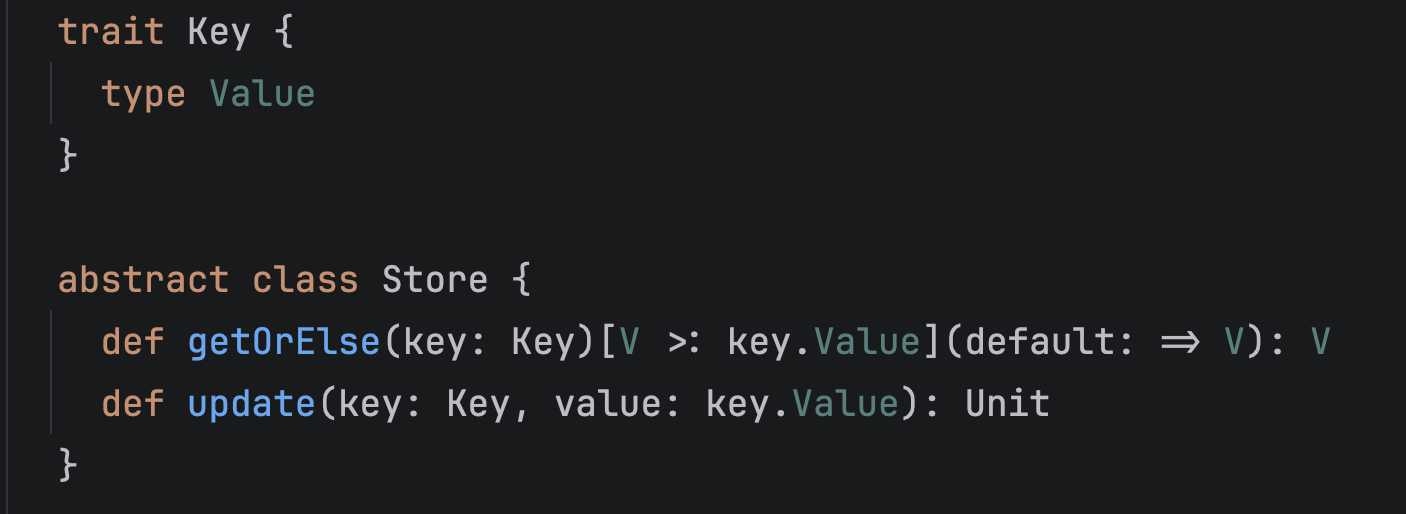
The update method in that code example also shows that we now support dependent parameter types belonging to the same clause. Previously, the example would have worked only if key and value had been placed in separate, single-parameter clauses.
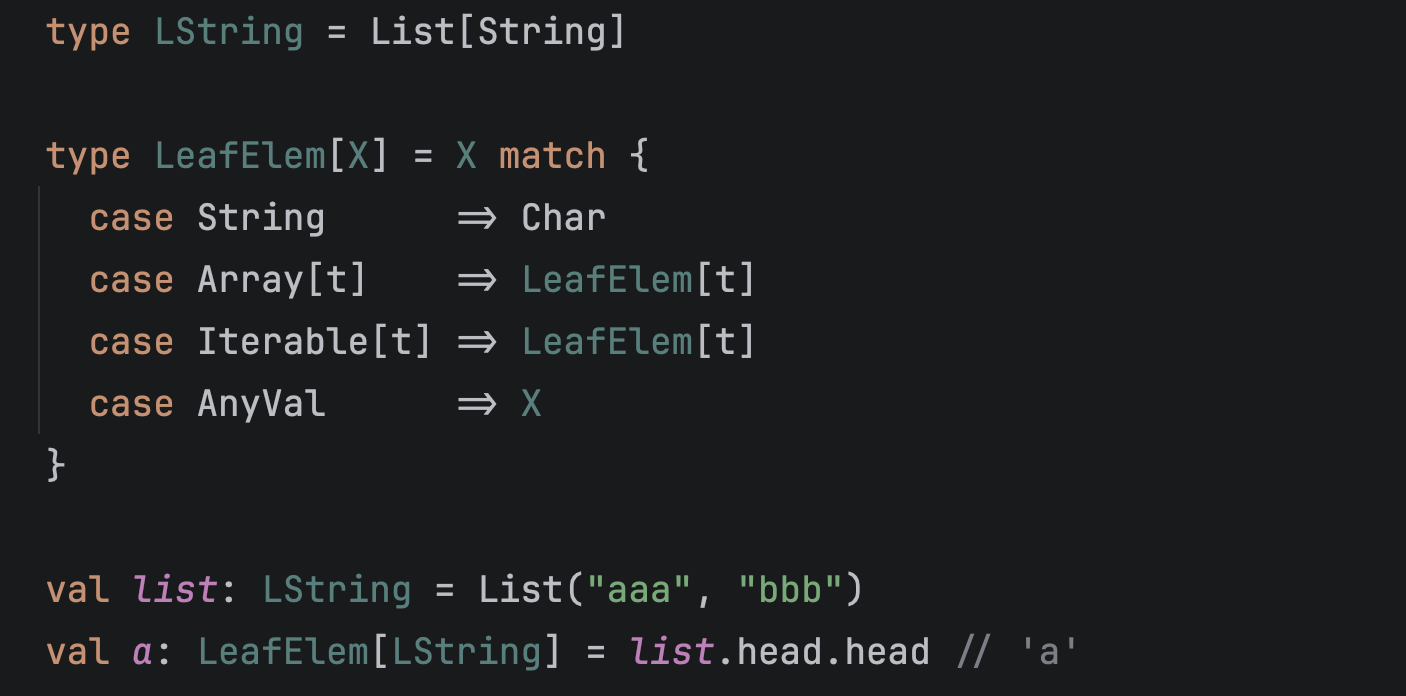
On the error-highlighting front, we’re working on improving support for match types in the built-in highlighting. This new release supports type-level operations, as shown in the code example below. We’re working on expanding this support to cover some missing corner cases.
We’ve also fixed a bug where calling a synthetic companion object could not be resolved, and another one where a wrong number of indents could lead to changed semantics.
Code completion
In v2026.2, we introduce support for Scala in a recently added IntelliJ IDEA feature, command completion. You are likely already familiar with the behavior where, if you type a dot (.) after a symbol (be it a class, a method, or a value name), IntelliJ IDEA opens a code completion window. Now, if you type two dots quickly one after another, another popup will appear with suggestions for commands that might be useful in the situation. You can learn more from our blog post dedicated to command completion or watch the screen recording below.
Other improvements
Additionally, we’ve improved the handling of @throws directives and of link references in ScalaDoc. The @Language injection annotation is now recognized on apply methods in case classes and implicit classes, and we’ve fixed an issue with how single tests are discovered in mUnit. Further improvements include a new version of the quick-fix for using scala.compiletime.uninitialized instead of null in null-initialized variables, as well as improved handling of nullable variables.
As always, we welcome your feedback. Please report any issues you find in YouTrack. If you have any questions, feel free to ask us on Discord.
Happy developing!
The Scala team at JetBrains