








iOS 26.5 is expected to launch next week, and a newly discovered improvement makes one of my most-used Reminders features even better.
Whenever you have a timed reminder come due, you’ll get a notification on your iPhone.
If you long-press that notification, the Reminders app has long offered multiple snoozing options.
You’ll see snooze options like ‘Remind Me in an Hour,’ ‘Remind Me This Afternoon,’ and ‘Remind Me Tomorrow.’
I use this snoozing feature all the time when I can’t complete a task right away, but don’t want to forget it.
The second option changes dynamically based on the time of day. So if you check it in the morning, you’ll see the option to snooze into the afternoon. If it’s afternoon, it will say “This Evening,” and in the evening you’ll see ‘Tomorrow Morning.’
But I’ve always felt like it was strange how ambiguous those morning/afternoon/evening descriptors are.
And it seems Apple agrees, as iOS 26.5 updates these snoozing options to show precise times instead.
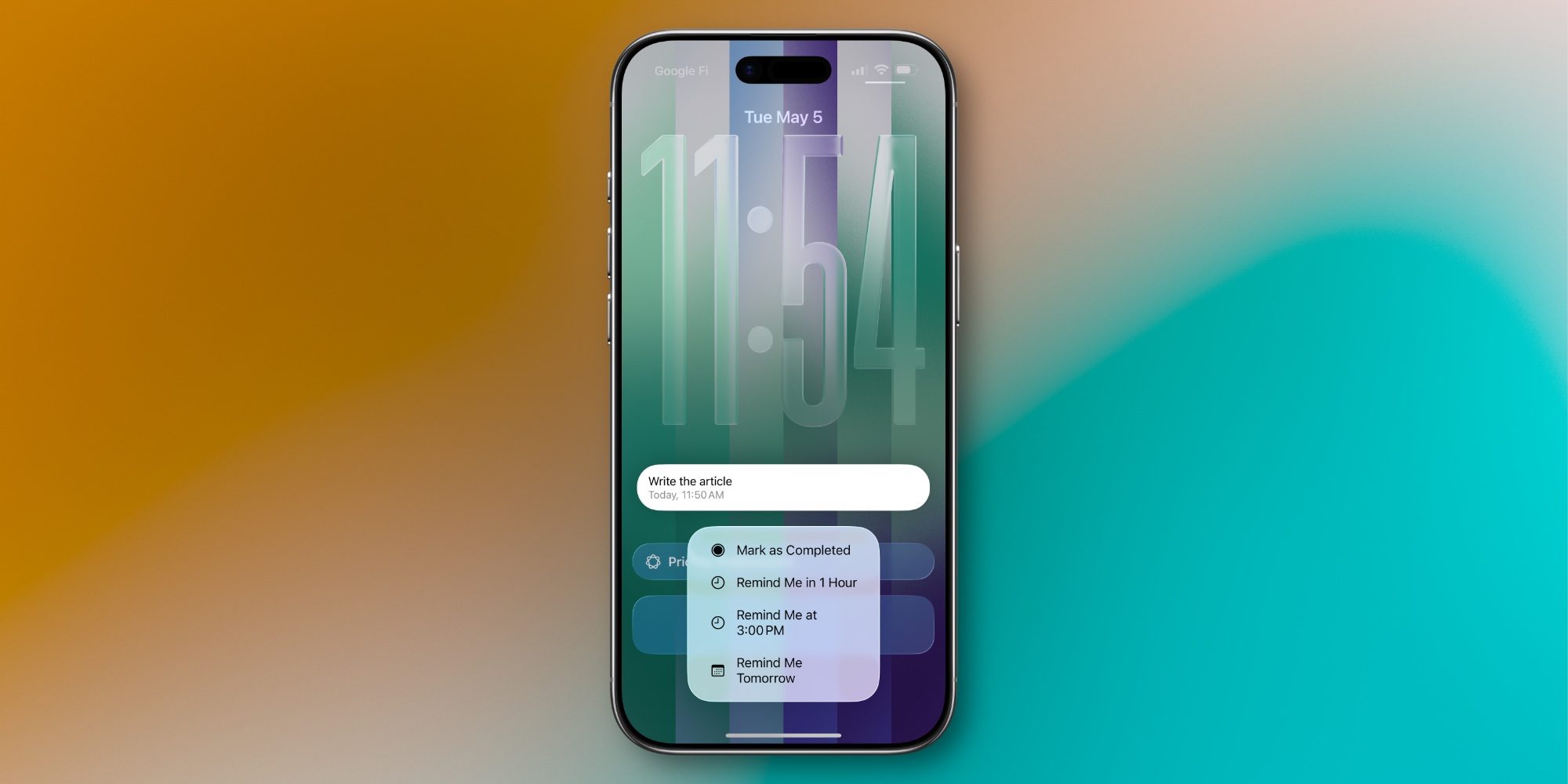
As discovered by Aaron Perris, Apple has updated the language for its snoozing options to make very clear what time a reminder will pop back up.
For example, here are the snoozing options I saw this morning in iOS 26.5:
Again, the second option changes based on time of day. So you’ll see the ‘3:00 PM’ language change if it’s not currently morning. For example, in the evening you’ll see an option that snoozes until ‘Tomorrow at 9:00 AM.’
It’s a fairly small improvement, but as someone who snoozes reminders a lot, I expect to start using that second option more than ever in iOS 26.5 and beyond.
Do you ever use Reminders’ snoozing options, and will iOS 26.5 change that at all? Let us know in the comments.


FTC: We use income earning auto affiliate links. More.
此内容由惯性聚合(RSS阅读器)自动聚合整理,仅供阅读参考。 原文来自 — 版权归原作者所有。