





Available in public beta soon, Adobe Firefly AI Assistant will take a user’s prompt and then orchestrate multi-step workflows across multiple Creative Cloud apps. Here are the details.
Today, Adobe is announcing Firefly AI Assistant, a smart agent that will soon build on existing AI assistants across several Creative Cloud apps, and orchestrate multi-step actions across them from a single, unified interface, maintaining context across sessions.
In practice, this means users won’t need to know the nuts and bolts of platforms such as Photoshop, Premiere, Express, Lightroom, Illustrator, and more. Instead, they’ll prompt Firefly AI Assistant, which will orchestrate actions across these apps to deliver the result.
Available in public beta in the coming weeks, Firefly AI Assistant will feature a growing library of pre-built Creative Skills (such as retouching portrait photos with consistent presets or generating content across
social channels), but will also let users create their own skills to streamline their workflow.
In fact, Adobe says Firefly AI Assistant will learn the user’s preferences over time, including aesthetic choices and preferred tools and workflows, “to deliver more consistent, tailored results.”
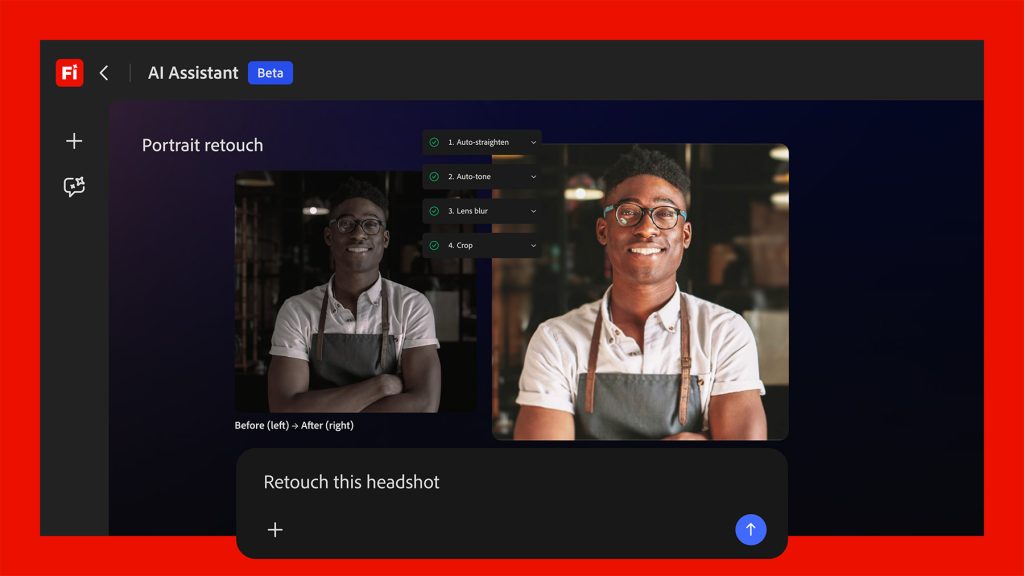
Importantly, Firefly AI Assistant will also present suggestions and even ask contextual questions depending on the user’s request, and will let users “step in at any point to guide, refine or adjust outputs.”
One ambitious aspect of Firefly AI Assistant is its context-aware capabilities. Here’s Adobe on the feature:
For example, if you’re editing a product photo set in a forest, the assistant might give you a simple slider to increase or reduce the surrounding trees and foliage—making it easy to adjust the scene without complex edits.
Adobe adds that its shared workflow platform Frame.io will also be part of the experience, letting users ask the assistant to package and organize materials for a presentation, share them with collaborators, collect feedback, and even apply requested changes automatically.
Finally, the company worked with Anthropic to bring Firefly AI Assistant compatibility to Claude, “enabling creators to access the best of Adobe directly within the surfaces where they work every day,“ with additional third-party integrations underway.
Right now, there is no launch date set for Firefly AI Assistant. The company says the platform “will be available in public beta in the coming weeks,” with more information and demos planned for Adobe Summit, which is set take place from April 19–22 in Las Vegas.
Today’s announcement also includes more actionable news that creators can leverage immediately.
First, Firefly Video Editor is adding new capabilities, including:
- Audio Upgrades: Enhance Speech, the award-winning feature in Premiere and Adobe Podcast that automatically cleans up dialogue, is now available in Firefly Video Editor, along with additional audio enhancements. Creators can reduce noise and reverb and balance speech, music and ambience for polished sound in just a few clicks.
- Color Adjustments: Creators can fine-tune exposure, contrast, saturation, temperature, and other key visual elements inside the Firefly Video Editor. Intuitive sliders put creators in control of the intensity of each adjustment, while one-click looks make it easy to get started.
- Adobe Stock Integration: Creators can access over 800 million licensed assets including video, images, audio and sound effects – directly within the Firefly Video Editor workflow.
Adobe Firefly is also adding Kling 3.0 and Kling 3.0 Omni to its list of more than 30 third-party video models, which also includes Google’s Nano Banana 2 and Veo 3.1, Runway Gen-4.5, Luma AI’s Ray3.14, Black Forest Labs’ FLUX.2 [pro], ElevenLabs’ Multilingual v2, Topaz Lab’s Topaz Astra and Adobe’s own “commercially safe” Firefly models.
Finally, Firefly’s image editing toolset is also getting new capabilities:
- Precision Flow: Creators can explore and refine images faster by generating a wide range of results from a single prompt. An intuitive slider lets creators browse variations—from subtle shifts to dramatic transformations—and select the version that best matches their vision without starting over.
- AI Markup: Creators can take hands-on control over where and how edits are applied. Using a brush, rectangle tool or reference images, they can draw directly on an image to place objects, sketch new elements or refine lighting.
What’s your take on today’s news? Let us know in the comments.


FTC: We use income earning auto affiliate links. More.

此内容由惯性聚合(RSS阅读器)自动聚合整理,仅供阅读参考。 原文来自 — 版权归原作者所有。