



9to5Mac Security Bite is exclusively brought to you by Mosyle, the only Apple Unified Platform. Making Apple devices work-ready and enterprise-safe is all we do. Our unique integrated approach to management and security combines state-of-the-art Apple-specific security solutions for fully automated Hardening & Compliance, Next Generation EDR, AI-powered Zero Trust, and exclusive Privilege Management with the most powerful and modern Apple MDM on the market. The result is a totally automated Apple Unified Platform currently trusted by over 45,000 organizations to make millions of Apple devices work-ready with no effort and at an affordable cost. Request your EXTENDED TRIAL today and understand why Mosyle is everything you need to work with Apple.
The Mac’s built-in green LED privacy indicator—paired with those displayed on-screen in macOS—do a solid job of alerting users in real time when the webcam or microphone is active. When you’re actively working on your Mac, they’re hard to miss. But that protection assumes you’re actually there to see the privacy indicators light up.
But what happens when you’re away from your Mac and malware triggers the camera or microphone to quietly record or eavesdrop? How would you know without being there to see it happen?
Well, there’s an app for that.
In a previous Security Bite column, I reluctantly threw myself to the wolves explaining why plastic webcam covers on modern MacBooks are no longer necessary ever since Apple’s 2008 decision to hardwire the camera module and LED indicator in the same circuit. This made the webcam impossible to receive power without that green light illuminating alongside it. That design change effectively killed off an entire class of stealth webcam attacks, but also created others.
In a comment to that piece, Apple security researcher, Objective-See founder, and friend of Security Bite Patrick Wardle suggested his organization’s free open-source tool OverSight as an additional layer of defense.
OverSight is capable of a lot, but the crux is in its ability to send notifications whenever your webcam or microphone is activated. That way when you return to your Mac you’ve have a log of any triggered events while you were away, including the name of the process responsible.
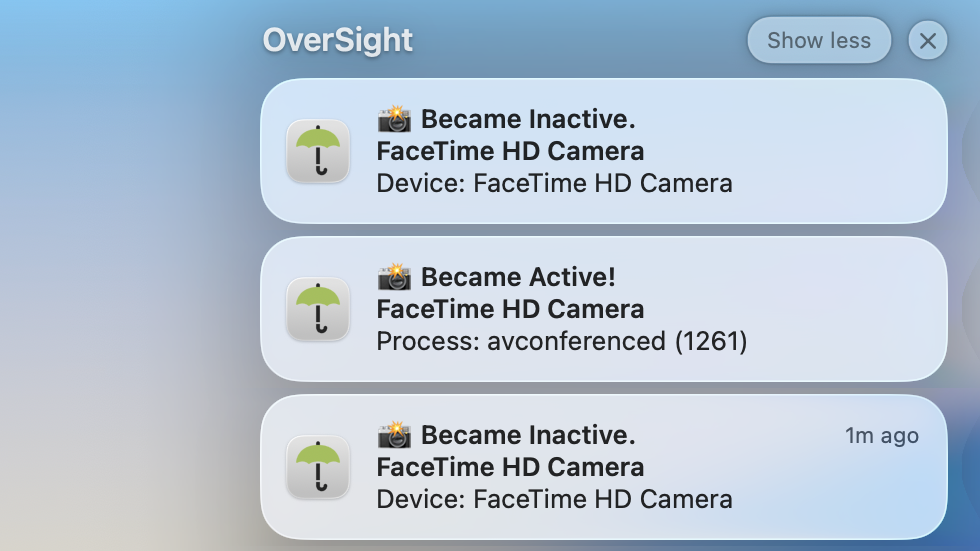
Historically, threats like Fruitfly, Mokes, Crisis, and others, have been observed lingering on systems for long periods, activating the camera only when users step away from their desks. If you’re out grabbing coffee or maybe even asleep, that green LED could be glowing without you ever knowing. OverSight doesn’t prevent this from happening outright, but it does log and receipt every activation event, giving you a clear record of what happened while you were gone.
OverSight is also able to detect piggybacking attacks.
There have been documented cases of macOS malware that will wait for you to join a legitimate video call, before silently attaching itself to the same camera stream and recording your conversation. Since Zoom, FaceTime, or Skype (jk, RIP) already has the camera active, there’s no new LED trigger to raise suspicion. macOS doesn’t differentiate between one app or multiple processes accessing the camera—but OverSight does, and it will alert you the moment an another process is triggered.
After running OverSight on my personal Mac for the past couple of weeks, I’ve grown genuinely in love with it. It’s one of the rare security tools that I recommend everyone install for just a little extra peace of mind. If you’re anything like me knowing exactly when hardware was accessed, without having to script custom logging or dig through system internals is a godsend.
You can learn more about OverSight on the Objective-See Foundation’s website here.
Security Bite is 9to5Mac’s weekly deep dive into the world of Apple security. Each week, Arin Waichulis unpacks new threats, privacy concerns, vulnerabilities, and more, shaping an ecosystem of over 2 billion devices.
Follow Arin: Twitter/X, LinkedIn, Threads


FTC: We use income earning auto affiliate links. More.
此内容由惯性聚合(RSS阅读器)自动聚合整理,仅供阅读参考。 原文来自 — 版权归原作者所有。