

惯性聚合 高效追踪和阅读你感兴趣的博客、新闻、科技资讯
阅读原文 在惯性聚合中打开

推荐订阅源

OSCHINA 社区最新新闻
OSCHINA 社区最新新闻
J
Java Code Geeks
Blog — PlanetScale
Blog — PlanetScale
F
Fortinet All Blogs
腾讯CDC
大猫的无限游戏
大猫的无限游戏
Jina AI
Jina AI
WordPress大学
WordPress大学
雷峰网
雷峰网
小众软件
小众软件
D
DataBreaches.Net
V
Visual Studio Blog
博客园 - Franky
IT之家
IT之家
奇客Solidot–传递最新科技情报
奇客Solidot–传递最新科技情报
B
Blog RSS Feed
博客园 - 聂微东
T
Tailwind CSS Blog
有赞技术团队
有赞技术团队
让小产品的独立变现更简单 - ezindie.com
Cyber Security Advisories - MS-ISAC
Microsoft Security Blog
G
Google Developers Blog
云风的 BLOG
云风的 BLOG

9to5Mac

Apple permanently closing three US stores, here’s when [Updated] Apple Arcade just added 4 new ad-free games with these titles now available At least for now, Liquid Glass in Pixelmator Pro remains a Creator Studio exclusive Apple @ Work: How to add an existing Mac to Apple Business Manager without wiping it Hands-on: SkyDex turns your daily weather check into a Pokémon adventure App Store fight continues as Apple and Epic clash over court-ordered stay OpenAI says to update Mac apps including ChatGPT and Codex as security precaution Apple TV in-person ‘experience’ coming later this month in LA New iPhone Fold leaks cover ‘Ultra’ name, launch timing, more Report: Apple tops global smartphone market for first time in Q1 as overall shipments drop Car Keys in Apple Wallet coming soon to major new vehicle brand Apple previews AI, accessibility, and AirPods Pro 3 research for CHI 2026 April 10, 2026 – Apple Store closures, more VSCO report explores how photographers perceive, adopt, and actually use AI XChat, X’s standalone messaging app, launching soon with these features Apple TV has three shows with finales this week, here’s what’s ending iOS 26.4 adds setting to let you change new Liquid Glass effect Hands-on: Satechi’s 3-in-1 Qi2 charger brings 25W of power with a clean Apple aesthetic [Video] iOS 27 adding new ‘Siri’ app to Home Screen: Here are the rumored features Deals: All 15-inch M5 MacBook Air models $150 off, Series 11 $99 off, Nomad leather iPhone 17 cases, more Amazon launches ‘Prime Video Ultra’ with new features, higher price How the Mac changed the way I clear mental clutter YouTube Premium is getting a US price hike of up to $4/month Tribit StormBox Micro 3: My favorite travel speaker just got better and cheaper FBI used iPhone notification data to retrieve deleted Signal messages Adobe’s low-processing camera app expands support to select iPads and the iPhone 17e New Apple TV movie starring Keanu Reeves now available to stream Apple collector showcases 50 years of Mac startup sounds [Video] WhatsApp is bringing Status updates to the top of the Chats tab iOS 26’s Messages app got a big upgrade for an essential feature
Here’s everything new coming to Safari on macOS 27 Golden...
Marcus Mendes · 2026-06-10 · via 9to5Mac

macOS 27 includes several additions and improvements in Safari, including optional AI-powered features that help organize tabs and keep users up to date on changes to the websites they’re watching. Here’s everything new.

Automatic tab groups

During yesterday’s WWDC keynote, Apple mentioned a few new features coming to Safari on macOS 27 later this year.

One of them is an Apple Intelligence-powered feature that will automatically organize tabs into topics.

The feature is optional and, when turned on, will let Safari analyze the content of each page, and group tabs by shared topics, such as “Vacation planning” or “School project research.”

As users open new tabs, Safari can automatically add them to existing groups when they match the same topic. Users can then save those automatically organized tabs as a new Tab Group, or simply close the whole group once they’re done with that subject or project.

Notify Me

Yet another Apple Intelligence-powered feature, Notify Me will let users set the conditions for when they want to be notified after the content of a specific page changes.
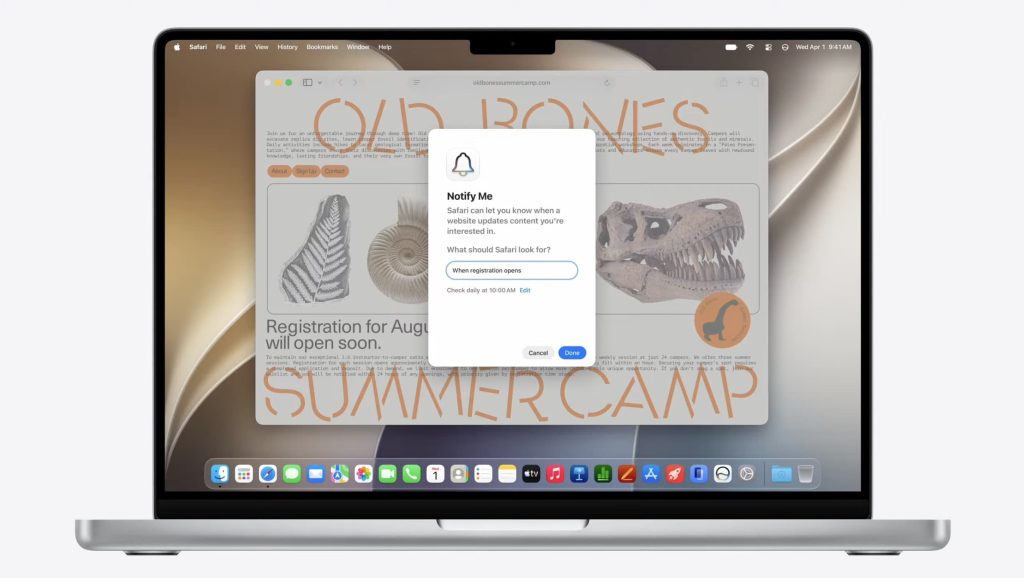
Users can set the automation to run daily, monthly, or on specific days of the week, as well as choose the exact time it should check for changes.

They can also use natural language to describe the kind of change they’re watching for, such as “Price drop on the shoes” or “When registration opens,” so Safari knows what to look for on the page.

Describe an extension

As with Notify Me, users will be able to describe in natural language what they want their new extension to do and how it should behave, and Safari will handle the rest.
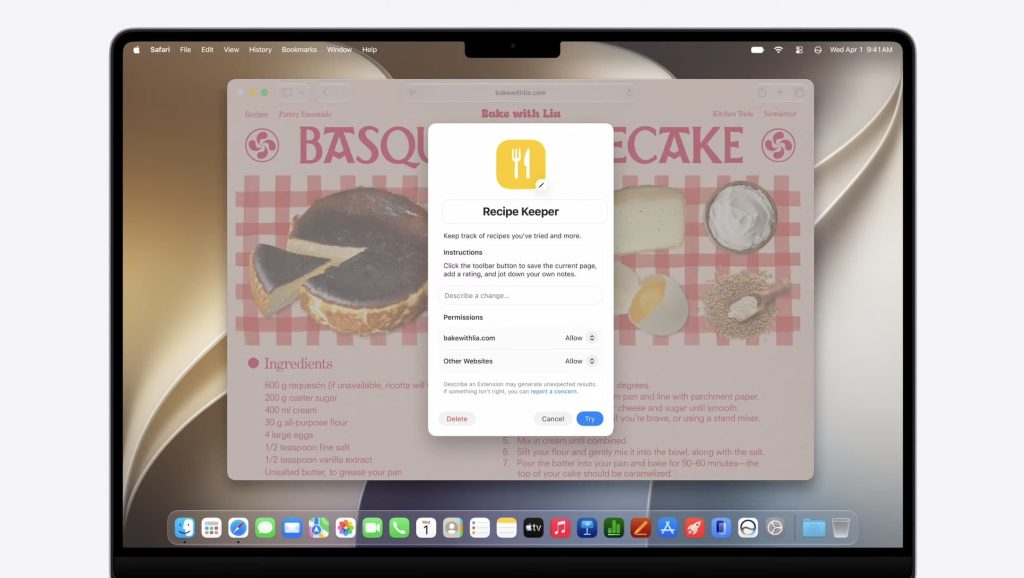
During the WWDC keynote, Apple showed an example where a user wrote:

“Save and track cooking recipes from around the web. Click the toolbar button to see your saved recipes and add notes to each.

Safari then created a Recipe Keeper extension with a new prompt field for the user to describe further changes they wanted to make, as well as options to control which sites were allowed to add or change recipes.

Swipe down to refresh

Just like on iOS and iPadOS, Mac users running macOS 27 will be able to pull down from the top of a page to refresh its content.

As the rubber band effect kicks in, Safari slowly reveals a spinning refresh indicator. Once the page has been pulled down far enough, Safari refreshes the entire page, just as users are already used to on iPhone and iPad.

Here’s the new behavior in action:

Passwords

Just like on iOS 27, Safari will be able to automatically and proactively change compromised passwords on the user’s behalf, and you can read more about that in our coverage of this specific feature here.

In addition to the features showcased during the WWDC keynote, Apple has made several under-the-hood tweaks to Safari as part of its broader effort to make apps and system experiences feel faster across its platforms.

That includes:

  • Enhanced power efficiency in macOS and iOS
  • Faster start page content loading
  • Faster web application performance
  • Faster handling of JavaScript
  • Smoother animations and graphics
  • Smoother scrolling
  • Smoother start page resizing
  • Multiple tab views in visionOS

For developers, the WebKit blog has started taking deeper dives into the new technologies included in Safari on macOS 27 and Apple’s other operating systems, and you can read more about that here.

For ongoing updates and full coverage of WWDC26, head over to our news hub.

What’s your favorite new feature coming to Safari? Let us know in the comments.

Worth checking out on Amazon

Add 9to5Mac as a preferred source on Google Add 9to5Mac as a preferred source on Google

FTC: We use income earning auto affiliate links. More.
