


惯性聚合 高效追踪和阅读你感兴趣的博客、新闻、科技资讯
阅读原文 在惯性聚合中打开

推荐订阅源

MyScale Blog
MyScale Blog
博客园 - 司徒正美
A
About on SuperTechFans
Vercel News
Vercel News
H
Hackread – Cybersecurity News, Data Breaches, AI and More
爱范儿
爱范儿
I
InfoQ
freeCodeCamp Programming Tutorials: Python, JavaScript, Git & More
博客园_首页
Google DeepMind News
T
Tailwind CSS Blog
奇客Solidot–传递最新科技情报
奇客Solidot–传递最新科技情报
F
Fortinet All Blogs
S
SegmentFault 最新的问题
阮一峰的网络日志
阮一峰的网络日志
D
Docker
钛媒体:引领未来商业与生活新知
钛媒体:引领未来商业与生活新知
G
Google Developers Blog
Stack Overflow Blog
Stack Overflow Blog
M
MIT News - Artificial intelligence
Jina AI
Jina AI
H
Help Net Security
量子位
IT之家
IT之家

9to5Mac

Apple permanently closing three US stores, here’s when [Updated] Apple Arcade just added 4 new ad-free games with these titles now available At least for now, Liquid Glass in Pixelmator Pro remains a Creator Studio exclusive Apple @ Work: How to add an existing Mac to Apple Business Manager without wiping it Hands-on: SkyDex turns your daily weather check into a Pokémon adventure App Store fight continues as Apple and Epic clash over court-ordered stay OpenAI says to update Mac apps including ChatGPT and Codex as security precaution Apple TV in-person ‘experience’ coming later this month in LA New iPhone Fold leaks cover ‘Ultra’ name, launch timing, more Report: Apple tops global smartphone market for first time in Q1 as overall shipments drop Car Keys in Apple Wallet coming soon to major new vehicle brand Apple previews AI, accessibility, and AirPods Pro 3 research for CHI 2026 April 10, 2026 – Apple Store closures, more VSCO report explores how photographers perceive, adopt, and actually use AI XChat, X’s standalone messaging app, launching soon with these features Apple TV has three shows with finales this week, here’s what’s ending iOS 26.4 adds setting to let you change new Liquid Glass effect Hands-on: Satechi’s 3-in-1 Qi2 charger brings 25W of power with a clean Apple aesthetic [Video] iOS 27 adding new ‘Siri’ app to Home Screen: Here are the rumored features Deals: All 15-inch M5 MacBook Air models $150 off, Series 11 $99 off, Nomad leather iPhone 17 cases, more Amazon launches ‘Prime Video Ultra’ with new features, higher price How the Mac changed the way I clear mental clutter YouTube Premium is getting a US price hike of up to $4/month Tribit StormBox Micro 3: My favorite travel speaker just got better and cheaper FBI used iPhone notification data to retrieve deleted Signal messages Adobe’s low-processing camera app expands support to select iPads and the iPhone 17e New Apple TV movie starring Keanu Reeves now available to stream Apple collector showcases 50 years of Mac startup sounds [Video] WhatsApp is bringing Status updates to the top of the Chats tab iOS 26’s Messages app got a big upgrade for an essential feature
Here’s everything new for AirPods in iOS 27 - 9to5Mac
Ryan Christoffel · 2026-06-18 · via 9to5Mac

When Apple unveiled iOS 27, it highlighted only a pair of new AirPods features initially. But there are several more AirPods additions in iOS 27, here’s everything new.
Custom EQ

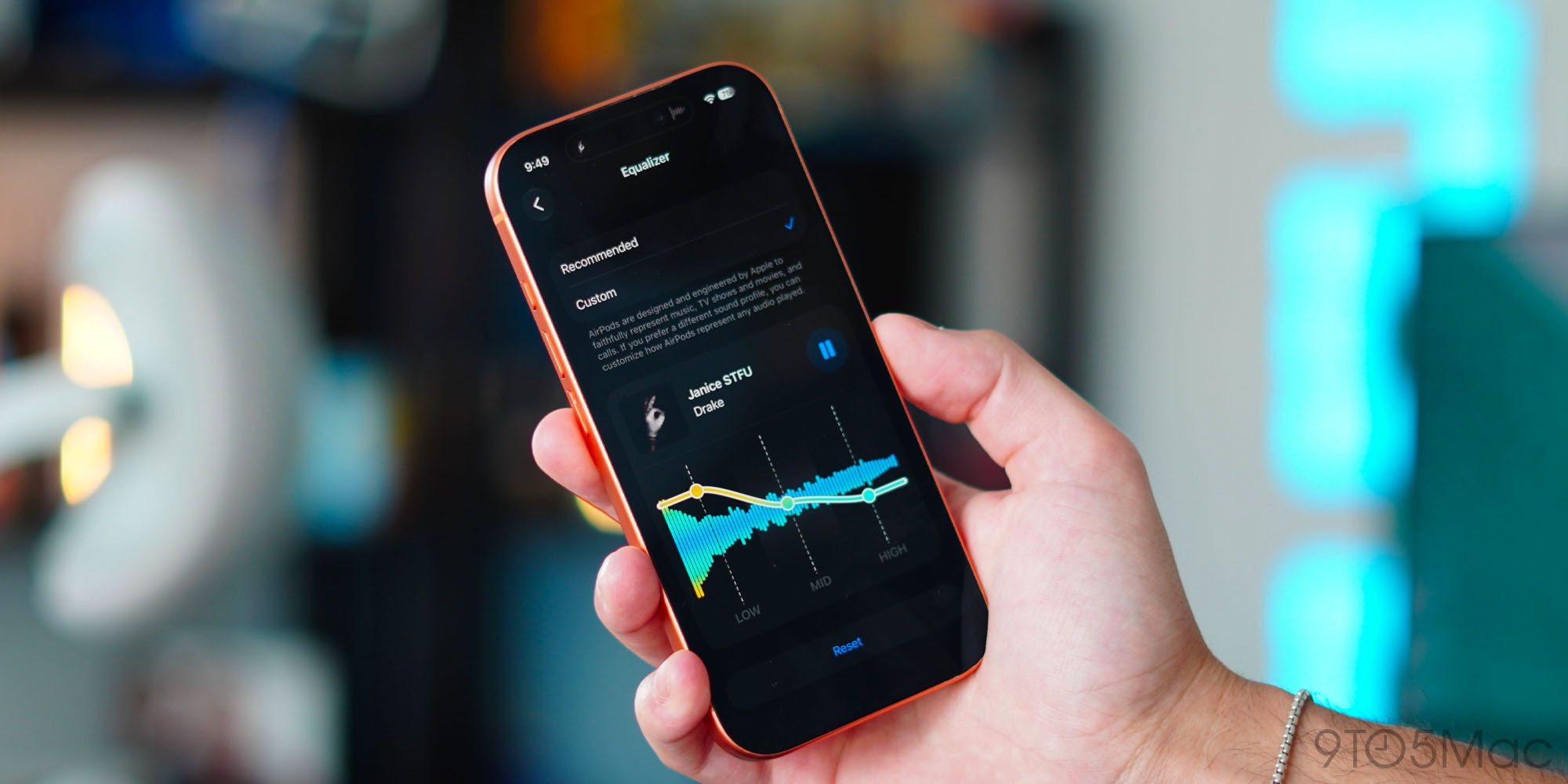
Custom EQ is a feature that some AirPods users thought Apple would never ship. But it’s here in iOS 27, available now in the AirPods beta.

With Custom EQ, Apple now lets you set your own sound profile for AirPods. Per Apple:

AirPods are designed and engineered by Apple to faithfully represent music, TV shows and movies, and calls. If you prefer a different sound profile, you can customize how AirPods represent any audio played.

You can change the EQ by going to your AirPods’ settings ⇾ Audio & Routing ⇾ Equalizer ⇾ Custom. From here, you can adjust the sound profile for low, mid, and high frequencies.

Custom EQ is available on AirPods Pro 3, AirPods Pro 2, AirPods Max 2, and AirPods 4.

GymKit can sync AirPods Pro 3’s heart rate data

Apple GymKit has been available for years, but only for Apple Watch. It lets you pair and sync workout data with compatible cardio equipment, like treadmills, ellipticals, indoor bikes, and more.

In iOS 27, GymKit expands to support iPhone using AirPods Pro 3’s heart rate sensor. My colleague Zac gave it a try:

The setup is simple. I tapped my iPhone to the treadmill, picked Indoor Walk (Indoor Run is also offered), and started the workout from the treadmill. With GymKit, workout data is stored privately on iPhone and removed from the equipment.

Once the workout started, the treadmill received heart-rate data from AirPods Pro 3. Meanwhile, the Fitness app on iPhone received the treadmill’s distance, pace, incline, and calorie data. Treadmills know details that an iPhone and AirPods can’t know on their own, especially incline and precise belt distance.

For more details on iOS 27’s GymKit feature for AirPods Pro 3, check out Zac’s full hands-on below.

Read more: iOS 27 basically turns your iPhone and AirPods into an Apple Watch at the gym

Siri AI

Siri AI is powered by Gemini models, but is not Gemini – what does that mean? | Siri AI animation shown

For most AirPods users, the single biggest upgrade in iOS 27 will be Siri AI.

Siri AI is available on compatible iPhone hardware in iOS 27, and Apple made sure to expand full support for the AI assistant to AirPods too.

AirPods are essentially becoming an AI wearable thanks to the new Siri. It will let users do a lot more than the current Siri. Here are some key features via Apple’s website:

  • World Knowledge: “Ask about virtually any topic that’s on your mind, from important facts to recipes and restaurant recommendations. Siri AI can reference information online to give you detailed, up-to-date insights.”
  • Conversational: “Siri AI is your conversational AI assistant with entirely new capabilities…Ask open-ended questions, brainstorm ideas for work or creative projects on the go, and engage in natural, back-and-forth conversations.”
  • Personal Context: “Siri AI can find relevant answers to what you’re looking for just by asking. Search for a photo from years ago, easily locate an email buried in your inbox, or pull up a note you saved on your iPhone.”

Read more: AirPods keep getting better, and iOS 27’s biggest upgrade is Siri
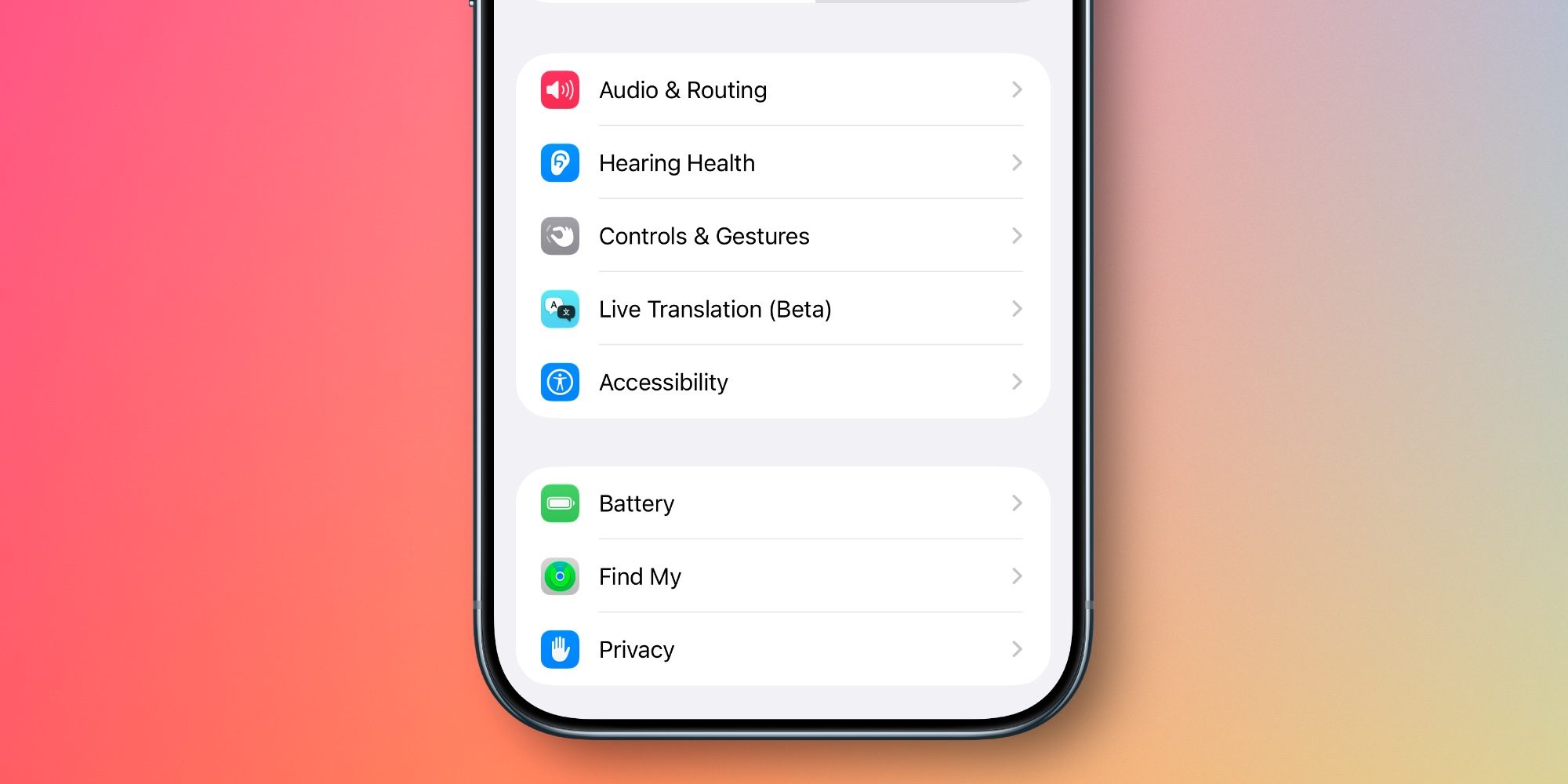
With every batch of new AirPods features that debuts, the AirPods settings screen in the Settings app gets more cluttered.

But in iOS 27, Apple has a welcome fix: it’s redesigned and reorganized all AirPods settings.

Now, you’ll find AirPods settings organized into more categories and submenus, accompanied by colorful icons. It makes finding the right setting way easier and more intuitive than before.

Read more: iOS 27 revamps AirPods settings in a big way, here’s the new design
Precision Finding via Apple Watch

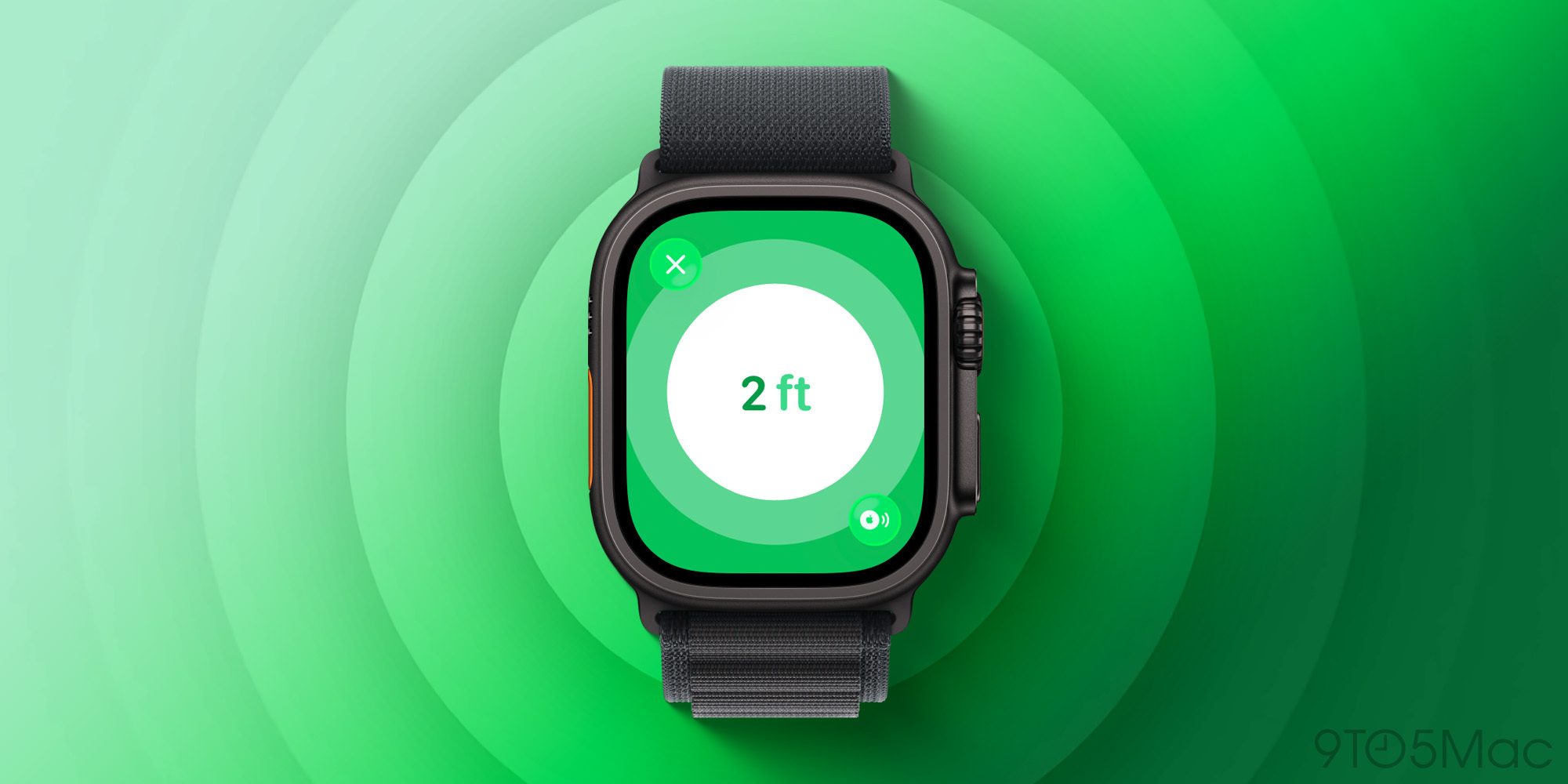
Earlier this year when AirTag 2 launched, Apple brought Precision Finding support to Apple Watch for the first time. Until now though, it’s been limited to AirTag 2.

But with iOS 27 and watchOS 27, Apple expands Precision Finding on the Watch to AirPods Pro 3.

AirPods Pro 3’s case includes the latest second-generation Ultra Wideband (UWB) chip, letting you find it with greater precision and step-by-step guidance right from your wrist.

Which new AirPods features in iOS 27 are you most excited about? Let us know in the comments.

Best AirPods deals and accessories

Add 9to5Mac as a preferred source on Google Add 9to5Mac as a preferred source on Google

FTC: We use income earning auto affiliate links. More.

