


惯性聚合 高效追踪和阅读你感兴趣的博客、新闻、科技资讯
阅读原文 在惯性聚合中打开

推荐订阅源

L
LINUX DO - 最新话题
MyScale Blog
MyScale Blog
月光博客
月光博客
S
SegmentFault 最新的问题
C
CERT Recently Published Vulnerability Notes
P
Proofpoint News Feed
Threat Intelligence Blog | Flashpoint
人人都是产品经理
人人都是产品经理
K
Kaspersky official blog
Forbes - Security
Forbes - Security
宝玉的分享
宝玉的分享
爱范儿
爱范儿
V
Visual Studio Blog
博客园 - 聂微东
OSCHINA 社区最新新闻
OSCHINA 社区最新新闻
N
News and Events Feed by Topic
阮一峰的网络日志
阮一峰的网络日志
V
V2EX
The Cloudflare Blog
Attack and Defense Labs
美团技术团队
L
LangChain Blog
NISL@THU
NISL@THU
IT之家
IT之家
T
Tor Project blog
云风的 BLOG
云风的 BLOG
Security Latest
Security Latest
Apple Machine Learning Research
Cisco Talos Blog
Cisco Talos Blog
I
InfoQ
Help Net Security
Help Net Security
Engineering at Meta
Engineering at Meta
Know Your Adversary
Know Your Adversary
I
Intezer
Recent Commits to openclaw:main
TaoSecurity Blog
TaoSecurity Blog
P
Palo Alto Networks Blog
GbyAI
GbyAI
Last Week in AI
Last Week in AI
T
Threat Research - Cisco Blogs
T
The Exploit Database - CXSecurity.com
Cyber Security Advisories - MS-ISAC
博客园 - Franky
L
Lohrmann on Cybersecurity
The Register - Security
W
WeLiveSecurity
Recorded Future
Recorded Future
大猫的无限游戏
大猫的无限游戏
AWS News Blog
AWS News Blog
G
GRAHAM CLULEY

The Eclectic Light Company

Apple has released an update to XProtect for all macOS Hero or hooligan: Theseus’ later years BSD flags are incompatible with iCloud Drive Apple has released macOS Tahoe 26.5.1 In memoriam Mary Cassatt: 1, 1868-1880 Solutions to Saturday Mac riddles 362 What Location Services do in macOS Eclectic paintings of Joseph Stella: 2 European myths Last Week on My Mac: Razzle and dazzle Eclectic paintings of Joseph Stella: 1 American landscapes Saturday Mac riddles 362 Protect files with the Locked or Immutable flag Reading Visual Art: 252 Dragonfly What happens in the log when an app crashes as it starts up? Portraits of trees: Introduction On Reflection: Conclusions and contents Which tasks require mains power? Medium and message: Vast canvases Online reference to external displays for Apple silicon Macs What’s in that phishing email? Hero or hooligan: Theseus and Ariadne Solutions to Saturday Mac riddles 361 How to search document versions Rubens’ Consequences of War Rubens’ Peace and War Saturday Mac riddles 361 How to search Time Machine backups? Naturalists: Contents and artists On Reflection: Extending the image Tackle QuickLook problems Medium and message: Pottery Hero or hooligan: Theseus and the sandals How QuickLook provides thumbnails and previews Last Week on My Mac: Syncing metadata in iCloud Drive Paintings of visits to India 1778-1877 Saturday Mac riddles 360 Naturalists: Sorolla and Zorn On Reflection: Pierre Bonnard 1909-1946 SpotTest 1.2 can display Spotlight metadata directly On Reflection: Pierre Bonnard 1899-1908 How to preserve versions, and how to create versioned PDFs Medium and message: Sculpture What gets synced in iCloud Drive? Hero or hooligan: Perseus 2 Solutions to Saturday Mac riddles 359 Last Week on My Mac: snapshots, the elephant in APFS Paintings of Beatrice Portinari: to 1862 Saturday Mac riddles 359 Naturalists: Into the 20th century How to check whether Spotlight is getting the right metadata On Reflection: Mirror play Hero or hooligan: Perseus 1 The bicentenary of Frederic Edwin Church: 1857-77 Solutions to Saturday Mac riddles 358 macOS virtual machines and audio-video syncing A walk in the parks of Rome, Vienna, Manhattan and Brooklyn Saturday Mac riddles 358 Naturalists: Photography Use Finder tags for categories Control what gets written to the log Medium and message: Tapestry Virtualisation on Apple silicon Macs is different Jerusalem Delivered: Overview and contents The bicentenary of Frederic Edwin Church: 1849-57 Solutions to Saturday Mac riddles 357 Painting Pandora and her box: 1883-1919 Painting Pandora and her box: 1550-1882 Saturday Mac riddles 357 Reading Visual Art: 250 Winged sandals The secret life of the xattr The macOS Natural Language framework and Nalaprop Medium and Message: Stained glass The MACL extended attribute Jerusalem Delivered: 13 Leading characters Solutions to Saturday Mac riddles 356 Privacy: How locations are protected Painting Spring blossom 2 Last Week on My Mac: Don’t be a victim of fraud Painting Spring blossom 1 Saturday Mac riddles 356 Explainer: Recovery Reading Visual Art: 249 Mask Naturalists: Urban poverty On Reflection: Cézanne Privacy: Which folders are protected in Tahoe? Medium and Message: Mosaic Jerusalem Delivered: 12 Delivery Solutions to Saturday Mac riddles 355 Centaurs 2: Revenge Centaurs 1: Fights Saturday Mac riddles 355 Explainer: sandboxes Naturalists: The modern meal Why you can’t trust Privacy & Security Apple has just released an update to macOS Tahoe, to version 26.4.1 On Reflection: Divisionism Commemorating the centenary of the death of John Ferguson Weir Privacy: Files & Folders or Full Disk Access? Jerusalem Delivered: 11 Into Jerusalem Privacy: protected folders
Please help update CPU frequencies for Apple silicon Macs
2026-04-09 · via The Eclectic Light Company

Apple silicon chips are designed to minimise the power and energy they use without compromising their performance. One of many tricks they use is to run their CPU cores at variable frequencies, and in more recent models to shut down those cores they don’t need. Last year, thanks to the many who contributed information about their Macs, we were able to assemble a table of CPU core frequencies for all the M-series chips then available. Those demonstrated that frequencies differed between families such as M1 and M2, and between models within each family such as M2 Pro and Max, as well as between P and E cores.

Since then Apple has released two new chips, M5 Pro and Max, a new chip series in the MacBook Neo, and reclassified the CPU cores in M5 chips into three types, Super, Performance and Efficiency. Those have brought the greatest changes since the first M1 was released. This article briefly reviews what we know about CPU core frequencies, and appeals for information about those new models.

The best way to discover which frequencies are supported by the cores in the CPU of an Apple silicon chip is using the output of the command tool powermetrics. This lists frequencies for core types, and this article relies on those it gives being correct. Although it’s most likely that these frequencies aren’t baked into silicon, so could be changed, I’ve seen no evidence to suggest that Apple has done that in any released Mac.

Frequencies

If powermetrics is to be believed, the maximum frequencies of each of the CPU cores used in each generation differ from some of those you’ll see quoted elsewhere. Correct values should be:

  • M1 E 2064 MHz or 2.1 GHz; P 3228 MHz or 3.2 GHz;
  • M2 E 2424 MHz or 2.4 GHz; P 3696 MHz or 3.7 GHz;
  • M3 E 2748 MHz or 2.7 GHz; P 4056 MHz or 4.1 GHz;
  • M4 E 2892 MHz or 2.9 GHz; P 4512 MHz or 4.5 GHz.
  • M5 E 3048 MHz or 3.0 GHz; Super 4608 MHz or 4.6 GHz (base variant only).
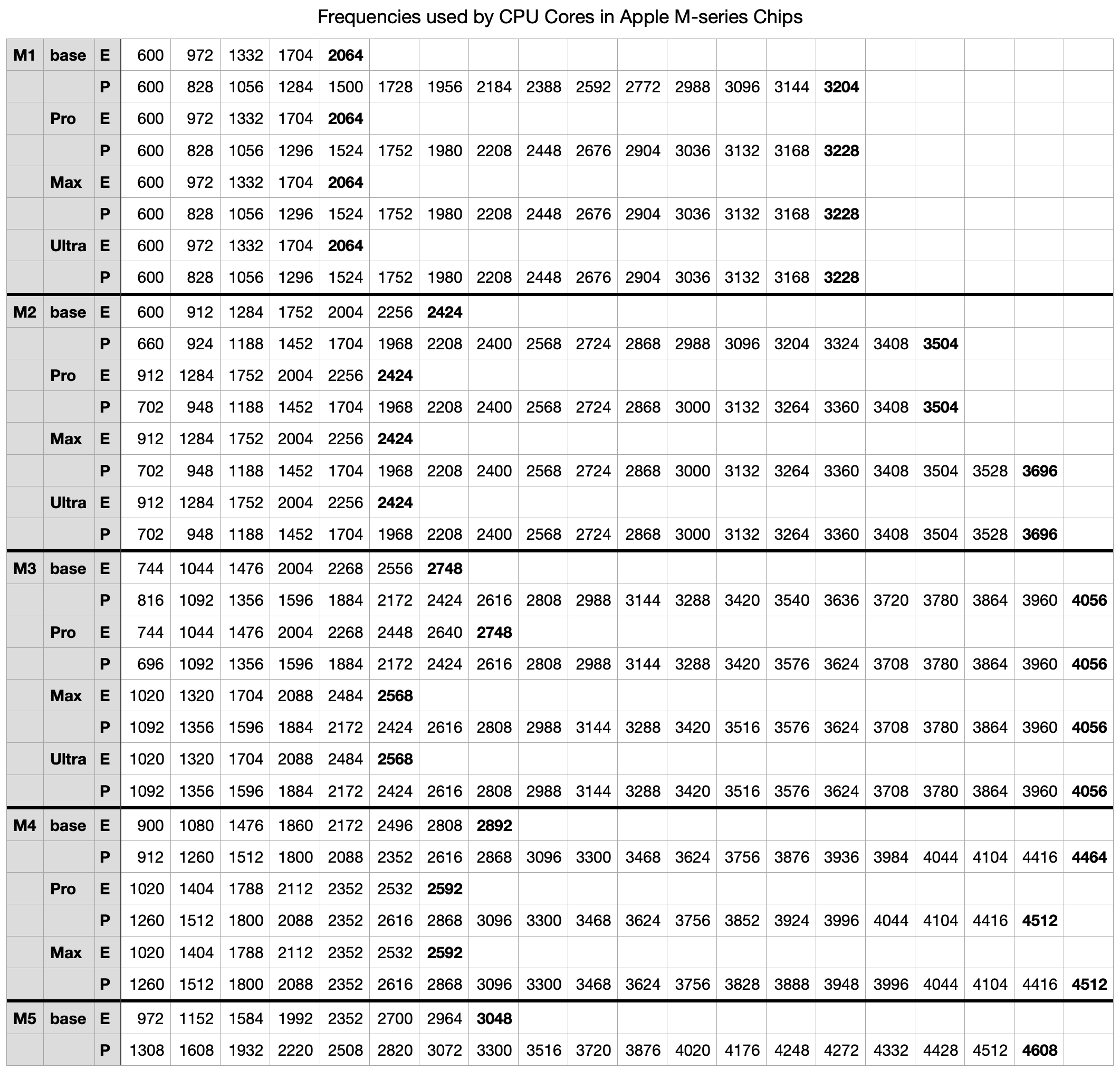
This is available for download as a Numbers spreadsheet and in CSV format here: mxfreqs1025

Why those frequencies?

Depending on workload, thread Quality of Service, power mode, and thermal status, macOS sets the frequency for each cluster of CPU cores. Those used range between the minimum or idle, and the maximum, usually given as the core’s ‘clock speed’ and an indication of its potential maximum performance. In between those are as many as 17 intermediate frequencies giving cores great flexibility in performance, power and energy use. Core design and development uses sophisticated models to select idle and maximum frequencies, and evidently to determine those in between.

Looking at the table, it would be easy to assume those numbers are chosen arbitrarily, but when expressed appropriately there are patterns. Apple’s engineers have clearly put considerable effort into picking optimised frequencies for each of the families and variants within them. If you think this is fine detail and only the maximum frequencies count, then bear in mind that both P and E cores spend a lot of their time running at those intermediate frequencies.

How to report frequencies

If you have a MacBook Neo, or a MacBook Pro with an M5 Pro or Max chip, you can add to this collection, please open Terminal and run the command
sudo powermetrics -n 1 -s cpu_power
which then prompts you for your admin password. A few seconds later the window will fill with a single set of measurements looking like this:
mcorefreqsx

All I’d like is a copy containing 3 lines from that:

  • Machine model at the top, to tell me which Mac it is, thus which chip.
  • E-Cluster HW active residency, which contains a list of frequencies for the E cores in the Neo.
  • P-Cluster HW active residency, which contains a list of frequencies for the P cores.
  • Super-Cluster HW active residency, which contains a list of frequencies for the Super cores in the M5 Pro or Max.

To help, I have highlighted those three lines in the screenshot above, although what you see may well be different given Apple’s new Super core type.

Thank you.