


Double-clicking a document has always been one of the most exciting experiences on a Mac, no matter how mundane it might seem. It’s that moment you see the bond between an individual file and the app that should edit it. In the years before Mac OS X, that was all up to the hidden desktop database, responsible for associating document types and creators. These days it depends on an elaborate artifice involving UTI types and LaunchServices. But behind those lurk the modern trappings of security and privacy protection.
Last week I looked at a problem that has plagued macOS for the last nearly seven years: how perfectly good apps can refuse to open perfectly good documents, failing to do what Macs have been so good at for the previous 35 years. In this article I walk through what happens.
So I have created in Pages an illustrated guide to cycling around the Isle of Wight, and exported it to PDF. Although its entire contents have remained on that Mac throughout, that PDF has a quarantine extended attribute added to it, its flag set to indicate that it’s in quarantine, just as it would if I had downloaded it from a suspicious website. The only difference is that its origin is given as the Pages app rather than Safari.
Normally I don’t use Preview as my default app for reading PDFs, but on this occasion I want to add annotations, so I change that document’s default app to Preview in the Finder’s Get Info dialog. I then double-click that PDF to open it in Preview, only to be told Apple (should that perhaps be macOS?) could not verify my PDF is free of malware, and offering to trash my hard-won work.
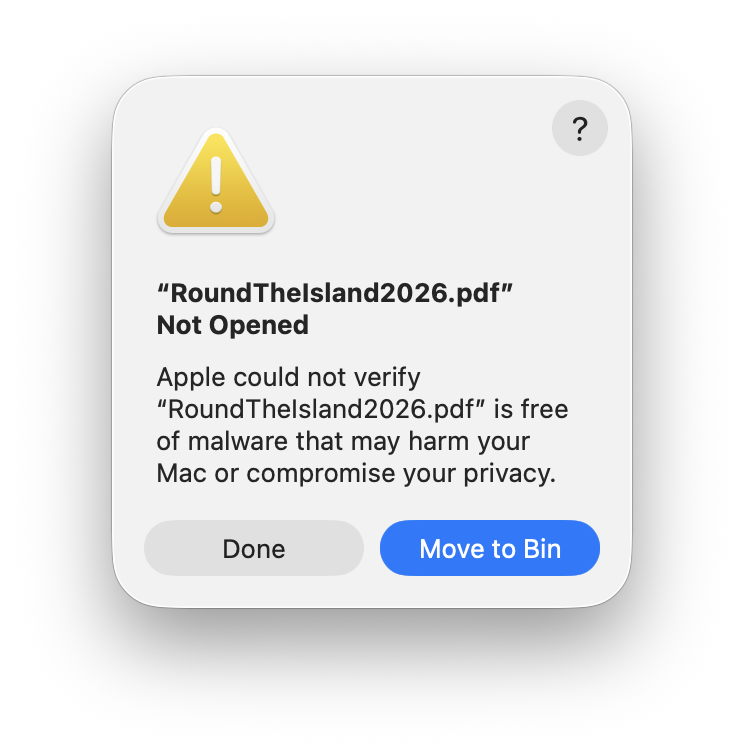
Mark those words carefully. Apple is informing me that it’s unable to tell whether a document created on a Mac using Apple’s own software contains malicious code, and is safe to open with an app it has developed and macOS runs in a sandbox. What point is there in running macOS and using Apple’s apps if the documents they create aren’t safe to use?
Click on the help button, and Tips opens a page about malware protection that has nothing to do with opening PDF documents, but tells me about hidden dangers in “scripts, web archives and Java archives”. Not ordinary everyday PDFs.
Examining what happened in the log is even more disturbing. My PDF is first checked against XProtect’s short blacklist in XProtect.meta.plist, then scanned against the Yara rules in XProtect.yara, neither of which report any adverse findings. But the file’s signature is also checked, and like every other PDF it’s unsigned. On the strength of it being in quarantine and not being signed, macOS then deems it isn’t safe to open.
Expecting to find a valid signature on a PDF document is frankly one of the most absurd behaviours I have seen in any operating system. Although a signature could be attached to the file in an extended attribute, a technique sometimes used when signing executable code, the signature itself could only be ad hoc, thus worthless as a guarantor of the file’s integrity. The signature would also have to be replaced every time the file was saved, a feature that simply doesn’t exist in Preview or any other PDF editor. Surely there’s some mistake in checking a PDF document for a signature?
It’s also strange that this dialog should mention that opening my PDF might compromise my privacy. That enters even murkier waters, given that I have expressed my intent unambiguously by double-clicking the document in the Finder, it’s in my Documents folder, to which Preview has full access, and was created by me.
Undeterred by Apple’s self-confessed shortcomings, I set my PDF’s default app back to the original, then use the Finder’s contextual Open With command to try opening it in Preview.
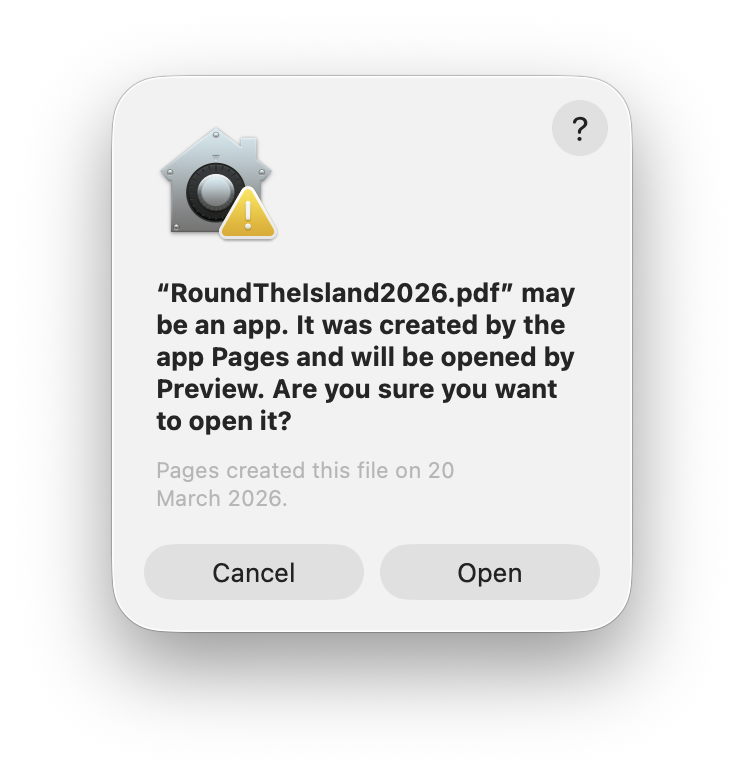
I’m now confronted with a different excuse, although at least I’m here given the option to press ahead and ignore these dire warnings. But in some ways this dialog is even more incoherent than the first. The icon shown reminds me of the Home app, not Preview, and tells me that my PDF document could be an app after all. I’m now wondering what sort of operating system can’t tell the difference between a single-file PDF document and an app bundle.
Comparing this dialog with the previous one, I’m mystified. The previous excuse, that Apple couldn’t verify whether my PDF is free of malware, has now been forgotten altogether. Does that imply Apple can verify that it’s safe to open if I use a different route to open it? If so, why didn’t Apple use this method of verification when I double-clicked the document the first time?
For this dialog, Tips explains to me “ways to avoid malware and harmful apps on Mac” in a set of tips all completely irrelevant to this problem. Ironically, it gives the advice, which it stresses is important, “If you see a warning that a file you received is an app – for example, a file sent to you in an email – and you don’t expect the file to be an app, don’t open the file. Delete it from your Mac.” Does this mean that I should delete my PDF on the grounds that it “may be an app” as this dialog informs me?
Being curious, I click on the Cancel button here, and instead open Preview and use the Open command in its file menu to select my PDF. Now there’s no dialog at all, my unsigned quarantined PDF that couldn’t be checked for malware and could be an app finally does what I want.
It has taken over forty years to progress from the Mac’s distinctive double-clickable documents to a file that Apple can’t verify that it’s free from malware, could be an app rather than a document, and might or might not open in the app of my choosing. Help may be on its way at last, though.
此内容由惯性聚合(RSS阅读器)自动聚合整理,仅供阅读参考。 原文来自 — 版权归原作者所有。