
惯性聚合 高效追踪和阅读你感兴趣的博客、新闻、科技资讯
阅读原文 在惯性聚合中打开

推荐订阅源

www.infosecurity-magazine.com
D
DataBreaches.Net
T
Tailwind CSS Blog
M
MIT News - Artificial intelligence
Stack Overflow Blog
Stack Overflow Blog
F
Full Disclosure
V2EX - 技术
V2EX - 技术
N
News and Events Feed by Topic
Help Net Security
Help Net Security
L
LangChain Blog
Y
Y Combinator Blog
宝玉的分享
宝玉的分享
Google Online Security Blog
P
Proofpoint News Feed
OSCHINA 社区最新新闻
OSCHINA 社区最新新闻
T
The Blog of Author Tim Ferriss
Google DeepMind News
The Register - Security
B
Blog RSS Feed
N
Netflix TechBlog - Medium
N
News | PayPal Newsroom
TaoSecurity Blog
TaoSecurity Blog
酷 壳 – CoolShell
酷 壳 – CoolShell
V
Vulnerabilities – Threatpost
B
Blog
C
Cyber Attacks, Cyber Crime and Cyber Security
I
Intezer
H
Hackread – Cybersecurity News, Data Breaches, AI and More
博客园_首页
CTFtime.org: upcoming CTF events
AI
AI
aimingoo的专栏
aimingoo的专栏
大猫的无限游戏
大猫的无限游戏
Threat Intelligence Blog | Flashpoint
Cyberwarzone
Cyberwarzone
P
Proofpoint News Feed
Google DeepMind News
G
GRAHAM CLULEY
Vercel News
Vercel News
罗磊的独立博客
MyScale Blog
MyScale Blog
Last Week in AI
Last Week in AI
博客园 - 司徒正美
C
CERT Recently Published Vulnerability Notes
GbyAI
GbyAI
Scott Helme
Scott Helme
K
KPMG report finds enterprise disconnect between AI and its ROI | CIO
T
Troy Hunt's Blog
A
About on SuperTechFans
P
Privacy International News Feed

The Eclectic Light Company

Hero or hooligan: Theseus’ later years BSD flags are incompatible with iCloud Drive Apple has released macOS Tahoe 26.5.1 In memoriam Mary Cassatt: 1, 1868-1880 Solutions to Saturday Mac riddles 362 What Location Services do in macOS Eclectic paintings of Joseph Stella: 2 European myths Last Week on My Mac: Razzle and dazzle Eclectic paintings of Joseph Stella: 1 American landscapes Saturday Mac riddles 362 Protect files with the Locked or Immutable flag Reading Visual Art: 252 Dragonfly What happens in the log when an app crashes as it starts up? Portraits of trees: Introduction On Reflection: Conclusions and contents Which tasks require mains power? Medium and message: Vast canvases Online reference to external displays for Apple silicon Macs What’s in that phishing email? Hero or hooligan: Theseus and Ariadne Solutions to Saturday Mac riddles 361 How to search document versions Rubens’ Consequences of War Rubens’ Peace and War Saturday Mac riddles 361 How to search Time Machine backups? Naturalists: Contents and artists On Reflection: Extending the image Tackle QuickLook problems Medium and message: Pottery Hero or hooligan: Theseus and the sandals How QuickLook provides thumbnails and previews Last Week on My Mac: Syncing metadata in iCloud Drive Paintings of visits to India 1778-1877 Saturday Mac riddles 360 Naturalists: Sorolla and Zorn On Reflection: Pierre Bonnard 1909-1946 SpotTest 1.2 can display Spotlight metadata directly On Reflection: Pierre Bonnard 1899-1908 How to preserve versions, and how to create versioned PDFs Medium and message: Sculpture What gets synced in iCloud Drive? Hero or hooligan: Perseus 2 Solutions to Saturday Mac riddles 359 Last Week on My Mac: snapshots, the elephant in APFS Paintings of Beatrice Portinari: to 1862 Saturday Mac riddles 359 Naturalists: Into the 20th century How to check whether Spotlight is getting the right metadata On Reflection: Mirror play Hero or hooligan: Perseus 1 The bicentenary of Frederic Edwin Church: 1857-77 Solutions to Saturday Mac riddles 358 macOS virtual machines and audio-video syncing A walk in the parks of Rome, Vienna, Manhattan and Brooklyn Saturday Mac riddles 358 Naturalists: Photography Use Finder tags for categories Control what gets written to the log Medium and message: Tapestry Virtualisation on Apple silicon Macs is different Jerusalem Delivered: Overview and contents The bicentenary of Frederic Edwin Church: 1849-57 Solutions to Saturday Mac riddles 357 Painting Pandora and her box: 1883-1919 Painting Pandora and her box: 1550-1882 Saturday Mac riddles 357 Reading Visual Art: 250 Winged sandals The secret life of the xattr The macOS Natural Language framework and Nalaprop Medium and Message: Stained glass The MACL extended attribute Jerusalem Delivered: 13 Leading characters Solutions to Saturday Mac riddles 356 Privacy: How locations are protected Painting Spring blossom 2 Last Week on My Mac: Don’t be a victim of fraud Painting Spring blossom 1 Saturday Mac riddles 356 Explainer: Recovery Reading Visual Art: 249 Mask Naturalists: Urban poverty On Reflection: Cézanne Privacy: Which folders are protected in Tahoe? Medium and Message: Mosaic Jerusalem Delivered: 12 Delivery Solutions to Saturday Mac riddles 355 Centaurs 2: Revenge Centaurs 1: Fights Saturday Mac riddles 355 Explainer: sandboxes Naturalists: The modern meal Why you can’t trust Privacy & Security Apple has just released an update to macOS Tahoe, to version 26.4.1 On Reflection: Divisionism Please help update CPU frequencies for Apple silicon Macs Commemorating the centenary of the death of John Ferguson Weir Privacy: Files & Folders or Full Disk Access? Jerusalem Delivered: 11 Into Jerusalem Privacy: protected folders
SilentKnight 3.0 for Apple silicon Macs running Sequoia and later (full release)
hoakley · 2026-06-22 · via The Eclectic Light Company

If you already use SilentKnight 2, have an Apple silicon Mac, and it’s running macOS 15.6 Sequoia or later, including Golden Gate beta, please update to the first full release of SilentKnight 3 (SK3), as you should find it much improved.

When you open SK3, it automatically runs its full checks on the security of your Mac, and within a second or two reports the results in the first three of its sections.
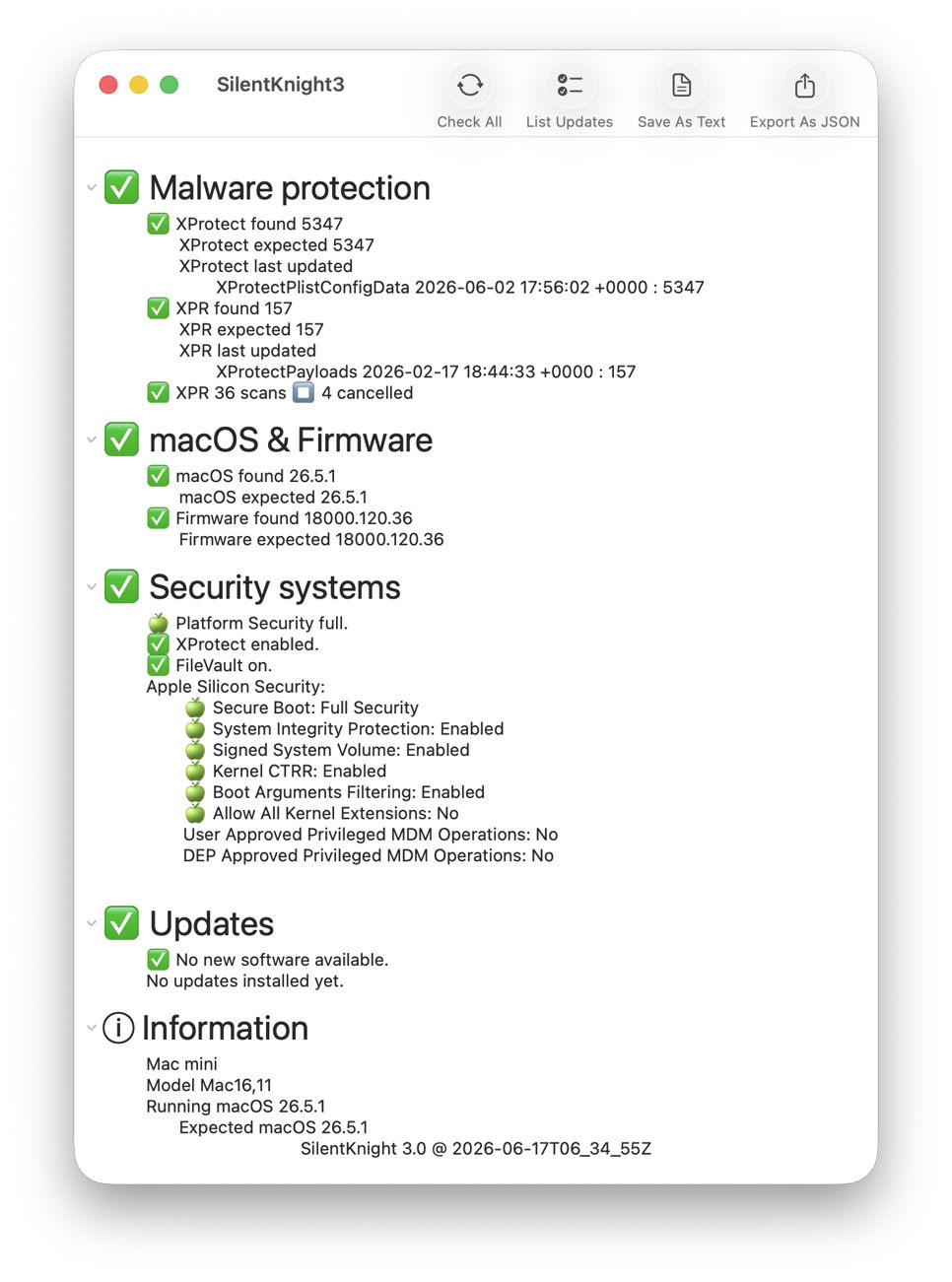
Malware protection

This includes checks on the installed versions of XProtect and XProtect Remediator, together with a check on scans recorded by the latter over the last 36 hours. As those are often cancelled when they run out of time, rather than warning you when they have, it simply reports the number that have been cancelled.

macOS & Firmware

This checks and reports the version of macOS installed. If your Mac is running an older major version, such as Sequoia, it doesn’t nag you to upgrade that, but checks whether it’s up to date for security updates. It also checks the version of firmware installed, and tolerates those that come with beta releases.

Security systems

This checks and reports the other macOS security systems, including the level of overall security, whether XProtect/Gatekeeper checks are enabled, whether FileVault is on, and the remainder of security settings for Apple silicon Macs, including secure boot and SIP.

It also provides a final Information section that brings together basic data about your Mac, macOS and SK3 itself.

Updates

Once those have been gathered and displayed, to check for any available Apple updates, click on the List Updates tool. It will then check with Apple’s servers in the background, and list any available updates. Unlike SK2, this separates out macOS and its security updates, which it reports but leaves alone for you to install separately using Software Update settings as you wish.
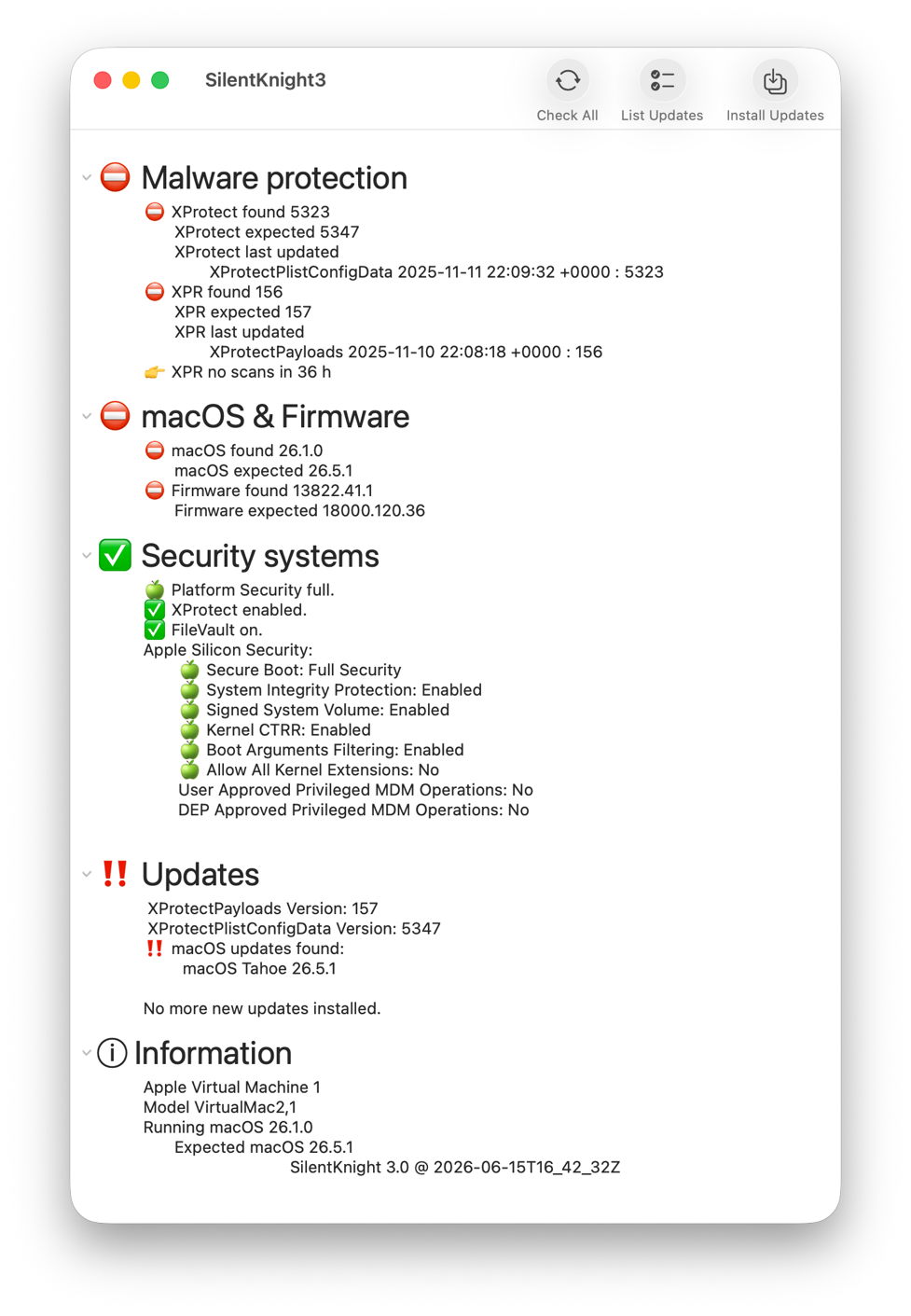
You can then click on the Install Updates tool for just those security data updates, such as XProtect and XProtect Remediator, to be downloaded and installed automatically.
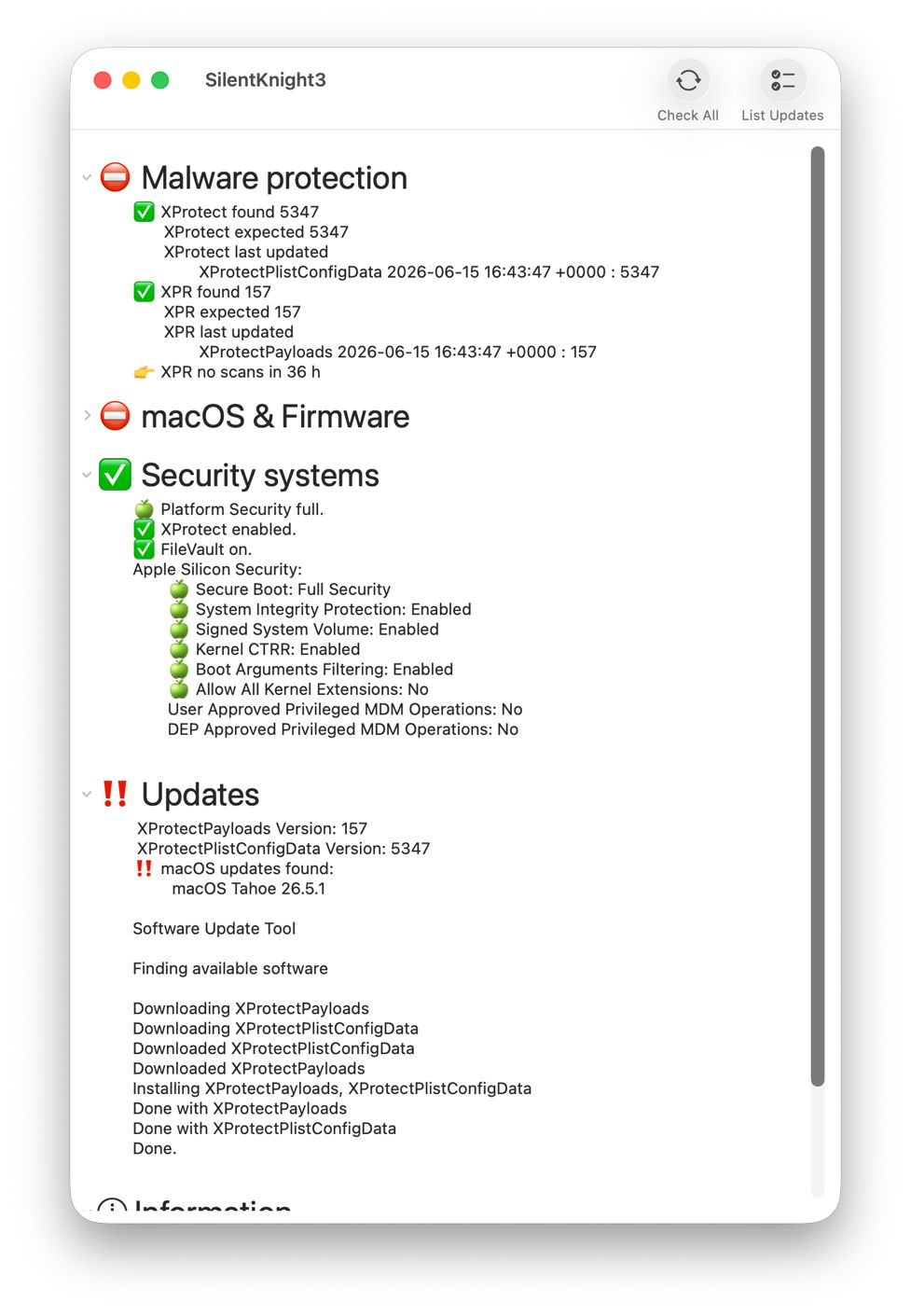
Updates are installed in the background and reported in full.

The one significant limitation in SK3 is that it still can’t update XProtect in its new location. To do that, you’ll need to use Terminal, just as in SK2. First check whether the update is available from iCloud for its new location with the command
sudo xprotect check
If that returns the new version that SK3 expects, then you can download and install that using
sudo xprotect update
Unfortunately, if the update isn’t yet available via iCloud there’s nothing you can do to expedite it.

Reports

If you want to save a record of its findings, you have a choice between a text copy of what’s shown in the window, or a JSON export that’s ready to import into a database or other software.

For those who have been testing SK3 betas, this release version:

  • should now update Safari when it’s available separately, including Safari Technology Preview;
  • runs slower processes as background threads with a busy spinner;
  • automatically runs Check All when opening its window.

SilentKnight 3 version 3.0 is now available from here: sk30
from Downloads above, and from its Product Page.

My two tasks for the next release are to add a privileged helper app to incorporate xprotect checks and updates, and to add App Intents to support Shortcuts access and automation.