


惯性聚合 高效追踪和阅读你感兴趣的博客、新闻、科技资讯
阅读原文 在惯性聚合中打开

推荐订阅源

人人都是产品经理
人人都是产品经理
Stack Overflow Blog
Stack Overflow Blog
L
LINUX DO - 最新话题
Google Online Security Blog
Schneier on Security
Spread Privacy
Spread Privacy
www.infosecurity-magazine.com
雷峰网
雷峰网
Google DeepMind News
Microsoft Azure Blog
IT之家
IT之家
V
Vulnerabilities – Threatpost
K
Kaspersky official blog
S
Schneier on Security
B
Blog
The Register - Security
SecWiki News
SecWiki News
Hacker News: Ask HN
Hacker News: Ask HN
cs.AI updates on arXiv.org
S
Security Affairs
T
The Blog of Author Tim Ferriss
G
Google Developers Blog
T
Tenable Blog
P
Proofpoint News Feed
Apple Machine Learning Research
D
DataBreaches.Net
S
Secure Thoughts
Security Latest
Security Latest
H
Heimdal Security Blog
The Hacker News
The Hacker News
O
OpenAI News
AWS News Blog
AWS News Blog
量子位
Exploit-DB.com RSS Feed
腾讯CDC
U
Unit 42
L
Lohrmann on Cybersecurity
cs.CL updates on arXiv.org
L
LangChain Blog
阮一峰的网络日志
阮一峰的网络日志
T
The Exploit Database - CXSecurity.com
NISL@THU
NISL@THU
cs.CV updates on arXiv.org
Application and Cybersecurity Blog
Hugging Face - Blog
Hugging Face - Blog
The Last Watchdog
The Last Watchdog
Recorded Future
Recorded Future
V2EX - 技术
V2EX - 技术
爱范儿
爱范儿
F
Full Disclosure

The Eclectic Light Company

Hero or hooligan: Theseus’ later years BSD flags are incompatible with iCloud Drive Apple has released macOS Tahoe 26.5.1 In memoriam Mary Cassatt: 1, 1868-1880 Solutions to Saturday Mac riddles 362 What Location Services do in macOS Eclectic paintings of Joseph Stella: 2 European myths Last Week on My Mac: Razzle and dazzle Eclectic paintings of Joseph Stella: 1 American landscapes Saturday Mac riddles 362 Protect files with the Locked or Immutable flag Reading Visual Art: 252 Dragonfly What happens in the log when an app crashes as it starts up? Portraits of trees: Introduction On Reflection: Conclusions and contents Which tasks require mains power? Medium and message: Vast canvases Online reference to external displays for Apple silicon Macs What’s in that phishing email? Hero or hooligan: Theseus and Ariadne Solutions to Saturday Mac riddles 361 How to search document versions Rubens’ Consequences of War Rubens’ Peace and War Saturday Mac riddles 361 How to search Time Machine backups? Naturalists: Contents and artists On Reflection: Extending the image Tackle QuickLook problems Medium and message: Pottery Hero or hooligan: Theseus and the sandals How QuickLook provides thumbnails and previews Last Week on My Mac: Syncing metadata in iCloud Drive Paintings of visits to India 1778-1877 Saturday Mac riddles 360 Naturalists: Sorolla and Zorn On Reflection: Pierre Bonnard 1909-1946 SpotTest 1.2 can display Spotlight metadata directly On Reflection: Pierre Bonnard 1899-1908 How to preserve versions, and how to create versioned PDFs Medium and message: Sculpture What gets synced in iCloud Drive? Hero or hooligan: Perseus 2 Solutions to Saturday Mac riddles 359 Last Week on My Mac: snapshots, the elephant in APFS Paintings of Beatrice Portinari: to 1862 Saturday Mac riddles 359 Naturalists: Into the 20th century How to check whether Spotlight is getting the right metadata On Reflection: Mirror play Hero or hooligan: Perseus 1 The bicentenary of Frederic Edwin Church: 1857-77 Solutions to Saturday Mac riddles 358 macOS virtual machines and audio-video syncing A walk in the parks of Rome, Vienna, Manhattan and Brooklyn Saturday Mac riddles 358 Naturalists: Photography Use Finder tags for categories Control what gets written to the log Medium and message: Tapestry Virtualisation on Apple silicon Macs is different Jerusalem Delivered: Overview and contents The bicentenary of Frederic Edwin Church: 1849-57 Solutions to Saturday Mac riddles 357 Painting Pandora and her box: 1883-1919 Painting Pandora and her box: 1550-1882 Saturday Mac riddles 357 Reading Visual Art: 250 Winged sandals The secret life of the xattr The macOS Natural Language framework and Nalaprop Medium and Message: Stained glass The MACL extended attribute Jerusalem Delivered: 13 Leading characters Solutions to Saturday Mac riddles 356 Privacy: How locations are protected Painting Spring blossom 2 Last Week on My Mac: Don’t be a victim of fraud Painting Spring blossom 1 Saturday Mac riddles 356 Explainer: Recovery Reading Visual Art: 249 Mask Naturalists: Urban poverty On Reflection: Cézanne Privacy: Which folders are protected in Tahoe? Medium and Message: Mosaic Jerusalem Delivered: 12 Delivery Solutions to Saturday Mac riddles 355 Centaurs 2: Revenge Centaurs 1: Fights Saturday Mac riddles 355 Explainer: sandboxes Naturalists: The modern meal Why you can’t trust Privacy & Security Apple has just released an update to macOS Tahoe, to version 26.4.1 On Reflection: Divisionism Please help update CPU frequencies for Apple silicon Macs Commemorating the centenary of the death of John Ferguson Weir Privacy: Files & Folders or Full Disk Access? Jerusalem Delivered: 11 Into Jerusalem Privacy: protected folders
First beta-test version of SilentKnight 3 for Apple silicon Macs
hoakley · 2026-06-16 · via The Eclectic Light Company

I’m delighted (and a little proud) to offer you the first beta-release of my successor to SilentKnight 2, named somewhat unimaginatively SilentKnight 3. This will only run on Apple silicon Macs with macOS 15.6 Sequoia or later, including 27.0 Golden Gate.

I released the first version of SilentKnight, then known as EFIcienC, on 4 July 2019, as an intended successor to LockRattler (2016) that also checked EFI firmware versions. That soon became SilentKnight 1, and on 10 October 2022 was updated to version 2 to cater exclusively for macOS Catalina and later.

SilentKnight 1.21 will continue to cater for those with Intel Macs running El Capitan to Mojave, version 2.11 for Catalina, and 2.14 for Big Sur to Tahoe on Intel or Apple silicon Macs. But if you have an Apple silicon Mac running Sequoia or later, I want version 3 to become your first choice.

SilentKnight 3 is intended to be lightweight but comprehensive, detailed but clean and accessible. Its interface is written using SwiftUI, and presents its results in sections with disclosure controls, so you can fold each away or expand it in full. It currently has just three tools:

  • Check All, to perform its checks on four categories from malware protection to general information.
  • List Updates, to obtain a list of all available updates from Apple’s servers.
  • Install Updates, to download and install all available updates except those for macOS itself.

Unlike previous versions, SilentKnight 3 analyses the list of available updates, and separates out those for macOS, which it leaves well alone, for Software Update settings where they can be managed properly. It then downloads those other updates, saving you from doing that manually.

It copes better with XProtect Remediator scans that are terminated early. Rather than reporting them as potential problems and sending you on a wild goose chase with XProCheck, those are simply reported as being cancelled.

Throughout its comparisons between versions found and those expected, SilentKnight 3 recognises that higher version numbers aren’t a problem. While it does report both, it doesn’t fret over your Mac’s version being more recent than expected. It also accepts Macs running older versions of macOS, for those who might prefer to stay with Sequoia instead of grappling with Tahoe or, when the time comes, Golden Gate.

Here’s a sequence of screenshots from a test run on macOS 26.1 in a VM. This starts by clicking the single tool offered, to Check All.
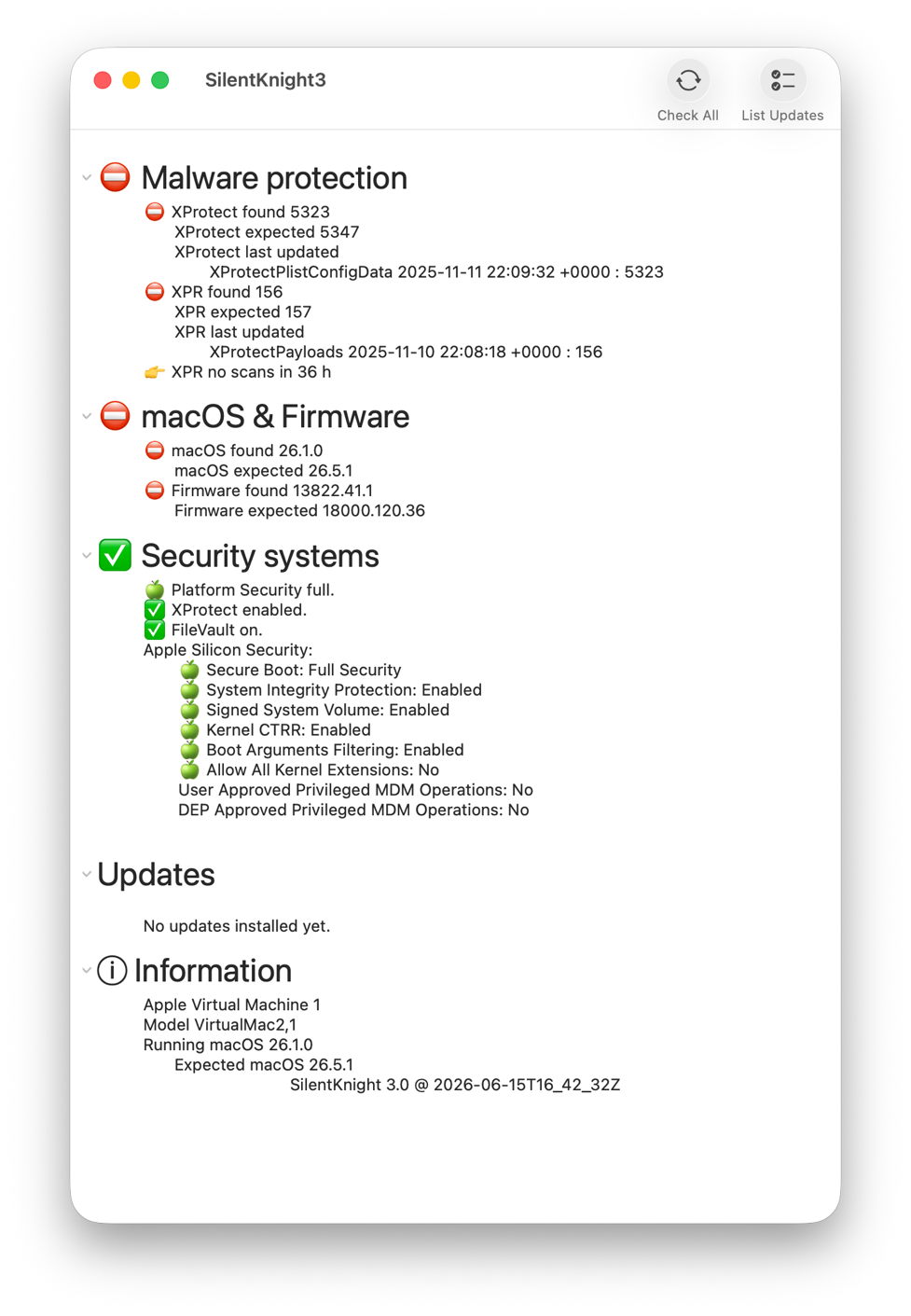
Once the results are in, there are clear disparities in malware protection, and macOS & firmware.
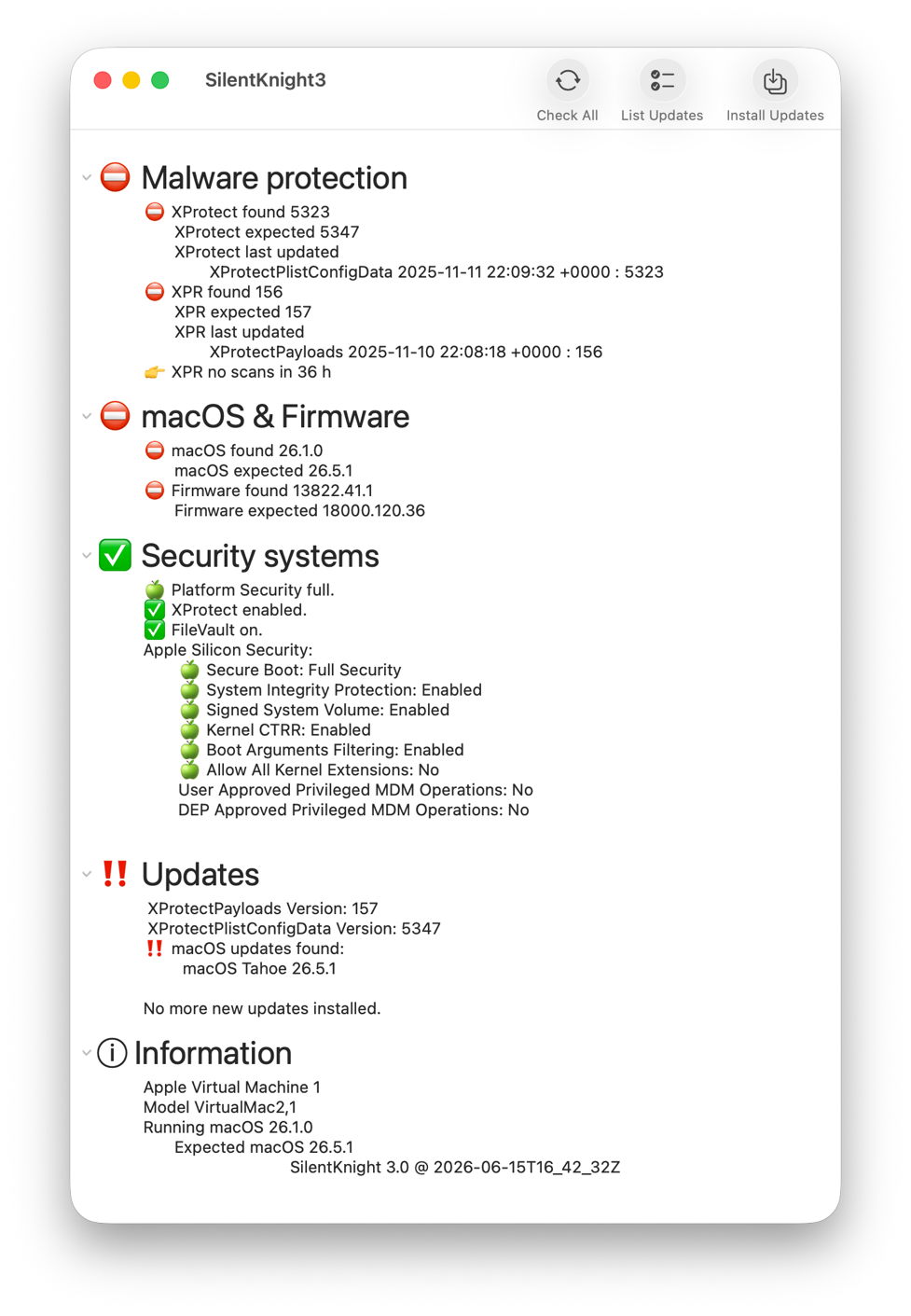
Click on the List Updates tool and there are updates available to XProtect and XPR as shown, as well as an update to Tahoe 26.5.1.
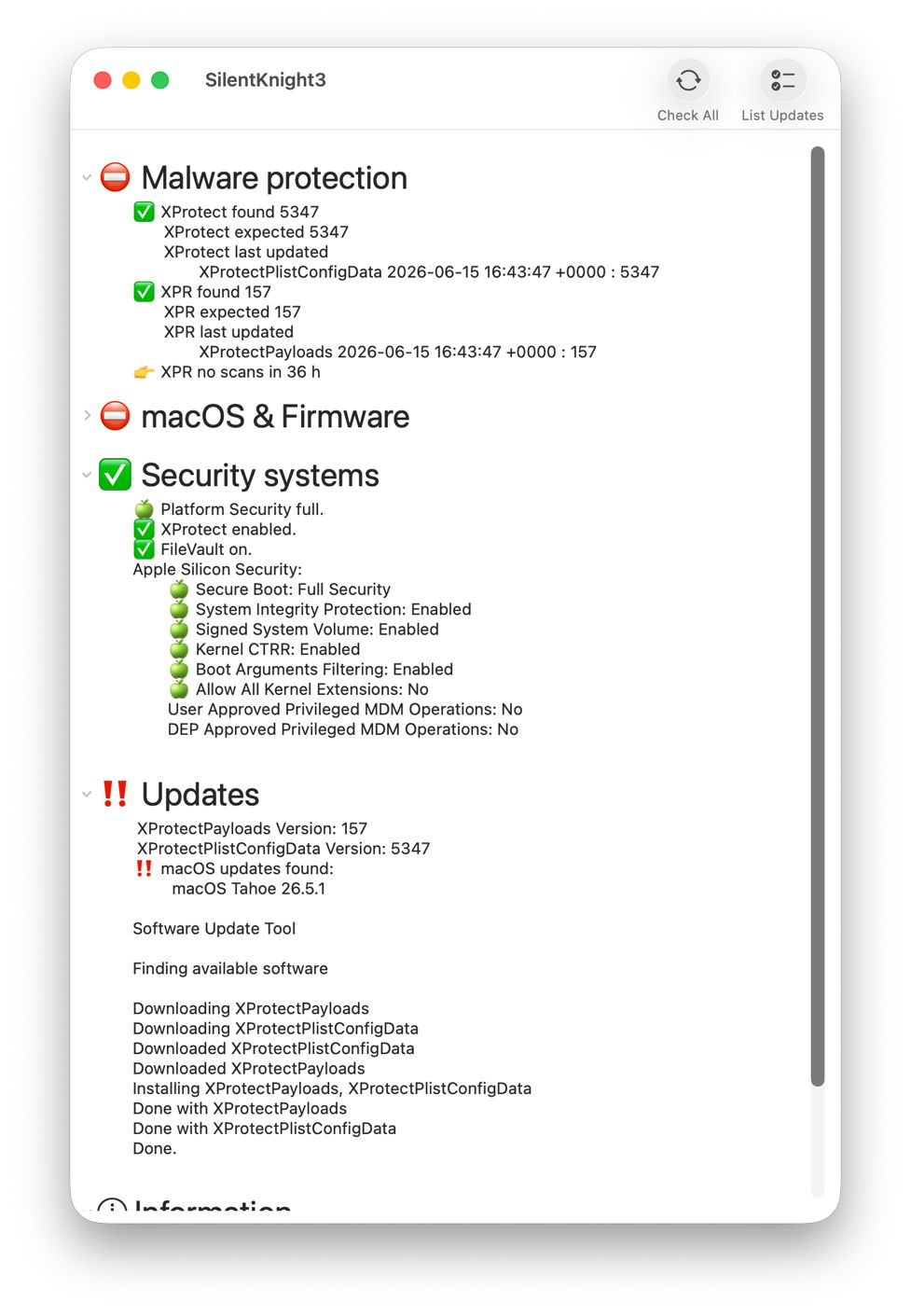
After clicking Install Updates, XProtect Remediator has been updated to version 157. XProtect has been updated manually using Terminal, and Check All then confirms they have been updated correctly, but the macOS update has been left well alone.

Although only the first beta, this comes with extensive help information, including beta-release notes. One important limitation of this version is that List Updates and Install Updates aren’t run in the background, so you will see a spinning beachball briefly while awaiting their results.

SilentKnight version 3.0 first beta (build 20) is now available from here: skbeta1

I’m very grateful to all who test it, and look forward to your comments.