


Extended attributes aren’t unique to macOS and Apple’s other OSes, but they have the longest and richest history, going right back to the first versions of Mac OS. Until the advent of Mac OS X they were resource forks, structured metadata that stored everything from executable code to keyboard layouts. After a shaky first four years in early versions of Mac OS X, 10.4 introduced extended attributes, xattrs, that steadily became used more extensively.
All files in HFS+ and APFS (and other file systems) contain a fairly standard set of metadata known as attributes, information about a file such as its name, datestamps and permissions. Xattrs are extensions to those that contain almost any other type of metadata, the first notable xattr coming in Mac OS X 10.5, named com.apple.quarantine. That contains quarantine information for apps and other files downloaded from the internet, in a format so ancient that the quarantine flag is stored not in binary but as text.
The quarantine xattr demonstrates some of the valuable properties of xattrs: it can be attached to any file or folder without changing its data, and isn’t included when calculating CDHashes for code signatures. It can thus be added safely without any danger of altering the app or its code, although it does change the way that macOS handles the code, by triggering security checks used to verify it isn’t malicious. Once those have been run, the flag inside the quarantine xattr can be changed to indicate it has been checked successfully.
Far from being a passing phase, or dying out as some had expected, xattrs have flourished since those early days. This has happened largely unseen by the user: few alter anything revealed in the Finder’s Get Info dialog, although they’re used to store some forms of visible metadata such as Finder tags, and the URL used to download items from the internet.
Xattrs are named using a reverse-URL format like com.mycorp.setting. There’s no official name registry, as that should suffice to ensure each type remains unique. Editing xattrs is normally performed silently: you’re not made aware of changes in the quarantine xattr, and in most cases the only way to manage xattrs is to use the xattr command tool, or one of very few apps like xattred that can edit and manage them.
Storage
Xattrs aren’t stored with a file’s data, nor with its normal attributes.
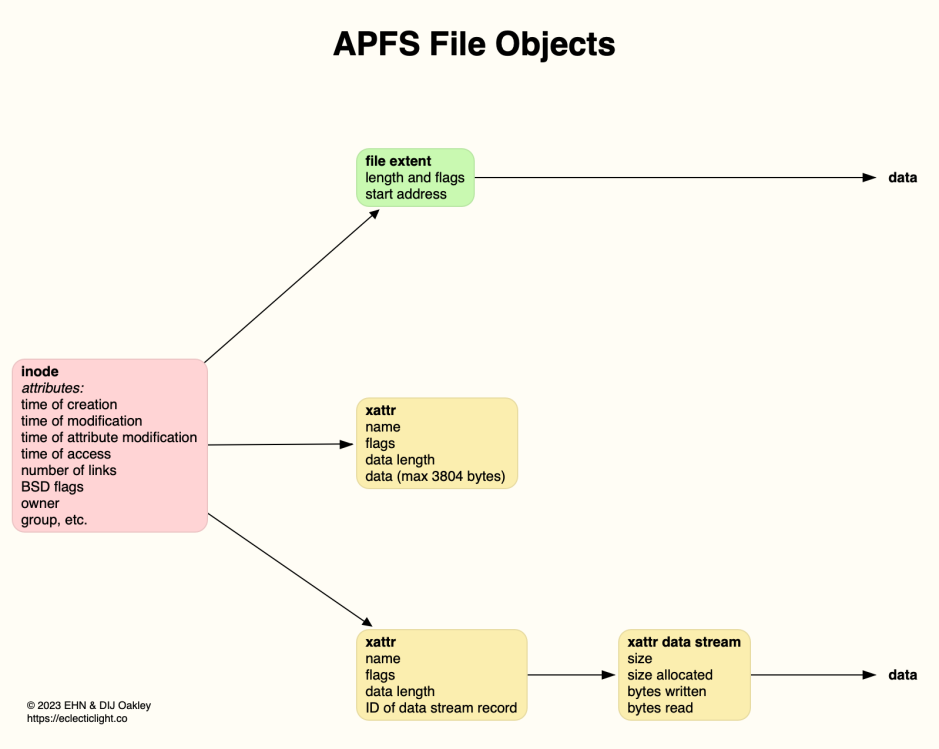
For smaller extended attributes up to 3,804 bytes, their data is stored alongside the xattr in the file system metadata. Larger extended attributes are stored as data streams, with separate records, but still separate from the file data. Apple doesn’t give a limit on the maximum size of xattrs, but they can certainly exceed 200 KB, and each file and folder can have an effectively unlimited number of them.
Persistence
Metadata varies in its useful lifetime. Some xattrs are intended to have a short life and then either be rewritten or discarded, while others are expected to be more or less permanent. Files that are copied to non-native file systems including FAT and ExFAT volumes can preserve xattrs in hidden shadow files, but those copied to NFS will have all their xattrs stripped.
Moving a file with xattrs within the same volume shouldn’t affect those xattrs, as they remain within the same file system, but copying them to another volume, even if both use APFS, may leave some of them behind if they’re considered to be ephemeral.
At least two xattr types may be protected by System Integrity Protection, SIP, and thus can’t be directly removed by the user. This is most widespread in the MACL xattr, com.apple.macl, but can also be seen sometimes in provenance, com.apple.provenance. The way that works is quite distinctive, in that cutting or deleting the xattr is successful for an instant before macOS adds the xattr back. As SIP protection doesn’t survive copying to another volume, when you need to remove a MACL xattr you can do so on a copy of the file on a different volume.
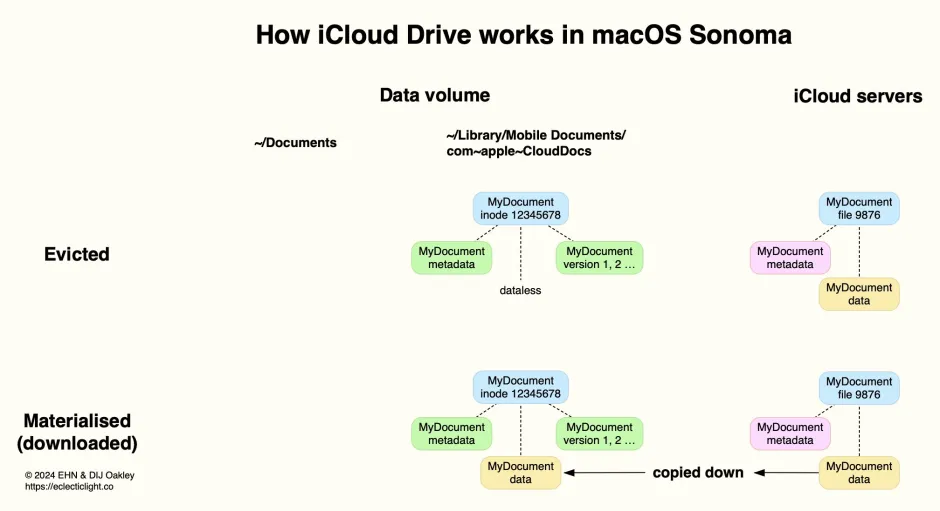
The most complex situation is when a file with xattrs is moved to iCloud Drive. The Mac that originated that file is likely to retain most if not all of its xattrs, because the local copy remains within the same volume and file system. However, not all xattrs are copied up to iCloud storage, so other Macs accessing that file may only see a small selection of them. The rules for which xattrs are to be preserved during file copying, including in iCloud Drive, are baked into macOS, and are outlined in the Appendix at the end.
In 2013, as part of its enhancements for iCloud in particular, Apple added support for flags on xattrs to indicate how those xattrs should be handled when the file is copied in various ways. Rather than change the file system, Apple opted to append characters to the end of the xattr’s name.
If you work with xattrs, you’ve probably already seen this in those whose name ends with a hash # then one or more characters: those are actually the flags, not part of the name, what Apple refers to as a ‘property list’. To avoid confusion I refer to them as xattr flags. A common example of this is com.apple.lastuseddate#PS, which is seen quite widely.
Appendix: Xattr flags
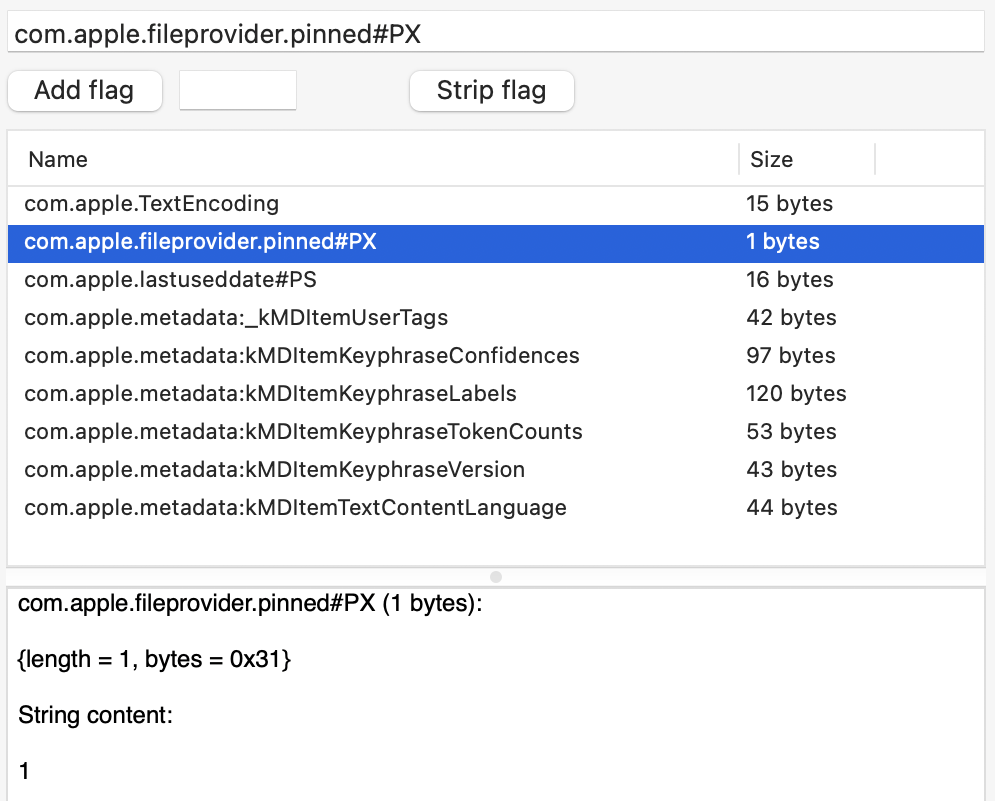
When first introduced in Mac OS X, no provision was made for xattrs to have type-specific preservation, and that was added later using flags suffixed to the xattr’s name. For example, the com.apple.lastuseddate xattr found commonly on edited files is shown with a full name of com.apple.lastuseddate#PS to assign the two flags P and S to it, and the most recent xattr com.apple.fileprovider.pinned, used to mark files in iCloud Drive that have been pinned, has the two flags P and X assigned to it for a the full name of com.apple.fileprovider.pinned#PX.
This is a kludge, as you normally have to refer to the xattr name including its flags, although the flags aren’t really part of its name. It’s further complicated by a set of system tables for some standard xattr types that don’t have flags suffixed, but are treated as if they do. One notable example of those is the quarantine xattr com.apple.quarantine, which is handled by macOS as if it has the PCS flags attached, although those are never used when referring to it by name.
There are also lower case flags that can be used to override those set in system tables, although those appear to be used exceedingly rarely, and I don’t recall ever coming across them. In theory, if you were using a new type based on the standard com.apple.metadata: family, com.apple.metadata:kMDItemNew, you could alter its behaviour to some similar types with the flags psB, as in com.apple.metadata:kMDItemNew#psB. I have no idea whether that would be respected in practice. For the rest of this article, I will ignore the existence of those lower case flags.
Intents
File operations involving decisions about the preservation of xattrs are simplified into the following intents:
- copy – simply copying a file from a source to a destination and preserving its data, such as using
cp, is labelledXATTR_OPERATION_INTENT_COPY - save – saving a file when probably changing its content, including performing a ‘safe save’; this may over-write or replace the source with the saved file. Some xattrs shouldn’t be preserved in this process of
XATTR_OPERATION_INTENT_SAVE - share – sharing or exporting this file, perhaps as an attachment to email, or placing the file in a public folder. Some sensitive metadata shouldn’t be preserved in
XATTR_OPERATION_INTENT_SHARE - sync – syncing the file to a service such as iCloud Drive, in
XATTR_OPERATION_INTENT_SYNC - backup – backing the file up, perhaps using Time Machine, in
XATTR_OPERATION_INTENT_BACKUP.
Flags
As of macOS 15.0 (including 26.0), the following flags are supported:
- C:
XATTR_FLAG_CONTENT_DEPENDENTties the flag with the file contents, so the xattr has to be recreated when the file data changes. This may be appropriate for checksums and hashes, text encoding, and position information. The xattr is then preserved for copy and share, but not in a safe save. - P:
XATTR_FLAG_NO_EXPORTdoesn’t export or share the xattr, but preserves it during copying. - N:
XATTR_FLAG_NEVER_PRESERVEensures the xattr is never preserved, even when copying the file. - S:
XATTR_FLAG_SYNCABLEensures the xattr is preserved during syncing with services such as iCloud Drive. Default behaviour is for xattrs to be stripped during syncing, to minimise the amount of data to be transferred, but this flag overrides that. - B:
XATTR_FLAG_ONLY_BACKUPkeeps the xattr only in backups, including Time Machine, where there’s no desire to minimise what’s backed up. - X:
XATTR_FLAG_ONLY_SAVINGkeeps the xattr only when saving and in backups, including Time Machine (macOS 15.0 and later only).
There’s another system limit that must be adhered to: total length of the xattr name including any # and flags cannot exceed a maximum of 127 UTF-8 characters.
System tables
These are hard-coded in source, where * represents a ‘wild card’:
com.apple.quarantine– PCS preserved in copy, sync, backupcom.apple.TextEncoding– CS copy, share, sync, backupcom.apple.metadata:kMDItemCollaborationIdentifier– B backupcom.apple.metadata:kMDItemIsShared– B backupcom.apple.metadata:kMDItemSharedItemCurrentUserRole– B backupcom.apple.metadata:kMDItemOwnerName– B backupcom.apple.metadata:kMDItemFavoriteRank– B backupcom.apple.metadata:*(except those above) – PS copy, save, sync, backupcom.apple.security.*– S or N depending on sandboxing, see belowcom.apple.ResourceFork– PCS copy, sync, backupcom.apple.FinderInfo– PCS copy, sync, backupcom.apple.root.installed– PC copy, backup.
System defaults for com.apple.security.* depend on whether the app performing the file operation is running in an app sandbox. Non-sandboxed apps apply S to preserve the xattr for copy, save, share, sync, backup; for sandboxed apps N is applied so the xattr is never preserved, even when copying the file.
Flags and intents
We can now revisit the list of intents, and establish the effects of xattr flags on each, as:
XATTR_OPERATION_INTENT_COPYpreserves xattrs that don’t have flag N or B or XXATTR_OPERATION_INTENT_SAVEpreserves xattrs that don’t have flag C or N or BXATTR_OPERATION_INTENT_SHAREpreserves xattrs that don’t have flag P or N or B or XXATTR_OPERATION_INTENT_SYNCpreserves xattrs if they have flag S, or have neither N nor BXATTR_OPERATION_INTENT_BACKUPpreserves xattrs that don’t have flag N.
Finally, Apple provides separate information on how xattrs are synced by FileProvider, for iCloud Drive and third-party cloud services using that API. This confirms that the S flag should sync a xattr, but is vague on other flags, simply stating “some older attributes are also synced”. However, a cap is applied on the maximum size of xattrs that are syncable, at “about 32KiB total for each item”. If the xattrs exceed that limit “the system automatically makes some of the attributes nonsyncable.” More puzzlingly, it states “the resource fork is content and isn’t included in the extended attributes dictionary.”
Sources
xattr_flags.h, xattr_flags.c, xattr_properties.h in copyfile source, e.g. at Apple’s OSS Distributions Github
man xattr_name_with_flags(3), included in copyfile source
FileProvider (Apple).