惯性聚合 高效追踪和阅读你感兴趣的博客、新闻、科技资讯
阅读原文 在惯性聚合中打开

推荐订阅源

AI
AI
G
Google Developers Blog
T
Tailwind CSS Blog
大猫的无限游戏
大猫的无限游戏
量子位
月光博客
月光博客
美团技术团队
阮一峰的网络日志
阮一峰的网络日志
罗磊的独立博客
T
The Exploit Database - CXSecurity.com
C
CXSECURITY Database RSS Feed - CXSecurity.com
Latest news
Latest news
P
Privacy International News Feed
www.infosecurity-magazine.com
WordPress大学
WordPress大学
博客园 - 三生石上(FineUI控件)
TaoSecurity Blog
TaoSecurity Blog
Hacker News: Ask HN
Hacker News: Ask HN
Hugging Face - Blog
Hugging Face - Blog
钛媒体:引领未来商业与生活新知
钛媒体:引领未来商业与生活新知
C
Cisco Blogs
Project Zero
Project Zero
Security Latest
Security Latest
Exploit-DB.com RSS Feed
奇客Solidot–传递最新科技情报
奇客Solidot–传递最新科技情报
人人都是产品经理
人人都是产品经理
Scott Helme
Scott Helme
S
Securelist
有赞技术团队
有赞技术团队
T
Threat Research - Cisco Blogs
N
News | PayPal Newsroom
博客园 - 聂微东
小众软件
小众软件
S
SegmentFault 最新的问题
D
Darknet – Hacking Tools, Hacker News & Cyber Security
K
KPMG report finds enterprise disconnect between AI and its ROI | CIO
P
Privacy & Cybersecurity Law Blog
博客园 - Franky
Cyberwarzone
Cyberwarzone
Cisco Talos Blog
Cisco Talos Blog
cs.CL updates on arXiv.org
Spread Privacy
Spread Privacy
A
Arctic Wolf
S
Security @ Cisco Blogs
The Hacker News
The Hacker News
腾讯CDC
博客园 - 【当耐特】
T
Troy Hunt's Blog
NISL@THU
NISL@THU
爱范儿
爱范儿

GIMP

GIMP - GIMP 3.2.4 Released GIMP - GIMP @ Libre Graphics Meeting 2026 GIMP - New Color Mode Coming to GIMP GIMP - GIMP 3.2.2 Released GIMP - GIMP 3.2 Released GIMP - GIMP 3.2 RC3: Third Release Candidate for GIMP 3.2 GIMP - Interview with Øyvind Kolås, GIMP developer GIMP - GIMP @ FOSDEM 2026 GIMP - GIMP 3.0.8 Released GIMP - GIMP 3.2 RC2: Second Release Candidate for GIMP 3.2 GIMP - GIMP 3.2 RC1: First Release Candidate for GIMP 3.2 GIMP - Interview with Simon Budig, GIMP developer GIMP - New Official Snap package GIMP - GIMP 3.0.6 Released GIMP - GIMP 3.1.4: Second Development Release towards GIMP 3.2 GIMP - Interview with Sevenix (author of GIMP 3.0’s splash image) GIMP - GIMP 3.1.2: First Development Release towards GIMP 3.2 GIMP - GIMP 3.0.4 Released GIMP - New Priorities for GIMP GIMP - GIMP 3.0.2 Released GIMP - GIMP 3.0 Released GIMP - GIMP 3.0 RC3 Released GIMP - GIMP team at FOSDEM 2025 (talk and keynote) GIMP - GIMP 3.0 RC2 Released 🎁 GIMP - GIMP 3.0 RC1 Released GIMP - Development Update: Closing In on the 3.0 Release Candidate GIMP - Experiments with AppImage GIMP - GIMP at LGM 2024 (Rennes, France) GIMP - GIMP 2.10.38 Released GIMP - GIMP 2.99.18 Released: The Last Development Preview Before 3.0! GIMP - GIMP 2.10.36 Released GIMP - GIMP now on Windows for ARM (experimental) GIMP - GIMP 2.99.16 Released: Wilber Week 2023 edition! GIMP - Wilber Week 2023: report GIMP - GIMP in GSoC 2023 GIMP - GIMP Help Manual 2.10.34 Released GIMP - GIMP 2.10.34 Released GIMP - 2022 annual report GIMP - GIMP 2.10.32 on Apple Silicon GIMP - Happy 27! GIMP - Development version: GIMP 2.99.14 Released GIMP - Conference “GIMP and ZeMarmot” in Vandœuvre-lès-Nancy (France) GIMP - Revival of the GIMP developer website GIMP - Development version: GIMP 2.99.12 Released GIMP - GIMP 2.10.32 is on the Microsoft Store! GIMP - GIMP 2.10.32 Released GIMP - GSoC 2022 project announced: CMYK features GIMP - GIMP is a GSoC 2022 mentor organization GIMP - Development version: GIMP 2.99.10 Released GIMP - 2021 annual report GIMP - GIMP 2.10.30 Released GIMP - GIMP is not affected by the log4j vulnerability GIMP - GIMP 2.99.8 macOS package now available GIMP - Development version: GIMP 2.99.8 Released GIMP - GIMP’s official mirrors and mirror policy GIMP - GIMP 2.10.28 Released GIMP - Funding GIMP developers for sustainable development GIMP - Development version: GIMP 2.99.6 Released GIMP - GIMP 2.10.24 Released GIMP - 🎄 Development release GIMP 2.99.4 is out 🎁 GIMP - GIMP 2.10.22 Released for macOS GIMP - This is 25 GIMP - Development release GIMP 2.99.2 is out GIMP - GIMP 2.10.22 Released GIMP - GIMP 2.10.20 Released GIMP - GIMP 2.10.18 Released GIMP - GIMP 2.10.14 Released GIMP - GIMP 2.10.12 Released GIMP - GIMP 2.10.10 Released GIMP - GIMP and GEGL in 2018 GIMP - GIMP 2.10.8 Released GIMP - GIMP receives a $100K donation GIMP - GIMP 2.10.6 Released GIMP - GIMP 2.10.4 Released GIMP - GIMP has moved to Gitlab GIMP - GIMP 2.10.2 Released GIMP - GIMP 2.10.0 Released GIMP - GIMP 2.10.0 Release Candidate 2 Released GIMP - Fun at SCaLE 2018 GIMP - GIMP 2.10.0 Release Candidate 1 Released GIMP - Libre Graphics Meeting + SCaLE 2018 GIMP - GIMP and GEGL in 2017 GIMP - Strings Freeze For GIMP 2.10 Is Now On GIMP - GIMP 2.9.8 Released GIMP - GIMP 2.9.6 Released GIMP - An Interview with Michael Schumacher, GIMP administrator GIMP - GIMP 2.8.22 Released GIMP - An Interview with Michael Natterer, GIMP maintainer GIMP - GIMP 2.8.20 Packages for macOS and Microsoft Windows are available GIMP - GIMP 2.10 blockers and the road to 3.0 GIMP - GIMP 2.8.20 Released GIMP - WilberWeek 2017 GIMP - Community-supported development of GEGL now live GIMP - 2016 in review GIMP - Making settings persistent in GIMP GIMP - GIMP 2.8.18 Released GIMP - GIMP 2.9.4 Released GIMP - GIMPers at Texas Linux Fest 2016 GIMP - GEGL 0.3.8 and babl 0.1.18 Released GIMP - Updated 2.8.16 Installer with a Major Bugfix Released
GIMP - GIMP and GEGL in 2019
by Wilber · 2020-01-04 · via GIMP

Here is what we did in 2019 and what we are planning to do in 2020.

Happy New Year 2020 from GIMP and ZeMarmot, by Aryeom
“Happy New Year 2020”, by Aryeom, Creative Commons by-sa 4.0

New releases and features

2019 was the second year in a row where we shipped updates with new features in the stable branch. Our assumption was that this could change the public’s perception of the ongoing development efforts and shift the balance towards having more contributors. Here is why.

Between 2012 and 2018 (v2.8 and v2.10 releases respectively), we worked hard and added a ton of improvements and new features, we demoed them on social networks, mentioned them in annual reports etc., and yet we kept hearing how GIMP was dead because those changes were not in any stable releases. The same thing was happening before in the four years between v2.6 and v2.8.

Moreover, this was preventing people from contributing as they would have to wait a long time to see their contribution actually used. That wasn’t sparking an interest really.

Hence, after the v2.10 release, we kept adding new features at the same pace and started producing regular updates with those features, and all of a sudden we started hearing how we “picked up the pace”!

So this could be a lesson for other projects: arguing against the irrational is futile. Just don’t keep people waiting. If you did something good, share it!

Either way, there have been three updates in 2019. In terms of focus, here is what we targeted. The list below is far from being complete, these are just the most obvious changes.

Usability improvements

  • GIMP is finally able to optionally display and edit pixels outside the canvas boundaries.
  • There’s a new preference to allow the editing of hidden layers.
  • On-canvas handles of transformation tools can now be readjusted after zooming in or out.
  • The Free Select tool now creates a preliminary selection so that you could both copy and paste the selection and tweak positions of nodes when you do a polygonal selection.
  • You can now switch to a particular layer by pointing at its pixels and pressing Alt + middle click.
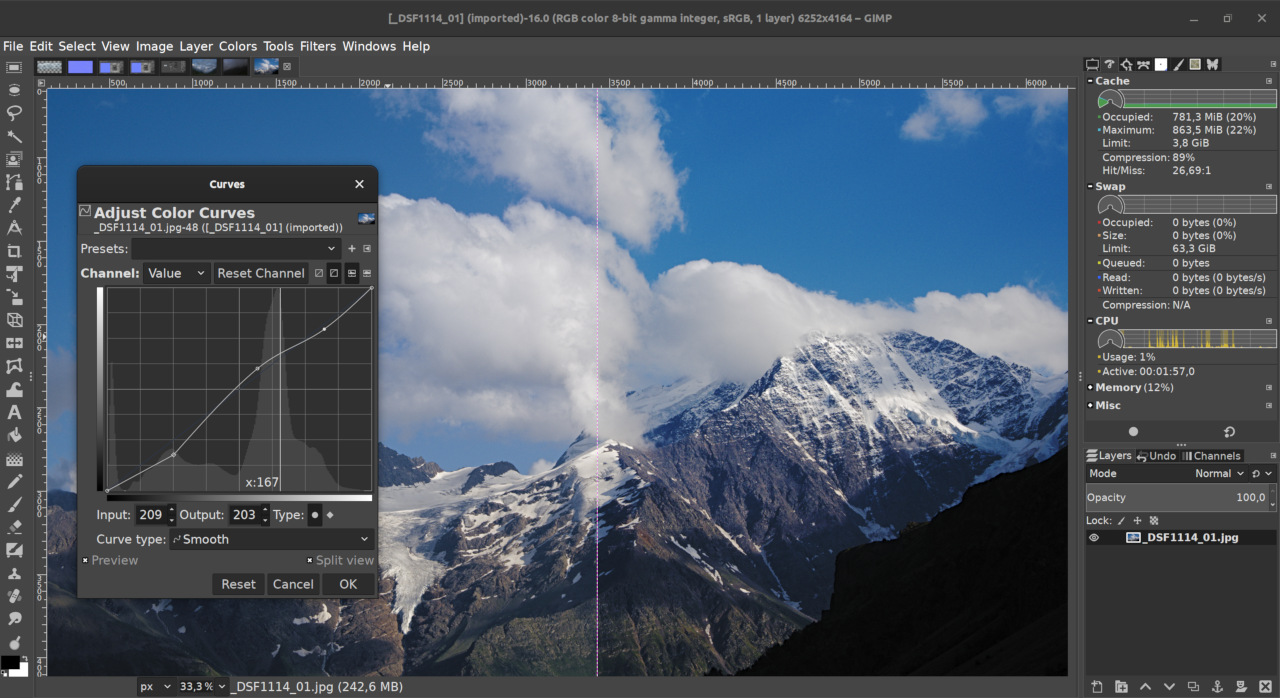
  • The Curves tool/filter now allows for more predictable editing and comes with two types of nodes instead of one to make more useful, more sophisticated curves.
Updated Curve tool
  • Parametric brushes now have 32-bit per channel precision.
  • The Bucket Fill tool got a new mode for smart colorization of line art, this is handy for comic artists.
  • The new Sample Merged option in the Heal tool allows non-destructive retouching of photos on a separate layer.
  • The Foreground Select tool got a new Grayscale preview mode.
  • The New Offset tool makes it possible to shift pixels and optionally wrap them around the edges so that you could create repeatable patterns.

Better performance

  • Faster painting: GIMP now doesn’t replace the paint buffer on every dab if the paint color/pixmap hasn’t changed.
  • Faster saving/exporting and layer groups rendering.
  • Grayscale workflows are now an order of magnitude faster thanks to changes in the babl library.

Improved file formats support

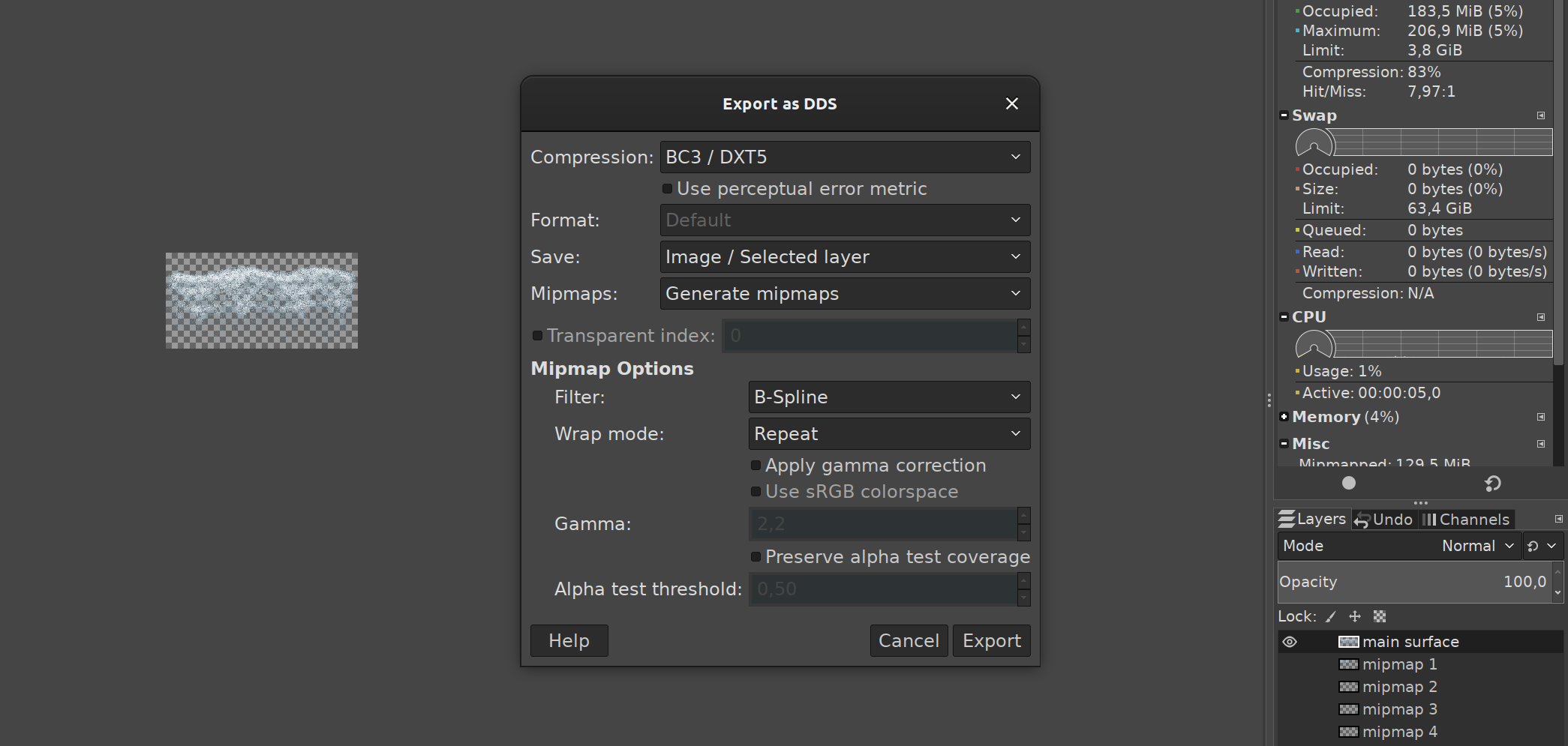
  • Due to popular demand, we merged the existing DDS plug-in originally developed by Shawn Kirst. But as none of us is a game developer, we appreciate further contributions from the community.
  • Layers are now optionally preserved when exporting to TIFF, and if you load a TIFF file with an unspecified channel, GIMP will now ask you how to handle it.
  • GIMP now supports ICC profiles in HEIF images at both loading and exporting time when built with libheif v1.4.0 and newer.
DDS exporting options

New filters

A major addition here is the Normal Map filter that generates normal maps commonly used in production of 3G graphics and games. It’s already usable for some workflows, and there’s a plan for further improvements.

We also provided direct access to more filters, developed in GEGL a couple of years ago:

  • Bayer Matrix (for ordered dithering) and Linear Sinusoid (useful for halftoning)
  • Newsprint, a GEGL version of the old GIMP filter for halftoning, plus quite a few extras
  • Mean Curvature Blur for edge-preserving blurring

A few more filters, namely Neon, Stretch Contrast, and Oilify are finally on par with the original implementations and thus replaced them.
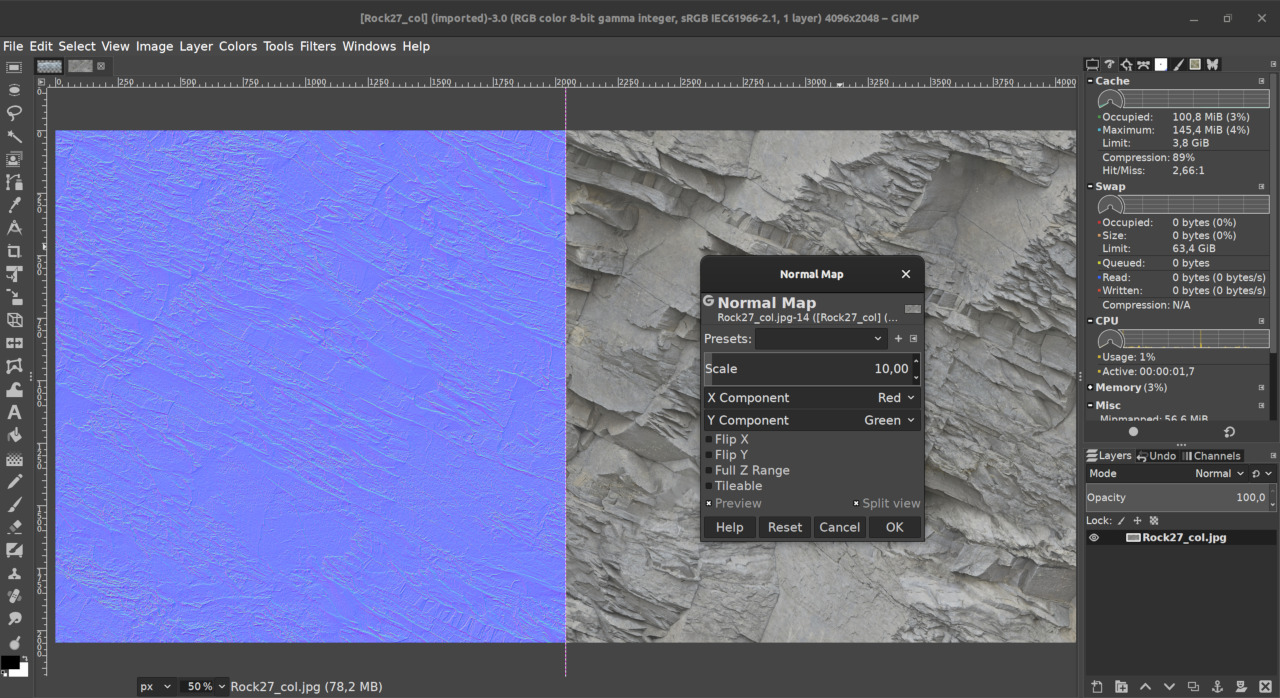
New Normal Map filter

Build systems, CI, and packaging

During 2019, we ported babl, GEGL, and the master branch of GIMP to the Meson build system. While it’s of little relevance to end-users who rely on ready-to-use builds of GIMP, to developers it means much faster compilation time.

We also set up Gitlab-based continuous integration (CI) for all three projects, which gives us a few bonuses over the previously used Jenkins-based solution. One of them is that Windows builds are now available for every successful commit to GIMP’s master branch.

Over the year, Alex Samorukov contributed a bunch of improvements to the macOS version, including support for Catalina.

Development in the unstable branch

As you probably already know from the previous report, we manage to backport most of the new features form the unstable branch to the stable one. However, some changes are the result of refactoring and some changes rely on the tech not available in the GTK2 stack.

One of the latter things is the entirely new object-based plug-ins API, with an extra bonus of preserving plugins’ settings across sessions. We expect more to happen there. This part of the work was done mostly by Michael Natterer and Jehan Pages.

The use of GObject introspection has more implications: we switched to Python 3 and made it possible to write new plug-ins in Lua and JavaScript.

Most recently, Jehan started working on a new feature that checks for availability of a newer version of the program and suggests downloading an update. It also integrates into the bug reporting dialog to tell the user if the version currently in use is out of date and the update may not have that bug anymore.

What’s new in GEGL and babl

There have been numerous changes in both GEGL and babl:

  • further work on space invasion to streamline the handling of color spaces, in collaboration with Elle Stone and others;
  • a ton of changes in the standalone GEGL tool, making it suitable for node-based compositing and video playback;
  • far more sophisticated CMYK support, up to blending CMYK and RGB pixel data, reading and writing CMYK TIFF and JPEG files;
  • a better use of available CPU cores on more operations thanks to newly added dynamic computation of per-operation thread cost;
  • better memory management: when you close large images in GIMP, it will now free used memory a lot faster.
  • sharper output when downscaling images with the cubic sampler.

Øyvind Kolås also started ctx, a new vector rasterizer project with API inspired by Cairo and HTML5 canvas’ 2D rendering context, and sufficiently small resource footprint to provide modern vector graphics on many microcontrollers.

The ctx library already has support for floating point pixel formats, and that support is geared to end up generic for gray, RGB, CMYK and other multi-component formats. Lack of support for color spaces and pixel encodings beyond 8-bit sRGB in cairo has been a gap for GEGL/GIMP that ctx can end up filling.

Team changes

Most of the source code changes in all three projects are still coming from the usual suspects: Michael Natterer, Jehan Pages, Ell, Øyvind Kolås, and Thomas Manni. Nevertheless, there have been a few new contributors who seem interested in sticking around.

A significant part of the contributions towards the new build system and CI support came from Félix Piédallu and Salamandar.

We now also have a small dedicated team of people, frogonia and nmat, who triage bug reports on a regular basis and do user support on the IRC channel. Liam Quin who has been team member for a long time, now does the vast majority of user support on Facebook.

We are still lucky to have Julien Hardelin as the author of the user manual.

And, of course, we keep getting no small amount of translation updates from new and seasoned translators. In fact, since the v2.10.14 release, we now mention non-code contributors to the project in release notes.

What’s next in 2020

There is an agreement among team members that 2.99.x releases are long overdue. We are likely to tie loose ends and start shipping them soon.

How you can help

As usual, we appreciate both coding and non-coding contributions to GIMP, GEGL, and babl.

There are many things we want to improve and even redo completely. And while we do say that certain changes are targeted for v3.2 and beyond, anything goes really, especially with the master branch.

UI/UX redesign? Shapes drawing? Clips for layers? Better text tool? Layer filters? Vector layers? You name it. Talk to us, if you want to work on any of that.

And if you don’t do programming, there’s plenty of work to do all around: updating and translating the user manual, writing new tutorials, updating incomplete translations, even making great art with GIMP and telling people about it.