








Two months after releasing GIMP 3.0, we are delighted to announce the second micro-release, GIMP 3.0.4. This addresses bugs and also incorporates some of the fabulous and helpful feedback we have received.
Micro releases like 3.0.4 are focused on fixing bugs and regressions, so there are no major new features to announce (though we continue to work on those! Just on separate feature branches for GIMP 3.2). However, we want to tell you about some major fixes that may have impacted your workflow.
There was a bug with pasting selections from GIMP into other programs, where the pasted section was padded to the original image size. This is now fixed thanks to work from Anders Jonsson, Aruius, and Alx Sa. If you notice any regressions or other issues after this fix, please let us know!
There were several types of crash reported to us, related to changing or turning off the main monitor. Jacob Boerema and Jehan worked together to diagnose this issue and make several necessary fixes. However, if you continue to have problems related to this, let us know so we can continue to work on it.
Idriss Fekir and Liam Quin, our resident font experts, have been busy making improvements to our text systems. In addition to general bug fixes with text layers, they’ve also greatly improved font loading speed on start-up. If you have a large number of fonts on your computer, GIMP should start much faster now!
Non-destructive filters received a number of bugfixes and improvements as well. The name of the filter is once again displayed in the undo history when added to an image. In addition, individual filter edits are now tracked in the undo history, thanks to work by Jehan and Alx Sa. We also resolved a few crashes, and we fixed some visual glitches when rotating layers with active non-destructive filters.
A few other small fixes of note:
New contributor Gabriele Barbero fixed a bug where the Help button on the About Dialog didn’t load the help page correctly.
New contributor Integral fixed a bug on KDE Wayland where the default Wayland icon was shown instead of our Wilber icon.
The ZDI-CAN-26752 bug for .ICO imports is now fixed.
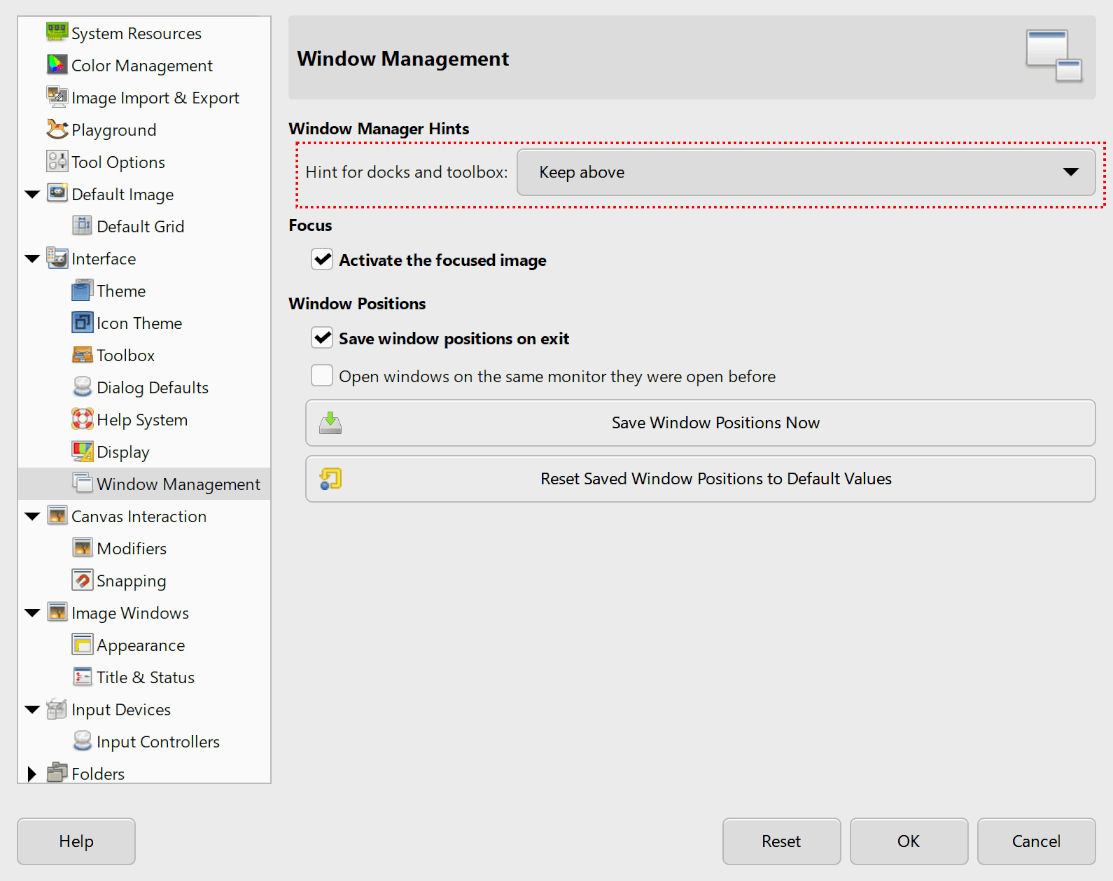
Akkana Peck noticed that the Window Hint option in Preferences no longer allowed floating windows to stay in front of the main image window in multi-window mode. She found and implemented a fix using the updated GTK3 API.
The space bar once again respects the action setting in Canvas Interactions. This means instead of always panning, you can set it to switch to the Move Tool instead - or even set it to do nothing at all!
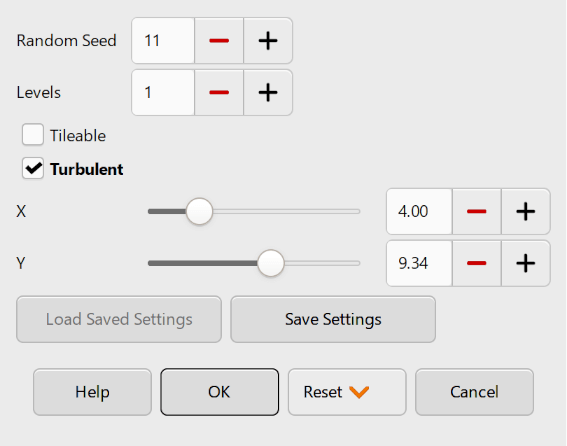
The Difference Cloud filter once again has a GUI to let you adjust its settings. This actually fixes a regression from
the port to GEGL in GIMP 2.8, so it’s a long-standing update!
A few other small fixes of note:
The Plug-in Browser should now show all plug-ins again.
New contributor Aruius resolved a bug where the Sample Points display didn’t update when the image’s precision changed.
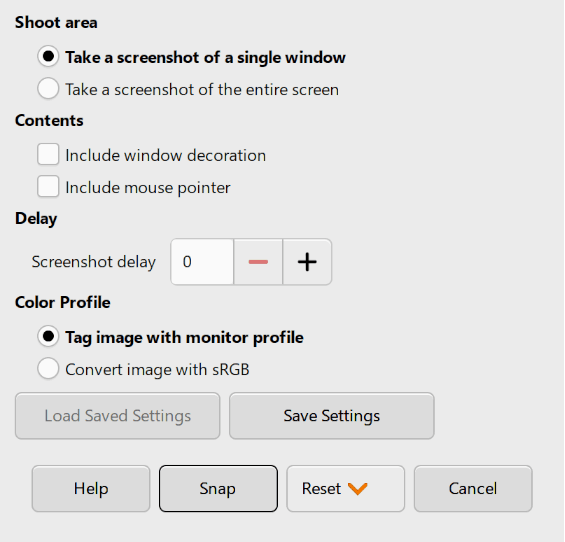
The Screenshot plug-in once again uses radio buttons rather than a drop-down menu for its options, reducing the number of clicks needed to change settings.
Rupert Weber fixed a bug on Linux where BMP format warnings didn’t display in some cases.
Since this is a “bugfix” release, we didn’t want to make too many disruptive UI changes. However, Reju has identified and designed a few smaller updates to help make GIMP’s UI more consistent.
The MyPaint Brush tools options UI has been redesigned to match the layout of other painting tools.
The generic “Force” slider does not impact the Pencil Tool. This option is now hidden in that tool’s options rather than just marked inactive, to be less confusing.
The Device Status dock has been updated to show more clearly which input device is in use, and is closer to the GIMP 2.10 version.
The Path tool now automatically closes the path when you click on the starting point in Design mode, rather than requiring
you to hold down the Ctrl first. This makes the Path tool more consistent with similar tools in GIMP, as well as
in other software. If you need to move the starting point, you can deselect the current end point by holding Shift
when you click on it, and then select the starting point to move it.
Jacob Boerema reviewed our brush size code, and found that different parts of GIMP set different limits for the maximum brush size. He defined a single maximum value and set it to be used throughout GIMP, to ensure there are no surprises when resizing your brush!
A few other small fixes of note:
On Windows, floating docks in Multi-Window Mode now also have their titlebars match the theme dark mode setting.
You can now press Enter to connect the start and end points in Scissor Select. Pressing Enter a second time will create a selection as normal.
We received reports that GCC 15 could not build GIMP by default, due to some older areas of our codebase using now reserved keywords for variable names. Nils Philippsen located the problem areas and updated the relevant code to match current standards.
On macOS, we now have a developer version of the .DMG as first mentioned in the 3.0.2 news post. This means that creating plug-ins for macOS will be much easier and faster than before. Thanks again to Lukas Oberhuber, Peter Kaczorowski, Dominik Reichardt, and other contributors for their hard work!
Our resident packaging and build expert Bruno Lopes has been busy with more improvements to our processes. A few of these updates are listed below:
The AppImage no longer contains Debug Symbols for dependencies (with the exception of babl and GEGL). This should significantly cut down on the file size, going back to the small size it had in RC3. Instead, if you need to debug the AppImage, follow our new debugging instructions.
To guarantee the best stability for future GIMP installations on Microsoft Windows, the installer’s Customize mode is now restricted to “clean” installations (a.k.a. when you first install GIMP). That’s because we need to adjust or even remove features from the .exe installer when they get too hard to maintain or become potentially broken (e.g. our custom file associations page was removed starting with GIMP 2.10.12 installer). In the Customize mode case, it was suppose to let you choose what GIMP components should installed, but unfortunately, it was not working like that at all.
Back then, to allow the Customize mode between GIMP installations (e.g. when reinstalling, updating), our Windows developers needed to 1) hardcode the components files almost twice and 2) code our own utility to do recursive uninstall of some complex components. All of that extra work to barely emulate how it (automatically) works on NSIS and WIX installers. Because of this, that feature became unmaintained without us noticing for many years and was silently breaking some GIMP installations. That said, you will still be able to use that feature with the command line - but keep in mind it is not properly working.
To be clear: that feature works perfectly on clean installs and, from 3.0.4 onward, also if the installer detects a broken install (e.g. when you installed GIMP in a external SSD but lost it). We call this much requested feature: Repair mode.
Also in the Customize mode, in addition to letting you choose what language packs are present, you can now also choose to install plug-in development files which work with our new plug-in tutorials.
As a bonus, even if you select literally all components available in the Customize mode, GIMP 3 is still more than 300MB smaller than GIMP 2.10 😉, that’s it.
GEGL version 0.4.62 brings several bug fixes to prevent crashes, courtesy of Øyvind Kolås. UI ranges were added by Budhil Nigam to some operations, which means our Fractal Trace filter now has more sensible number ranges on the slider.
babl version 0.1.114 contains some fixes from Øyvind to ensure TRCs are stored correctly from color profiles.
Internally, Bruno Lopes converted many scripts in both projects to use Python, making them easier to build on other platforms.
Since GIMP 3.0.2, in the main GIMP repository:
32 people contributed changes or fixes to GIMP 3.0.4 codebase (order is determined by number of commits; some people are in several groups):
Contributions on other repositories in the GIMPverse (order is determined by number of commits):
gimp-data had 8 commits by 3 contributors: Bruno Lopes, Jehan, Lukas Oberhuber.gimp-test-images (unit testing repository) repository had 1
commit by 1 contributor: Jacob Boerema.gimp-macos-build (macOS packaging scripts) release had 4
commits by 1 contributor: Lukas Oberhuber.Let’s not forget to thank all the people who help us triaging in Gitlab, report bugs and discuss possible improvements with us. Our community is deeply thankful as well to the internet warriors who manage our various discussion channels or social network accounts such as Ville Pätsi, Liam Quin, Michael Schumacher and Sevenix!
Note: considering the number of parts in GIMP and around, and how we
get statistics through git scripting, errors may slip inside these
stats. Feel free to tell us if we missed or mis-categorized some
contributors or contributions.
Reju, an active contributor to the UX design repository, has been recently granted “reporter” status. We appreciate their hard work developing designs and discussing UX improvements with developers and the community!
We are once again participating in the Google Summer of Code internship program. We have three great project proposals from our summer students:
Ondřej Míchal is working on a redesign of our developer reference system in GIMP. They already have some early work done on a GEGL Filter Browser, which will be very helpful for plug-in creators looking to use the new Filter API.
Gabriele Barbero will be developing further improvements to the text tool, building on past work by former GSoC students and current contributor Idriss Fekir.
Shivam Shekhar Soy will be working on our online extensions repository. This is another step on our roadmap to allow you to easily download and install new extensions to GIMP, replacing the beloved GIMP Plug-in Registry.
Since the 3.0.2 news post, two new mirrors have been contributed:
Mirrors are important as they help the project by sharing the load for dozens of thousands of daily downloads. Moreover by having mirrors spread across the globe, we ensure that everyone can have fast download access to GIMP.
You will find all our official builds on GIMP official website (gimp.org):
Other packages made by third-parties are obviously expected to follow (Linux or *BSD distributions’ packages, etc).
Note: The Microsoft Store release may be delayed as we wait for the certification process to finish.
Since GIMP 3.0.0 release, we focused on bug fixing. As could be expected after a 7-year development marathon, various issues have slipped through our testing and we had to deal with these. Though perfection doesn’t exist and we’ll continue to work on bug fixes, we believe we are in a saner state now, and therefore we are now going to enter a “Merge Window” period where we will allow new features and breaking changes in the code again. In other words, we are starting to move onto active GIMP 3.2 preparation! 😱
We won’t spoil 🤫 too much our feature list, also because it is possible that some of the features we are planning don’t make it (though development has already started in feature branches). But we can already tell you that we feel that GIMP 3.2 will be pretty awesome too, despite being much smaller than GIMP 3.0 was!
To be continued…
Don’t forget you can donate and personally fund GIMP developers, as a way to give back and accelerate the development of GIMP. Community commitment helps the project to grow stronger!
此内容由惯性聚合(RSS阅读器)自动聚合整理,仅供阅读参考。 原文来自 — 版权归原作者所有。