惯性聚合 高效追踪和阅读你感兴趣的博客、新闻、科技资讯
阅读原文 在惯性聚合中打开

推荐订阅源

V
Vulnerabilities – Threatpost
月光博客
月光博客
OSCHINA 社区最新新闻
OSCHINA 社区最新新闻
美团技术团队
Last Week in AI
Last Week in AI
Jina AI
Jina AI
P
Privacy International News Feed
有赞技术团队
有赞技术团队
WordPress大学
WordPress大学
宝玉的分享
宝玉的分享
T
Tenable Blog
阮一峰的网络日志
阮一峰的网络日志
P
Proofpoint News Feed
T
Tailwind CSS Blog
Apple Machine Learning Research
P
Privacy & Cybersecurity Law Blog
人人都是产品经理
人人都是产品经理
S
Schneier on Security
Google DeepMind News
爱范儿
爱范儿
C
Cisco Blogs
K
Kaspersky official blog
C
Cybersecurity and Infrastructure Security Agency CISA
Hugging Face - Blog
Hugging Face - Blog
博客园_首页
O
OpenAI News
cs.AI updates on arXiv.org
IT之家
IT之家
Threat Intelligence Blog | Flashpoint
酷 壳 – CoolShell
酷 壳 – CoolShell
T
Tor Project blog
博客园 - 【当耐特】
腾讯CDC
V
V2EX
A
Arctic Wolf
Webroot Blog
Webroot Blog
S
Securelist
小众软件
小众软件
大猫的无限游戏
大猫的无限游戏
D
Darknet – Hacking Tools, Hacker News & Cyber Security
博客园 - 三生石上(FineUI控件)
The GitHub Blog
The GitHub Blog
量子位
J
Java Code Geeks
博客园 - 叶小钗
S
SegmentFault 最新的问题
Project Zero
Project Zero
www.infosecurity-magazine.com
Scott Helme
Scott Helme
Cyberwarzone
Cyberwarzone

GIMP

GIMP - GIMP 3.2.4 Released GIMP - GIMP @ Libre Graphics Meeting 2026 GIMP - GIMP 3.2.2 Released GIMP - GIMP 3.2 Released GIMP - GIMP 3.2 RC3: Third Release Candidate for GIMP 3.2 GIMP - Interview with Øyvind Kolås, GIMP developer GIMP - GIMP @ FOSDEM 2026 GIMP - GIMP 3.0.8 Released GIMP - GIMP 3.2 RC2: Second Release Candidate for GIMP 3.2 GIMP - GIMP 3.2 RC1: First Release Candidate for GIMP 3.2 GIMP - Interview with Simon Budig, GIMP developer GIMP - New Official Snap package GIMP - GIMP 3.0.6 Released GIMP - GIMP 3.1.4: Second Development Release towards GIMP 3.2 GIMP - Interview with Sevenix (author of GIMP 3.0’s splash image) GIMP - GIMP 3.1.2: First Development Release towards GIMP 3.2 GIMP - GIMP 3.0.4 Released GIMP - New Priorities for GIMP GIMP - GIMP 3.0.2 Released GIMP - GIMP 3.0 Released GIMP - GIMP 3.0 RC3 Released GIMP - GIMP team at FOSDEM 2025 (talk and keynote) GIMP - GIMP 3.0 RC2 Released 🎁 GIMP - GIMP 3.0 RC1 Released GIMP - Development Update: Closing In on the 3.0 Release Candidate GIMP - Experiments with AppImage GIMP - GIMP at LGM 2024 (Rennes, France) GIMP - GIMP 2.10.38 Released GIMP - GIMP 2.99.18 Released: The Last Development Preview Before 3.0! GIMP - GIMP 2.10.36 Released GIMP - GIMP now on Windows for ARM (experimental) GIMP - GIMP 2.99.16 Released: Wilber Week 2023 edition! GIMP - Wilber Week 2023: report GIMP - GIMP in GSoC 2023 GIMP - GIMP Help Manual 2.10.34 Released GIMP - GIMP 2.10.34 Released GIMP - 2022 annual report GIMP - GIMP 2.10.32 on Apple Silicon GIMP - Happy 27! GIMP - Development version: GIMP 2.99.14 Released GIMP - Conference “GIMP and ZeMarmot” in Vandœuvre-lès-Nancy (France) GIMP - Revival of the GIMP developer website GIMP - Development version: GIMP 2.99.12 Released GIMP - GIMP 2.10.32 is on the Microsoft Store! GIMP - GIMP 2.10.32 Released GIMP - GSoC 2022 project announced: CMYK features GIMP - GIMP is a GSoC 2022 mentor organization GIMP - Development version: GIMP 2.99.10 Released GIMP - 2021 annual report GIMP - GIMP 2.10.30 Released GIMP - GIMP is not affected by the log4j vulnerability GIMP - GIMP 2.99.8 macOS package now available GIMP - Development version: GIMP 2.99.8 Released GIMP - GIMP’s official mirrors and mirror policy GIMP - GIMP 2.10.28 Released GIMP - Funding GIMP developers for sustainable development GIMP - Development version: GIMP 2.99.6 Released GIMP - GIMP 2.10.24 Released GIMP - 🎄 Development release GIMP 2.99.4 is out 🎁 GIMP - GIMP 2.10.22 Released for macOS GIMP - This is 25 GIMP - Development release GIMP 2.99.2 is out GIMP - GIMP 2.10.22 Released GIMP - GIMP 2.10.20 Released GIMP - GIMP 2.10.18 Released GIMP - GIMP and GEGL in 2019 GIMP - GIMP 2.10.14 Released GIMP - GIMP 2.10.12 Released GIMP - GIMP 2.10.10 Released GIMP - GIMP and GEGL in 2018 GIMP - GIMP 2.10.8 Released GIMP - GIMP receives a $100K donation GIMP - GIMP 2.10.6 Released GIMP - GIMP 2.10.4 Released GIMP - GIMP has moved to Gitlab GIMP - GIMP 2.10.2 Released GIMP - GIMP 2.10.0 Released GIMP - GIMP 2.10.0 Release Candidate 2 Released GIMP - Fun at SCaLE 2018 GIMP - GIMP 2.10.0 Release Candidate 1 Released GIMP - Libre Graphics Meeting + SCaLE 2018 GIMP - GIMP and GEGL in 2017 GIMP - Strings Freeze For GIMP 2.10 Is Now On GIMP - GIMP 2.9.8 Released GIMP - GIMP 2.9.6 Released GIMP - An Interview with Michael Schumacher, GIMP administrator GIMP - GIMP 2.8.22 Released GIMP - An Interview with Michael Natterer, GIMP maintainer GIMP - GIMP 2.8.20 Packages for macOS and Microsoft Windows are available GIMP - GIMP 2.10 blockers and the road to 3.0 GIMP - GIMP 2.8.20 Released GIMP - WilberWeek 2017 GIMP - Community-supported development of GEGL now live GIMP - 2016 in review GIMP - Making settings persistent in GIMP GIMP - GIMP 2.8.18 Released GIMP - GIMP 2.9.4 Released GIMP - GIMPers at Texas Linux Fest 2016 GIMP - GEGL 0.3.8 and babl 0.1.18 Released GIMP - Updated 2.8.16 Installer with a Major Bugfix Released
GIMP - New Color Mode Coming to GIMP
by CmykStudent · 2026-04-01 · via GIMP

Edit: thank you CmykStudent for keeping the 🐠 April fool 🐟 fun alive!

As most would have noted, this new “Color Mode” was obviously a joke. This being said, it underlines real work in progress, whose hint is actually visible in this news!

So I guess, this year, the April fool gets to continue as an Easter egg 🐣 hunt! Happy easter! 🐰

🐡🥚 End of Edit 🔔🦈


Hello! I’m one of the developers for GIMP. If you use GIMP, you might be familiar with my work adding support for Seattle Filmworks photos, along with other, less important features and fixes.

We like to emphasize that GIMP is made by the community. That’s why we try to spotlight areas of interests by our developers, designers, and artists - such as Bruno Lopes’ work on Snap packaging, Fredrik Persson’s art for the GIMP 3.0 splash screen and interviews with Mitch, Michael, Simon, and Øyvind. Today, I’ll add to this illustrious group by sharing a bit about my own area of interest that I’ll be focusing on for the next version of GIMP!

The first big project I worked on when I started contributing to GIMP was related to color models. Images can be stored and represented in lots of different ways. The most common mode for many people is RGB, where each color is made up of a combination of red, green, and blue values. You can also represent colors with a single color component, often in Grayscale. Another frequently seen mode is indexed, where you limit the total number of colors to a specific palette (this model is often used in games and pixel art).

GIMP has supported all three of these color modes for many years. However, there have been constant user requests for including another well-known color model. Unfortunately, no one had ever stepped up to work on it - until now! I am proud to announce that I will be focused on implementing the long awaited…

EGA Color Mode

That’s right! At last, GIMP will allow you to easily create images compatible with IBM’s Enhanced Graphics Adapter. You’ll be able to define up to 16 different colors to use with your image from the palette of 64 approved colors. It’ll also be optimized to show high-quality images at a jaw-dropping maximum resolution of 640 × 350!

It should be noted that GIMP has had an EGA palette built in for years, so a “late-binding” EGA workflow where you converted before export was already possible. My work will enable an “early-binding” workflow where you can edit and create in EGA color mode right from the start.

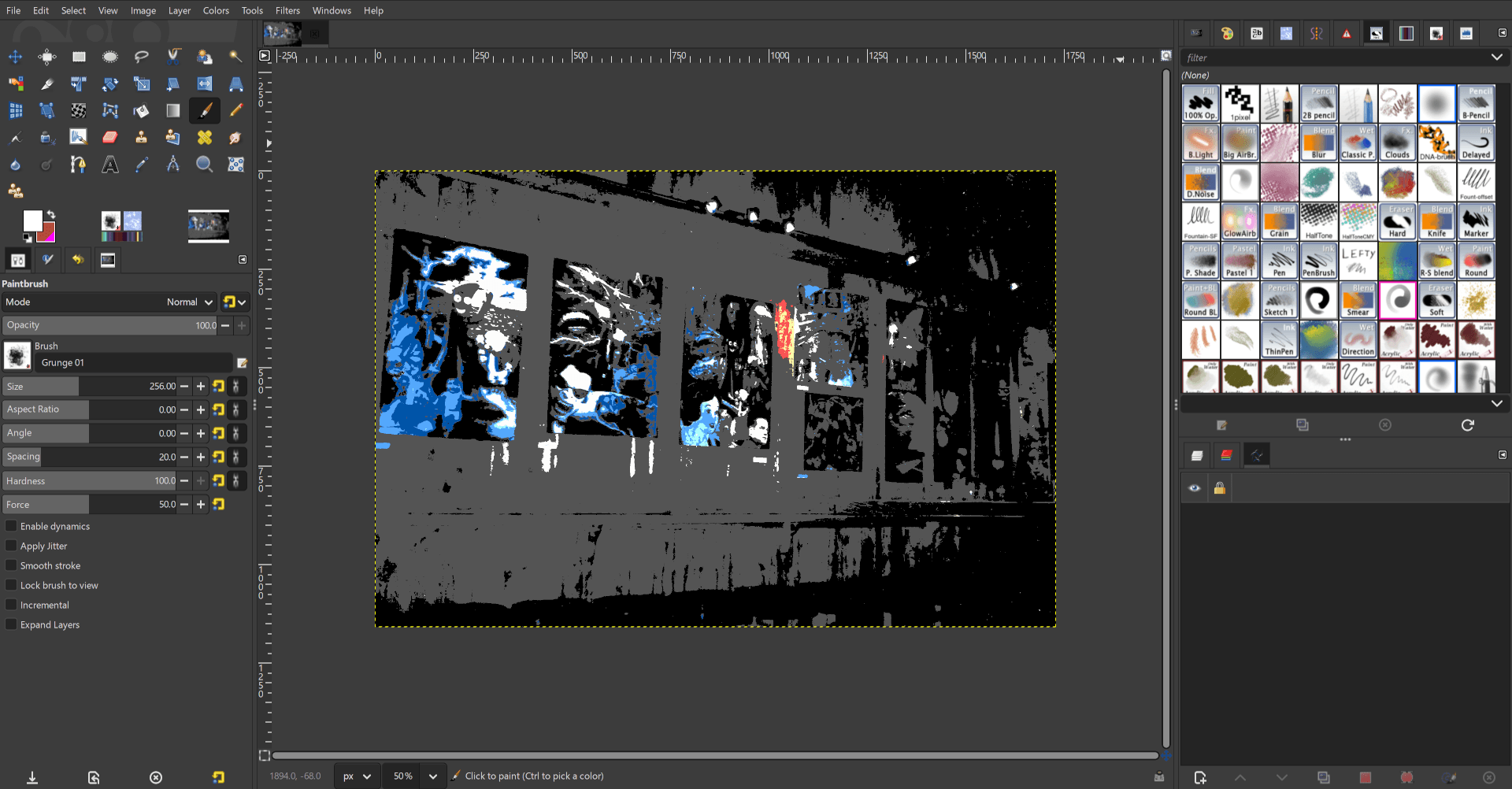
While this feature is still in early development, here’s an example of before and after converting a RGB image to EGA Color Mode.
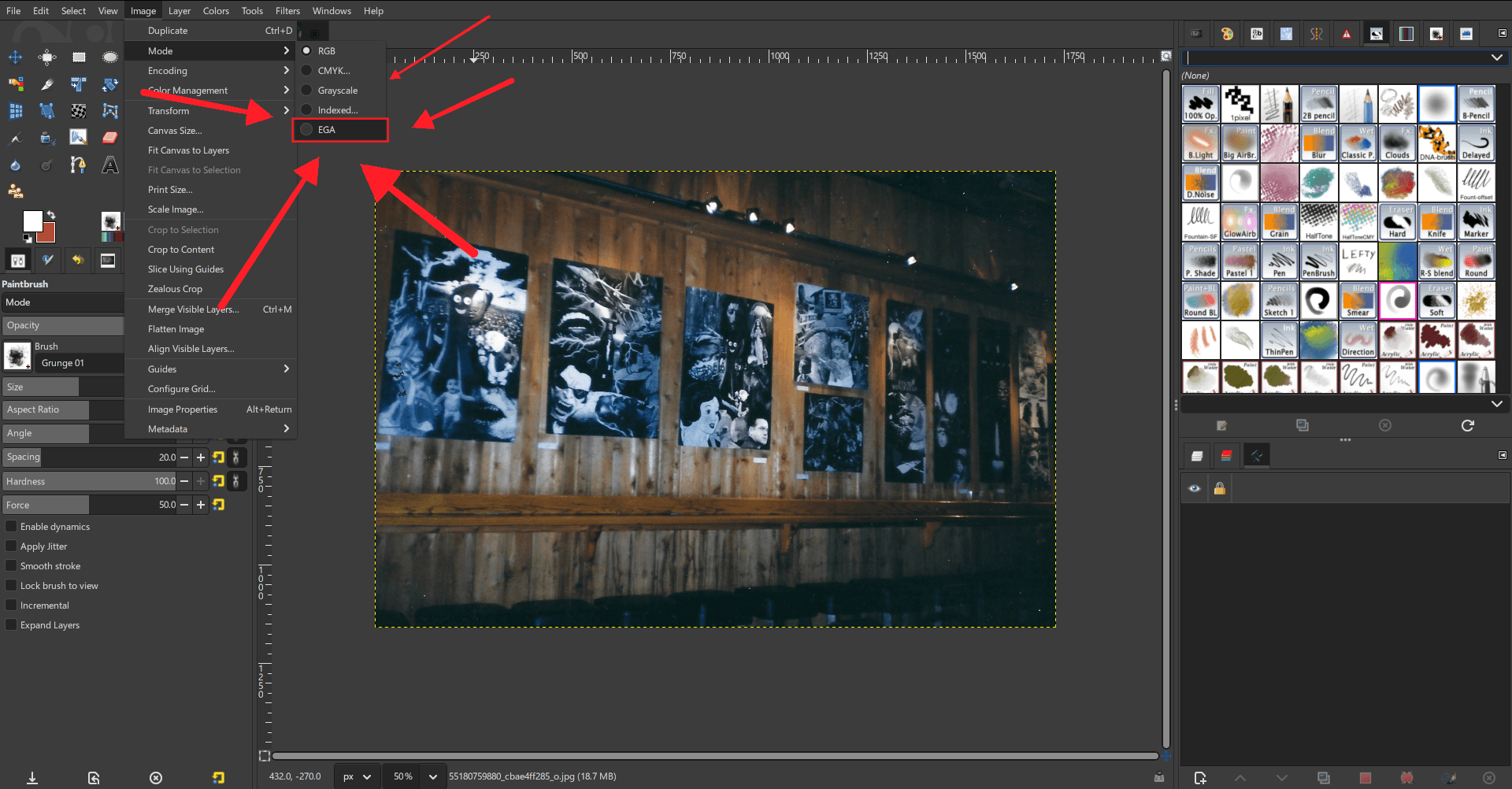
In-progress EGA color mode menu option
In-progress EGA color mode menu option (image by Charles Swank, CC0)
RGB Image after being converted to EGA color mode
RGB Image after being converted to EGA color mode (original image by Charles Swank, CC0)

Note that these are still work-in-progress UX - the actual interactions and GUI elements may change during development.

Once the initial version has been built, tested, and merged, I have plans for further expansions such as adding a CGA-compatible mode. I also hope that the final code submission will serve as a guide for other developers to add more long-requested color models to GIMP, such as a 1-bit mode and even the highly compressible 0-bit color mode!

I’m looking forward to sharing more updates on this exciting new feature once we start the next phase of development for GIMP 3.4. I hope you all will try it out when it’s added in our development builds, and I look forward to your feedback!