


GIMP 2.10.12 is mostly a bug fix release as some annoying bugs were discovered, which is to be expected after a 2.10.10 with so many changes!
Still, some very cool improvements are also available:
The interaction with curves in general has been greatly enhanced, which is an improvement both to the Curves tool and all other places where curves need tweaking (currently paint dynamics and input device settings):
When dragging an existing curve point, it won’t “jump” anymore to the cursor position upon pressing the button. Instead it will move relatively to its current position as the cursor moves. This allows selecting a point with a quick click without moving it, and adjusting a point position more easily.
Additionally, when the cursor hovers above a point, or when dragging a point, the coordinate indicator now show the point’s position, rather than the cursor’s.
When holding down Ctrl while adding or dragging a point, the
Y-coordinate will snap to the original curve. This is particularly
useful for adding points along the curve.
Likewise, the coordinate indicator shows the snapped coordinates.
Additionally, some improvements are specific to the Curves tool:
Two new spin-buttons labelled “Input” and “Output” are now available in the Curves tool interface. They allow setting the selected point’s coordinates numerically and accurately if needed.
Control points can now be either smooth or corner points. Smooth points produce a smooth curve, while corner points result in sharp angles (previously, all points were smooth and this is still the default).
Corner points are displayed using a diamond shape, instead of a circle and the type can be changed in the Curves tool.
Thanks to Tobias Ellinghaus, well known as a darktable developer, TIFF can now export images without merging layers.
Though not fully tested, we now have a temporary support of a new Windows 10 feature. Windows 10 users indeed now have the ability to install fonts without admin permissions since a recent update.
Therefore we added this non-admin font folder to our search path when running GIMP. It should be only a temporary workaround since eventually this should be supported by fontconfig, the upstream library used to manage fonts.
Note also that it is not fully tested because of our lack of Windows developers. Therefore we are mostly hoping it will work as expected, and this is a good time to make a call again:
Are you a Windows developer? Do you love GIMP? Please contribute!
Seriously, none of our current developers use Windows and bugs are piling up in our bug tracker for this platform (same can be said on macOS by the way), whereas GIMP is so enjoyably stable on GNU/Linux. We are happy to do the occasional good deeds, but there are limits to what we can do for a platform we don’t use. On the other hands, we happily welcome patches and new contributors!
GIMP now doesn’t replace the paint buffer on every dab if the paint color/pixmap hasn’t changed. This results in faster painting on specific cases.
As a by-product of the change, the color-from-gradient dynamics is now fixed when the image has a color profile.
The Dodge/Burn tool got a new “Incremental” option which, similarly to the Paintbrush, Pencil, and Eraser tools, applies the effect incrementally as the pointer moves.
One of GIMP 2.10.0 changes which annoyed many people was that the Free
Select tool was not creating a selection immediately when the region
was closed. One was forced to perform an additional confirmation step (Enter or double-click).
This was done on purpose because we wanted to leave ability to tweak the polygonal selection that is built into the Free Select tool. Yet it could obviously be better, proof being the Rectangle Select tool which still allowed to edit the rectangle even though a selection was pre-created.
The Free Select tool now works the same way: even though a preliminary selection exists (allowing to directly copy or delete a contents without additional step), you will still be able to edit this free selection as long as you don’t start another selection nor change tools.
New Offset tool shifts pixels and optionally wraps them around the edges so that you could create repeatable patterns.
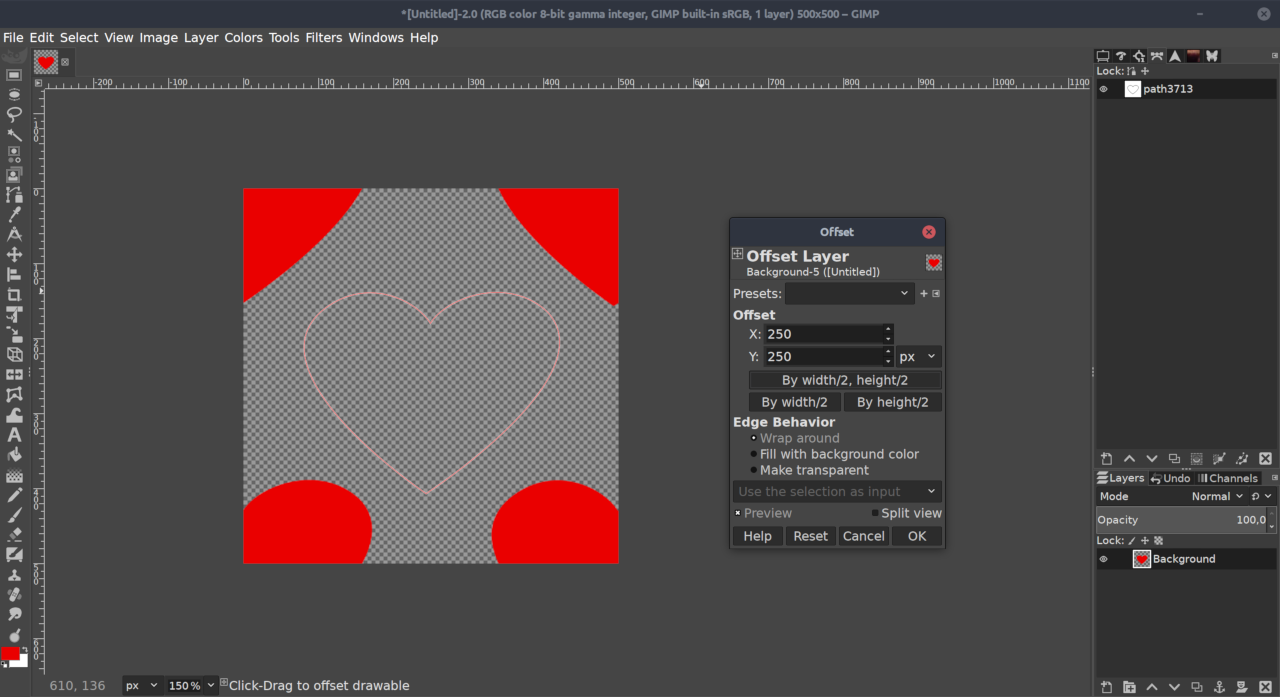
There’s a simple on-canvas interaction available: just drag on the canvas to shift the layer.
You can activate the new filter either via Layer > Transform > Offset menu,
or via Shift+Ctrl+O shortcut.
The Move tool can now move together an intersecting pair of guides. by dragging the guides at their point of intersection. This is useful when the guides are used to mark a point, rather than a pair of lines (e.g., as is the case for the mandala symmetry guides, which mark the symmetry’s point of origin).
Many bugs were fixed, some more severe than others (in particular a few crashes), as well as some code cleaning, factorization, and so on. The usual deal!
More than the new features, we actually thought these issues were enough to warrant this new release.
Among most pesky bugs fixed:
And more. GIMP 2.10.12 is the result of about 200 commits in 2 months! We will focus below on two specific bug fixing which deserve mentioning.
The symmetry painting backend got some improvements, which resulted in a few fixes, in particular some artifacts could occur with big brushes or in the Clone/Heal tool when the brush was cropped to the bounds of a drawable. These are now fixed.
In the Ink tool as well, the brush shape was not properly transformed. This has been fixed as well.
Just open the Symmetry Painting dockable dialog, choose a type of symmetry and paint away!
Several people noticed that exporting some images ended up in washed-up colors sometimes. This was because in some cases, we were exporting by error sRGB colors with a linear profile (especially visible in GIMP 2.10.10 since we were exporting profiles by default even when using a default GIMP profile). We fixed this and took the opportunity to improve GIMP’s export logics.
Now we are always exporting an explicitly set profile as-is, and pixel colors are stored according to this profile expectation. If you manually assigned a profile, GIMP should indeed always follow your request.
On the other hand, if no explicit profile was set, we implemented various strategies depending on the format:
Note that there are still edge cases which we may not find optimal yet regarding how profiles are handled. These should all be greatly improved when we will merge the “Space Invasion” code (an ongoing mid-term project, as we were already talking about it when releasing GIMP 2.10.8). This code merge should hopefully happen soon enough!
During this development span, GEGL 0.4.16 got released (91 commits), as well as babl 0.1.64 (31 commits) and 0.1.66 (7 commits).
The biggest user-visible change is probably the cubic sampler coefficient change, which used to produce smooth interpolation, suitable for some cases, but not as sharp as people would expect in most other cases. Now in all places where there is choice of interpolation (all transformation tools, Warp Transform tool, etc.), the result with cubic has changed and produces sharper results.
Another notable improvement in GEGL is an updated memory management, by
conditionally freeing memory from the heap (thanks to manual calls of
malloc_trim()), hence forcing the underlying libc to release memory
more often. This behavior is especially suitable for long-running
applications whose memory need can greatly vary, such as GIMP.
In practice, it means that GIMP process’ memory size will now shrink
much faster when you will close big images on supporting systems.
Though it gets less visibility, work on upcoming GIMP 3 continues and is going well. We will give more news soon enough. For the time being, don’t forget you can donate to the project and personally fund several GIMP developers, as a way to give back and to accelerate GIMP development.
此内容由惯性聚合(RSS阅读器)自动聚合整理,仅供阅读参考。 原文来自 — 版权归原作者所有。