




GIMP 2.10.14 arrives with bugfixes and various enhancements.
Here are release highlights:
Not being able to view and edit data outside the canvas boundary used to be a deal breaker in quite a few use cases. So this is going to be a bit of a breakthrough moment for quite a few users.
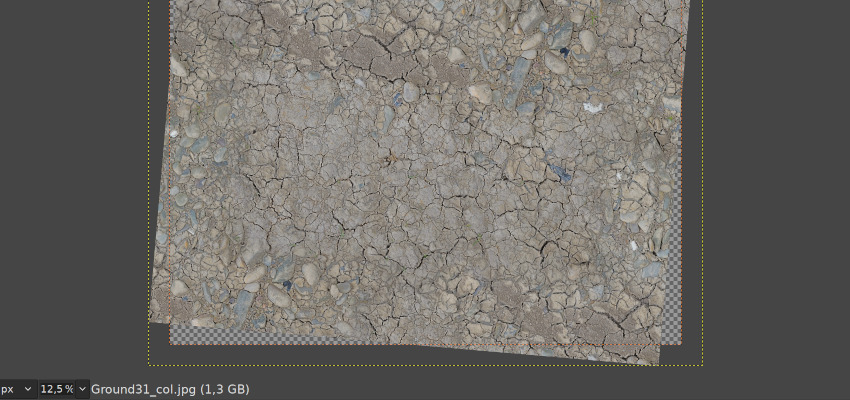
This is what has changed:
This is basically the first shot at the previously missing feature set, so expect more to land to GIMP at some point in the future. Making selection tools work outside the canvas sounds like a sensible next stop. Then maybe we can seriously talk about boundless canvas.
Most of the work on this was done by Ell.
This new feature is closely related to out-of-canvas viewing and editing and was also contributed by Ell.
Now when you e.g. rotate a single-layer image, you can use this transform type to automatically expand the canvas to include all of rotated pixels when using the default Adjust clipping mode. The switch is right next to layer/path/selection toggle at the top of any transform tool’s settings.
It’s complemented by a new Image > Transform > Arbitrary Rotation… menu entry, which activates the rotate tool in the Image mode.
The result of some filters can be larger than the original layer. A very common example is Drop Shadow, which adds a shadow at an offset to the layer. Such filters are no longer clipped to the layer boundary by default. Instead, the layer is automatically resized as necessary when the filter is applied.
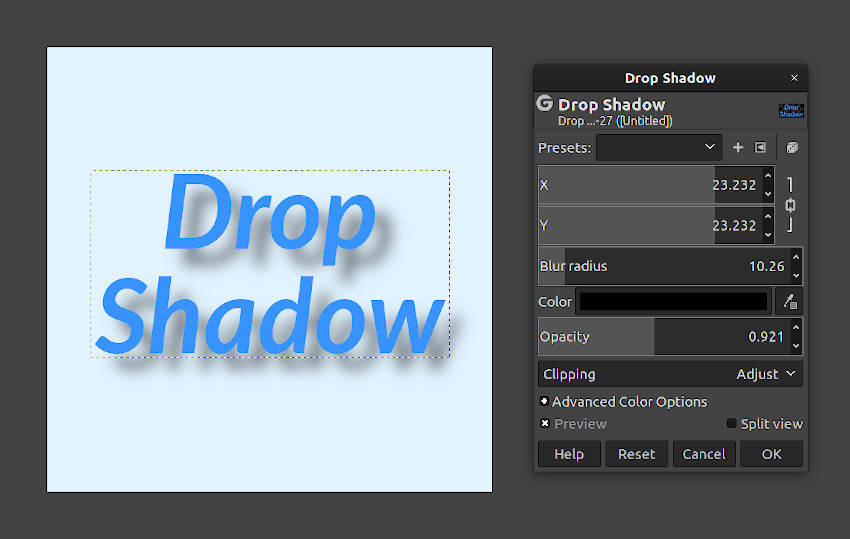
This behavior can be toggled through the new Clipping option in the filter dialog.
There is now a global toggle to enable the editing of layers with disabled visibility (the eye icon in the layers docker). There was some demand for it from users, and it was easy to do, so a new contributor, woob, added this feature.
The Free Select tool received further usability improvements. It now supports using Alt+drag to quickly move, cut, and copy the selection, without having to commit the selection first, similarly to the rest of the selection tools.
Thomas Manni contributed a new Grayscale preview mode to the Foreground Select tool, which allows seeing the resulting mask in black and white. The usual preview mode is now called Color and choosing the color and opacity for the mask instead of imposing only 4 colors (red, green, blue, grey).
The Feather Selection dialog has a new Selected areas continue outside the image toggle, working similarly to the corresponding option in the Shrink Selection and Border Selection dialogs. This option affects the border behavior of the operation: when toggled, selected areas along the image border are assumed to continue past the image bounds, and are therefore not affected by the feather.
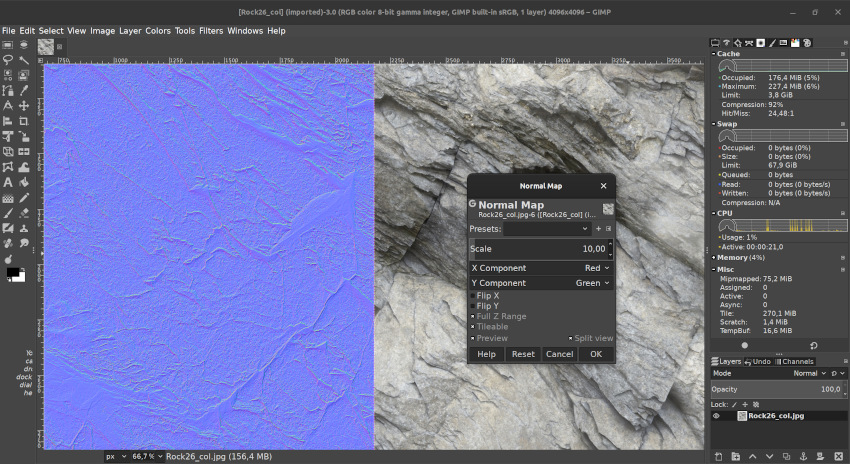
Thanks to Ell, GIMP is now shipping with a simple Normal Map filter (Filters > Generic) that generates normal maps from height maps. This is early initial work, a lot more is expected to be done.
GIMP now provides direct access to more GEGL filters:
Also, more GEGL-based filters with on-canvas preview have replaced old GIMP counterparts: Neon (Filters > Edge-Detect), Stretch Contrast (Colors > Auto), and Oilify (Filters > Artistic).
Moreover, Michael Natterer did a simple 8-bit per channel port of 27 older filters to use GEGL buffers (they are still GIMP filters, not GEGL operations). Another filter, Van Gogh, got higher bit depth support (up to 32bpc float).
GIMP now supports ICC profiles in HEIF images at both loading and exporting time when built with libheif v1.4.0 and newer. The exporting dialog also features a new “Save color profile” checkbox.
The TIFF importer now asks how to process unspecified TIFF channels: use as non-premultiplied alpha (used to be the default), as premultiplied alpha, or just import as a generic channel. This fixes a known bug with 4-channel (RGBA) TIFF files as demonstrated here.
Finally, the PDF exporter was fixed by Lionel to export text layers inside layer groups as text correctly.
XCF loading is now a bit more resilient to corruption: it doesn’t stop any more at the first layer or channel error; instead it tries to load more layers/channels to salvage as much data as possible from a corrupted XCF file.
Alex Samorukov introduced various improvements to the macOS build of GIMP.
First and foremost, GIMP is now compatible with macOS Catalina and doesn’t have the file permission issue that the 2.10.12 build had.
Secondly, the DMG will now open a window with an Applications shortcut
that explains how to install it.
He also added some fixes for command line users.
Finally, Alex built the new version with updated 3rd party components. Among other things, this means support for color profiles in HEIF/HEIC files.
Gitlab CI for GIMP now has a job building GIMP for Windows. It is currently set up to make builds of the master branch only (will eventually become GIMP 3.0).
To download a build:
gimp-2.99.exe is found under gimp-prefix\bin\, though
you might have to run gimp-wrapper.cmd instead.The build was set up by Jehan.
⚠️ Please note that we don’t recommend using the master branch for production! This is mostly for testing purposes. ⚠️
As usual, a complete list of changes is available in the NEWS file. Starting with this release, NEWS also features the list of all code and translation conbtributors.
We also thank frogonia, nmat, Michael Schumacher, and everyone else who helps us triaging bug reports and providing technical support to end-users.
Both babl and GEGL have been ported to the Meson build system and now use Gitlab CI for continuous integration. This has little significance for end-users but makes developers’ life easier in many ways.
There has been a ton of other changes and improvements in GEGL since the previous release. Here are some of the most interesting ones.
GEGL now makes a better use of available CPU cores on more operations thanks to newly added dynamic computation of per-operation thread cost.
The built-in GEGL UI has superceded the older built-in ‘gcut’ video editor, so the latter is now removed. Playing back video has been improved: GEGL now uses nearest neighbor interpolation while decoding for realtime playback of HD video content, it now also uses frame cache for rendered video frames.
Moreover, you can now also use external file managers to drag and crop content into collections. See the updated NEWS file for more details.
As for babl, it now supports Yu’v’ (CIE 1976 UCS) color model, handles grayscale ICC color profiles, and uses AVX2 acceleration for some linear-to-float conversions.
Alpha handling in babl has been slightly revamped. The library is now using the terms ‘associated alpha’ and ‘separate alpha’, all of nonpremultiplied-, premultiplied- and nonassociated- alpha are now considered deprecated API. Conversions between associated and separate alpha have been dramatically improved.
Øyvind Kolås has a plan to add a per-image associated/separate alpha switch to GIMP’s menu once another batch of code changes by Michael Natterer lands to the master branch.
Here is a lightning talk at CCC where Øyvind investigates the data loss incurred
by going separate alpha -> associated -> separate or
associated -> separate -> associated and discovers that the special cased
transparent/emissive cases end up lossless:
Øyvind also iterated on new conversions in babl that cover grayscale in all precisions supported by GIMP for some things, this means that working in grayscale is an order of magnitude faster than it was before the last babl release.
See here for more information on the latest release.
Another new project worth mentioning is ctx, also by Øyvind Kolås. It’s an API inspired by Cairo and HTML5 canvas’ 2D rendering context. It works on 32-bit microcontrollers like ESP32 and ARM-CortexM4, and is devised to scale to networked/remote and threaded software rendering.
The ctx library already has support for floating point pixel formats, and that support is geared to end up generic for gray, RGB, CMYK and other multi-component formats. The latter is one of the things we’ve been missing in Cairo.
So this is a very interesting project that we might consider using for GIMP further along the road. It will be used in GEGL’s own UI soon enough.
While we do maintain the 2.10.x branch and include new features from the master branch, our full attention really goes to development of what will become GIMP 3.0. We are considering the release of 2.99.2 in the next few months to pave the way for regular alpha/beta releases leading up to a major update of GIMP.
For the time being, don’t forget you can donate to the project and personally fund several GIMP developers, as a way to give back and to accelerate GIMP development.
此内容由惯性聚合(RSS阅读器)自动聚合整理,仅供阅读参考。 原文来自 — 版权归原作者所有。