


惯性聚合 高效追踪和阅读你感兴趣的博客、新闻、科技资讯
阅读原文 在惯性聚合中打开

推荐订阅源

美团技术团队
Y
Y Combinator Blog
宝玉的分享
宝玉的分享
S
Secure Thoughts
The Cloudflare Blog
P
Proofpoint News Feed
腾讯CDC
Latest news
Latest news
AWS News Blog
AWS News Blog
The Hacker News
The Hacker News
freeCodeCamp Programming Tutorials: Python, JavaScript, Git & More
IT之家
IT之家
T
The Exploit Database - CXSecurity.com
T
Threat Research - Cisco Blogs
C
Cybersecurity and Infrastructure Security Agency CISA
V
Vulnerabilities – Threatpost
Hugging Face - Blog
Hugging Face - Blog
博客园 - 聂微东
小众软件
小众软件
L
Lohrmann on Cybersecurity
Apple Machine Learning Research
cs.CV updates on arXiv.org
L
LINUX DO - 热门话题
博客园_首页
Hacker News - Newest:
Hacker News - Newest: "LLM"
Google Online Security Blog
T
Threatpost
Project Zero
Project Zero
Cyberwarzone
Cyberwarzone
月光博客
月光博客
G
GRAHAM CLULEY
P
Palo Alto Networks Blog
cs.CL updates on arXiv.org
Help Net Security
Help Net Security
K
Kaspersky official blog
A
Arctic Wolf
D
Darknet – Hacking Tools, Hacker News & Cyber Security
C
Cyber Attacks, Cyber Crime and Cyber Security
钛媒体:引领未来商业与生活新知
钛媒体:引领未来商业与生活新知
T
Troy Hunt's Blog
Webroot Blog
Webroot Blog
SecWiki News
SecWiki News
OSCHINA 社区最新新闻
OSCHINA 社区最新新闻
H
Heimdal Security Blog
N
News | PayPal Newsroom
C
Cisco Blogs
博客园 - 叶小钗
C
CXSECURITY Database RSS Feed - CXSecurity.com
WordPress大学
WordPress大学
Exploit-DB.com RSS Feed

GIMP

GIMP - GIMP 3.2.4 Released GIMP - GIMP @ Libre Graphics Meeting 2026 GIMP - New Color Mode Coming to GIMP GIMP - GIMP 3.2.2 Released GIMP - GIMP 3.2 Released GIMP - GIMP 3.2 RC3: Third Release Candidate for GIMP 3.2 GIMP - Interview with Øyvind Kolås, GIMP developer GIMP - GIMP @ FOSDEM 2026 GIMP - GIMP 3.0.8 Released GIMP - GIMP 3.2 RC2: Second Release Candidate for GIMP 3.2 GIMP - GIMP 3.2 RC1: First Release Candidate for GIMP 3.2 GIMP - Interview with Simon Budig, GIMP developer GIMP - New Official Snap package GIMP - GIMP 3.0.6 Released GIMP - GIMP 3.1.4: Second Development Release towards GIMP 3.2 GIMP - Interview with Sevenix (author of GIMP 3.0’s splash image) GIMP - GIMP 3.1.2: First Development Release towards GIMP 3.2 GIMP - GIMP 3.0.4 Released GIMP - New Priorities for GIMP GIMP - GIMP 3.0.2 Released GIMP - GIMP 3.0 Released GIMP - GIMP 3.0 RC3 Released GIMP - GIMP team at FOSDEM 2025 (talk and keynote) GIMP - GIMP 3.0 RC2 Released 🎁 GIMP - GIMP 3.0 RC1 Released GIMP - Development Update: Closing In on the 3.0 Release Candidate GIMP - Experiments with AppImage GIMP - GIMP at LGM 2024 (Rennes, France) GIMP - GIMP 2.10.38 Released GIMP - GIMP 2.99.18 Released: The Last Development Preview Before 3.0! GIMP - GIMP 2.10.36 Released GIMP - GIMP now on Windows for ARM (experimental) GIMP - GIMP 2.99.16 Released: Wilber Week 2023 edition! GIMP - Wilber Week 2023: report GIMP - GIMP in GSoC 2023 GIMP - GIMP Help Manual 2.10.34 Released GIMP - GIMP 2.10.34 Released GIMP - 2022 annual report GIMP - GIMP 2.10.32 on Apple Silicon GIMP - Happy 27! GIMP - Development version: GIMP 2.99.14 Released GIMP - Conference “GIMP and ZeMarmot” in Vandœuvre-lès-Nancy (France) GIMP - Revival of the GIMP developer website GIMP - Development version: GIMP 2.99.12 Released GIMP - GIMP 2.10.32 is on the Microsoft Store! GIMP - GIMP 2.10.32 Released GIMP - GSoC 2022 project announced: CMYK features GIMP - GIMP is a GSoC 2022 mentor organization GIMP - Development version: GIMP 2.99.10 Released GIMP - 2021 annual report GIMP - GIMP 2.10.30 Released GIMP - GIMP is not affected by the log4j vulnerability GIMP - GIMP 2.99.8 macOS package now available GIMP - Development version: GIMP 2.99.8 Released GIMP - GIMP’s official mirrors and mirror policy GIMP - GIMP 2.10.28 Released GIMP - Funding GIMP developers for sustainable development GIMP - Development version: GIMP 2.99.6 Released GIMP - GIMP 2.10.24 Released GIMP - 🎄 Development release GIMP 2.99.4 is out 🎁 GIMP - GIMP 2.10.22 Released for macOS GIMP - This is 25 GIMP - Development release GIMP 2.99.2 is out GIMP - GIMP 2.10.22 Released GIMP - GIMP 2.10.20 Released GIMP - GIMP 2.10.18 Released GIMP - GIMP and GEGL in 2019 GIMP - GIMP 2.10.14 Released GIMP - GIMP 2.10.12 Released GIMP - GIMP 2.10.10 Released GIMP - GIMP and GEGL in 2018 GIMP - GIMP 2.10.8 Released GIMP - GIMP receives a $100K donation GIMP - GIMP 2.10.6 Released GIMP - GIMP has moved to Gitlab GIMP - GIMP 2.10.2 Released GIMP - GIMP 2.10.0 Released GIMP - GIMP 2.10.0 Release Candidate 2 Released GIMP - Fun at SCaLE 2018 GIMP - GIMP 2.10.0 Release Candidate 1 Released GIMP - Libre Graphics Meeting + SCaLE 2018 GIMP - GIMP and GEGL in 2017 GIMP - Strings Freeze For GIMP 2.10 Is Now On GIMP - GIMP 2.9.8 Released GIMP - GIMP 2.9.6 Released GIMP - An Interview with Michael Schumacher, GIMP administrator GIMP - GIMP 2.8.22 Released GIMP - An Interview with Michael Natterer, GIMP maintainer GIMP - GIMP 2.8.20 Packages for macOS and Microsoft Windows are available GIMP - GIMP 2.10 blockers and the road to 3.0 GIMP - GIMP 2.8.20 Released GIMP - WilberWeek 2017 GIMP - Community-supported development of GEGL now live GIMP - 2016 in review GIMP - Making settings persistent in GIMP GIMP - GIMP 2.8.18 Released GIMP - GIMP 2.9.4 Released GIMP - GIMPers at Texas Linux Fest 2016 GIMP - GEGL 0.3.8 and babl 0.1.18 Released GIMP - Updated 2.8.16 Installer with a Major Bugfix Released
GIMP - GIMP 2.10.4 Released
by Alexandre Prokoudine · 2018-07-04 · via GIMP

The latest update of GIMP’s new stable series delivers bugfixes, simple horizon straightening, async fonts loading, fonts tagging, and more new features.

Simple Horizon Straightening

A common use case for the Measure tool is getting GIMP to calculate the angle of rotation, when horizon is uneven on a photo. GIMP now removes the extra step of performing rotation manually: after measuring the angle, just click the newly added Straighten button in the tool’s settings dialog.
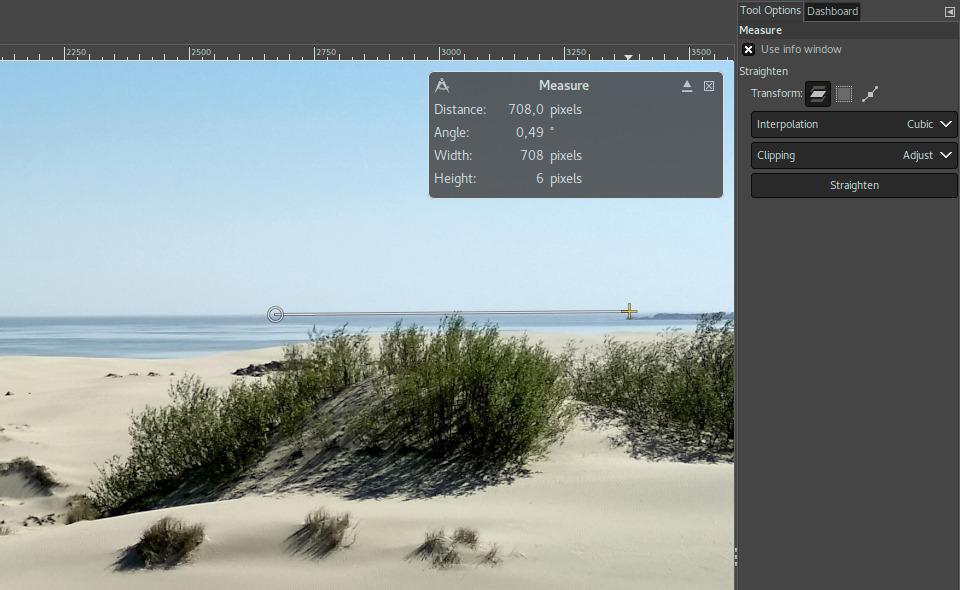
Straightening images
Straightening images in GIMP 2.10.4.

Asynchronous Fonts Loading

Loading all available fonts on start-up can take quite a while, because as soon as you add new fonts or remove existing ones, fontconfig (a 3rd party utility GIMP uses) has to rebuild the fonts cache. Windows and macOS users suffered the most from it.

Thanks to Jehan Pagès and Ell, GIMP now performs the loading of fonts in a parallel process, which dramatically improves startup time. The caveat is that in case you need to immediately use the Text tool, you might have to wait till all fonts complete loading. GIMP will notify you of that.

Fonts Tagging

Michael Natterer introduced some internal changes to make fonts taggable. The user interface is the same as for brushes, patterns, and gradients.

GIMP doesn’t yet automatically generate any tags from fonts metadata, but this is something we keep on our radar. Ideas and, better yet, patches are welcome!

Dashboard Updates

Ell added several new features to the Dashboard dockable dialog that helps debugging GIMP and GEGL or, for end-users, finetune the use of cache and swap.

New Memory group of widgets shows currently used memory size, the available physical memory size, and the total physical memory size. It can also show the tile-cache size, for comparison against the other memory stats.
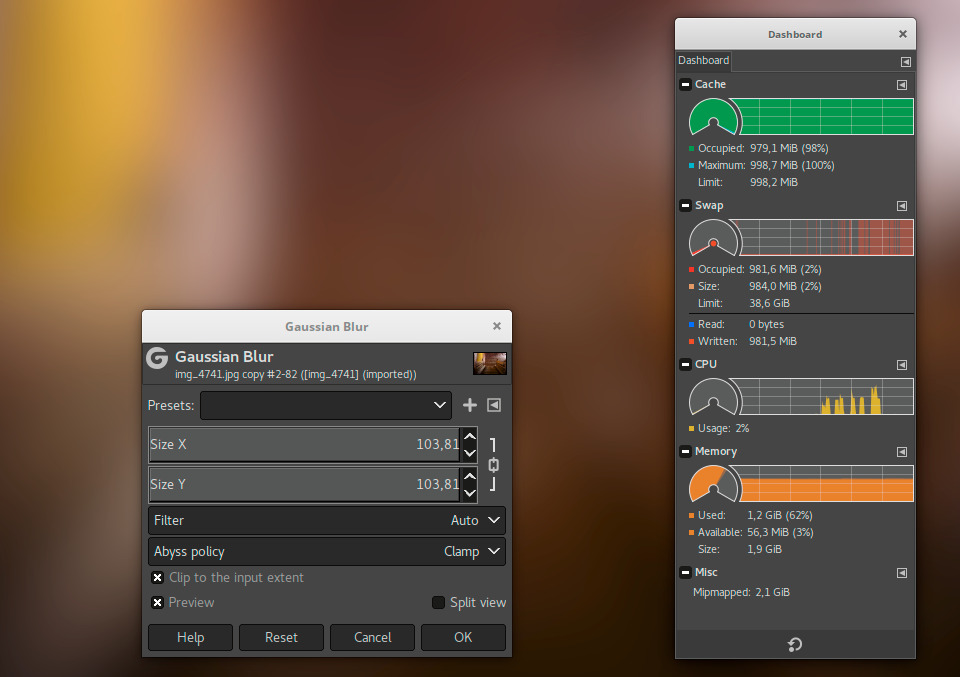
Updated Dashboard
Updated Dashboard in GIMP 2.10.4.

Note that the upper-bound of the meter is the physical memory size, so the memory usage may be over 100% when GIMP uses the swap.

The Swap group now features “read” and “written” fields which report the total amount of data read-from/written-to the tile swap, respectively. Additionally, the swap busy indicator has been improved, so that it’s active whenever data has been read-from/written-to the swap during the last sampling interval, rather than at the point of sampling.

PSD Loader Improvements

While we cannot yet support PSD features such as adjustment layers, there is one thing we can do for users who just need a file to render correctly in GIMP. Thanks to Ell, GIMP now can load a “merged”, pre-composited version of the image, that becomes available when a PSD file was saved with “Maximize Compatibility” option enabled in Photoshop.

This option is currently exposed as an additional file type (“Photoshop image (merged)”), which has to be explicitly selected from the filetype list when opening the image. GIMP then will render the file correctly, but drop certain additional data from the file, such as channels, paths, and guides, while retaining metadata.

Builds for macOS Make a Comeback

Beta builds of GIMP 2.10 for macOS are available now. We haven’t eliminated all issues yet, and we appreciate your feedback.

GEGL and babl

Ell further improved the Recursive Transform operation, allowing multiple transformations to be applied simultaneously. He also fixed the trimming of tile xache into the swap.

New Selective Hue-Saturation operation by Miroslav Talasek is now available in the workshop. The idea is that you can choose a hue, then select width of the hues range around that base hue, then tweak saturation of all affected pixels.

Øyvind Kolås applied various fixes to the Pixelize operation and added the “needs-alpha” meta-data to Color to Alpha and svg-luminancetoalpha operations. He also added a Threshold setting to the Unsharp Mask filter (now called Sharpen (Unsharp Mask)) to restore and improve the legacy Unsharp Mask implementation from GIMP prior to v2.10.

In babl, Ell introduced various improvements to the babl-palette code, including making the default palette initialization thread-safe. Øyvind Kolås added an R~G~B~ set of spaces (which for all BablSpaces mean use sRGB TRC), definitions of ACEScg and ACES2065-1 spaces, and made various clean-ups. Elle Stone contributed a fix for fixed-to-double conversions.

Ongoing Development

While we spend as much time on bugfixing in 2.10.x as we can, our main goal is to complete the GTK+3 port as soon as possible. There is a side effect of this work: we keep discovering old subpar solutions that frustrate us until we fix them. So there is both GTK+3 porting and refactoring, which means we can’t predict when it’ll be done.

Recently, we also revitalized an outdated subproject called ‘gimp-data-extras’ with the sole purpose of keeping the Alpha-to-Logo scripts that we removed from 2.10 due to poor graphics quality. Since some users miss those scripts, there is now a simple way to get them back: download gimp-data-extras v2.0.4, unpack the archive, and copy all ‘.scm’ files from the ‘scripts’ folder to your local GIMP’s ‘scripts’ folder.