


惯性聚合 高效追踪和阅读你感兴趣的博客、新闻、科技资讯
阅读原文 在惯性聚合中打开

推荐订阅源

aimingoo的专栏
aimingoo的专栏
WordPress大学
WordPress大学
阮一峰的网络日志
阮一峰的网络日志
博客园 - 司徒正美
月光博客
月光博客
宝玉的分享
宝玉的分享
Recent Announcements
小众软件
小众软件
H
Hackread – Cybersecurity News, Data Breaches, AI and More
美团技术团队
博客园 - 三生石上(FineUI控件)
A
About on SuperTechFans
J
Java Code Geeks
云风的 BLOG
云风的 BLOG
罗磊的独立博客
大猫的无限游戏
大猫的无限游戏
IT之家
IT之家
Vercel News
Vercel News
量子位
Martin Fowler
Martin Fowler
OSCHINA 社区最新新闻
OSCHINA 社区最新新闻
V
Visual Studio Blog
腾讯CDC
有赞技术团队
有赞技术团队

Peter Steinberger

OpenClaw, OpenAI and the future | Peter Steinberger Shipping at Inference-Speed | Peter Steinberger The Signature Flicker | Peter Steinberger Just Talk To It - the no-bs Way of Agentic Engineering | Peter Steinberger Claude Code Anonymous | Peter Steinberger Live Coding Session: Building Arena | Peter Steinberger My Current AI Dev Workflow | Peter Steinberger Essential Reading for Agentic Engineers - August 2025 | Peter Steinberger Just One More Prompt | Peter Steinberger Poltergeist: The Ghost That Keeps Your Builds Fresh | Peter Steinberger Don't read this Startup Slop | Peter Steinberger Essential Reading for Agentic Engineers - July 2025 | Peter Steinberger Self-Hosting AI Models After Claude's Usage Limits | Peter Steinberger Logging Privacy Shenanigans | Peter Steinberger VibeTunnel's first AI-anniversary | Peter Steinberger Making AppleScript Work in macOS CLI Tools: The Undocumented Parts | Peter Steinberger Peekaboo 2.0 – Free the CLI from its MCP shackles | Peter Steinberger Command your Claude Code Army, Reloaded | Peter Steinberger Essential Reading for Agentic Engineers | Peter Steinberger Slot Machines for Programmers: How Peter Builds Apps 20x Faster with AI | Peter Steinberger My AI Workflow for Understanding Any Codebase | Peter Steinberger stats.store: Privacy-First Sparkle Analytics | Peter Steinberger Showing Settings from macOS Menu Bar Items: A 5-Hour Journey | Peter Steinberger VibeTunnel: Turn Any Browser into Your Mac's Terminal | Peter Steinberger Vibe Meter 2.0: Calculating Claude Code Usage with Token Counting | Peter Steinberger llm.codes: Make Apple Docs AI-Readable | Peter Steinberger Automatic Observation Tracking in UIKit and AppKit: The Feature Apple Forgot to Mention | Peter Steinberger Peekaboo MCP – lightning-fast macOS screenshots for AI agents | Peter Steinberger Migrating 700+ Tests to Swift Testing: A Real-World Experience | Peter Steinberger Commanding Your Claude Code Army | Peter Steinberger
UIKit Debug Mode | Peter Steinberger
Peter Steinberger · 2015-01-09 · via Peter Steinberger

A while ago, I’ve stumbled on a string called UIPopoverControllerPaintsTargetRect in some UIKit disassembly - definitely worth investigating! Now that I finally own IDA, I did some research. Turns out there’s a hidden preferences file under /Library/Preferences/com.apple.UIKit that UIKit queries for these settings.

I’ve used Aspects to swizzle NSUserDefaults and enable this key when queried. This actually works, but only under iOS 7, since iOS 8 uses the newer UIPopoverPresentationController and that one doesn’t fully support target rect drawing (or it’s compiled out in our release version of UIKit.)
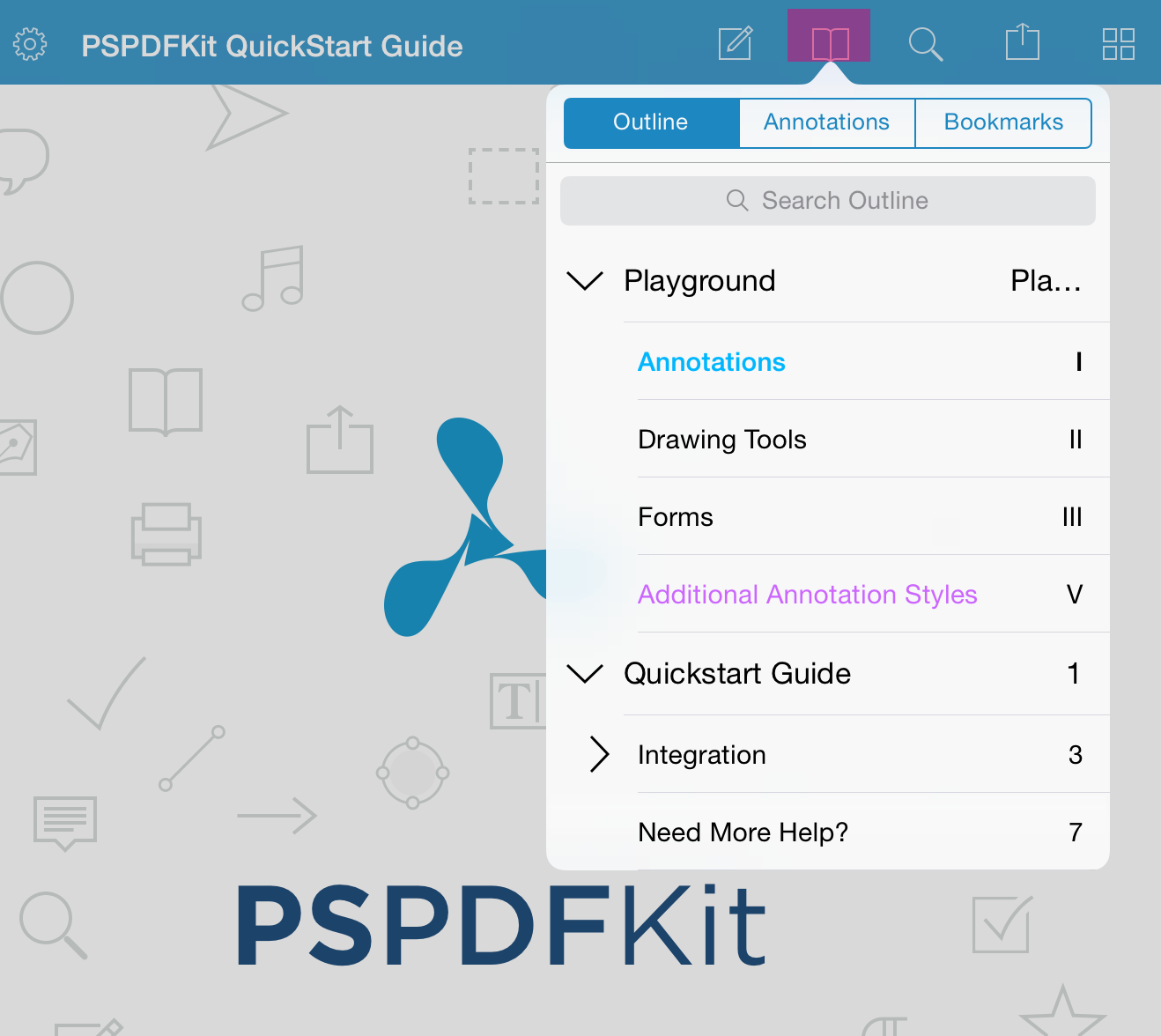
UIKit Debug Mode showing purple overlay on the popover target rectangle

(Screenshot from PSPDFKit - the Leading iOS PDF Framework. Note the purple overlay on the bookmark icon.)

Digging deeper, I found a bunch of very interesting and useful flags for debugging, which print extensive logging for touches, gestures, animations and more. I’ve listed the most interesting flags in the gist at the end of this article.

The process was easy for UIPopoverControllerPaintsTargetRect but quite a bit harder for most other flags, as these are protected by a check to CPIsInternalDevice() which lives in the private AppSupport.framework. All it does is query libMobileGestalt for a few settings; checking if "InternalBuild" is true or if alternatively "Oji6HRoPi7rH7HPdWVakuw" is set to YES.

I’ve tried to use dlsym to get MGSetAnswer() and set the values manually, however this doesn’t work - it seems that only a few values are modifiable here. So instead, I’ve used Facebook’s fishhook to redirect all calls from MGGetBoolAnswer and manually return YES if it’s queried for “InternalBuild”. Granted, we could also hook CPIsInternalDevice instead; both will work.

Want to try for yourself? Check out my UIKitDebugging repository and add all files to your repository. Remember, that’s just for debugging and to satisfy your curiosity, don’t ship any of that.

Here’s some interesting output. The touch and gesture logging seems very useful.

There are a few other interesting flags like the infamous UISimulatedApplicationResizeGestureEnabled, I’ve only listed the most interesting ones in the gist…