







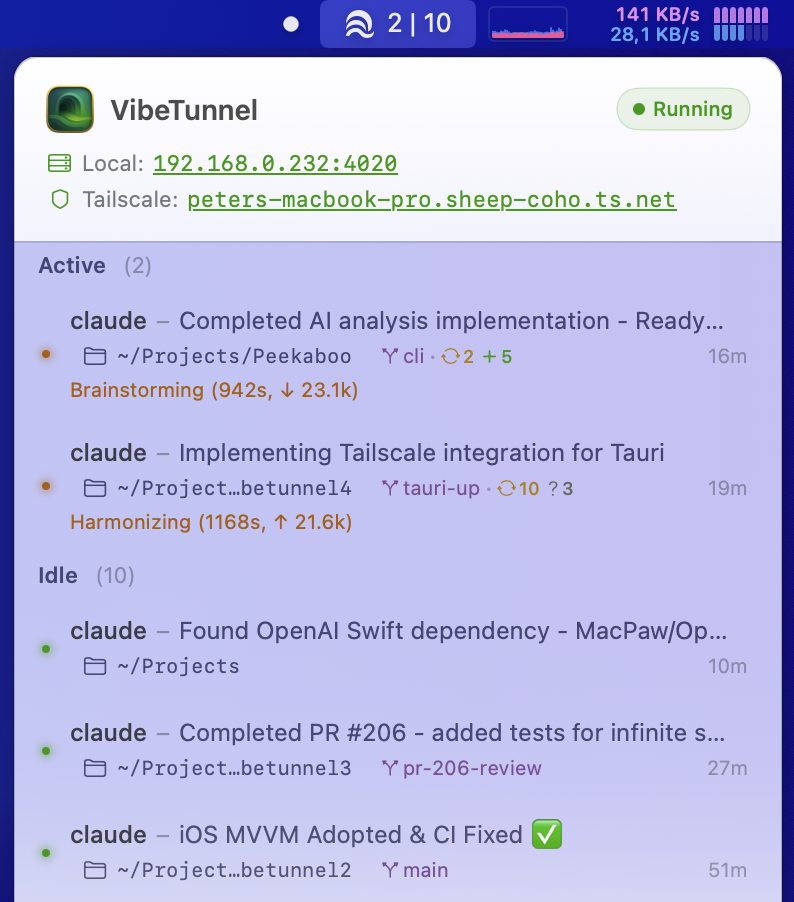
Managing multiple Claude Code sessions just got a whole lot easier. With VibeTunnel’s new terminal title management feature, you can now see at a glance what each Claude instance is working on across your projects.
The screenshot above shows the power of this feature: each Claude session displays exactly what it’s working on, and Claude does this automatically without us having to ask for it. You can also set custom titles via vt title "Custom title" for more control. Clicking on a session selects that terminal, and you can also click on the folder icon to open Finder or on the Git info to open your Git client. This is all new in VibeTunnel 1.0 Beta 6, which you can download at vibetunnel.sh.
I tried the solution from my previous post, but Claude kept rewriting the terminal title, so I needed a better solution—hence this VibeTunnel integration. Note that this only works for Claude instances that are started with the vt command as prefix (e.g., vt claude).
VibeTunnel Terminal Title Management
Here’s the complete section to add to your ~/.claude/CLAUDE.md file:
## VibeTunnel Terminal Title Management

When working in VibeTunnel sessions, actively use the `vt title` command to communicate your current actions and progress:

### Usage
vt title "Current action - project context"

### Guidelines
- **Update frequently**: Set the title whenever you start a new task, change focus, or make significant progress
- **Be descriptive**: Use the title to explain what you're currently doing (e.g., "Analyzing test failures", "Refactoring auth module", "Writing documentation")
- **Include context**: Add PR numbers, file names, or feature names when relevant
- **Think of it as a status indicator**: The title helps users understand what you're working on at a glance
- If `vt` command fails (only works inside VibeTunnel), simply ignore the error and continue

### Examples
# When starting a task
vt title "Setting up Git app integration"

# When debugging
vt title "Debugging CI failures - playwright tests"

# When working on a PR
vt title "Implementing unique session names - github.com/amantus-ai/vibetunnel/pull/456"

# When analyzing code
vt title "Analyzing session-manager.ts for race conditions"

# When writing tests
vt title "Adding tests for GitAppLauncher"

### When to Update
- At the start of each new task or subtask
- When switching between different files or modules
- When changing from coding to testing/debugging
- When waiting for long-running operations (builds, tests)
- Whenever the user might wonder "what is Claude doing right now?"

This helps users track your progress across multiple VibeTunnel sessions and understand your current focus.
Implementation
To enable this feature in your Claude Code setup, you have two options:
-
Automatic setup: Simply paste the URL of this blog post into Claude and tell it to set it up for you.
-
Manual setup: Add the configuration above to your global Claude rules at
~/.claude/CLAUDE.md. You can also check out the full gist for additional implementation details.
By keeping your terminal titles updated, you can effectively manage your “Claude Code Army” - running multiple AI assistants in parallel across different projects while maintaining clear visibility into what each one is doing.