








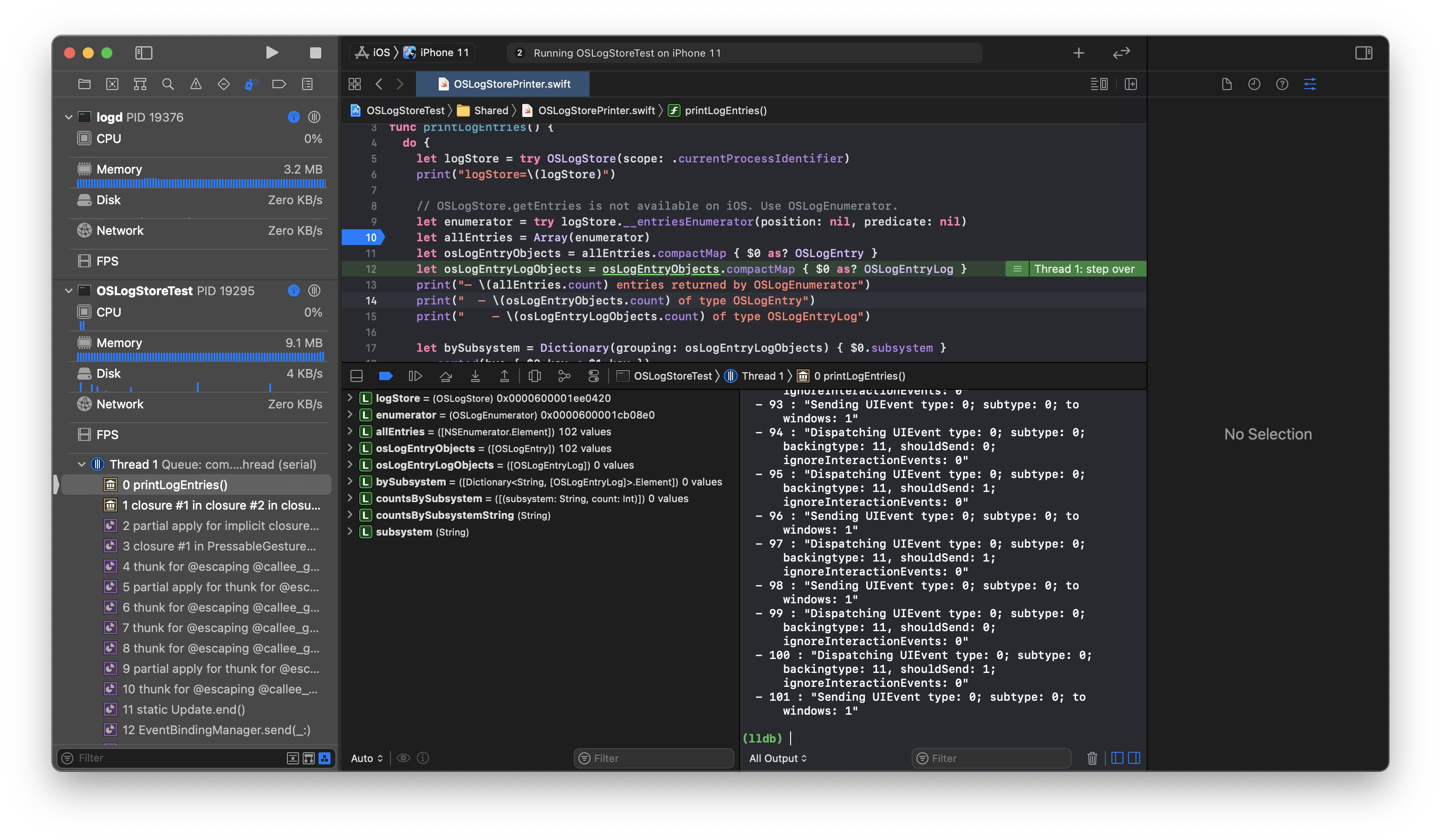
With iOS 14, Apple improved the built-in logging framework and added many missing pieces. Is OSLog now something that can finally be used?
Does OSLogStore Work Yet?
YES!*
*Apple removed `OSLogStore` from iOS 14 at the very last moment, but brought it back in iOS 15. As of iOS 15 beta 7 and macOS Monterey beta 5 (21A5304g) `OSLogStore` finally works. [Jump to the latest update "Update: iOS 15"](#update-ios-15).Why OSLog Is Awesome
Every developer uses some form of logging, be it NSLog in Objective-C or print in Swift. These helpers are convenient, but they don’t scale — there’s no concept to classify messages.
Apple introduced os_log with iOS 10 and macOS 10.12 in an attempt to provide a better universal logging system.1 It supersedes the ageing Apple System Logger (ASL) and comes with features expected from a modern logging system:
- Categorization and Filtering — Log levels and grouping via subsystem and category.
- Privacy — Dynamic strings, collections, and arrays are replaced to preserve personally identifiable information. This can be overridden on a per-parameter basis.
- Usability — The logging information collects calling information for you, and it’s integrated into the system via
Console.appand the log command line tool. If activity tracing is used, logs are automatically correlated. - Performance — Logs are stored extremely efficiently and all system logs are in one place.
You might have already stumbled over the log, as you now need a third breakpoint when investigating where a log message is coming from: Next to NSLog and CFLog, you now need a breakpoint to _os_log_impl.
The New Swift Logging Framework
Instead of calling os_log, you can now use the new Logger struct in Swift — at least if you have the luxury of exclusively supporting iOS 14 already:
let logger = Logger(subsystem: "com.steipete.LoggingTest", category: "main")
logger.info("Logging \(obj.description, privacy: .public)")
This innocent-looking code uses a bunch of new tricks! First off, the new string interpolation feature of Swift 5 is used to make it easy to customize the privacy of data.
Second, Apple modified the Swift compiler to allow compile-time constant expressions to evaluate the string at compile time. This ensures that logging is extremely fast. The technology behind it is fascinating, and it seems it was worth the wait.2 For more example code, see Apple’s excellent documentation on Generating Log Messages from Your Code.
Calling os_log in Swift
If you still need to use iOS 13 or are curious how things worked back in the day, here’s how calling os_log works. Naively, you might try following approach:
os_log("foo: \(x) \(obj.description)", log: OSLog.default, type: .debug)The compiler complains right away:
Cannot convert value of type ‘String’ to expected argument type ‘StaticString’
os_log requires the use of Objective-C style format strings for performance and security reasons.3 At the same time, Apple also strongly recommends to avoid wrapping os_log. So there’s really no way around using the following syntax:
os_log("foo: %@ %@", log: .default, type: .debug, x, obj.description)What’s the Problem with Wrapping OSLog?
OSLog is designed to accept static strings, in order to be fast and to correctly separate between dynamic data (private) and static data (public). Most wrappers simply forward messages via os_log("%{public}@"..., which makes all strings dynamic and public, removing most of the benefits of OSLog.
Apple maintains a separate SwiftLog logging framework for the Swift on Server ecosystem.4 The framework supports plugins, and there’s a third-party swift-log-oslog plugin, which forwards logs to the os_log machinery. Apple does link to it but also explicitly warns about usage:
we recommend using os_log directly as decribed here. Using os_log through swift-log using this backend will be less efficient and will also prevent specifying the privacy of the message. The backend always uses
%{public}@as the format string and eagerly converts all string interpolations to strings. This has two drawbacks: 1. the static components of the string interpolation would be eagerly copied by the unified logging system, which will result in loss of performance. 2. It makes all messages public, which changes the default privacy policy of os_log, and doesn’t allow specifying fine-grained privacy of sections of the message. In a separate on-going work, Swift APIs for os_log are being improved and made to align closely with swift-log APIs. References: Unifying Logging Levels, Making os_log accept string interpolations using compile-time interpretation.
There are also surprising bugs like doubles that aren’t logged correctly, which can be very hard to debug.
Accessing Log Files
Log files are useful whenever users report a bug or a crash is being sent. Most logging frameworks therefore include a rolling file logger, which makes it easy to access logs on demand.
Apple’s solution to accessing logs is either collecting a sysdiagnose or calling log collect --device on a terminal. The latter possibly requires filtering the output via the --start or --last limits and then sending the output manually.
This might work if your audience is macOS developers, but if you’re targeting regular users, it’s much harder to make them follow a tutorial and then explain how to send a multiple-hundred-megabyte sysdiagnose. Furthermore, this will only work if your user runs a recent version of macOS.
In all practicality, this resulted in basically no app using os_log directly, which completely defeats the point. The most used logging frameworks to date seem to be SwiftyBeaver and CocoaLumberjack.
The inability to access logs has been a point of personal frustration; there are multiple forum entries where people are just baffled that this doesn’t exist. I’ve brought it up every year in the WWDC labs except for in 2020. The usual answer is “Apple cares about privacy, so accessing logs is a no-go,” but the alternative is that people use other logging frameworks that have no privacy-preserving features built in.
At PSPDFKit, we tried switching to os_log but hit the same issues: Our customers depend on a custom log handler that integrates our log messages with their infrastructure. To date, this can only be done with OSLog using SPI.5
New in iOS 14: OSLogStore
With OSLogStore, Apple added an API to access the log archive programmatically. It allows accessing OSLogEntryLog, which contains all the log information you’ll possibly ever need.
The new store access is available for all platform versions of 2020. It’s the missing piece in the os_log story that finally will get us the best of both worlds. Let’s look at how this works:
func getLogEntries() throws -> [OSLogEntryLog] {
    // Open the log store.
    let logStore = try OSLogStore(scope: .currentProcessIdentifier)

    // Get all the logs from the last hour.
    let oneHourAgo = logStore.position(date: Date().addingTimeInterval(-3600))

    // Fetch log objects.
    let allEntries = try logStore.getEntries(at: oneHourAgo)

    // Filter the log to be relevant for our specific subsystem
    // and remove other elements (signposts, etc).
    return allEntries
        .compactMap { $0 as? OSLogEntryLog }
        .filter { $0.subsystem == subsystem }
}
The code is fairly straightforward; however, the above version has various issues, e.g. it works on macOS but doesn’t work on iOS.
Swift Overlay Issues
Apple forgot to add the Swift overlay shims on iOS, so we need to use some tricks to access the Objective-C enumerator (FB8518476):
#if os(macOS)
    let allEntries = try logStore.getEntries(at: oneHourAgo)
#else
    // FB8518476: The Swift shims for the entries enumerator are missing.
    let allEntries = try Array(logStore.__entriesEnumerator(position: oneHourAgo, predicate: nil))
#endif
Since the non-sugared version also works on macOS, it’s not necessary to do an if/else dance at all. However, this is a good pattern to document how it should work, assuming the bug gets fixed before the GM.
Predicate Issues
The next issue is that the entries enumerator has a built-in way of filtering via the predicate. However, this doesn’t seem to work (FB8518539):
// TODO: How to format the predicate? See "PREDICATE-BASED FILTERING" in `man log`.
// Things I tried unsuccessfully:
// - NSPredicate(format: "subsystem == %@", "com.steipete.LoggingTest")
// - NSPredicate(format: "subsystem == \"com.steipete.LoggingTest\"")
Credit for the syntax goes to Ole Begemann, who started investigating OSLogStore early on and maintains an OSLogStoreTest sample project.
iOS Entitlement Issues
While it’s fairly easy to work around the first two bugs, the third one is a real showstopper. While accessing the log store works great on macOS AppKit and macOS Catalyst, it fails with an entitlement error on iOS:
Error Domain=OSLogErrorDomain Code=9 "Client lacks entitlement to perform operation"
UserInfo={NSLocalizedDescription=Client lacks entitlement to perform operation, _OSLogErrorInternalCode=14}
Why this wouldn’t work isn’t documented, and neither is what entitlement is required. There’s anecdotal evidence on Twitter that Apple’s intent is to allow this on iOS, however, we’re slowly nearing the end of Apple’s beta cycle and there hasn’t been an official announcement or a fix.
If you feel strongly about this, please also report a radar and engage in the discussion on Apple’s Developer Forum.
Digging Deeper
How does OSLogStore access logs in the first place? The store is part of the OSLog framework, which includes a small XPC service. At initialization time, the store opens a synchronous XPC request to com.apple.OSLogService, the service included in the framework.
OSLogService ensures logs are filtered for the current process and then accesses OSLogEventStore. OSLogEventStore is implemented in the private LoggingSupport.framework. Here, you can see it connects to logd and also captures the failure condition, which ultimately produces the entitlement error.
If we keep digging and also take a look at logd, we find references to various private entitlements:
com.apple.private.logging.admincom.apple.private.logging.diagnostic
The admin one is required for accessing the log store. If we attach to both our app and logd, we can modify the flow at runtime to trick it into believing the entitlement is there, and voila, logging works on iOS!
{% twitter https://twitter.com/khaost/status/1297647313804857345 %}
Full credit goes to Khaos Tian, who took the time to figure out the details. Attaching LLDB to logd requires SIP to be disabled, since logd is hardened and doesn’t include the get-task-allow debug entitlement.
Streaming OSLog
It’s often desirable to stream log messages as they come in. This is a feature of many popular analytics and logging frameworks. Of course, OSLog also needs this feature.
LLDB is doing exactly that; it listens to OSLog messages and prints the streams as they’re created. Thankfully, LLDB is open source, so we can look at DarwinLogCollector.cpp, which implements this feature.6
The SPI we need is in ActivityStreamSPI.h, which is part of LLDB. (It contains various structs which cannot be redefined in Swift; this file needs to be plain C.) The main functions that are important to us are:
// Get an activity stream for a process.
typedef os_activity_stream_t (*os_activity_stream_for_pid_t)(
    pid_t pid, os_activity_stream_flag_t flags,
    os_activity_stream_block_t stream_block);

// Start the activity stream.
typedef void (*os_activity_stream_resume_t)(os_activity_stream_t stream);

// Stop the activity stream.
typedef void (*os_activity_stream_cancel_t)(os_activity_stream_t stream);

// Get a formatted message out of an activity.
typedef char *(*os_log_copy_formatted_message_t)(os_log_message_t log_message);
Given these functions, we can write a Swift7 class that accesses the streaming log. You can see a reference implementation in my gist of OSLogStream.swift. While this works, SPI is still a private API and you shouldn’t ship this in the App Store (FB8519418).
The complete sample project is on GitHub.
Conclusion
OSLog is an extremely awesome API and all the pieces are there — they’re just currently locked away behind private APIs, entitlements, and some bugs. It remains exciting to see if Apple will fix the various issues in OSLogStore before the GM. Or does it work as intended?
Did I miss something? Hit me up on Twitter or open a pull request to help with typos. Thanks! 🙏
Update: Testing with iOS 14 Beta 8
Apple changed the header documentation for OSLogStore to explain which certificate is needed (com.apple.logging.local-store):
 *
 * Gaining access to the local unified logging system requires
 * permission from the system. The caller must be run by an admin
 * account and the have the com.apple.logging.local-store
 * entitlement.
 */
+ (nullable instancetype)localStoreAndReturnError:(NSError **)error
API_AVAILABLE(macos(10.15)) API_UNAVAILABLE(ios, tvos, watchos)
NS_SWIFT_NAME(local());
However, running my example on iOS now fails completely because the storeWithScope:error: initializer is completely missing:
+[OSLogStore storeWithScope:error:]: unrecognized selector sent to class 0x1fae85728If we use the runtime to look at what’s there instead, we can verify that it’s gone. Interestingly enough, the “unavailable” localStore initializer exists on iOS:
(lldb) expression -l objc -O -- [[OSLogStore class] _methodDescription]
<OSLogStore: 0x1fae85728>:
in OSLogStore:
	Class Methods:
		+ (id) localStoreAndReturnError:(id*)arg1; (0x1ce73622c)
		+ (id) storeWithURL:(id)arg1 error:(id*)arg2; (0x1ce735f10)
	Instance Methods:
		- (id) entriesEnumeratorWithOptions:(unsigned long)arg1 position:(id)arg2 predicate:(id)arg3 error:(id*)arg4; (0x1ce735ce0)
		...
When we use some header trickery to call this initializer, we get the following error:
Domain=OSLogErrorDomain Code=10 "Connection to logd failed" UserInfo={NSLocalizedDescription=Connection to logd failed, _OSLogErrorInternalCode=15}Simulator prints a slightly different error:
Error Domain=OSLogErrorDomain Code=-1 "No access to local store" UserInfo={NSLocalizedDescription=No access to local store}Using OSLogStore(scope: .currentProcessIdentifier) works on Simulator, but it still prints the familiar “Client lacks entitlement to perform operation” error. Declaring com.apple.logging.local-store in the entitlements didn’t change anything:
Error Domain=OSLogErrorDomain Code=9 "Client lacks entitlement to perform operation" UserInfo={NSLocalizedDescription=Client lacks entitlement to perform operation, _OSLogErrorInternalCode=14}
failure(Foundation._GenericObjCError.nilError)
The Swift shims for enumeration are still missing. Given that this is likely the last beta before the GM, it doesn’t look like OSLogStore will be functional.
Accessing the log store still works on Catalyst, however I only did a quick run, as running Catalyst apps is broken in the current beta.
Update: Tested with iOS 14 GM
Apple removed OSLogStore from iOS completely with the iOS 14 GM release:
API_AVAILABLE(macos(10.15)) API_UNAVAILABLE(ios, tvos, watchos)
OS_EXPORT
@interface OSLogStore : NSObject
This is a surprising move and really sad. There’s still hope that this API might come back with iOS 14.1 beta and that it was simply removed due to it not working and time restrictions, but as there’s no official communication around it, it’s impossible to say.
If you think this API is important, and that the absence of it results in things being slower and less secure for everyone, please make yourself heard and submit feedback.
Even worse: Apple forgot a definition in the late-removal, so importing OSLog now fails completely and just produces an error “‘OSLogEnumeratorOptions’ is unavailable: not available on iOS” with Xcode 12 GM. This has been fixed in Xcode 12.2b1.
{% twitter https://twitter.com/steipete/status/1310285038349684738?s=21 %}
Update thanks to Kay Butter: This can be fixed via importing os.log instead of OSLog.
Apple peeps: I reported this feature request via FB8704637.
Update: An Honest Voice
It’s been quiet around OSLogStore for many months, but finally there’s a new semi-official note on it. Quinn “The Eskimo!” talks about it in this DevForum entry
In iOS 14 beta we added the OSLog framework to the iOS SDK, along with a new initialiser to OSLogStore that allowed iOS apps to read their own log messages. Unfortunately this feature didn’t work properly )-: and so it was removed very late in the iOS 14 beta cycle. (…) What I can say is that the OSLog team are well aware of the demand for this feature from third-party developers.
This gives me high hopes that we see this feature finally land in iOS 15. WWDC 2021 is going to be exciting!
Update: iOS 15
As of iOS 15 and macOS Monterey, OSLogStore works just as expected. No entitlements or hacks needed. It works in the Simulator, on device, on macOS and macOS Catalyst. Try out the OSLogTest project here.
Further Reading
- Unified Logging and Activity Tracing, WWDC 2016
- Explore logging in Swift, WWDC 2020
- Generating Log Messages from Your Code
- Meet the new Logger API
- Making
os_logPublic on macOS Catalina - Unredacting <private> os_log() messages on iOS
-
This post doesn’t address
os_signpost,os_trace, andos_activity— all of which are amazing features that fit into the logging concept and that you should be using. ↩ -
Apple claimed in the WWDC 2016 video about unified logging that support for Swift was coming “real soon.” It took four years, but Apple finally delivered on a worthy wrapper. ↩
-
It’s fairly easy to cause undefined behavior with NSLog when Swift string interpolation and Swift format specifiers are mixed. There’s a great example of this on Stack Overflow.
os_logalso supports a few special identifiers that aren’t part of NSString, so it’s not exactly the same. ↩ -
There are efforts underway to try to unify or at least better align the two logging frameworks. See Logging levels for Swift’s server-side logging APIs and new os_log APIs in the Swift Forums. ↩
-
System Programming Interface. This is a private API that’s used within Apple’s frameworks. As such, it’s extremely rare that SPI is changed, unlike completely internal private APIs. ↩
-
A more convenient implementation is in FLEX. ↩
-
There’s currently no way to correctly define C structs in Swift, so importing the
ActivityStreamSPI.hC file is a requirement. This is a shame, as it makes releasing the sample code above as a SwiftPM module nearly impossible. We can either rewrite everything in Objective-C to make it work or hope that mixed-mode projects will be supported eventually. ↩