





As of macOS 10.15.4, text input in Mac Catalyst apps sometimes crashes. I’ve noticed this a lot in Twitter for Mac, however, we also saw crash reports for PDF Viewer for Mac. My hope was Apple would fix this in 10.15.5, but now the release is out and things are still crashing, so let’s fix this ourselves.
A Typical Crash
Here’s what a typical crash looks like:
Exception Type:        EXC_BAD_ACCESS (SIGSEGV)
Exception Codes:       KERN_INVALID_ADDRESS at 0x0000000000000018
Exception Note:        EXC_CORPSE_NOTIFY

Termination Signal:    Segmentation fault: 11
Termination Reason:    Namespace SIGNAL, Code 0xb
Terminating Process:   exc handler [45863]

VM Regions Near 0x18:
-->
    __TEXT                 000000010b6ee000-000000010b6ef000 [    4K] r-x/r-x SM=COW  /Applications/Twitter.app/Contents/MacOS/Twitter

Application Specific Information:
objc_msgSend() selector name: contextBeforeInput


Thread 0 Crashed:: Dispatch queue: com.apple.main-thread
0   libobjc.A.dylib               	0x00007fff6afac81d objc_msgSend + 29
1   com.apple.RemoteTextInput     	0x00007fff5e20831a -[RTIDocumentState selectedTextRange] + 38
2   com.apple.AppKit              	0x00007fff2fe47a80 -[NSTextInputContext(NSTextInputContext_RemoteTextInput_UIKitOnMac) selectedRange_RTI] + 72
3   com.apple.AppKit              	0x00007fff2f8273f1 -[NSTextInputContext(NSInputContext_WithCompletion) selectedRangeWithCompletionHandler:] + 92
4   com.apple.AppKit              	0x00007fff2f827343 -[NSTextInputContext selectedRange] + 124
5   com.apple.AppKit              	0x00007fff2f662e3f -[NSTextCheckingController selectedRangeWithCompletionHandler:] + 66
6   com.apple.AppKit              	0x00007fff2f662df6 -[NSTextCheckingController annotatedSubstringForSelectedRangeWithCompletionHandler:] + 77
7   com.apple.AppKit              	0x00007fff2f662d9e -[NSTextCheckingController _checkBubblesAfterMovementFromRange:] + 124
8   com.apple.AppKit              	0x00007fff2f660bd1 -[NSTextCheckingController didChangeSelectionFromRange:] + 121
9   com.apple.AppKit              	0x00007fff2fb9aaf0 -[NSBridgedTextCorrectionController observeValueForKeyPath:ofObject:change:context:] + 318
10  com.apple.Foundation          	0x00007fff34880550 NSKeyValueNotifyObserver + 335
11  com.apple.Foundation          	0x00007fff3496f7bc NSKeyValueDidChange + 437
The crashers all circle around NSTextCheckingController, NSBridgedTextCorrectionController, and NSTextInputContext, but they vary quite a bit.
Crash Hypothesis
A crash pattern like the one above indicates we’re dealing with an over-release. In times of ARC, this is rare, but it can still happen if a property is set on multiple threads. Text input in Mac Catalyst is a challenge. There’s text and grammar correction that simply works differently than in iOS, and a user expects that this works just like with any other AppKit app. Apple bridged these systems:
-[NSTextInputContext(NSTextInputContext_RemoteTextInput_UIKitOnMac) attributedString_RTI]Taking a closer look at RemoteTextInput.framework, we can see it uses XPC under the hood. XPC uses background threads to communicate:
@interface RTIInputSystemServiceSession : RTIInputSystemSession <RTIInputSystemPayloadDelegate, RTIInputSystemSessionProtocol> {
    NSXPCConnection * _connection;
    ...
In the first crash, we see -[NSTextInputContext(NSTextInputContext_RemoteTextInput_UIKitOnMac) selectedRange_RTI] calling -[RTIDocumentState selectedTextRange]. Let’s find the former. From my earlier experiments with Marzipan, I know that a lot of UIKit-AppKit glue code is in UIKitMacHelper, in the iOSSupport system /System/iOSSupport/System/Library/PrivateFrameworks/UIKitMacHelper.framework, which is really a symlink to /System/Library/PrivateFrameworks/UIKitMacHelper.framework.Versions/A/UIKitMacHelper. However, there’s no selectedRange_RTI implementation. Where else could it be?
Finding the Implementation
To find out where a method or category is implemented, I’m using dladdr, an old trick I learned in 2014. Since this is a bit difficult to call via LLDB, we write a small helper, which can be anywhere in your app:
@implementation NSObject (PSHAXX)
+ (void)findHaxx {
    let klass = NSClassFromString(@"NSTextInputContext");
    let sel = NSSelectorFromString(@"selectedRange_RTI");
    Dl_info info;
    if (dladdr(class_getMethodImplementation(klass, sel), &info)) {
        NSLog(@"%s", info.dli_fname);
    }
}
@end
Once the app runs, we call findHaxx: e -l objc -O -- [NSObject findHaxx] and see that it returns /System/Library/Frameworks/AppKit.framework/Versions/C/AppKit.
Update: @JorgeWritesCode pointed out that there’s a more convenient way to do this directly from LLDB:
(lldb) image lookup -n "-[NSTextInputContext selectedRange_RTI]"
1 match found in /System/Library/Frameworks/AppKit.framework/Versions/C/AppKit:
        Address: AppKit[0x00000000009f2938] (AppKit.__TEXT.__text + 10418568)
        Summary: AppKit`-[NSTextInputContext(NSTextInputContext_RemoteTextInput_UIKitOnMac) selectedRange_RTI]
Analyzing NSTextInputContext
Now we know that Apple bolted a lot of Catalyst code directly into AppKit. This is an interesting choice, as every Mac app pays some overhead for Catalyst in Catalina. Let’s look at the pseudocode of selectedRange_RTI with Hopper:
/* @class NSTextInputContext */
-(struct _NSRange)selectedRange_RTI {
    r15 = _cmd;
    rbx = self;
    rdi = *([self auxiliary] + 0x58);
    if (rdi != 0x0) {
            r14 = [[rdi documentState] selectedTextRange];
            r12 = rdx;
            if (*(int8_t *)_s__NSiOSMacClientLoggingComputedValue != 0x0) {
                    rax = *(int8_t *)_s__NSiOSMacClientLoggingComputedValue;
                    rax = rax + 0xfe;
            }
            else {
                    rax = __NSGetBoolAppConfig(@"__NSiOSMacClientLogging", 0x0, _s__NSiOSMacClientLoggingComputedValue, 0x0);
            }
            if (rax != 0x0) {
                    NSLog(@"[%@ %@] (RTIDocumentState=>selectedTextRange) => selectedRange=%@", NSStringFromClass([rbx class]), NSStringFromSelector(r15), NSStringFromRange(r14));
            }
    }
    else {
            r14 = 0x7fffffffffffffff;
            r12 = 0x0;
    }
    rax = r14;
    return rax;
}
With this pseudocode, we know that NSTextInputContext calls the RemoteTextInput framework through an auxiliary variable. Let’s test this at runtime:
e -l objc -O -- [[[[[[NSApplication sharedApplication] mainWindow] firstResponder] inputContext] auxiliary] _ivarDescription]
<__NSTextInputContextAuxiliaryStorage: 0x60000295aae0>:
in __NSTextInputContextAuxiliaryStorage:
	_inputContext (NSTextInputContext*): <NSTextInputContext: 0x600002c95500>
	_functionRowItemIdentifiers (NSArray*): <__NSArray0: 0x7fff88742300>
	_keyboardInputSourceViewController (NSViewController*): nil
	_keyboardInputSourcePopoverTouchBarItem (NSPopoverTouchBarItem*): nil
	_keyboardInputSourcePopoverTouchBar (NSTouchBar*): nil
	_characterPickerViewController (NSViewController*): <IMKInputSession_NSRemoteViewController: 0x600002c0da00>
	_characterPickerPopoverTouchBarItem (NSPopoverTouchBarItem*): nil
	_pressAndHoldPopoverTouchBarItem (NSPopoverTouchBarItem*): nil
	_trackpadHandwritingPopoverTouchBarItem (NSPopoverTouchBarItem*): nil
	_ucharDataForSelectedInputSource (NSData*): <__NSCFData: 0x11989a000>
	_rtiCurrentInputSystemServiceSession (RTIInputSystemServiceSession*): <RTIInputSystemServiceSession: 0x6000021f4280>
	_ticFlags (struct ?): {
		_haveKeyboardIM (b1): NO
		_havePressAndHold (b1): NO
		_haveCharacterPickerInput (b1): YES
		_haveTrackpadHandwritingInput (b1): NO
		_characterPickerDisabled (b1): NO
		_haveFunctionRowDeviceKVOObserver (b1): YES
		_iosMacClient (b1): YES
		_extra (b25): 0
	}
in NSObject:
	isa (Class): __NSTextInputContextAuxiliaryStorage (isa, 0x1dffff8820fafd)
The decompiled code calls rdi = *([self auxiliary] + 0x58); so we know it’s a direct ivar access; we can also access this code at runtime via KVC:
e -l objc -O -- [[[[[[NSApplication sharedApplication] mainWindow] firstResponder] inputContext] auxiliary] valueForKey:@"_rtiCurrentInputSystemServiceSession"]
<RTIInputSystemServiceSession: 0x6000021f4280>
Thread Access Check
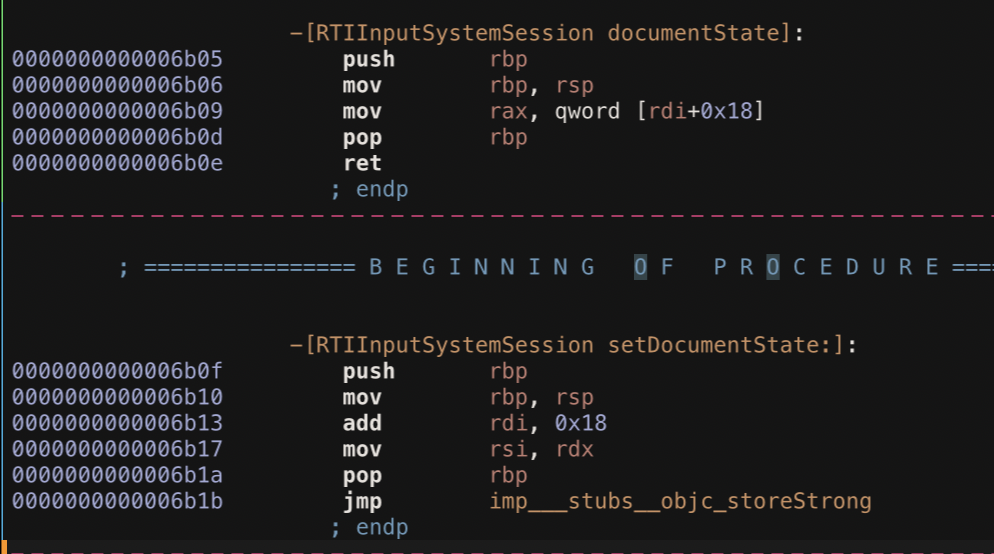
The Catalyst glue calls documentState on RTIInputSystemServiceSession. Let’s look at it via Hopper:
This is the default implementation of a nonatomic property; there are no locking intrinsics here. From looking at the crash, I’m guessing this is a race condition. Let’s verify this via adding breakpoints on -[RTIInputSystemServiceSession documentState] and -[RTIInputSystemServiceSession setDocumentState]:
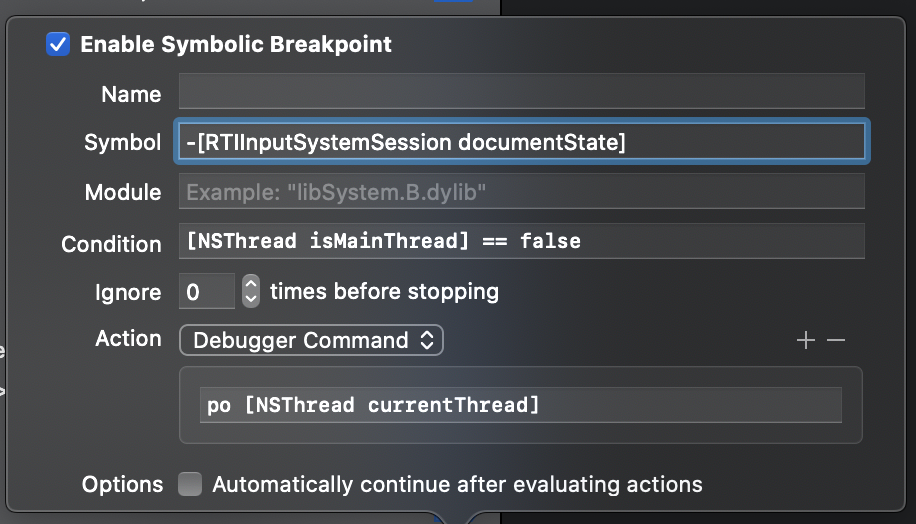
I’m using a conditional breakpoint that stops if non-main-thread access is detected. It also prints out the thread automatically. Since we’re in AppKit, methods are usually called on the main thread (remove the condition to verify). However, sometimes this is called from an XPC thread:
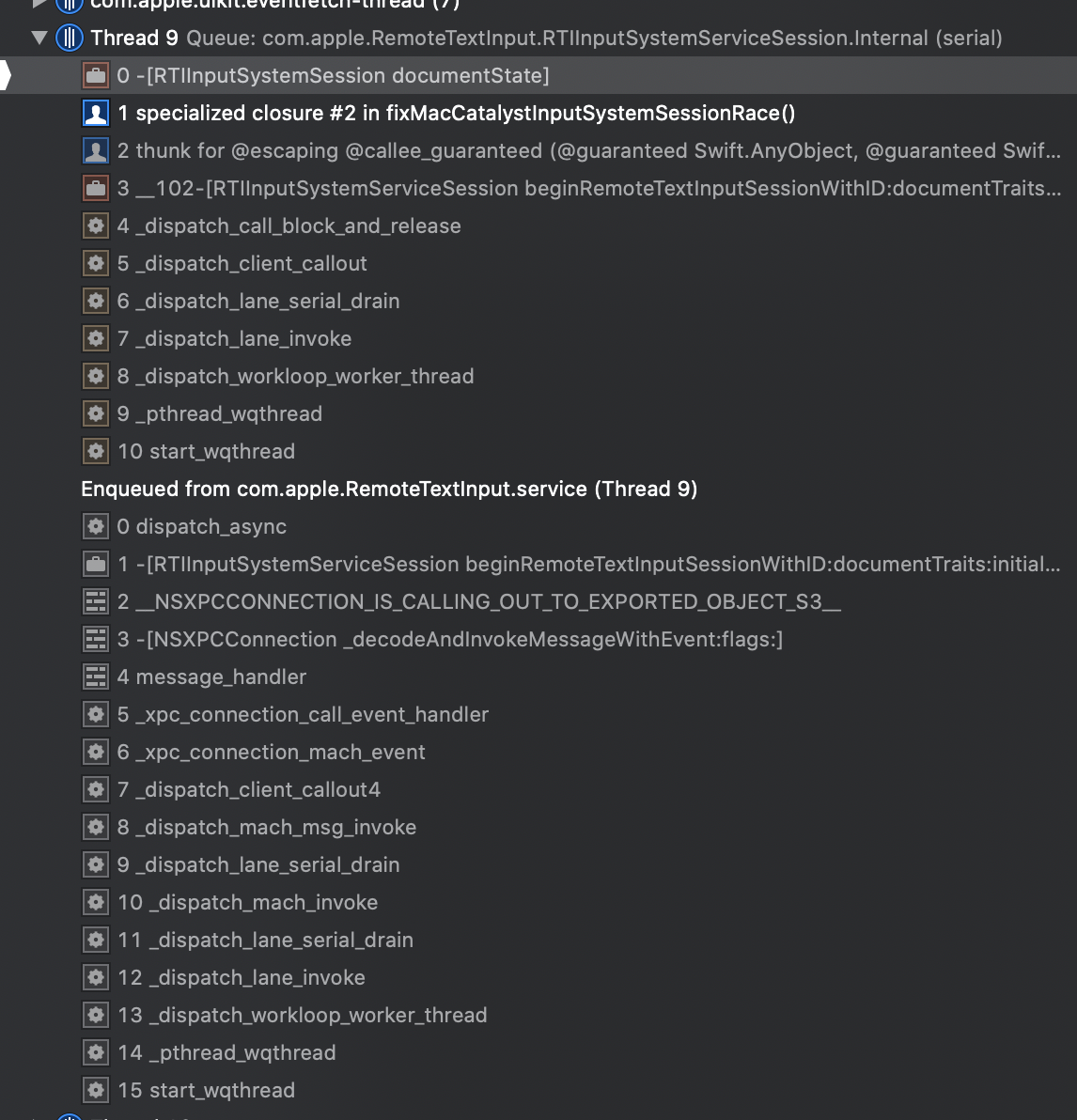
And we verified the issue! documentState is usually accessed from the main thread, but both the getter and setter are also accessed via XPC, and here Apple forgot to dispatch to the main thread.
Here’s an example for the setter:
(lldb) bt
* thread #4, queue = 'com.apple.RemoteTextInput.RTIInputSystemServiceSession.Internal', stop reason = breakpoint 7.1
  * frame #0: 0x000000010008529f PDF Viewer`specialized closure #2 in fixMacCatalystInputSystemSessionRace(blockSelf=0x0000600002228500, newValue=0x00006000026761c0, origIMP=0x00007fff5cf8fb05, lockStore=Darwin.os_unfair_lock @ 0x0000600000255390, sel="documentState") at MacCatalystAppKitTextCrashFix.swift:78:19
    frame #1: 0x0000000100085daa PDF Viewer`thunk for @escaping @callee_guaranteed (@guaranteed Swift.AnyObject, @guaranteed Swift.AnyObject) -> () at <compiler-generated>:0
    frame #2: 0x00007fff5cf8c942 RemoteTextInput`__102-[RTIInputSystemServiceSession beginRemoteTextInputSessionWithID:documentTraits:initialDocumentState:]_block_invoke + 75
    frame #3: 0x0000000117a35844 libdispatch.dylib`_dispatch_call_block_and_release + 12
    frame #4: 0x0000000117a36826 libdispatch.dylib`_dispatch_client_callout + 8
    frame #5: 0x0000000117a3ddd7 libdispatch.dylib`_dispatch_lane_serial_drain + 777
    frame #6: 0x0000000117a3eb90 libdispatch.dylib`_dispatch_lane_invoke + 438
    frame #7: 0x0000000117a4bfe0 libdispatch.dylib`_dispatch_workloop_worker_thread + 691
    frame #8: 0x0000000117ac4361 libsystem_pthread.dylib`_pthread_wqthread + 290
    frame #9: 0x0000000117ac349b libsystem_pthread.dylib`start_wqthread + 15
Making a Non-Atomic Property Atomic
Now that we understand the issue, it’s fairly easy to fix.1 Let’s add a lock to prevent the property from a raced access:
private var didInstallCrashFix = false

private func fixMacCatalystInputSystemSessionRace() -> Bool {
    guard let klass = NSClassFromString("RTIInputSystemSession") else { return false }
    guard didInstallCrashFix == false else { return false }

    var lockStore = os_unfair_lock()
    let sel = NSSelectorFromString("documentState")
    var origIMP : IMP? = nil
    let newHandler: @convention(block) (AnyObject) -> AnyObject = { blockSelf in
        typealias ClosureType = @convention(c) (AnyObject, Selector) -> AnyObject
        let callableIMP = unsafeBitCast(origIMP, to: ClosureType.self)
        os_unfair_lock_lock(&lockStore)
        defer {
            os_unfair_lock_unlock(&lockStore)
        }
        return callableIMP(blockSelf, sel)
    }
    guard let method = class_getInstanceMethod(klass, sel) else { return false }
    origIMP = class_replaceMethod(klass, sel, imp_implementationWithBlock(newHandler), method_getTypeEncoding(method))

    let setSel = NSSelectorFromString("setDocumentState:")
    var setOrigIMP : IMP? = nil
    let newSetHandler: @convention(block) (AnyObject, AnyObject) -> Void = { blockSelf, newValue in
        typealias ClosureType = @convention(c) (AnyObject, Selector, AnyObject) -> Void
        let callableIMP = unsafeBitCast(setOrigIMP, to: ClosureType.self)
        os_unfair_lock_lock(&lockStore)
        callableIMP(blockSelf, sel, newValue)
        os_unfair_lock_unlock(&lockStore)
    }
    guard let setMethod = class_getInstanceMethod(klass, setSel) else { return false }
    setOrigIMP = class_replaceMethod(klass, setSel, imp_implementationWithBlock(newSetHandler), method_getTypeEncoding(setMethod))

    didInstallCrashFix = true
    return origIMP != nil && setOrigIMP != nil
}
I’m using os_unfair_lock to synchronize the original property call. Since the actual implementation is extremely short and thus fast, this is a better choice than a more heavyweight dispatch queue to sync.
Swizzling Dynamically Loaded Frameworks
Now there’s one last problem: When we call this in our app delegate, the RTIInputSystemSession class doesn’t exist. The RemoteTextInput is loaded at some later time, when we’re first entering the call. Of course, we could find a later spot and make sure we call this before any text input, but that’s not an elegant solution. Instead, we can hook into dyld to simply be notified whenever a new framework is loaded into our process:
_dyld_register_func_for_add_image { _, _ in
    DispatchQueue.main.async {
        if fixMacCatalystInputSystemSessionRace() {
            print("Successfully installed Mac Catalyst Text Input Race Fix.")
        }
    }
}
I’m dispatching to the main thread just to make sure this isn’t accidentally called on multiple threads, in order to not produce yet another race.
The complete code is in this Gist. MIT Licensed. Call installMacCatalystAppKitTextCrashFix() from your App Delegate, and don’t forget to check if Apple might have eventually fixed2 this issue. (Apple folks: FB7593149.)
Update: InterposeKit
Since the swizzling code here isn’t easy to write or read, I built InterposeKit, a library that helps with that. Much nicer, eh?
try Interpose.whenAvailable(["RTIInput", "SystemSession"]) {
    let lock = DispatchQueue(label: "com.steipete.document-state-hack")
    try $0.hook("documentState", { store in { `self` in
        lock.sync {
            store((@convention(c) (AnyObject, Selector) -> AnyObject).self)(`self`, store.selector)
        }} as @convention(block) (AnyObject) -> AnyObject})

    try $0.hook("setDocumentState:", { store in { `self`, newValue in
        lock.sync {
            store((@convention(c) (AnyObject, Selector, AnyObject) -> Void).self)(`self`, store.selector, newValue)
        }} as @convention(block) (AnyObject, AnyObject) -> Void})
}-
Swizzling in Swift isn’t pretty, but once you know how it works, it’s not much different than Objective-C — just a bit more verbose. If there’s a way to make this better/more concise, please slide into my DMs. ↩
-
To fix this, remove three characters from a property (the “non” in non-atomic). ↩