









At PSPDFKit, we provide an SDK to display and annotate PDFs, for other people to integrate into their apps. There is a large set of API and therefore many things can go wrong. As you can imagine, things are quite busy on support as I work every day with developers reading through their bug reports. At the same time, we also forward many bugs to the engineers at Apple, as they ship even larger frameworks with even more API (e.g. UIKit), because all software has bugs.
Over the years, this dual role has given me quite a perspective on what makes a good bug report. While this post is Apple-centric, many details can be applied to any sort of bug reporting.
To quote Tanya Gupta from Apple:
“Sometimes they say, well it’s a really obvious problem! I’m sure you have 12 copies of the bug. I am sure someone else has already filed it, should I still file a bug report? Yes, you should still file a bug report. Better have 5 copies of a bug than none at all. At Apple, if an issue is not tracked using a bug report, it essentially does not exist for us. Bug reports are like to-do items. We track everything using bug reports. Bugs, tasks, even big features that go into a particular release.”
Why you should care
While I’ve inevitably been pushed into more management over the years, I’m still an iOS developer at heart (and at night). iOS isn’t going anywhere. Our product isn’t going anywhere either. If you encounter a bug and just look the other way, that might be okay once. Do that 100 times and your code will be a minefield. People in your team will not understand why you’re doing things in such a weird way, and will tap into the same issues again and again. If you take time to analyze the issue and document it, the hack will now be maintainable and have a (manual) test case in the form of a sample. With every major iOS version, you can easily try the sample to check if the hack is still needed. It’s also documented for new people that join the team, so they don’t undo your crazy code because you had reasons. It also opens doors. If you care and are nice to people, you might see that they care as well and are nice to you too when you’re stuck.
So, here we go - tips on filing good radars.
File one report per issue
Don’t try to save time by writing multiple problems into one radar/ticket. One issue should always be one ticket. This makes it much easier to track the status and to move it to people internally.
Add the selector name to the issue title
Often Apple engineers try to search the HUGE radar database for dupes. Adding the selector to the title makes this much easier. Since all Apple frameworks are written in Objective-C (except Create ML which is still in beta as of June 2018), please use the Objective-C name.
Make a short, runnable sample
Even if it’s trivial to reproduce. And until Swift really settles on features, please write it in Objective-C. Nothing is more annoying than getting a sample that doesn’t compile without manual edits. Delete everything that’s not important like the fillers that Xcode adds. Strip it down to just the bug. I usually don’t bother writing a test case because you don’t know how their architecture looks and chances are high that they don’t re-use the test (considering license issues alone), so a regular app is fine.
At PSPDFKit, we usually mirror the samples that we attach to the radar in a public GitHub repo while noting that updated samples are available under this public repository. This doesn’t work for all radars: sometimes the bug report or the sample contain confidential information. But in most cases we can keep our radars public.
Update (May 2019): With Swift 5 out, using Swift as the radar language for examples is now generally fine; changes are small enough that it should work. Not all engineers are fluent in Swift yet however, so your experience will vary.
Make it really obvious to trigger the issue
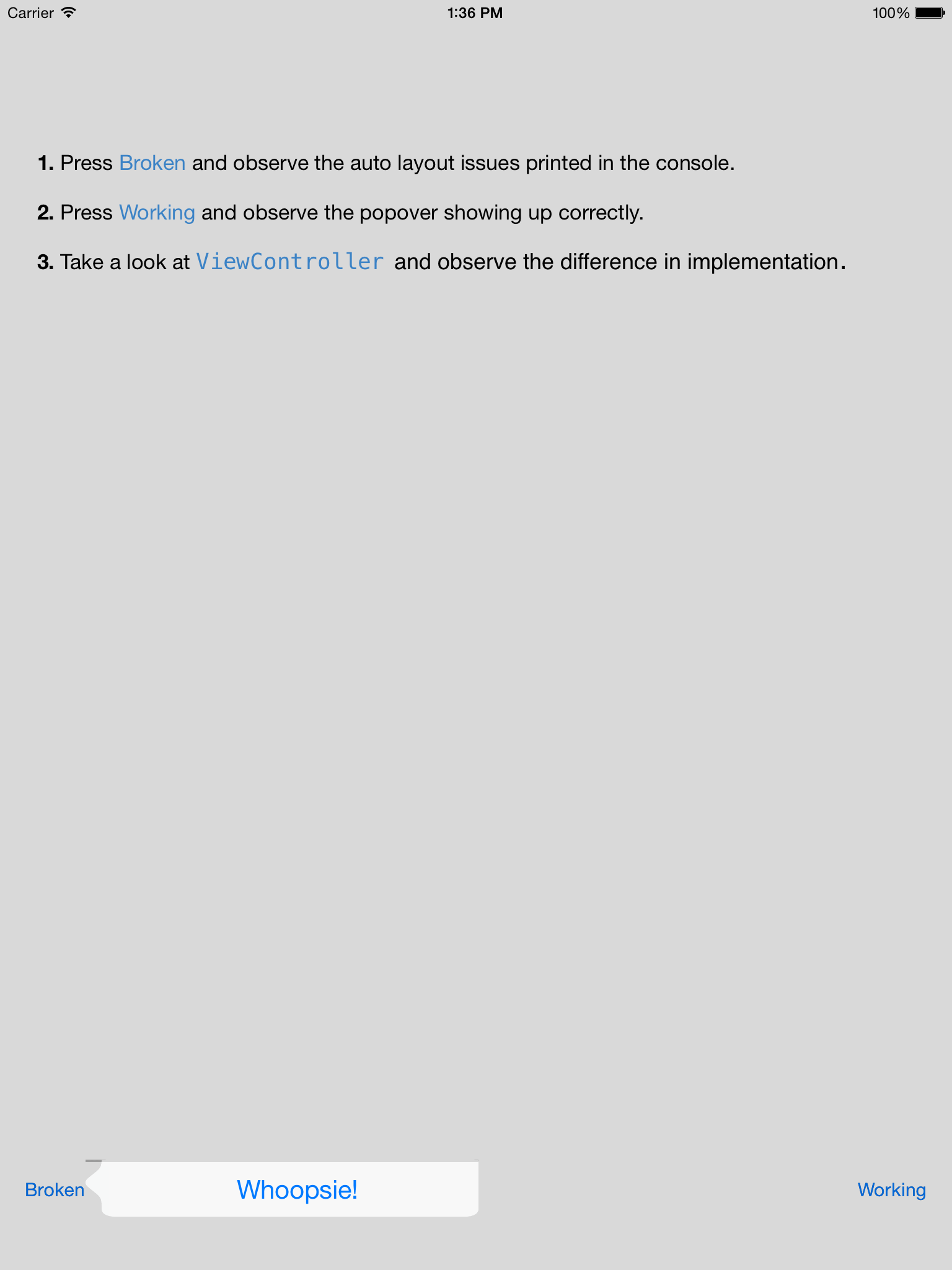
I often add a big button named “Press me to crash” or “Tap for tears.” Make it obvious. An alert that explains the thing a bit more on load is also very very useful. Here’s how we explain rdar://20020818.
Add humor
Bug reports don’t need to be dry! Sometimes they are because I’m in a hurry. Sometimes they are Dr. Who themed. Or have cat pictures. Or funny texts. Or they show a message that can only be read once a bug is fixed. I’m sure the engineer appreciates a bit of creativity - just don’t obscure the bug or make the sample harder to use. Whatever you do, it shouldn’t get in the way of their work.
Made a Dr. Who themed radar about the cut off edges on UIAlertController. rdar://25572553 /cc @smileyborg pic.twitter.com/D9YWfdDyeC
— Peter Steinberger (@steipete) April 6, 2016
But also be productive. Rants like “nothing works” doesn’t help anyone and just make it less likely that someone will work on your issue. You’re not working with a machine but with real humans here. Make good stuff, and you’ll get more responses.
Be concise
Don’t write a novel. Try to explain the issue in concise terms and then optionally add a second block where you go into more details. What have you tried already to work around it? What assumptions do you have? Some of our radars are quite short - yet complete.
The report title is especially important. Be clear and succinct. It should be descriptive. See it as an advertisement for your cause. There will always be too many bugs to fix. If you want your problem to be fixed, make an effort, and write up a good article. Write it so that the engineer wants to open it, read it, and fix it.
Keep in mind that the engineers might not have an efficient way to contact you. If they respond to a radar, this might be screened. And because screening can take up to a few days, try to write complete information that allows any engineer to reproduce the issue without further questions.
Propose a workaround
Radars are also documentation, and other developers might find your radar, as long as you re-post it to Open Radar. If you have a workaround - add it! A good example of this is rdar://26295020 - Action sheets presented for links/numbers don’t work in presented view controllers. The problematic code was duplicated in WKWebView, which is open source. That made it quite easy to understand and then find the least invasive way to work around.
You can use the open source QuickRadar Mac app to make writing bug reports faster. It even allows cross-posting to Open Radar. It currently doesn’t play along with two-factor authentication, but I’m sure eventually someone will add that as well.
Add a symbolicated crash log if applicable
Sometimes radars get pushed back as we’re reporting a crash and even include a sample project. The separate .crash file allows Apple to better categorize the crash and match it with existing data. Of course, not every radar is a crash.
Timing is Key
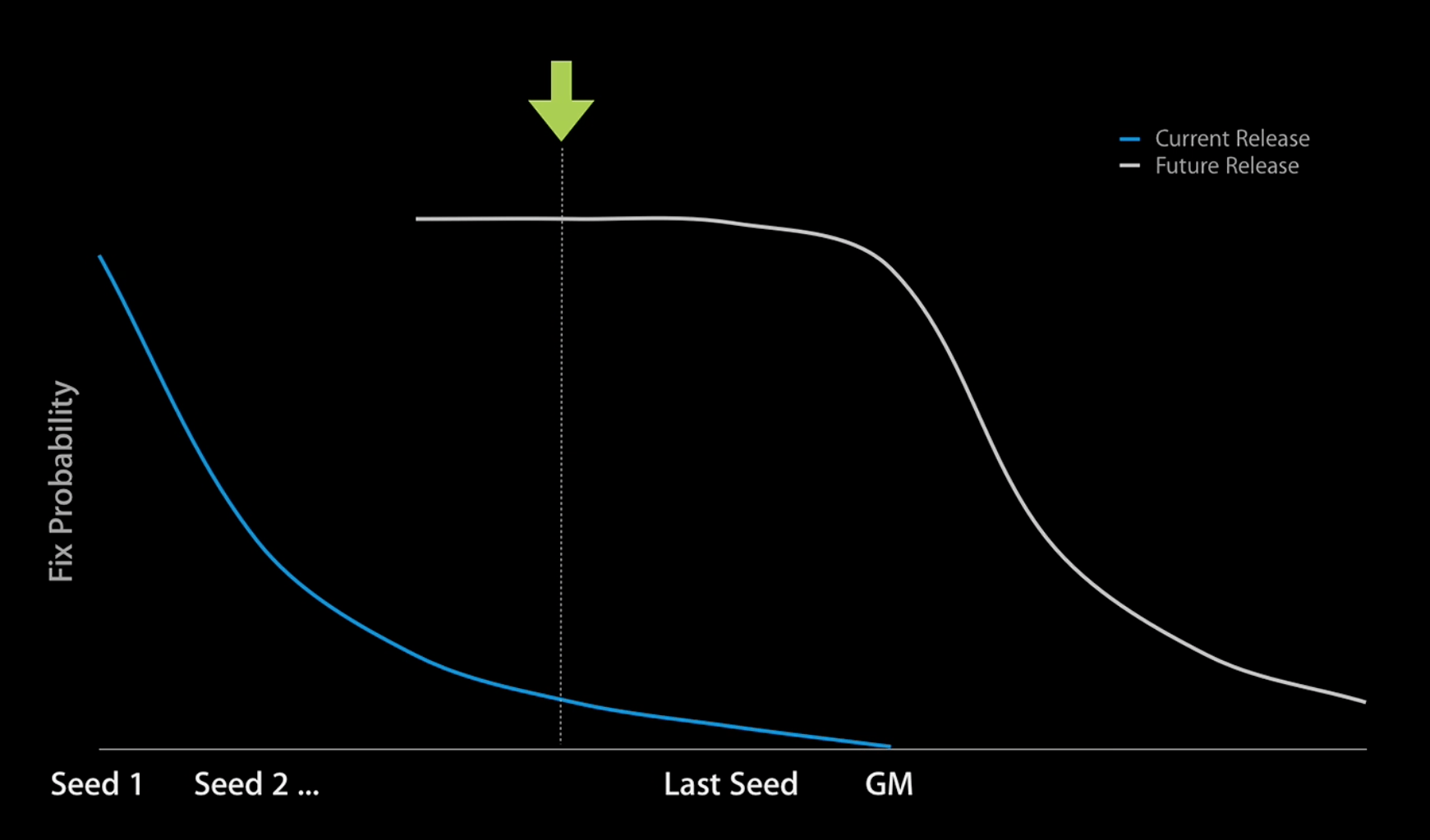
Whenever Apple releases a new major version of its OS - test early! Chances that your bug gets fixed when you report it in Seed 1 are much more likely than when the GM is just a few weeks away.
Here’s an incomplete list of bugs the PSPDFKit team wrote this year (crossed out radars are fixed)
- rdar://28827675 UIAppearance setter called multiple times
- rdar://28799659 UIPasteboard needs asynchronous calls
- rdar://28787338 Universal Clipboard causing apps to freeze for up to 15 seconds while it checks for data on the main thread
- rdar://28776130 Allow preloading custom application data for UI Tests
- rdar://28771678 UIPasteboard notifications don’t fire for other processes
- rdar://28612548 ThreadSanitizer: use of an invalid mutex (e.g. uninitialized or destroyed) (CoreGraphics+0x34650f) in ripl_retain
- rdar://28577248 Identifier of Apple Watch should be selectable or copyable via cmd-c in the Devices window. Had to use Accessibility Inspector to copy it. O.o
- rdar://28281042 UIDocumentMenuViewController returns 100 on modalPresentationStyle on iOS 10. (UIActivityViewController was affected in iOS 10 beta, but is fixed as of GM)
- rdar://28275291 UIMenuController is leaking out blur background. Discussed at WWDC 2016. Hard to reproduce. Always sticks in the eye.
- rdar://28252672 Crash: Double-Free when using Core Image (deep in CoreImage /libFosl_dynamic)
- rdar://28252227 Incorrect App Store rejections for name clashes on methods that happen to be named like private API (especially bad for us, as we ship an SDK.)
- rdar://28250871 CoreGraphics PDF backend has a confusing log
- rdar://28250805 Document Xcode config settings to enable Clang Sanitizers
- rdar://28167779 UICollectionView performBatchUpdates can trigger a crash if the collection view is flagged for layout
- rdar://28103342 ASAN_OPTIONS no longer settable when running tests within Xcode. (Regression)
- rdar://28053584 Xcode/Clang: certain typedefs for Objective–C generics break KVC
- rdar://27968875 Documents Inbox directory cannot be removed
- rdar://27844864 CoreText.framework is missing for the watchOS Simulator (but is available on the device platform SDK)
- rdar://27844227 Xcode is unusably slow during indexing
- rdar://27843710 Expose AudioToolbox on watchOS
- rdar://27843679 Expose QuartzCore on watchOS
rdar://27526025 Unable to ship Bitcode for arm64 because of a linker bug(Not on OpenRadar because we had to send many internal files to track that one down)- rdar://27844971 Keychain fails on iOS 10 simulator
- rdar://27844889 UIDocumentPickerViewController blocks UI while importing files from iCloud
- rdar://27822079 Linking fails due to assertion failure (cfiStartsArray[i] != cfiStartsArray[i-1]) with incremental LTO
- rdar://27821239 Tests run fails because test host is installing or uninstalling
- rdar://27820992 Duplicate PLBuildVersion symbol
- rdar://27790746 UIDocumentMenuViewController double height status bar issues
- rdar://27750195 Xcode warns about mismatched iCloud containers with per-configuration bundle IDs
- rdar://27471372 UIDocumentMenuViewController Auto Layout error
- rdar://27448912 Can’t show activity view controller filling a form sheet
- rdar://27448488 Reading an alert controller’s popoverPresentationController property changes behavior
- rdar://27261367 Breaking changing on UIActivityViewController when checking modalPresentationStyle leads to crash
- rdar://27192338 Detect access to UIKit from non-main-thread as a debugging feature
- rdar://27124693 Improve Xcode handling of external project changes
- rdar://27076273 Action sheets shown on a popover-presented controller do not preserve their position after rotation
- rdar://26995465 Bring Night Shift to macOS
- rdar://26972564 Xcode project update checker does not correctly handle version numbers
- rdar://26954460 Clarify if creation of UIImage on background threads is safe
- rdar://26939107 Expose verify state
- rdar://26900741 Radar should send notification when duplicates change status
- rdar://26900542 Allow to view radars from company members
- rdar://26897226 NSBundle’s path resolution is broken with unicode
- rdar://26893205 Previous versions to Xcode should be able to deploy to future iOS versions
rdar://26667447 Game Center on OS X 10.11.5 is a little bit broken- rdar://26623090 Default table view cells don’t size properly
rdar://26516120 UIGraphicsGetImageFromCurrentImageContext is __null_unspecified. Why?rdar://26295020 Action sheets presented for links/numbers don’t work in presented view controllers- rdar://26227380 UITintColorVisitor causes exponentially worsening performance when adding subviews
- rdar://26215866 Clang Analyzer is crashing in Xcode 7.3.1 (exit code 254, files attached)
- rdar://26136992 There should be API to read the text speed from UIAccessibility settings
- rdar://25961521 SFSafariViewController renders a blank white screen for 100–300ms upon first presentation
- rdar://25873723 UICollectionView crashes when invalidating non existing header
- rdar://25809832 left bar button items have gap to the back button
rdar://25737301 NS_NOESCAPE- rdar://25733862 New JS alerts: destroyed keyboard navigation
- rdar://25656808 Impove default indentation for array and dictionary literals
- rdar://25595715 +[NSKeyedUnarchiver unarchiveTopLevelObjectWithData:error:] undocumented
- rdar://25595684 XCUIElementType triggers partial availability warning inside XCTest
- rdar://25572553 UIAlertController doesn’t lay itself out correctly if no title is set - weird edges ahead!
- rdar://25550676 Custom UINavigationItem is ignored if ViewController is initialized via Storyboard
- rdar://25337169 UI frozen after rotating due to animation completion handler not called
- rdar://25337955 UICollectionViewCell should be extended with a setSelected:animated: method
rdar://25311044 The visual debugger fails because of an assertion in UIKit’s UITextView when auto layout is not used- rdar://25235882 UICollectionViewFlowLayout movement has incorrect sizing behavior
- rdar://25214965 Open Quickly showing generated interface is annoying
- rdar://24972653 Build fails with address sanitizer feature enabled and custom CC
- rdar://24298174 [UIReferenceLibraryViewController dictionaryHasDefinitionForTerm:] is unusable slow
- rdar://24196184 Allow better keyboard states detection
rdar://27447948 xcodebuild test hangs when piping it’s output- rdar://24135531 Initial layout is caught in animation block when keyboard frame change is triggered when a view in a form sheet will appearing
Radar works
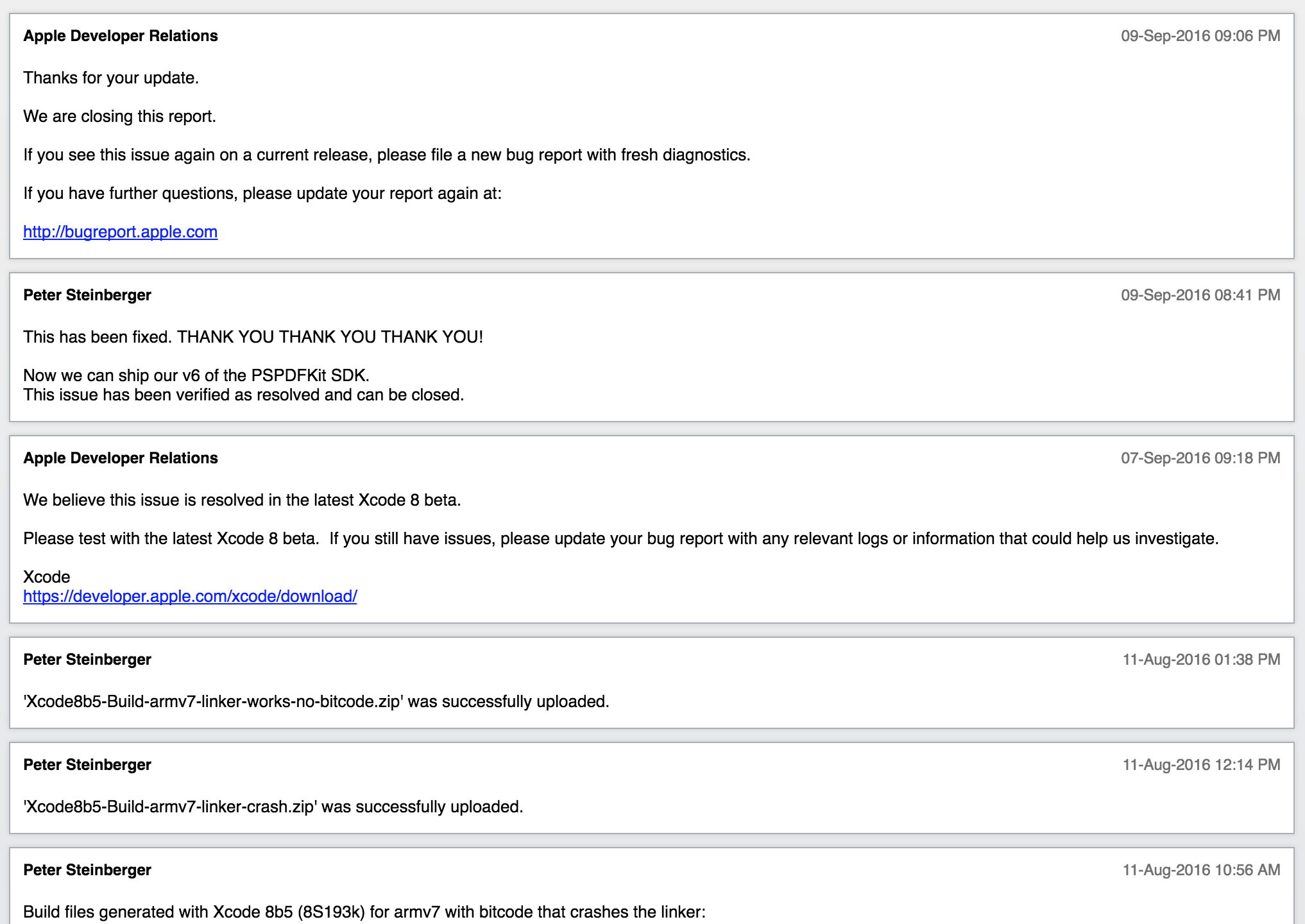
Filing radars is worth it, even if it seems like a black hole at the first look. Sometimes it takes a while, but critical issues often get fixed.
I really need this fixed!
If you have a critical bug that you need to work around, write it up and then submit a DTS/TSI (Technical Support Incident). This means that a human will look at the issue within the next 1-2 weeks. There’s no guarantee that you’ll get a workaround, but it often helps, and it certainly brings attention to the radar. We’re only doing this in rare cases, since Apple only has a few resources on TSI and we don’t want to be annoying for non-critical radars and, by default, you only have two tickets per account. With $249 USD for a 5-Pack, they’re extremely cheap for the value you get.
Forums
The Apple Developer Forums are also worth considering. The noise ratio is very high, but there are always a few Apple employees around that might be able to help. As always, the more care you put into documenting your problem, and providing a sample project, the more likely it is that somebody can help you.
Learn More
Watch the Maximizing Apple Development Resources presentation from WWDC 2013 to learn more where to find documentation and how to file a bug report.
TN2239, iOS Debugging Magic, TN2124, Mac OS X Debugging Magic and TN2151, Understanding and Analyzing iOS Application Crash Reports also contain a treasure of information that will help you to identify, understand and work around issues.