


A few weeks after kernel panics started showing up on my MacBook Pro (and after many comments were left, in which I kept pinging Apple and reporting on this issue, and after trying a Supplemental Update but still suffering from this bug), somebody recommended to me that I should disable the “Power Nap” feature. I was skeptical, but sure enough, ever since I disabled it, the kernel panics stopped.
If you just started reading now, check out the backstory: Kernel Panics and Surprise boot-args.
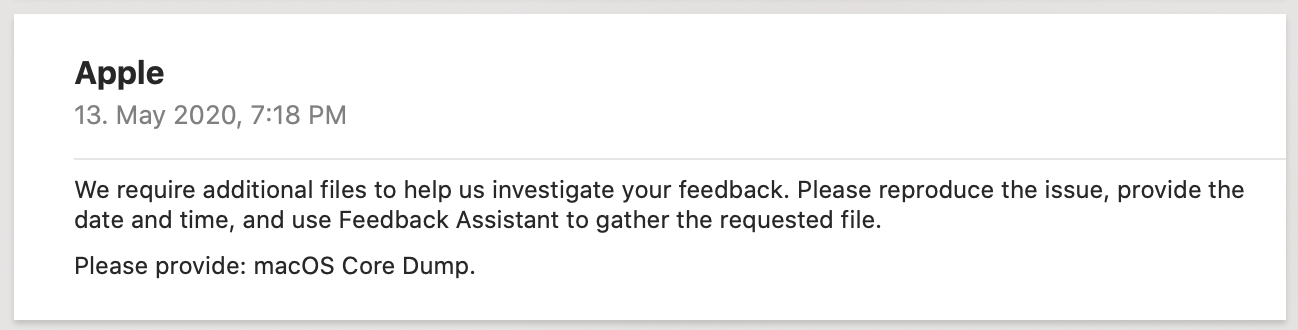
The problem seemingly fixed, I brushed it off and almost forgot about it, but two months after I reported my issue via Feedback Assistant, Apple replied!
I mean, it’s something. But it’s also somewhat of a joke. After my initial reaction of getting mad at how bad Apple’s communication is here, I started seeing this as a challenge and began my search to determine what they could have possibly meant with “Core Dump.”
The Great Core Dump Mystery
If you google “macOS core dump” you will eventually end up on StackOverflow, as is the case with so many things.
The article I found recommends setting ulimit -c unlimited, but this didn’t seem right — how is that related to a kernel panic?
Next up, I looked into Apple’s Technical Note TN2151: Understanding and Analyzing Application Crash Reports, which has a section about Core Dumps, and it also mentioned ulimit:
You can enable core dumps on a system-wide basis by adding the line limit core unlimited to your /etc/launchd.conf file
Problem: This file doesn’t even exist on macOS Catalina. But the above document was last updated in 2010, so that might explain why.
Via Quinn “The Eskimo!”, I also learned about the use case for application core dumps to debug crashers.
Kernel Core Dump(lings)
I’ve asked around on Twitter and learned that a kernel core dump is something else entirely. Thanks to Sarah for helping me here!
Welcome to two easy steps to create your kernel core dump!
1 — Change the boot-args to enable kernel debugging. This needs to be run with csrutil disabled or in recovery mode. keepsyms=1 is used to symbolicate the panic log:
sudo nvram boot-args="debug=0x104c44 keepsyms=1"2 — Once you get a panic with the debug= boot-args set, just dd the Apple_KernelCoreDump volume on your APFS container to a file:
dd of=“~/IntelFramebufferFun.img” if="/Volumes/Apple_KernelCoreDump"Deciphering 0x104c44
Of course, my curiosity was sparked when reading debug=0x104c44, which led to just one search result for a crash with VirtualBox.
All the flags below are related to macOS kernel debugging. It’s easier to look at them one by one when we move to a binary representation. Thankfully, XNU is open source, so we can just look up the source code of /osfmk/kern/debug.h.
0x104c44 = 1 0000 0100 1100 0100 0100
DB_NMI 0x4 changes the power button to create a non-maskable interrupt? (These days, NMI is ⌃+⌘+⌥+⇧+power; the old behavior is via 0x8000.)
DB_ARP 0x40 allows debugging across subnets via ARP (usual flag).
DB_KERN_DUMP_ON_PANIC 0x400 Trigger core dump on panic.
DB_KERN_DUMP_ON_NMI 0x800 Trigger core dump on NMI.
DB_REBOOT_POST_CORE 0x4000 Attempt to reboot after post-panic crashdump/paniclog dump.
DB_REBOOT_ALWAYS 0x100000 Don’t wait for debugger connection.
Let’s check if we got everything: 0x100000 + 0x4000 + 0x800 + 0x400 + 0x40 + 0x4 = 0x104c44.
Articles That Helped
- 2008: Technical Note TN2118:Kernel Core Dumps
- 2018: Scott Knight, macOS Kernel Debugging
- 2019: GeoSn0w, Debugging macOS Kernel For Fun
Conclusion
After writing up my story here, I found an article on Mr. Macintosh that documents the very same wake-from-sleep kernel panic. It seems it is fixed in macOS 10.15.5 Beta 4, so there’s no need for me to actually send a macOS Core Dump anymore.
Still, it was an interesting learning experience.
Update: Apple followed up again on FB7642937, this time with detailed instructions: see Network Kernel Core Dump for more on this.