



Clang has powerful sanitizers that help you find bugs faster, fix them with more confidence, and find all these impossible-to-reproduce race conditions. These tools are extremely powerful and mature and exist in various forms since 2010. These tools are so incredibly useful that we collected our experiences using them, between iOS, Android and our C++ core, to help you through some gotchas.
Address Sanitizer on iOS & macOS
Enter Clang’s AddressSanitizer. It’s a fast memory error detector, based on both compiler instrumentation and a run-time library. It uses a shadow memory region and the slowdown is a very acceptable 2x. Apple added a checkbox for it in Xcode 7 and further improved support for it in Xcode 8:
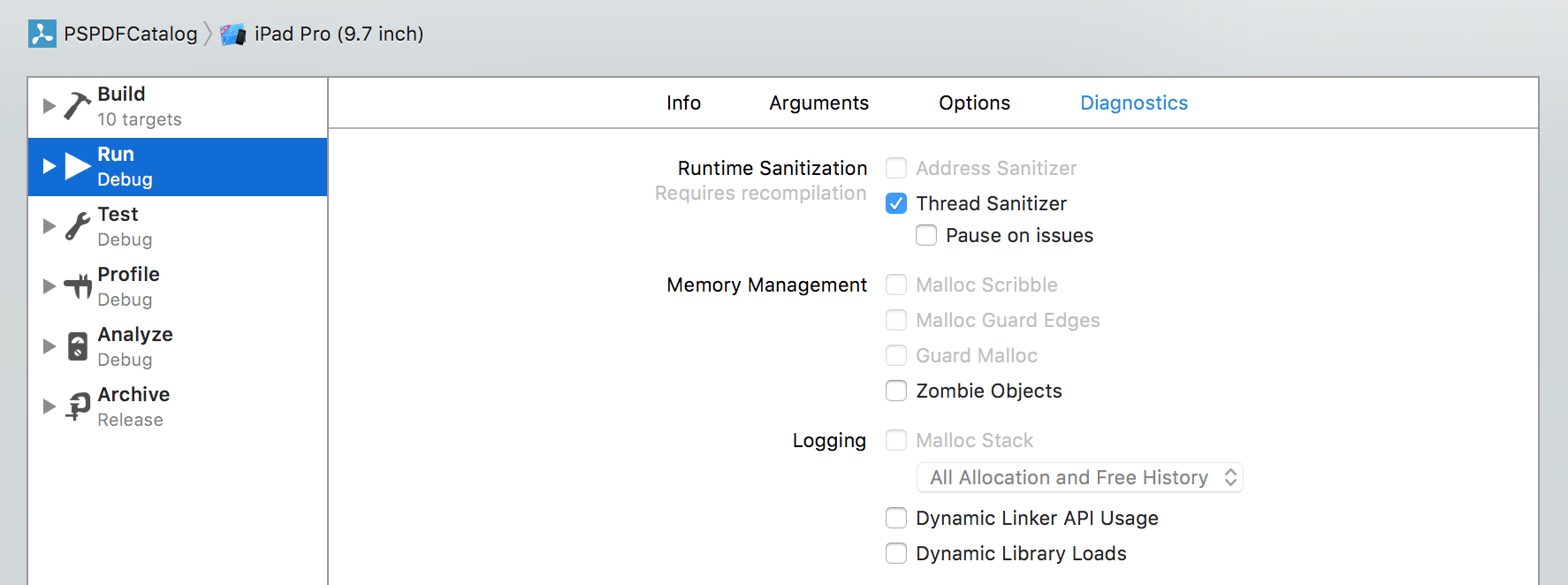
This feature has existed for many years now and while it was initially very hard to get up and running, it’s now just a click away and has great support in Xcode.
Configuration files
I’ll take a small detour here. Our SDK consists of many sub-projects and multiple testing targets. We keep all of our configuration in sync using xcconfig files. The actual project file only contains the absolute minimal set of changes, and we configure everything we can with these shared files.
However, we have two opposing goals:
- Tests should be easy to debug.
- Tests should match the resulting binary as close as possible.
We resolve this by having a configuration file (Defaults-Testing-CI.xcconfig) only for our Jenkins CI. Our actual configuration script is much larger, but this is just a selection of the most interesting settings in the context of this article.
Defaults-Testing.xcconfig:
GCC_TREAT_WARNINGS_AS_ERRORS = YES
ENABLE_NS_ASSERTIONS = YES

// from https://github.com/WebKit/webkit/blob/master/Tools/asan/asan.xcconfig
// This should allow us to get better stack traces on errors
OTHER_CFLAGS = $(OTHER_CFLAGS_COMMON) -fno-omit-frame-pointer -g

// Allows conditional include of files (CI file should only exist on CI)
#include? "Defaults-Testing-CI.xcconfig"
Defaults-Testing-CI.xcconfig:
// Release flags
LLVM_LTO = YES_THIN
GCC_UNROLL_LOOPS = YES
GCC_OPTIMIZATION_LEVEL = s
SWIFT_OPTIMIZATION_LEVEL = -Owholemodule

// Code protection
STRIP_INSTALLED_PRODUCT = YES
SEPARATE_STRIP = YES
COPY_PHASE_STRIP = YES
DEAD_CODE_STRIPPING = YES
STRIP_STYLE = non-global
What’s not documented is the equivalent switch that you can use in your xcconfig file:
CLANG_ADDRESS_SANITIZER = YESAnd when I say not documented, you will literally find my tweet and my rdar://28250805 (Document xcode config settings to enable Clang Sanitizers) on the first page of Google. Let’s be thankful that WebKit is open source.
** WARNING WARNING WARNING **
Since this flag is undocumented it might change without warning, and there are some hints that this might be renamed to ENABLE_ADDRESS_SANITIZER.
Using this flag makes it simpler to dynamically switch this on or off without having to create a separate Xcode configuration that would be much harder to maintain, and you can configure your CI to run tests both with and without ASan to both have a great assurance of memory correctness and testing the binary that you actually ship to customers. We currently have a farm of 15 Mac Minis having a lot of fun with testing all variants per commit.
The dirty details
Now, that would be far too easy, wouldn’t it?
Enabling ASan for us triggered an issue right on launch in some C++ code. It seems this is a known false-positive on ODR detection and easy to fix with setting ASAN_OPTIONS=detect_odr_violation=0 in the environment variables. This works great in Xcode if you run your binary normally. It also used to work for tests in Xcode 7.3.1. However, since Xcode needs some custom settings for tests as well, there is a bug in Xcode 8 that no longer merges the custom settings with yours, so your settings are ignored. rdar://28103342 - SAN_OPTIONS no longer settable when running tests within Xcode. (Regression) took me a long time to figure that one out. I even opened a DTS but Apple doesn’t help for beta software, and back then Xcode 8 was already GM, but not yet officially released.
The good news is that Address Sanitizer also checks for a function named __asan_default_options() to get custom settings at runtime and this works. You need to make sure to plant that function in your test host. If you don’t yet have a test host, set one up - you’ll need it for so many things (e.g. NSUserDefaults) and it makes tests much more predictable. It also helps when you want to track code coverage.
Suppressions
Of course, that’s not the full story. There might be places that report invalid memory access that you are unable to control. We still use Apple’s CoreGraphics CGPDF code in some older tests to generate test data. There are many problems with Apple’s PDF renderer around correctness, which forced us to move away from it over a year ago. PSPDFKit now shows its own PDF renderer, but we haven’t yet migrated all of our tests. For generating test data, CGPDF is good enough. However, ASan reported that CGPDF accesses already freed memory. Since this is deep in CoreGraphics, we cannot fix it, other than writing a radar. That’s where ASan suppression lists come in. Suppressions cannot be directly added inside the options string but have to be in a separate file, referenced via the suppressions=FILEPATH option. We have a project-wide file named AddressSanitizerSuppressions.supp that we copy into our Test App Hosts in the resource step, which allows us to simply use a relative path. (This sounds easy, but it took me days and the help of my Twitter folks to really figure this one out.)
AddressSanitizerSuppressions.supp:
# Apple has issues in there that we cannot fix.
interceptor_via_fun:pdf_Finalize
The file is always copied, even if we don’t enable ASan. In that case, it just doesn’t do anything, and it’s only used for the test hosts anyway. Google has a great documentation on the available options and the supporessor file options are best documented on the LLVM website.
Putting it all together
Here’s our ASAN_OPTIONS.h file that contains the implementation. Import this in your test host app delegate and you’re good to go.
You’ll see a log similar to this when you run it:
==32672==AddressSanitizer: libc interceptors initialized
|| `[0x200000000000, 0x7fffffffffff]` || HighMem    ||
|| `[0x140000000000, 0x1fffffffffff]` || HighShadow ||
|| `[0x120000000000, 0x13ffffffffff]` || ShadowGap  ||
|| `[0x100000000000, 0x11ffffffffff]` || LowShadow  ||
|| `[0x000000000000, 0x0fffffffffff]` || LowMem     ||
MemToShadow(shadow): 0x120000000000 0x123fffffffff 0x128000000000 0x13ffffffffff
redzone=16
max_redzone=2048
quarantine_size_mb=64M
malloc_context_size=30
SHADOW_SCALE: 3
SHADOW_GRANULARITY: 8
SHADOW_OFFSET: 0x100000000000
==32672==Installed the sigaction for signal 11
==32672==Installed the sigaction for signal 10
==32672==T0: stack [0x7fff59945000,0x7fff5a145000) size 0x800000; local=0x7fff5a13cfe8
AddressSanitizer: reading suppressions file at /Volumes/CI/ci/Library/Developer/CoreSimulator/Devices/3F1B4940-0E64-42B2-9982-C9D02DC17001/data/Containers/Bundle/Application/3285F08A-FA39-4704-904F-85538FFD8D70/PSPDFTestHost.app/AddressSanitizerSuppressions.supp
==32672==AddressSanitizer Init done
We discovered a few rare, small but hard to track down memory corruptions, including one that was sitting extremely deep in CoreImage’s Kernel compiler (rdar://28252672 - Double-Free when using Core Image) with ASan and now run all our tests with it.
Using Swift?
Don’t panic, this also works in a pure Swift project, but you can’t just import the ASAN_OPTIONS.h file in your app delegate. And because the bridging header is also just a header file, importing it there also won’t work. So you have to be a little bit creative. The trick is to create an empty .m file and import ASAN_OPTIONS.h there.
Command Line
ASan/TSan can also be enabled via the command line directly:
 xcodebuild -help | grep -i sanitizer
    -enableAddressSanitizer YES|NO      turn the address sanitizer on or off
    -enableThreadSanitizer YES|NO       turn the thread sanitizer on or off
Thanks to John Engelhart (Mr. JSONKit) for the tip!
ASan on Android
It’s possible to run your NDK compiled code with ASan as well, but it’s not as straightforward. That is because ASan has to intercept the calls to malloc, realloc and free free to properly do memory accounting. That’s not a problem in statically linked binaries, but, in Android apps, that means ASan runtime library needs to be preloaded into the zygote process that’s actually running the app.
Android NDK includes the script that will modify the OS running on a device to preload ASan - it’s called asan_device_setup inside the toolchains/prebuilt/<arch>/bin directory. Since it copies ASan libraries to the system partition, it’ll only work on devices that allow root access. The script itself will enable ASan for ALL processes on the device, which turns out to be a serious problem. If a system service loads a library with memory leaks, ASan will trigger an exception and cause the device to boot loop. After bricking three separate devices, we found out that trying to run ASan on an actual device is NOT a good idea. Same issues were noticed when trying to use ASan with Genymotion emulator.
You CAN successfully use asan_device_setup with the bundled Android Emulator. We found out that both 6.0 and 7.0 x86 images worked well. We recompiled our NDK with added -fsanitize=address -fno-omit-frame-pointer to LOCAL_CFLAGS and -fsanitize=address to LOCAL_LDFLAGS. Running the app on AVD then showed any memory issues as stack traces inside logcat and helped a lot with finding memory leaks. The only remaining issue was that the stack traces weren’t fully symbolicated; it seems that ndk-stack doesn’t recognise them and ASan on device itself can’t properly resolve all the symbols. Chromium project actually uses a custom built script to do desymbolication, which is unfortunately not compatible with general apps.
A good idea for a side project ;)
More information about ASan on Android can be found on google/sanitizers project Wiki.
There’s more!
There’s also ThreadSanitizer (ENABLE_THREAD_SANITIZER) and MemorySanitizer that have a much higher runtime cost, but can help you finding even more bugs. (MemorySanitizer currently is not supported on macOS.)
ThreadSanitizer especially can help you fix a whole set of very hard to find edge cases and races. Since performance is much worse, we use a separate Jenkins job. With commenting “Run TSAN” on a Pull Request, we trigger a complete run, which takes about an hour (compared to ~20 minutes with ASan.) Start with TSAN_OPTIONS.h, similar to how ASan is enabled.
You can only run enable one Sanitizer per process, so disable ASan if you run the ThreadSanitizer. We needed suppressions (see ThreadSanitizerSuppressions.supp) as well for the ThreadSanitizer, ironically, for Apple’s PDF implementation in CoreGraphics, which just seems to be not very well tested and is racy. (We implemented our own PDF renderer in our PDF SDK, but are using Apple’s PDF code in our automated tests to generate simple test assets.)
Some people could get the idea that enabling Sanitizers for production binaries sounds like a good idea to harden security and find more bugs. It is not a hardening tool - please don’t abuse it as such.
For “serious” business, there’s also Valgrind and Dr. Memory. Since they either have lacking (or no) support for macOS and don’t really work with iOS either (although some people try) they are only mentioned for completeness reasons. If you have a cross-platform codebase (like we do) these tools are phenomenal though.
Shout-out to the amazing folks at Twitter for proof-reading this article!
Further reading
- WWDC 2015, Session 413: Advanced Debugging and the Address Sanitizer
- Mike Ash Friday Q&A 2015-07-03: Address Sanitizer
If you want to try for yourself how rock-solid our upcoming PDF Viewer app is, get the app. (Available for both iOS and Android - onboarding is just a few clicks and it’s free.)