


惯性聚合 高效追踪和阅读你感兴趣的博客、新闻、科技资讯
阅读原文 在惯性聚合中打开

推荐订阅源

PCI Perspectives
PCI Perspectives
Threat Intelligence Blog | Flashpoint
C
CXSECURITY Database RSS Feed - CXSecurity.com
P
Palo Alto Networks Blog
S
Schneier on Security
Scott Helme
Scott Helme
T
Threat Research - Cisco Blogs
K
Kaspersky official blog
Microsoft Azure Blog
T
The Exploit Database - CXSecurity.com
C
Cybersecurity and Infrastructure Security Agency CISA
T
Tenable Blog
G
GRAHAM CLULEY
OSCHINA 社区最新新闻
OSCHINA 社区最新新闻
Cyber Security Advisories - MS-ISAC
I
Intezer
D
Docker
月光博客
月光博客
L
Lohrmann on Cybersecurity
Latest news
Latest news
B
Blog
罗磊的独立博客
M
MIT News - Artificial intelligence
S
Securelist
Know Your Adversary
Know Your Adversary
Help Net Security
Help Net Security
Recorded Future
Recorded Future
S
SegmentFault 最新的问题
N
Netflix TechBlog - Medium
T
Threatpost
H
Hacker News: Front Page
K
KPMG report finds enterprise disconnect between AI and its ROI | CIO
人人都是产品经理
人人都是产品经理
F
Fortinet All Blogs
博客园 - Franky
P
Proofpoint News Feed
大猫的无限游戏
大猫的无限游戏
Blog — PlanetScale
Blog — PlanetScale
有赞技术团队
有赞技术团队
博客园 - 【当耐特】
A
About on SuperTechFans
奇客Solidot–传递最新科技情报
奇客Solidot–传递最新科技情报
T
Tor Project blog
Google Online Security Blog
Application and Cybersecurity Blog
cs.AI updates on arXiv.org
Engineering at Meta
Engineering at Meta
Webroot Blog
Webroot Blog
Security Archives - TechRepublic
Microsoft Security Blog

Peter Steinberger

OpenClaw, OpenAI and the future | Peter Steinberger Shipping at Inference-Speed | Peter Steinberger The Signature Flicker | Peter Steinberger Just Talk To It - the no-bs Way of Agentic Engineering | Peter Steinberger Claude Code Anonymous | Peter Steinberger Live Coding Session: Building Arena | Peter Steinberger My Current AI Dev Workflow | Peter Steinberger Essential Reading for Agentic Engineers - August 2025 | Peter Steinberger Just One More Prompt | Peter Steinberger Poltergeist: The Ghost That Keeps Your Builds Fresh | Peter Steinberger Don't read this Startup Slop | Peter Steinberger Essential Reading for Agentic Engineers - July 2025 | Peter Steinberger Self-Hosting AI Models After Claude's Usage Limits | Peter Steinberger Logging Privacy Shenanigans | Peter Steinberger VibeTunnel's first AI-anniversary | Peter Steinberger Making AppleScript Work in macOS CLI Tools: The Undocumented Parts | Peter Steinberger Peekaboo 2.0 – Free the CLI from its MCP shackles | Peter Steinberger Command your Claude Code Army, Reloaded | Peter Steinberger Essential Reading for Agentic Engineers | Peter Steinberger Slot Machines for Programmers: How Peter Builds Apps 20x Faster with AI | Peter Steinberger My AI Workflow for Understanding Any Codebase | Peter Steinberger stats.store: Privacy-First Sparkle Analytics | Peter Steinberger Showing Settings from macOS Menu Bar Items: A 5-Hour Journey | Peter Steinberger VibeTunnel: Turn Any Browser into Your Mac's Terminal | Peter Steinberger Vibe Meter 2.0: Calculating Claude Code Usage with Token Counting | Peter Steinberger llm.codes: Make Apple Docs AI-Readable | Peter Steinberger Automatic Observation Tracking in UIKit and AppKit: The Feature Apple Forgot to Mention | Peter Steinberger Peekaboo MCP – lightning-fast macOS screenshots for AI agents | Peter Steinberger Migrating 700+ Tests to Swift Testing: A Real-World Experience | Peter Steinberger Commanding Your Claude Code Army | Peter Steinberger Code Signing and Notarization: Sparkle and Tears | Peter Steinberger Vibe Meter: Monitor Your AI Costs | Peter Steinberger Claude Code is My Computer | Peter Steinberger Stop Over-thinking AI Subscriptions | Peter Steinberger Introducing Demark: HTML in. MD out. Blink-fast. | Peter Steinberger The Future of Vibe Coding: Building with AI, Live and Unfiltered | Peter Steinberger MCP Best Practices | Peter Steinberger Finding My Spark Again | Peter Steinberger Top-Level Menu Visibility in SwiftUI for macOS | Peter Steinberger Fixing keyboardShortcut in SwiftUI | Peter Steinberger Supporting Both Tap and Long Press on a Button in SwiftUI | Peter Steinberger On Using Apple Silicon Mac Mini for Continuous Integration | Peter Steinberger Apple Silicon M1: A Developer's Perspective | Peter Steinberger Gardening Your Twitter: Curating Your Timeline | Peter Steinberger Gardening Your Twitter: Growing Your Followers | Peter Steinberger Forbidden Controls in Catalyst: Optimize Interface for Mac | Peter Steinberger Disabling Keyboard Avoidance in SwiftUI's UIHostingController | Peter Steinberger The State of SwiftUI | Peter Steinberger Logging in Swift | Peter Steinberger Building with Swift Trunk Development Snapshots | Peter Steinberger Calling Super at Runtime in Swift | Peter Steinberger zld — A Faster Version of Apple's Linker | Peter Steinberger How to Fix LLDB: Couldn't IRGen Expression | Peter Steinberger Updating macOS on a Hackintosh | Peter Steinberger InterposeKit — Elegant Swizzling in Swift | Peter Steinberger The Great Mac Catalyst Text Input Crash Hunt | Peter Steinberger Jailbreaking for iOS Developers | Peter Steinberger Network Kernel Core Dump | Peter Steinberger How to macOS Core Dump | Peter Steinberger Kernel Panics and Surprise boot-args | Peter Steinberger Let's Try This Again | Peter Steinberger How We Work at PSPDFKit | Peter Steinberger Swizzling in Swift | Peter Steinberger WWDC for First-Timers, 2019 Edition | Peter Steinberger Challenges of Adopting Drag and Drop | Peter Steinberger Marzipan: Porting iOS Apps to the Mac | Peter Steinberger How to Use Slack and Not Go Crazy | Peter Steinberger Hardcore Debugging - Heavy Weapons for Hard Bugs | Peter Steinberger Binary Frameworks in Swift | Peter Steinberger Even Swiftier Objective-C | Peter Steinberger The Case for Deprecating UITableView | Peter Steinberger Running tests with Clang Address Sanitizer | Peter Steinberger UI testing on iOS, without busy waiting | Peter Steinberger Hiring a distributed team | Peter Steinberger Writing Good Bug Reports | Peter Steinberger Real-time collaboration, Apple, and you | Peter Steinberger Converting Xcode Test Runs to JUnit, the Fast Way | Peter Steinberger Efficient iOS Version Checking | Peter Steinberger Investigating Thread Safety of UIImage | Peter Steinberger Swifty Objective-C | Peter Steinberger Running UI Tests on iOS With Ludicrous Speed | Peter Steinberger A Pragmatic Approach to Cross-Platform | Peter Steinberger Surprises with Swift Extensions | Peter Steinberger Using ccache for Fun and Profit | Peter Steinberger UITableViewController designated initializer woes | Peter Steinberger Researching ResearchKit | Peter Steinberger The curious case of rotation with multiple windows on iOS 8 | Peter Steinberger UIKit Debug Mode | Peter Steinberger Retrofitting containsString: on iOS 7 | Peter Steinberger A Story About Swizzling "the Right Way™" and Touch Forwarding | Peter Steinberger Hacking with Aspects | Peter Steinberger Fixing UITextView On iOS 7 | Peter Steinberger Fixing What Apple Doesn't | Peter Steinberger How To Inspect The View Hierarchy Of Third-Party Apps | Peter Steinberger Fixing UISearchDisplayController On iOS 7 | Peter Steinberger Smart Proxy Delegation | Peter Steinberger Adding Keyboard Shortcuts To UIAlertView | Peter Steinberger How To Center Content Within UIScrollView | Peter Steinberger UIAppearance for Custom Views | Peter Steinberger Hacking Block Support Into UIMenuItem | Peter Steinberger
The LG UltraFine 5K, kernel_task, and Me | Peter Steinberger
Peter Steinberger · 2020-05-19 · via Peter Steinberger

A good story is nuanced and complicated, and it contains surprise twists and a happy ending. Me owning an LG UltraFine 5K delivers on all of that. So let’s dive right in:

{% twitter https://twitter.com/steipete/status/1253550223445708800 %}

Background

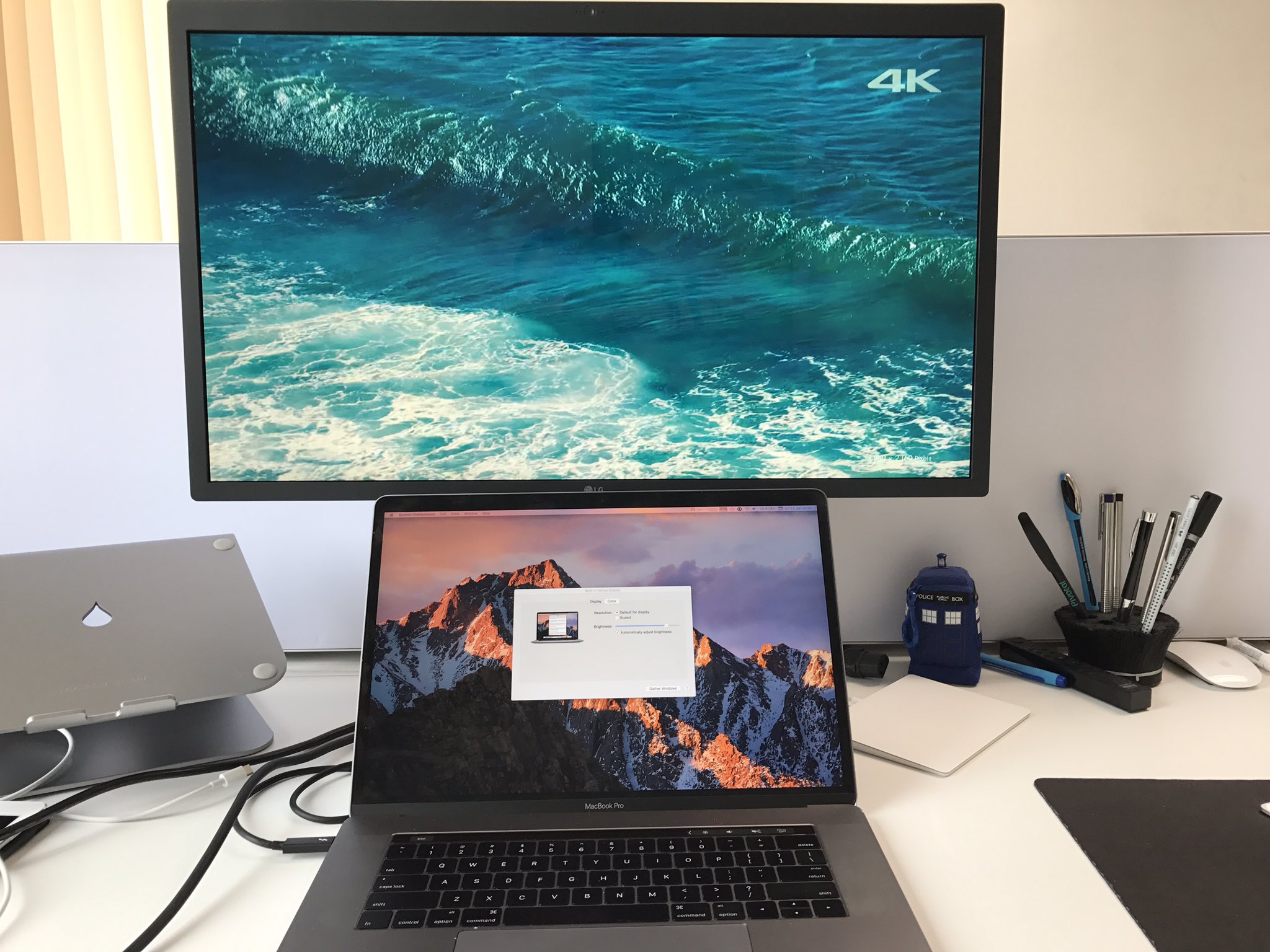
I own one of the cursed LG UltraFine 5K displays.1 In fact, I don’t just own one; I own about 10 of them. But I realize now that blindly trusting in Apple hardware is a mistake.

Problems

Since we first purchased the displays, we’ve been having issues with them, starting with delayed shipping, ghosting, and Wi-Fi interference, and moving on to compatibility — there’s no HDMI, DisplayPort, or similar. The only way to use these monitors is with a modern Mac.2 As for the compatibility issue, that was a known tradeoff, and for me, it was acceptable. After all, the benefit of only having a single cable as a modern docking station and a beautiful panel outweighed the drawbacks. I still remember my innocent excitement.

Since receiving these displays, we’ve had to return most of them to get fixes for various issues, and we’ve patiently updated the firmware multiple times with LG’s crappy Screen Manager software. There are also issues with expanding batteries, and Apple has blamed the LG 5K, saying just don’t use it a lot and you’ll be UltraFine.

The Great Flickering

With the 2017 MacBook Pro, I had an extraordinary amount of fun, since plugging in the LG was causing graphic issues on the MacBook display. I wrote radars, called Apple Support, and even took a cab to a repair center with the screen in tow in order to prove the hardware was broken. It’s difficult when neither the screen itself nor the MacBook have issues, but the combination of the two causes problems.

{% twitter https://twitter.com/steipete/status/956863946404827136 %}

Nobody knew what was going on, and this all occurred before we had an Apple Store in Austria, so getting help there was out of the question. Apple eventually agreed to change my logic board for free, but only after countless hours of phone calls and emails and after this issue had been escalated multiple times. Mind you, this was all with active AppleCare and a machine that wasn’t even one year old. The replacement of my logic board took more than a week, and after it was returned, it had the exact same issue. I mostly gave up and just didn’t use my external screen.

kernel_task Goes Omnomnom

The graphic issues disappeared with the 2018 MacBook Pro. However, the biggest issue was also the weirdest: Sometimes, after longer use, my MacBook Pro became unusably slow. Mere seconds after removing the external screen, kernel_task disappeared back into the CPU activity ground noise. Sometimes I had hours after disconnecting in which the MacBook worked, but other times this happened really fast. (I use iStat Menus here.)

{% twitter https://twitter.com/steipete/status/1128703168697839617 %}

I was never able to reliably reproduce this, nor could Apple Support help. They also claimed to not know anything about this issue. I again mostly gave up and didn’t use the external screen.

16-Inch MacBook Pro and LG UltraFine

I spend between eight and ten hours per day on my MacBook Pro, so updating it every year is a good investment. Of course, this also gave me the opportunity to test each hardware generation with the LG display.

When Apple announced the 16-inch MacBook Pro, I just had to get one. I don’t enjoy splitting my work across multiple machines, and I like to move around in my apartment, so it had to be a portable one. Over the years, Apple has managed to build beefier and beefier portables. However, its 8-core 15-inch MacBook Pro is severely thermal throttled — using this tool, you can see how it runs at top speed for a few seconds, only to be thermal throttled.

The 16-inch MacBook Pro was marketed as “thicker” as a way of fixing the throttling, and it delivered! Everything is noticeably faster. It also fixed my biggest issue with the whole MacBook Pro lineup so far: the dreaded kernel_task that eats up CPU like Pac-Man eats ghosts.

Then, in April, I stumbled upon a Stack Exchange question that seemed to explain what was going on all these years.

high CPU usage by kernel_task is caused by high Thunderbolt Left Proximity temperature, which is caused by charging and having normal peripherals plugged in at the same time.

I HAD PLUGGED THE SCREEN INTO THE WRONG SIDE. YES.

The 16-inch MacBook Pro doesn’t seem to suffer from this temperature sensor misplacement and can drive the LG UltraFine without slowdown on both ends. But all generations before have this issue (tested with 2016 and later, purchased every generation.) My posting about the issue on Twitter made waves, and I even ended up being mentioned in some tech articles.

The bad news: The LG can provide 87 watts of power, but the notebook comes with a 96-watt adaptor. This means that the battery is constantly compensating. Play StarCraft for three hours and your computer will shut off with a dead battery. Even when compiling code in Xcode, the battery will fluctuate. To deal with this, Apple recommends using a separate power adapter when using the 16-inch MacBook Pro.

Brightness Bugs

Though the above issue was solved, there is a new bug that started happening with the 16-inch MacBook Pro: Sometimes after wakeup, the gamma settings of the screen are way off (usually too bright, but it can also be too dark). This can be fixed via unplugging/replugging or via toggling True Tone. This bug is independent of the screen you use though. (Apple: FB7722012) Also, don’t confuse this bug with the eye-burning brightness bug after reboot (I know it’s hard to keep up with all the different bugs these days). Luckily, Apple fixed the latter bug in Catalina 10.15.4.

{% twitter https://twitter.com/steipete/status/1263225822485381120 %}

Conclusion

Do I recommend this setup? Yes. I am writing this story on the LG display after all. I mostly use the separate power plug to fix the “missing 9-watt problem.” If you have top-notch hardware, it is a beautiful panel, and it seems Apple has fixed all the issues after a four-year hiatus. (And by fixed, I mean they released new hardware, aka Fix In Next Chip.) Besides, every time I look around for other screens, they all seem terrible.

And it’s true: Once you are used to Retina, you don’t want to go back to 4K. Maybe this is all a years-long elaborate ploy to make me buy a Pro Display XDR. Maybe I am just a bug magnet. Or maybe it’s not just me.

Is this the end of the story? Find out in Kernel Panics and Surprise boot-args.

Update: LG released an update to the 5K Display that increases power output to 94 watts.

  1. LG released a second generation of the LG UltraFine 5K display, and it adds support for 3840 x 2160 @ 60Hz over USB-C DisplayPort, so you can now connect an iPad Pro. Sporadic reports also mention fewer issues with the second generation. ↩

  2. I managed to get it working with a Gigabyte GC-Titan Ridge card on a Hackintosh. ↩