This guide only includes open-source analytics tools that:
Have built-in analysis views. This includes end-to-end analytics, and dashboard tools that connect to existing data sources, but not data pipeline platforms.
Are actively maintained. This is subjectively judged based on recently merged pull requests, commits to their repos, and the responsiveness of the maintainer to review requests.
Are free to self-host. Tools that are "open core" but don't offer a free, self-hostable deployment option are not included.
This guide is maintained by PostHog, an open-source developer platform. You can suggest additions to this guide by opening an issue on our website repo.
We maintain separate guides on open-source feature flag tools, open-source AB testing products, and open-source session replay tools.
You want visibility into what users are doing – but you also want control over where that data lives. Open source analytics tools give you both: insights without handing your data to a third party.
This guide covers the best open source analytics tools you can self-host, from full product analytics platforms to lightweight web analytics and BI tools.
Looking for cloud product analytics tools instead? See our guide to the best product analytics tools for startups.
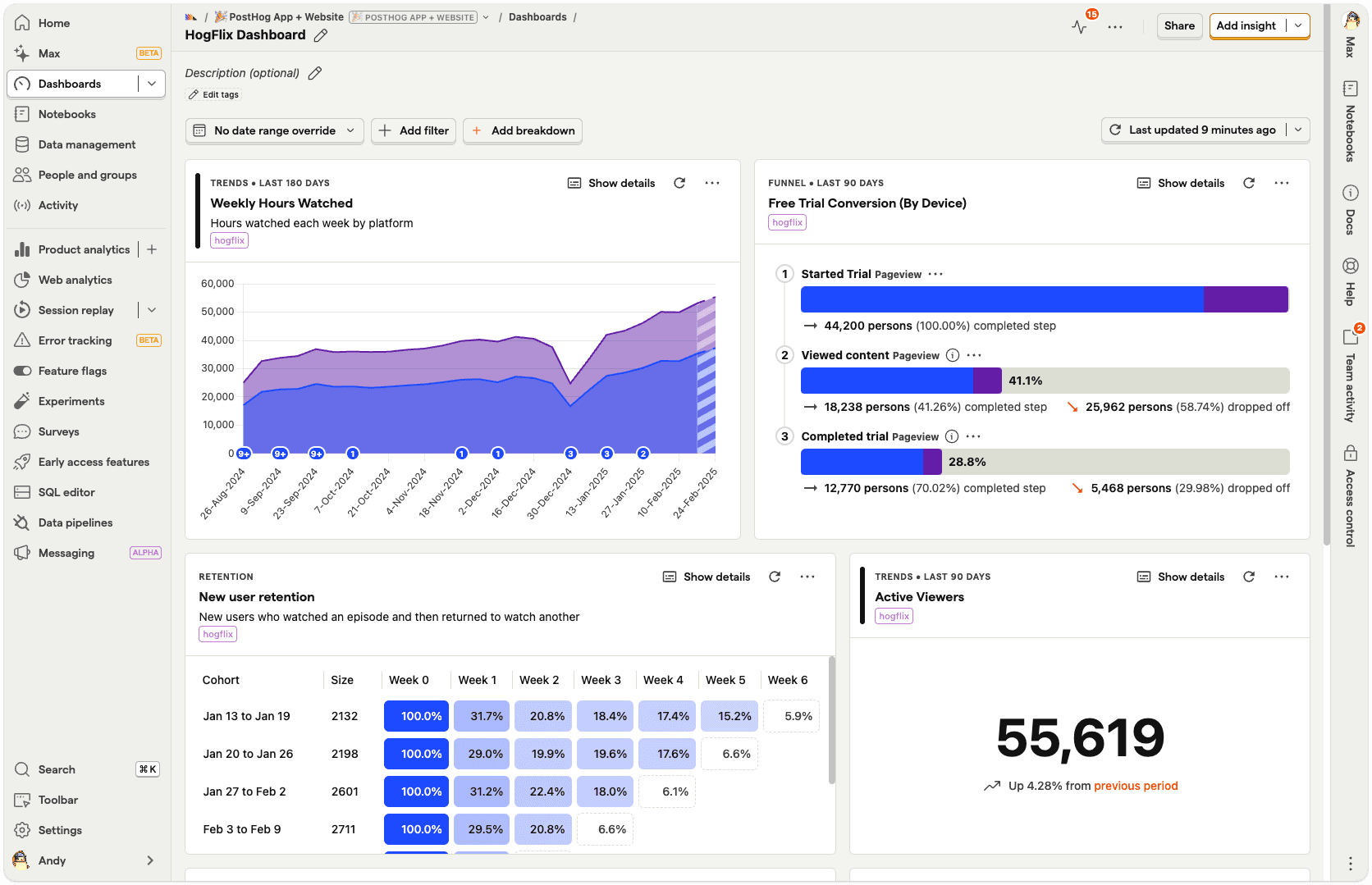
PostHog is an all-in-one platform that combines product analytics with several other developer-focused tools, such as web analytics, session replay, feature flags, experiments, error tracking, surveys, logs, and more.
Beyond the core product analytics features, it also supports creating custom insights using SQL, and offers a built-in data warehouse so you can import data from external sources like Stripe, Hubspot, and Zendesk.
Developers and startups who need an in-depth understanding of what users are doing in their app, or want to track the complete journey from their marketing website through to their app. There's a generous free tier, which means ~90% of users use PostHog for free.
| Pros | Cons |
|---|---|
| Advanced product analytics features | Self-hosting not recommended above 300k events per month |
| Easy-to-use web analytics dashboard | Steeper learning curve compared to lightweight analytics tools |
| Session replay for web and mobile apps | |
| Replaces multiple tools | |
| Generous free tier on cloud |
Several. The built-in product analytics is an alternative to tools such as Mixpanel, Amplitude, and Heap and it can replace Google Analytics for website and marketing analytics.
With heatmaps plus session replay for both web and mobile apps, PostHog can replace the likes of Hotjar and FullStory. It even includes feature flag and experiment features like those found in LaunchDarkly or error tracking like Sentry.
PostHog Open Source is distributed under an MIT license for hobbyists and proof of concepts via a Docker Compose deployment. It includes most features, but is limited to one project per instance and is provided without guarantee.
The minimum requirements are a VPS with 4 vCPU, 16GB RAM, and more than 30GB storage. Note that PostHog only recommends the self-hosted release for deployments up to ~300k events per month. Above this, it recommends switching to PostHog Cloud due to the complexity of scaling to higher event volumes.
Yes. PostHog offers a managed cloud option with a generous free tier of 1 million events, 5,000 recordings, and 1 million flag API requests every month, and the option of US or EU-based hosting.

Matomo is an open-source platform for website analytics. The user experience is closely modeled on the previous version of Google Analytics, known as Universal Analytics, which many people prefer to Google's current offering.
It looks little dated compared to some tools in this list, but it's a mature and reliable platform used by many large government and non-profit organizations.
Companies that want comprehensive website and marketing analytics without the privacy implications of using Google Analytics.
| Pros | Cons |
|---|---|
| Easy GDPR compliance | Features like session replay and heatmaps not included in open-source release |
| Google Analytics data import | Session-based analytics less appropriate for app analytics |
| Easy installation for Wordpress and popular CMS | Dated user interface |
| Used by many large orgs (United Nations & EU) | More complex to self-host than lightweight analytics tools |
| Strong web and marketing analytics features | |
| Built-in tag manager |
It's mainly pitched as an alternative to Google Analytics 4, especially for those looking for ironclad GDPR compliance. Matomo even offers a data import tool for Google Analytics, so you can bring your data with you.
Matomo on-premise includes all the core website analytics features, such as user and event tracking, e-commerce tracking, customizable dashboards, user segmentation, scheduled email reports, and alerts. Features like A/B testing and session replay are available as paid add-ons only.
The minimum requirements for 100,000 pageviews per month are: one server 2 CPU, 2 GB RAM, 50GB SSD disk. Matomo recommends separate app and database servers for anything over 1 million page views per month.
Yes. Matomo's cloud offering includes all features and charges by "hits per month". The hosted version unlocks some features, like A/B testing and heatmaps, that are paid add-ons for the on-premise release.
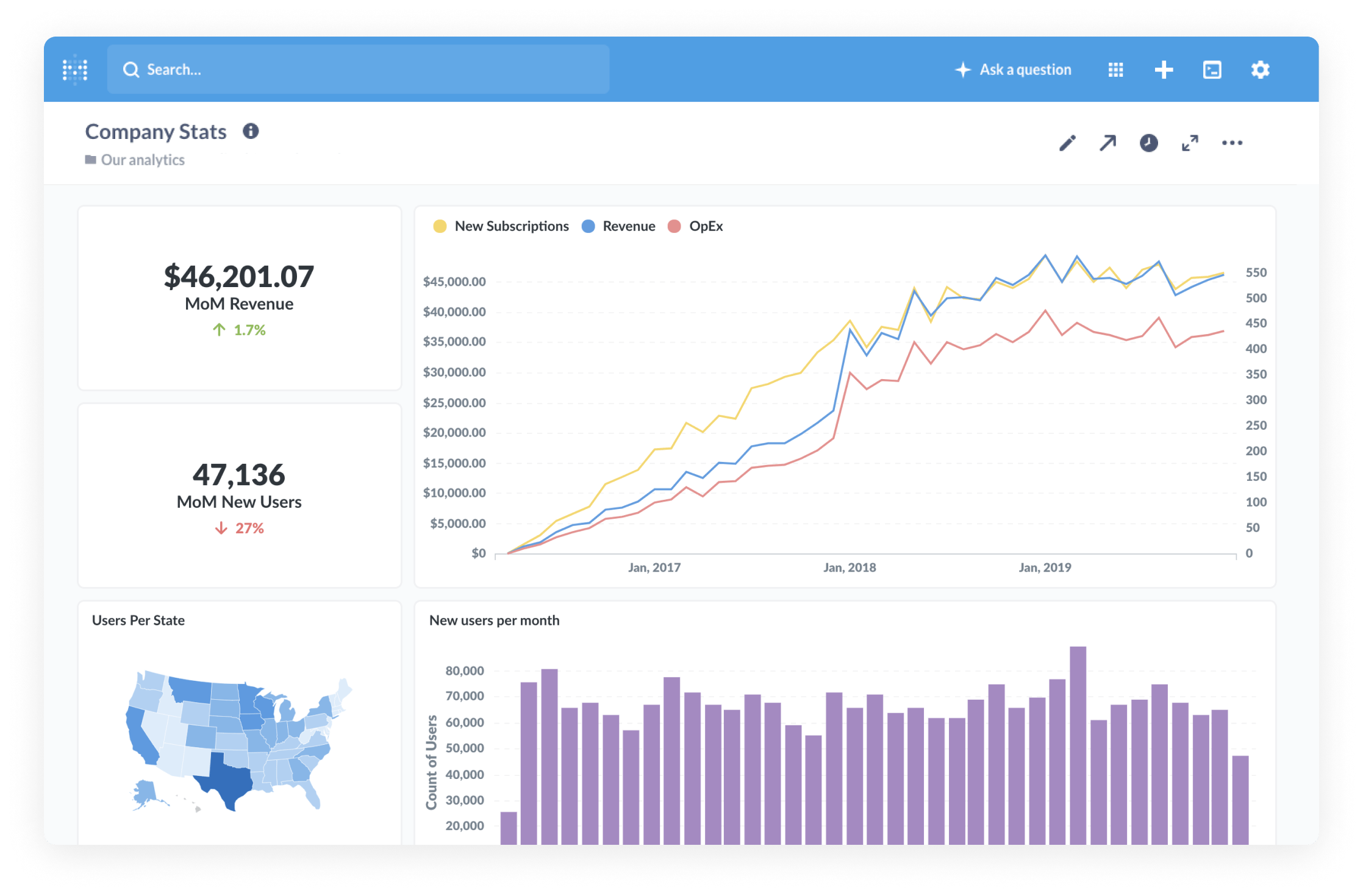
Metabase is one of the most popular open-source BI tools. Metabase's visual query builder enables you to create shareable dashboards in just a few minutes with a drag-and-drop interface, and there's a native SQL editor for advanced users.
Metabase is a great tool for business and revenue reporting. It requires more technical knowledge than either PostHog or Matomo, but it's powerful in the right hands.
Companies that want to analyze product and company data that's already stored in data warehouses and have a reasonable degree of internal knowledge of SQL.
| Pros | Cons |
|---|---|
| Connects to all popular closed and open-source databases | Requires separate event collection and storage setup |
| Visual query builder for building simple queries | Less accessible for non-technical users |
| Full SQL editor for advanced users and queries | Lacks features beyond BI |
| Join and query data from multiple sources | |
| Light hosting requirements |
Metabase is a direct alternative to business intelligence tools like Google's Looker / Looker Studio, Tableau, and Microsoft's Power BI. There are official connectors for all the most popular databases (Redshift, BigQuery, Snowflake, etc), and community and partner-managed connectors for the likes of ClickHouse and DuckDB.
The open-source version includes the same core query and visualization features as paid versions, but without advanced permission and security features tailored to large companies.
Metabase recommends two servers: one for the application and one for the database. It needs at least 1 core and 1GB of RAM with additional resources required depending on the number of concurrent users.
Yes. The Starter plan includes cloud deployment for $85 per month for five users, with each additional user adding $5 per month.
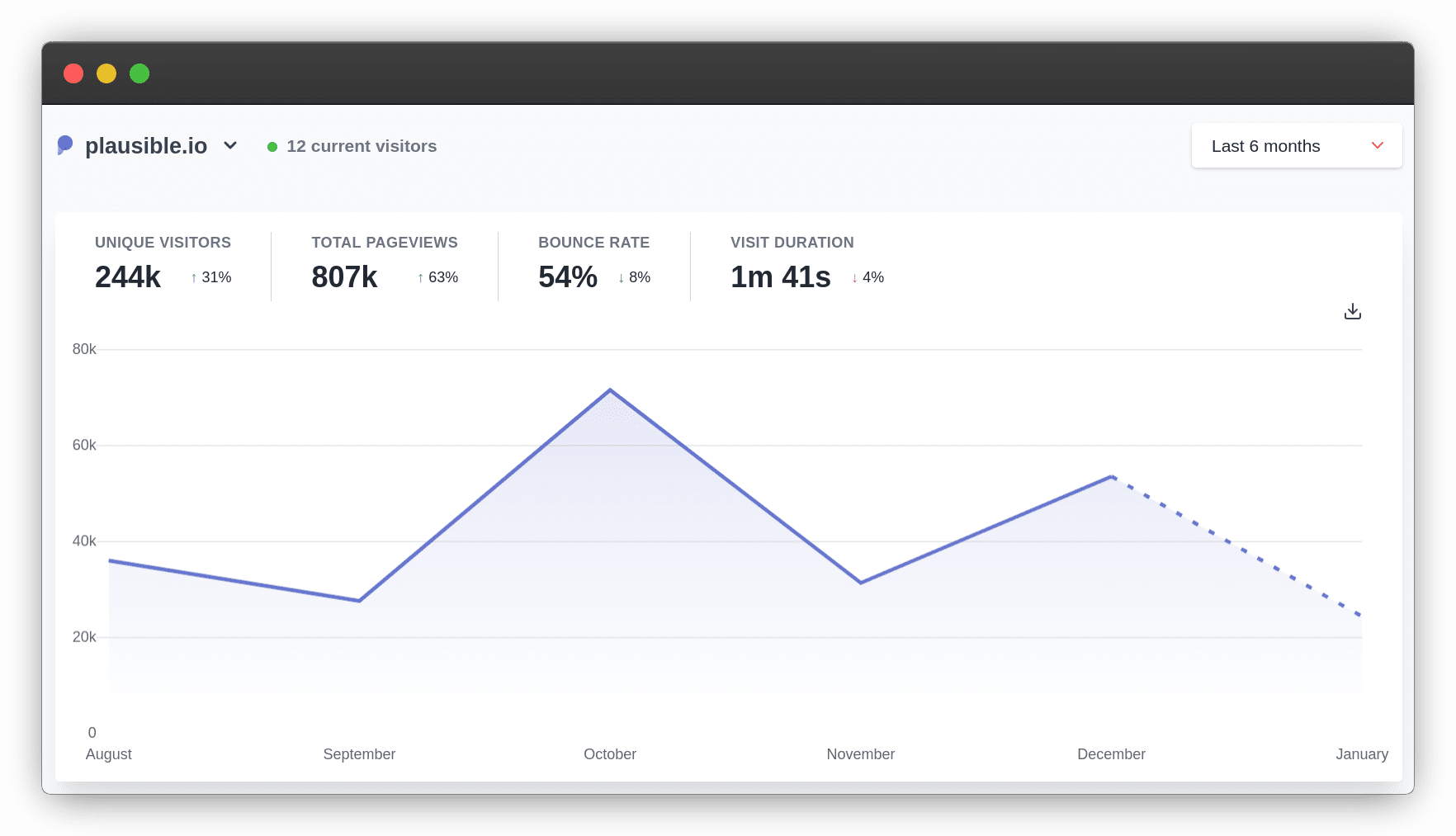
Plausible Analytics is a lightweight web analytics tool focused on providing GDPR-compliant website analytics that doesn't infringe on user privacy. This means Plausible doesn't rely on cookies and is compliant with regulations like GDPR out of the box.
It's very fast and easy to use, though this comes at the expense of features. It's ideal for anyone who just wants simple web analytics features, like tracking top pages and referrers, but it's less useful for app analytics and understanding user behavior.
Anyone who wants easy-to-use website analytics that doesn't want to use Google Analytics, have cookie banners, or collect any private data.
| Pros | Cons |
|---|---|
| Fast and easy to use | Limited analytics features |
| Minimal impact on website performance | Open-source release only updated twice a year |
| Cookieless GDPR-compliance | No free tier on hosted version |
| Google Analytics import available | |
| Will scale to large traffic requirements |
It's a popular alternative to Google Analytics for people who want something fast and easy to use. Unlike Google Analytics, Plausible's lightweight tracking script has minimal impact on website performance.
The community edition offers the same features as paid versions, including tracking all common website metrics, goal and conversion tracking, basic funnels, and reports in Slack or via email. The only limitation is that it's only updated twice a year, whereas the cloud version gets continuous updates.
Plausible recommends at least 2GB of RAM, and it requires a CPU that supports SSE 4.2 or NEON instruction set or higher.
Yes. There's no free tier, but it's cheap even at high volumes. Pricing starts at €9 per month for 10,000 monthly page views.
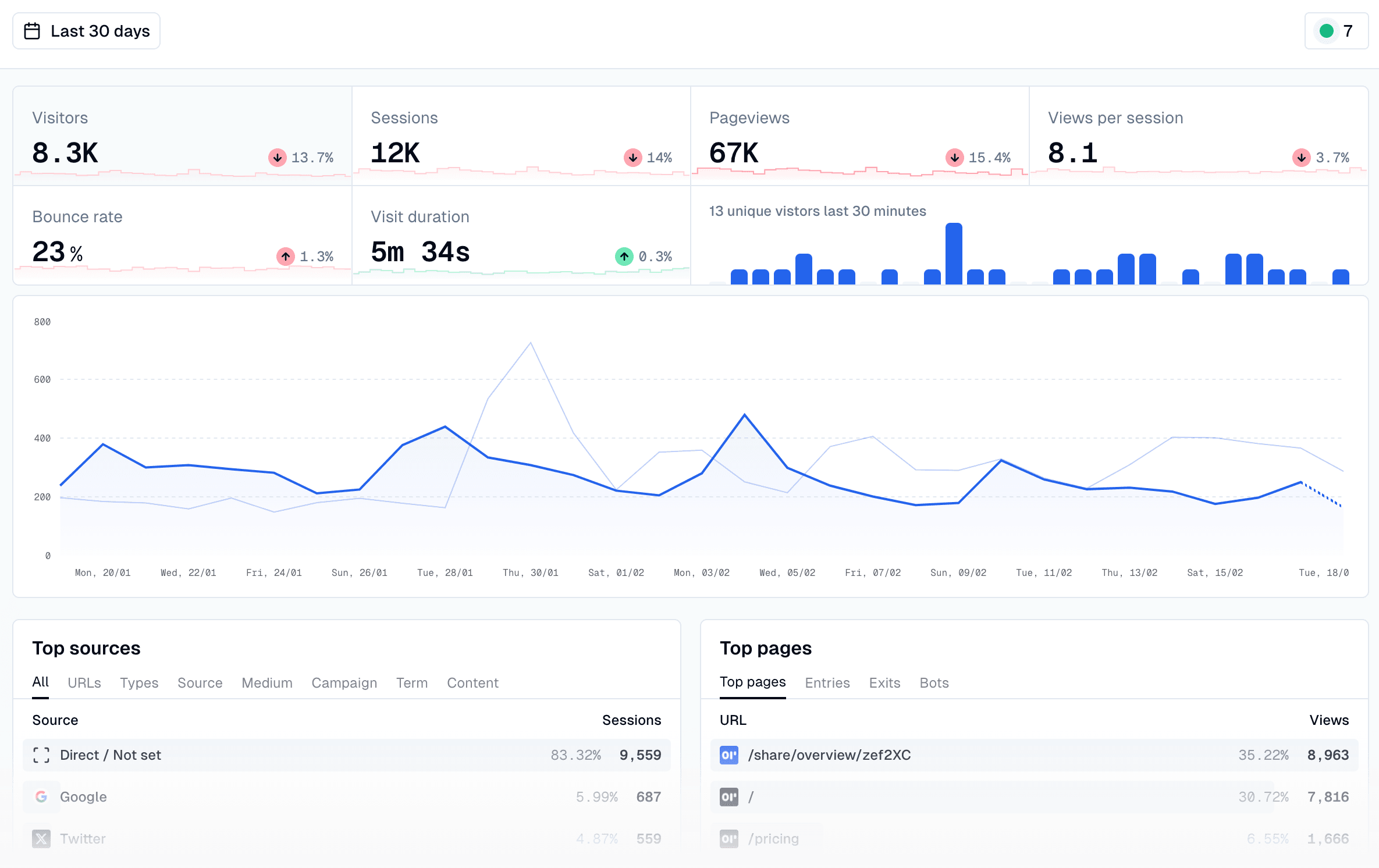
OpenPanel is inspired by Mixpanel and Plausible. It aims to offer some tools common of a product analytics tools, but with the speed, simplicity, and privacy-friendly features Plausible brings to web analytics.
This means that, unlike Plausible, you can build custom dashboards, as well as build insights that track retention within your app. OpenPanel also creates profiles for individual users that show how often they use your app, events they trigger, and most visited pages.
Developers who want basic product and website analytics for their project, but don't want to the more in-depth analysis of a tool like PostHog.
| Pros | Cons |
|---|---|
| Fast and easy to use | Young project and small community |
| More analysis options than Plausible | Only supports basic product analytics features |
| No cookies required | |
| Basic funnel and retention analysis | |
| Cheaper than typical product analytics tools |
OpenPanel could replace Mixpanel, Amplitude, and Google Analytics. It isn't as advanced as any of these tools, but it covers most of the essential features they offer. Unlike PostHog, OpenPanel is focused solely on product analytics, so doesn't include things like session replay or A/B testing features.
The open-source version is available with no limitations. Features include custom dashboards and charts (line, bar, area, map, pie, funnels, histograms, and retention), user profiles, a realtime analytics view, and tracking scripts for most popular frameworks, including Next.js, React, and React Native.
OpenPanel doesn't provide minimum requirements, but recommends hosting using Hetzner, and notes it'll work on any server where you have pre-installed Docker, Docker Compose, Node and pnpm.
Yes. There is no free tier, but 100k events a month cost just $20, and 1 million events are $90 per month.
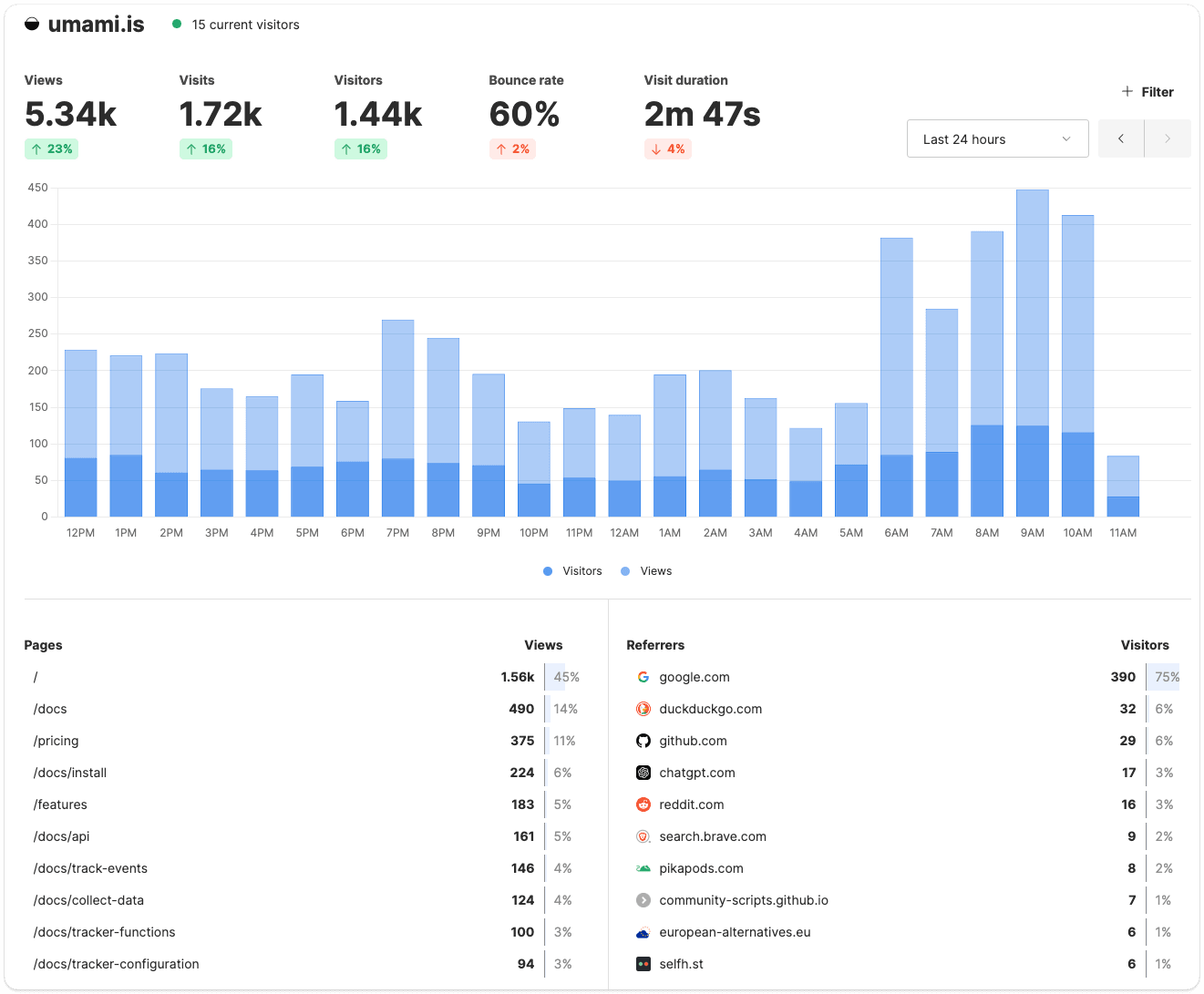
Umami is another popular privacy-first website analytics tool. Like Plausible, it tracks basic website analytics, doesn't collect any personal information, and is extremely fast. Similar to OpenPanel, it's added some product analytics features, such as user journeys, retention, and funnels, though it only supports very basic analysis.
Similar to Plausible, Umami is ideal for anyone who wants easy-to-use website analytics that respects privacy. The two products are very similar, so which you choose will depend on personal preferences.
| Pros | Cons |
|---|---|
| Easy to use and clean UI | Less polished than Plausible |
| Supports basic event tracking | Postgres database less scalable than Plausible's ClickHouse backed event database |
| No cookies required | |
| Minimal impact on website performance | |
| Easy to self host |
Google Analytics mainly, but also any other tool focused mainly on website analytics, including closed-source alternatives like Fathom.
There's no difference between the open source and paid products. Umami tracks all common website metrics, supports custom events, and offers basic funnel, user path, and retention analysis as well.
Umami requires a server with Node.js version 18.18 or newer and an SQL database – MySQL (minimum v8.0) and PostgreSQL (minimum v12.14) are supported.
Yes and, unlike Plausible, there's a free tier. You can track up to 100k events per month on Umami Cloud for free. The Pro tier starts at just $20 per month for 1 million events per month.
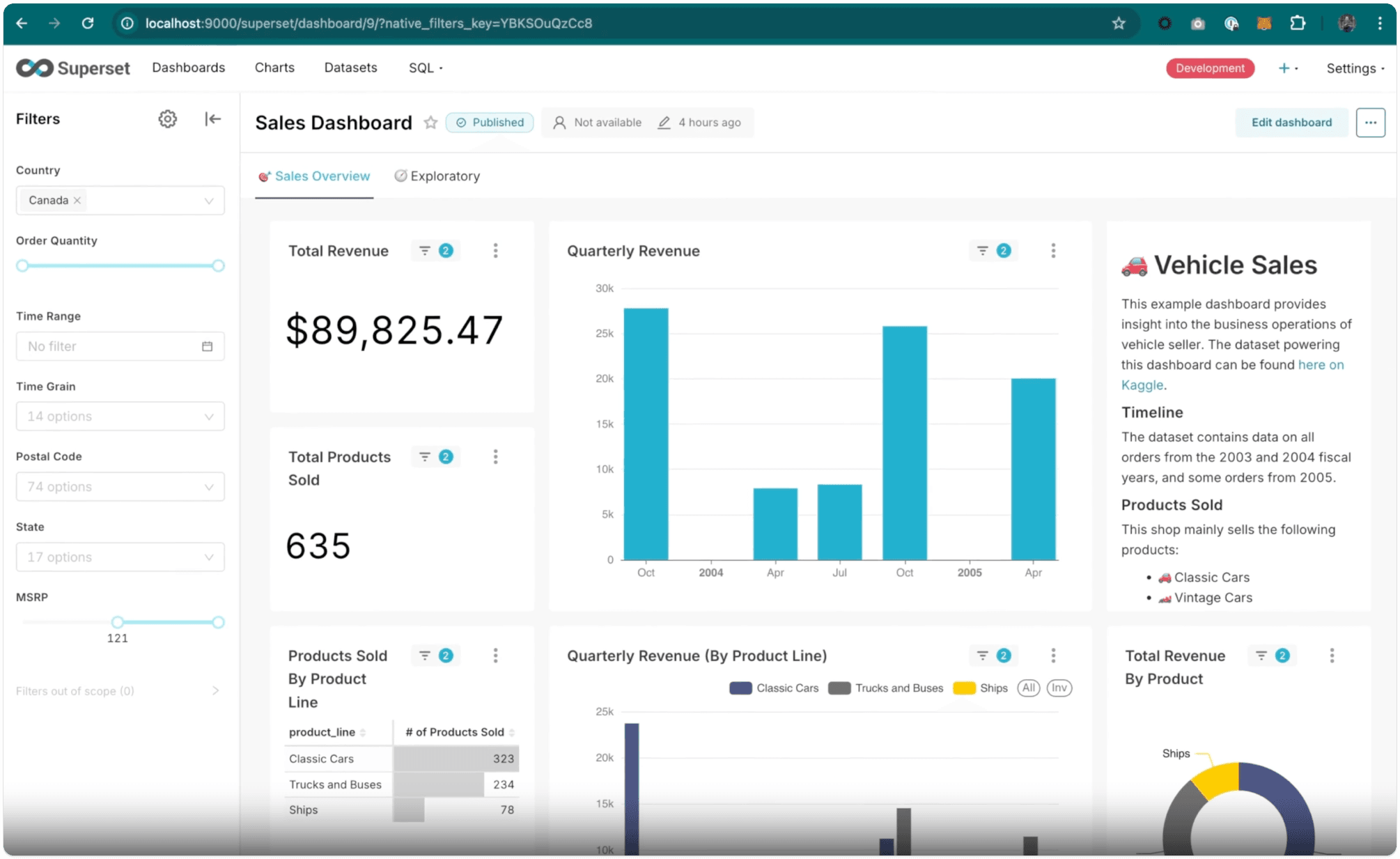
Superset is the another of the big open-source business intelligence tools alongside Metabase and Redash. It's also considered the most complex and least accessible for non-technical users, though its range of visualizations and charting options is unmatched. Superset is ideal for enterprises with experienced in-house data teams, or anyone with lots of SQL experience.
Companies that want to do advanced analysis and have the internal resources and knowledge to use Superset to its full potential. Superset is better-suited to companies with dedicated data science people, whereas Metabase is more accessible to non-technical users.
| Pros | Cons |
|---|---|
| Huge range of visualization features | Not suitable for non-technical users |
| Highly customizable | Relatively complex to host |
| Very scalable for large orgs | |
| Large community |
Looker, Tableau and Power BI.
There's no paid version, so all features are included in the open source release, which includes 40+ pre-installed visualizations and vast options for data scientists to customize them to their needs.
While there is a Docker Compose deployment, it's not recommended for production use cases, which require deploying Superset on Kubernetes. Superset's FAQ indicates 8GB RAM and 2vCPUs is "adequate to run a moderately-sized instance".
Not directly, though third-parties offer managed instances.
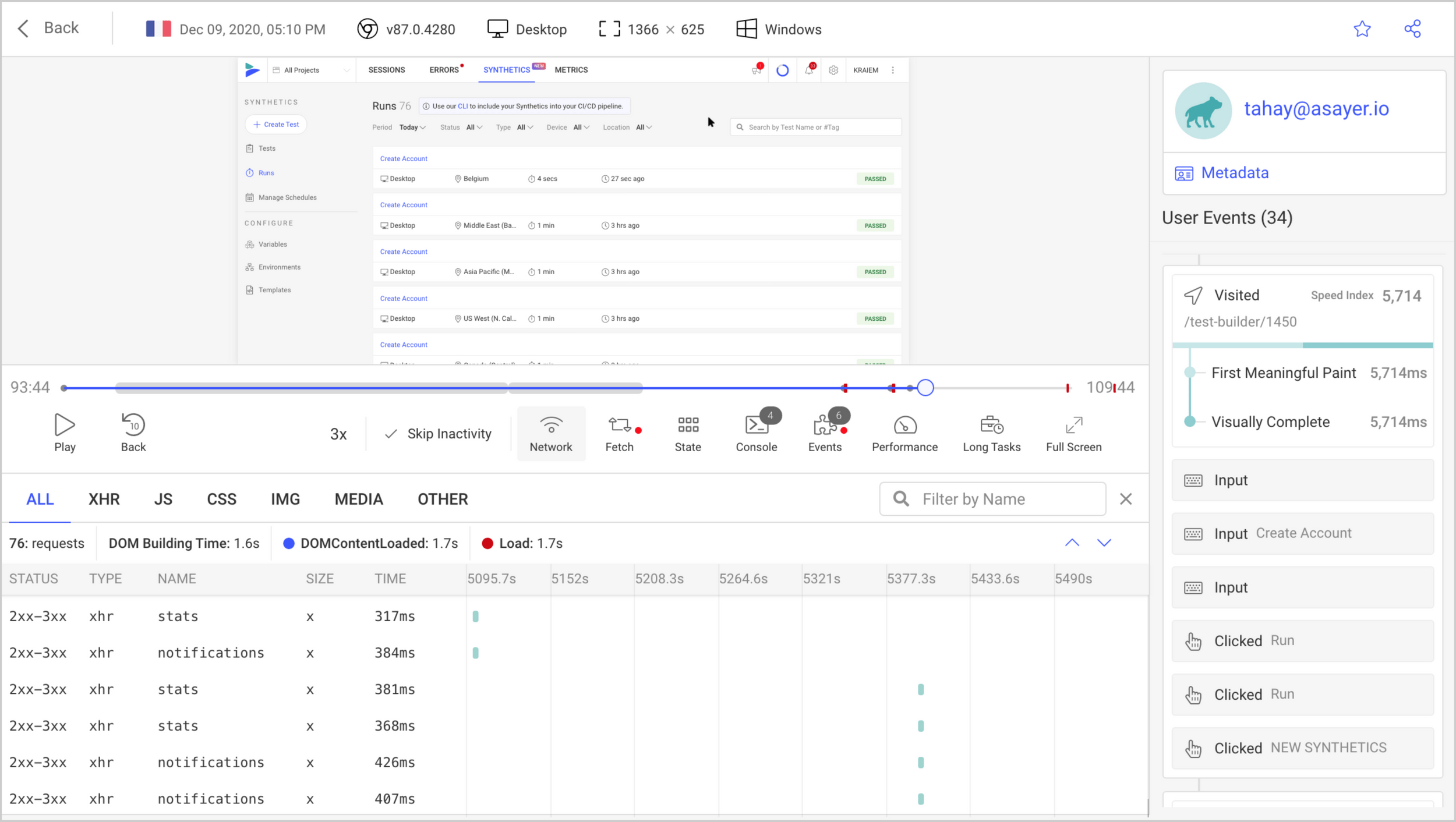
OpenReplay is a session replay suite built for developers to find and eliminate problems.
In addition to session replay, it also includes some product analytics features, such as conversion funnels, user paths, heatmaps, trends, and custom dashboards. These features aren't as developed as dedicated analytics tools like Mixpanel or PostHog, but they're a useful augment to the core replay features.
Companies that want an alternative to LogRocket that they can self-host.
| Pros | Cons |
|---|---|
| Comprehensive session replay features | Analytics features are secondary to session replay |
| Useful for discovering issues in your app | Data export limited to Enterprise plans |
| Built-in performance monitoring | |
| Supports both web and mobile app tracking |
OpenReplay is an alternative to LogRocket and other similar dev-focused session replay tools, like PostHog. It can also replace the likes of Hotjar, and includes a co-browsing feature that's similar to Hotjar's.
The free community edition includes all OpenReplay's core features for session replay, app monitoring, and analytics with no limits on users or projects. Paying customers gain a handful of advanced features, such as support for data export, extra security features, and dedicated support.
OpenReplay typically recommends a minimum of 2 vCPUs, 8 GB of RAM, 50 GB of storage, though this varies depending on the hosting provider.
Yes. There's a free tier that's limited to 1,000 session per month, or you can pay-as-you-go for $5.95 per 1,000 sessions each month.
Based on our research, the best open source analytics tools you can self-host right now are:
Open source analytics tools let you self-host on your own infrastructure, giving you full control over where your data lives. This is useful for GDPR compliance, data sovereignty, or cost management at scale.
Cloud analytics tools are managed by the vendor – easier to set up and maintain, but your data lives on their servers. Most tools in this list also offer a cloud-hosted option if you'd rather not manage infrastructure yourself.
For cloud product analytics tools, see our guide to the best product analytics tools for startups.
You can, but for most teams PostHog Cloud is the better choice – even if open source and data control are important to you.
Here's why:
The main reason to self-host is strict data residency requirements that can't be met by PostHog's EU Cloud option. If that's your situation, the open source release is a solid starting point. For everyone else, cloud is the faster, easier, and usually cheaper path.
Plausible and Umami are cookieless by default and collect no personal data, making them the simplest path to GDPR compliance. Matomo is widely used by government and enterprise organizations specifically for its GDPR compliance features, including data anonymization and consent management. PostHog offers cookieless tracking and EU Cloud hosting if you want a managed option with EU data residency.
For a deeper breakdown, see our guide to the best GDPR-compliant analytics tools.
Yes. PostHog offers both a self-hostable open source release (MIT license) and a cloud-hosted free tier. The cloud free tier includes 1 million events, 5,000 session recordings, and 1 million feature flag requests every month. Around 90% of PostHog users pay nothing.
See PostHog's pricing page for full details.
Matomo is the most direct open source alternative to Google Analytics – it even supports importing your existing GA data. Plausible and Umami are better options if you want something simpler and privacy-first. For deeper product analytics beyond website traffic, PostHog is the strongest option.
PostHog is more than an analytics tool. It combines everything developers need to build and improve their product in one platform:
Subscribe to our newsletter
Read by 100,000+ founders and builders
We'll share your email with Substack
此内容由惯性聚合(RSS阅读器)自动聚合整理,仅供阅读参考。 原文来自 — 版权归原作者所有。