惯性聚合 高效追踪和阅读你感兴趣的博客、新闻、科技资讯
阅读原文 在惯性聚合中打开

推荐订阅源

MyScale Blog
MyScale Blog
WordPress大学
WordPress大学
cs.AI updates on arXiv.org
C
CXSECURITY Database RSS Feed - CXSecurity.com
I
Intezer
V
Visual Studio Blog
Cisco Talos Blog
Cisco Talos Blog
Microsoft Azure Blog
S
Securelist
CTFtime.org: upcoming CTF events
N
News and Events Feed by Topic
Recorded Future
Recorded Future
Simon Willison's Weblog
G
GRAHAM CLULEY
酷 壳 – CoolShell
酷 壳 – CoolShell
L
Lohrmann on Cybersecurity
U
Unit 42
Hacker News: Ask HN
Hacker News: Ask HN
阮一峰的网络日志
阮一峰的网络日志
Vercel News
Vercel News
PCI Perspectives
PCI Perspectives
H
Help Net Security
C
Cisco Blogs
爱范儿
爱范儿
Recent Announcements
Google DeepMind News
小众软件
小众软件
T
Tor Project blog
Exploit-DB.com RSS Feed
Schneier on Security
H
Hackread – Cybersecurity News, Data Breaches, AI and More
www.infosecurity-magazine.com
IT之家
IT之家
J
Java Code Geeks
人人都是产品经理
人人都是产品经理
Spread Privacy
Spread Privacy
T
The Blog of Author Tim Ferriss
Application and Cybersecurity Blog
AI
AI
S
Security @ Cisco Blogs
T
Tenable Blog
Security Archives - TechRepublic
aimingoo的专栏
aimingoo的专栏
Cloudbric
Cloudbric
D
Docker
W
WeLiveSecurity
Hacker News - Newest:
Hacker News - Newest: "LLM"
F
Fortinet All Blogs
The Hacker News
The Hacker News
Help Net Security
Help Net Security

PostHog's RSS Feed

Training our own AI models - PostHog From 270GB RAM to 5GB: Moving local flag evaluation from Django to Rust The best analytics stack for vibe-coded apps The do's and don'ts of minimum viable product marketing - PostHog The best MCP servers for startups, by workflow 4,063 errors closed without a human opening PostHog – here's what we learned - PostHog PostHog Code and the self-driving product - PostHog Why attacking your competitors online is dumb - PostHog The best real-time analytics platforms for developers, compared DuckDB vs ClickHouse: Why we use both at PostHog - PostHog PostHog's next chapter - PostHog Making Claude Cowork actually useful - PostHog PostHog vs Matomo in-depth tool comparison You're doing lifecycle emails wrong Untangling Tokio and Rayon in production: From 2s latency spikes to 94ms flat The best HIPAA-compliant A/B testing tools - PostHog A beginner's guide to testing AI agents - PostHog I hate the standup bot (so I built an agent to do it for me) - PostHog The best CDPs for developers, compared The best error tracking tools for developers, compared The best feature flag software for developers, compared 7 best session replay tools for mobile apps 7 best free open source business intelligence tools right now 7 best free and open source LLM observability tools PostHog vs LogRocket in-depth tool comparison The most popular PostHog alternatives, compared The 9 best GA4 alternatives for apps and websites - PostHog PostHog vs Google Analytics 4 in-depth tool comparison How we built automatic clustering for LLM traces - PostHog The 7 best HIPAA-compliant analytics tools 8 best open source analytics tools you can self-host - PostHog The best product analytics tools for startups, compared PostHog vs FullStory in-depth tool comparison The best in-app survey tools for product teams, compared The 7 best mobile app analytics tools PostHog vs Hotjar in-depth tool comparison The 8 best free and open-source feature flag services - PostHog The 5 best free and open-source A/B testing tools - PostHog The best mobile app A/B testing tools, compared What is a feature flag? Feature Flags vs Remote Config vs A/B Testing PostHog is now available in Vercel’s v0 The best Heap alternatives & competitors, compared PostHog vs Heap in-depth tool comparison PostHog vs Pendo in-depth tool comparison PostHog × Vercel: feature flags, minus the plumbing Your logs' final destination is in GA. You always end up here anyway Behind the scenes of a PostHog hackathon - PostHog The most popular Mixpanel alternatives & competitors, compared PostHog vs Mixpanel in-depth tool comparison The 9 best GDPR-compliant analytics tools How we use Logs at PostHog The best web analytics tools for developers, compared Stop AI slop: Run evals with LLM-as-a-Judge - PostHog You product data just got a job: Workflows is now out App onboarding: How to fix drop-off points Meet Logs (beta) – logs with all the tools you’re already using Why small teams crush tiger teams How we built user behavior analysis with multi-modal LLMs (in 5 not-so-easy steps) - PostHog The best Contentsquare alternatives & competitors, compared 8 learnings from 1 year of agents – PostHog AI - PostHog Why we killed our AI product assistant Workflows graduate to beta! Product data, meet automation The best Rollbar alternatives & competitors, compared Workflows are now in Alpha and I already broke mine - PostHog I've consistently underestimated how important communication is as a CEO - PostHog How we made feature flags even faster and more reliable The best session replay tools for developers, compared What I learned attending my first ever hackathon - PostHog Did you know AI is answering our community questions? - PostHog How not to be boring - PostHog We built an internal tool to generate changelog images for social media - PostHog What we built at our windswept Mykonos hackathon - PostHog How we built our onboarding email flow (with actual performance data) - PostHog We're building a better PostHog community by closing our public Slack - PostHog Introducing Notebooks for PostHog - PostHog Why we've launched PostHog user surveys - PostHog How we made feature flags faster and more reliable - PostHog In-depth: ClickHouse vs Redshift - PostHog Introducing HouseWatch: An open-source toolkit for ClickHouse - PostHog Introducing HogQL: Direct SQL access for PostHog - PostHog What we built at our sun-kissed Aruba hackathon - PostHog In-depth: ClickHouse vs BigQuery - PostHog In-depth: ClickHouse vs Elasticsearch - PostHog HogMail #22: Why do companies over-hire?" - PostHog Our simpler goal: Help engineers to be better at product - PostHog In-depth: ClickHouse vs Snowflake - PostHog HogMail #21: Avoiding the "Product Death Cycle" - PostHog Sunsetting Kubernetes support for PostHog - PostHog Why 'Product Engineer' is the most fun role I've had in tech - PostHog HogMail #20: Why do startups fail? - PostHog The best Google Optimize alternatives for apps and websites - PostHog Array 1.43.0: Massive performance improvements! - PostHog In-depth: ClickHouse vs Druid - PostHog HogMail #19: Which meetings should you kill? - PostHog CEO diary: The things I learned in 2022 - PostHog The essential tools used by product engineers - PostHog HogMail #18: What can SaaS learn from the New York Times? - PostHog What is a product engineer? - Product Engineer Handbook - PostHog Array 1.42.0: Get beta features via our roadmap! - PostHog HogMail #17: The personal traits that can't be taught - PostHog
Open source (and self-hosted) session replay tools - PostHog
Hanna Crombi · 2026-03-13 · via PostHog's RSS Feed

Open-source analytics is great when you need hard numbers, but hard numbers don't give you the full picture.

What else do you need to do? Talk to users? Sure. Gather feedback? That's useful, too. But, for us, there's nothing better than watching session replays for understanding a user's pain points.

Replays (aka session recordings) are a great way to understand:

  • What causes bugs and user frustration.
  • Where users are getting stuck on your site.
  • Hesitation at different stages of your funnel.
  • How your users are interacting with individual elements of your product.

Hotjar (now part of Contentsquare) and Fullstory are popular session replay products, but they're expensive, inflexible, and primarily designed with marketing teams.

In this guide, we're looking at Hotjar alternatives that are either free or open source, particularly session replay tools.
1. PostHog

PostHog

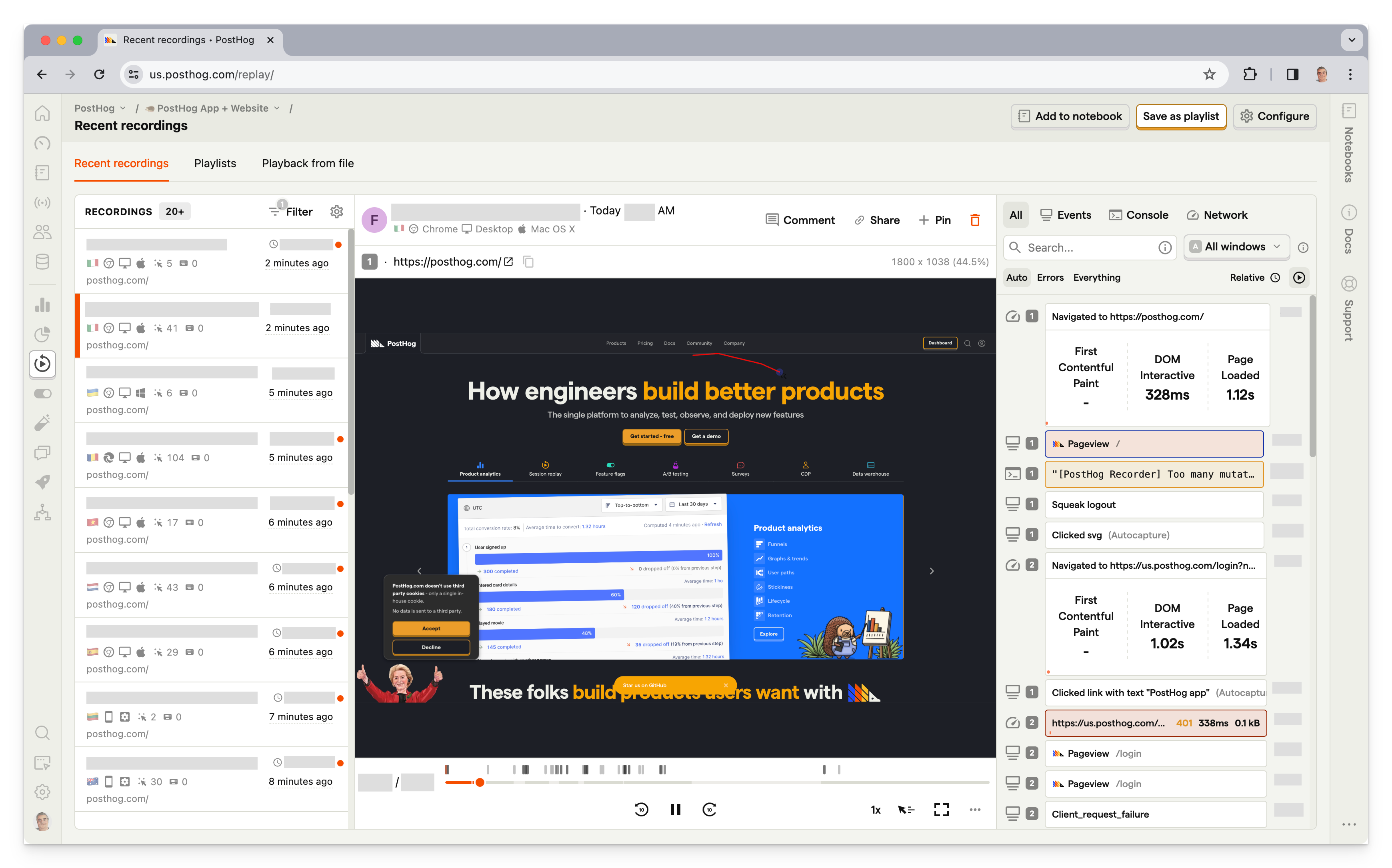
PostHog (that's us 👋) is an all-in-one developer platform that includes session replay, product analytics, heatmaps, feature flags, A/B testing, error tracking, surveys, and more.

This means it's not just an open source session replay tool, but a full replacement for tools like Hotjar, FullStory, LaunchDarkly, and Sentry.

PostHog's session replay includes console logs, network activity, a DOM explorer, and performance metrics so you can identify the root cause of bugs without leaving the replay. You can filter recordings by user, event, feature flag, or any combination of properties, save playlists of related sessions, and export recordings offline for safe keeping.

AI session summaries automatically surface key moments and issues, so you don't have to watch every recording in full. All of PostHog's tools work together natively – jump from a funnel drop-off directly into a relevant replay, or see which feature flag a user was on when they hit a bug.

Who is PostHog for?

PostHog is ideal for startups, product-minded developers, and product teams. Unlike Hotjar and Fullstory, it's designed for technical users. Its broad range of features means PostHog can replace several tools.

It also supports replay for mobile apps running that use Android, iOS, React Native, and Flutter SDKs, making it a good option if you're also looking for a tool that offers Hotjar features for mobile apps.

Key features

  • Session replay: Console logs, network activity, DOM explorer, and performance metrics. Filter recordings by user, event, or feature flag. Export recordings offline. AI session summaries automatically surface key moments and issues without watching every recording.
  • Mobile replay: Native SDKs for iOS, Android, React Native, and Flutter with 2,500 free mobile recordings per month.
  • Heatmaps: Visualize clicks (including rage clicks), scroll depth, and mouse movement.
  • Error tracking: Monitor exceptions and stack traces connected directly to session replays.
  • Product analytics: Funnels, user paths, retention, trends, and SQL access for custom queries.
  • Privacy controls: CSS selectors to block sensitive data. Cookieless tracking available.

How much does PostHog cost?

PostHog is free up to 1 million captured events, 5,000 web recordings, and 2,500 mobile recordings per month, and you can set billing limits to avoid surprise bills.

Bottom line

PostHog is the best open source session replay tool if you want more than just replay. Its generous free tier, mobile support, and tight integration with analytics, feature flags, and error tracking make it the most complete option on this list.
OpenReplay - open source session replay

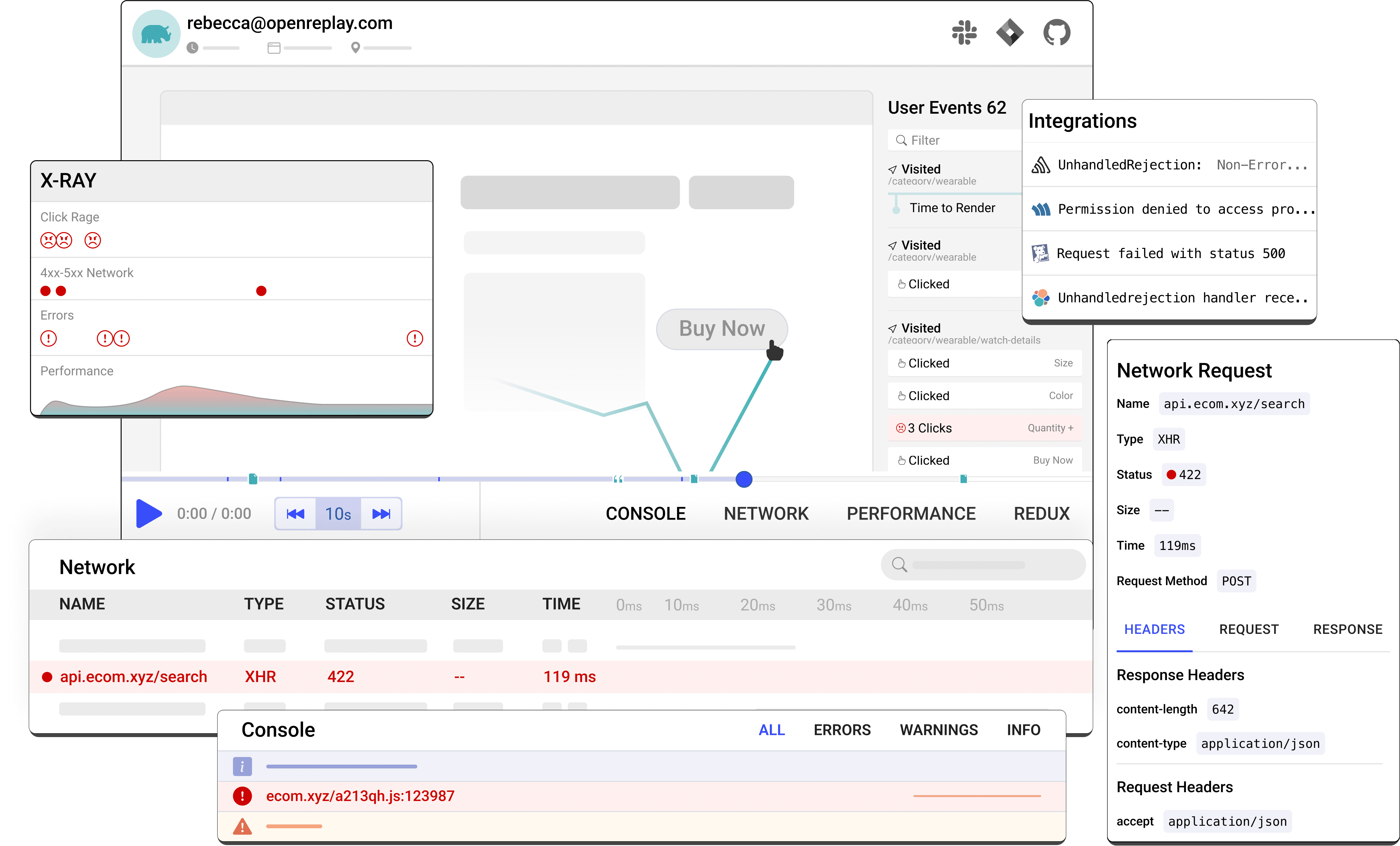
OpenReplay is an open-source alternative to Microsoft Clarity that offers more advanced, technical features for engineers on top of basic session replay. Its tooling is particularly effective for application state and customer support. It has some basic analytics features, such as funnel analysis, though it falls some way short of feature-complete product analytics tools.

Who is OpenReplay for?

OpenReplay is a developer-friendly tool. It allows engineers to see how users are interacting with their web apps, respond to issues faster, and troubleshoot problems with users.

Key features

  • Session replay: Pixel-perfect recordings with event timelines, network activity, console logs, and JS error capture.
  • DevTools: Reproduce bugs as if they happened in your own browser, with application state, GraphQL queries, and 40+ metrics.
  • Co-browsing: Live screen sharing with users via WebRTC – no third-party software required.
  • Heatmaps: Click and scroll heatmaps added in recent releases.
  • Product analytics: Basic funnel analysis and conversion tracking.
  • Spot: A Chrome extension for recording bugs directly from the browser with full technical context attached.

How much does OpenReplay cost?

OpenReplay has three cloud plans and a free self-hosted option.

  • The Free cloud plan is $0 and includes up to 1,000 sessions/month, 2 users, 1 project, and 30-day data retention.
  • The Serverless plan is $5.95 per 1,000 sessions/month with unlimited users and projects, also with 30-day retention.
  • The Dedicated plan starts at $0.25/hour (roughly $179/month) and gives you a dedicated VM with configurable data retention, SSO/SAML, conditional recording, and data residency across 35+ regions.

The self-hosted open source edition is completely free and includes all core features.

Bottom line

OpenReplay is the best self-hosted option for developer teams that need advanced debugging tools and full data sovereignty. Its co-browsing feature is unique among open source tools. The tradeoff is that self-hosting requires real DevOps resources to deploy and maintain at scale.
3. Sentry

Sentry

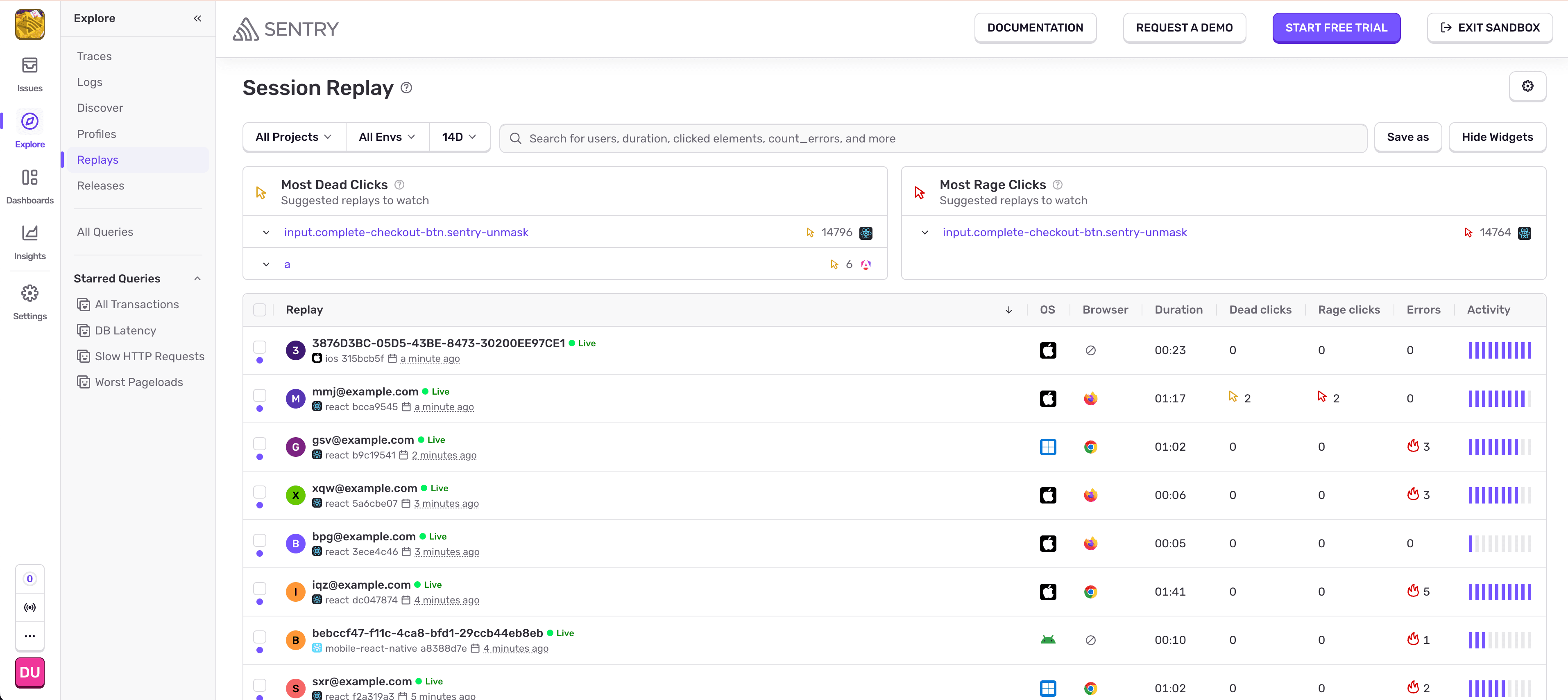
Sentry is a source-available application monitoring platform primarily known for error tracking and performance monitoring.

Session replay was added in 2023 and is tightly integrated with Sentry's error data: when an exception fires, the session replay for the affected user is automatically linked, giving you the full interaction context without any additional investigation.

Who is Sentry for?

Sentry is for developers and engineering teams, not UX or product teams. Sentry approaches replay from an error-first perspective – it's most valuable when you want to understand what a user was doing right before something broke.

Key features

  • Session replay: Video-like reproduction of user interactions including page visits, mouse movements, clicks, taps, and scrolls.
  • Error-linked replay: Every error automatically links to the relevant session replay for instant context.
  • Performance monitoring: Web vitals, transaction tracing, and frontend performance data alongside replays.
  • Error tracking: Real-time exception monitoring with stack traces across dozens of languages and frameworks.
  • Self-hosting: Full self-hosted deployment available free.

How much does Sentry cost?

Sentry has four plans.

  • The Free plan is $0 and includes 1 user, error monitoring, and 50 session replays/month.
  • The Team plan is $26/month with unlimited users and 50 replays included, with additional replays available at usage-based rates.
  • The Business plan is $80/month and adds unlimited custom dashboards and anomaly detection.
  • Enterprise pricing is custom.

All plans include 50 session recordings. Self-hosting is free via Docker Compose, though it's designed for simpler deployments rather than large-scale production use.

Bottom line

Sentry is the best option if your team already uses it for error monitoring and wants to add session replay without a new vendor. It's not a standalone replay tool – it's most valuable when replay is part of a broader error and performance monitoring workflow.
UXWizz - self hosted session replay

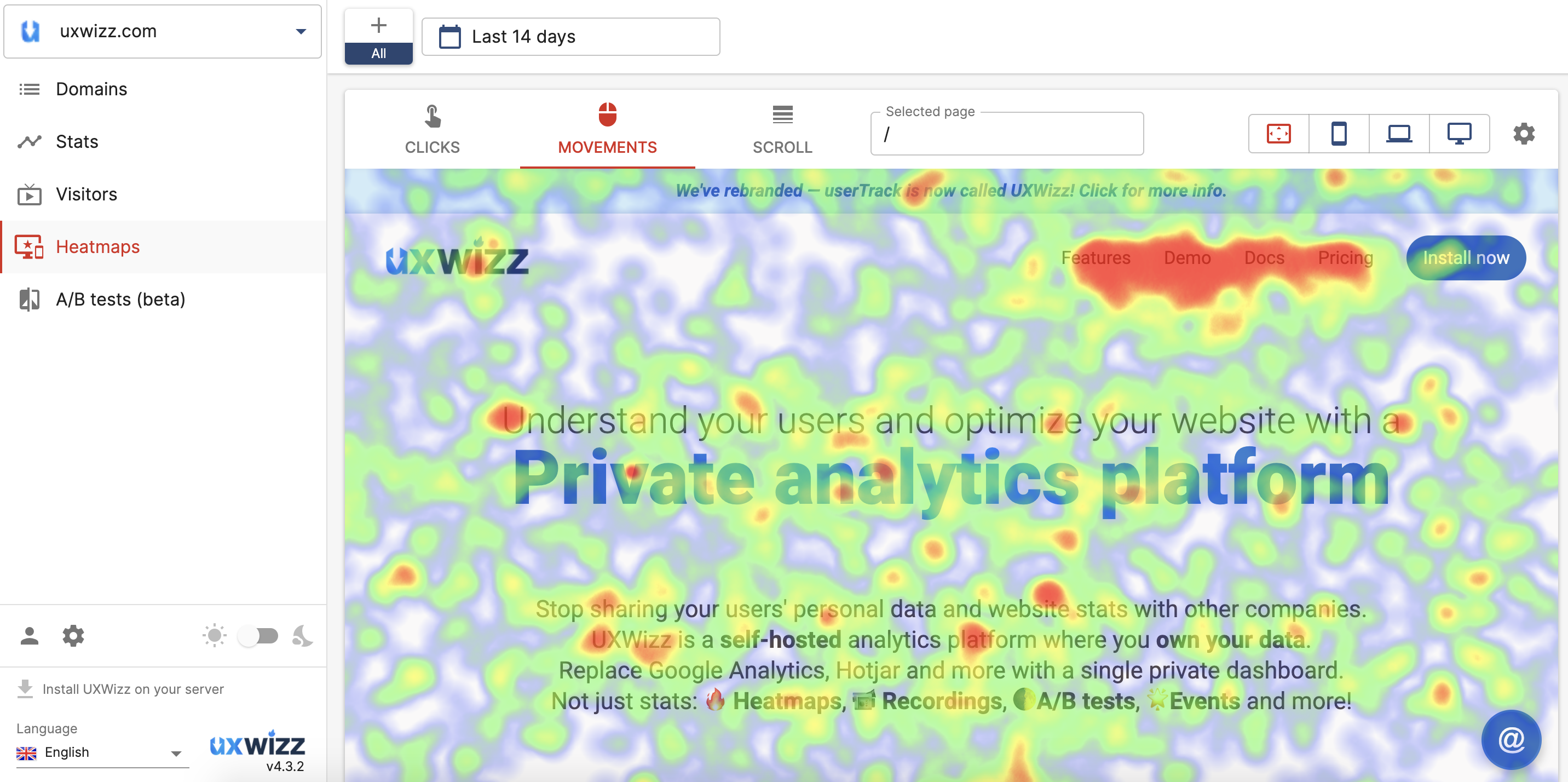
UXWizz is a self-hosted product analytics tool offering visitor insights, session recording, heatmaps, segments, and basic A/B testing.

It offers a lightweight version of session recording that only stores the URL of the page and the user actions. This is designed to optimize your data storage and remove the manual maintenance otherwise required by UXWizz.

Who is UXWizz for?

UXWizz is a good choice for individuals and small businesses who want quick, qualitative insights and session recordings. A Wordpress plugin is also available.

Key features

  • Session recording: Lightweight and full DOM recording modes.
  • Heatmaps: Click, move, and scroll heatmaps.
  • Visitor segmentation: Filter and group visitors by behavior, device, or custom properties.
  • A/B testing: Basic split testing built in.
  • Error tracking: Monitor and log JavaScript errors.
  • AI analysis: Ask AI to generate stats and charts using natural language queries.
  • WordPress plugin: Easy installation for WordPress sites.

How much does UXWizz cost?

UXWizz is self-hosted only with a one-time license fee.

  • The Personal license is $299 and covers unlimited websites, visitors, recordings, and heatmaps for a single user.
  • The Company license is $799 and adds unlimited dashboard users for teams. Both include one year of free support and updates, with extensions available as paid add-ons.
  • The Agency license is $2,490 and includes white-labeling, custom branding, custom dashboard pages, domain limits per user, and up to 5 servers – intended for agencies managing analytics on behalf of clients.

All tiers include one year of free support and updates, with extensions available as paid add-ons. There is no cloud version and no free tier, though a free trial is available.

Bottom line

UXWizz is a good fit for individuals and small businesses who want basic self-hosted analytics and session recording without a monthly bill. The single-developer maintenance model is a real risk for long-term reliability, but the one-time pricing makes it a low-stakes option to try.
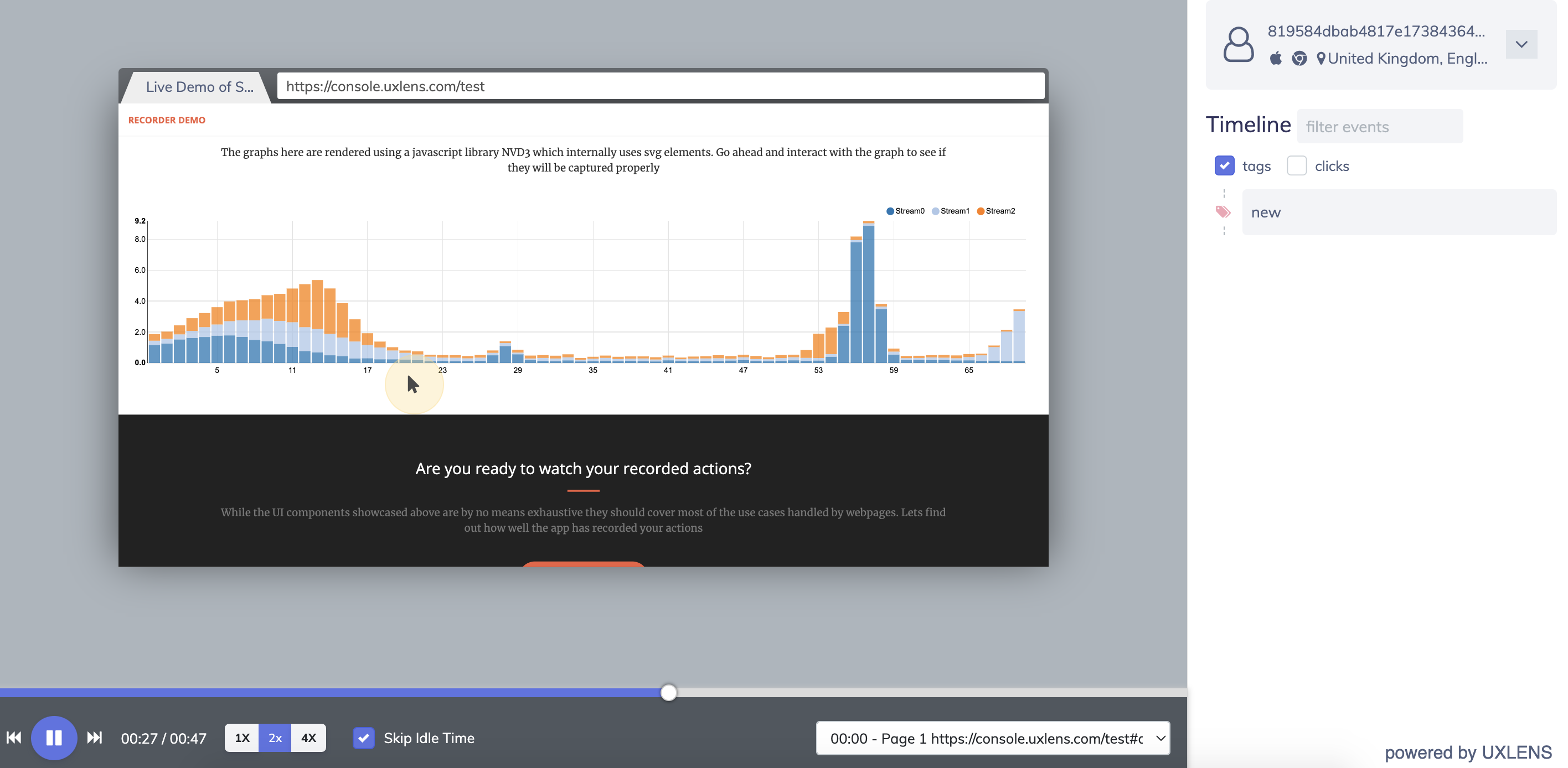
UXlens - self hosted session replay

UXlens is a developer-first session recording tool that provides insight into user interface and conversion issues. It does not include any additional analytics tools, but does have useful segment filtering features that help businesses locate blocks in their funnel.

Who is UXlens for?

UXlens is a good choice for UX designers and product teams who want to study the impact of their UI on the user journey without spending too much.

Key features

  • Session recording: Lightweight recordings focused on user interactions.
  • Segment filtering: Customizable filters to track sessions by user segment, device, or page.
  • Privacy by default: Input elements masked by default to protect user data.
  • Self-hosting: Docker-based self-hosted deployment available.

How much does UXlens cost?

UXlens offers both cloud subscriptions and self-hosted lifetime licenses. Cloud plans start at $6/month (Starter, 6,000 recordings) and go up to $70/month (Business Plus, 80,000 recordings), with Professional at $12/month (12k) and Business at $30/month (32k).

All cloud plans include a 30-day recording history and conversion funnels. Enterprise plans are available on request.

Self-hosted lifetime licenses start at $200 one-time (Startup – up to 3 websites, 10 admin seats) and $500 one-time (Agency – unlimited websites, 10 admin seats). An Agency Plus tier with REST API access is available on a yearly basis (contact for pricing), and a free license is available for non-commercial and personal use.

Bottom line

UXlens is a minimal, affordable session recording tool for small teams who just need the basics. It lacks the depth of analytics and developer tools found in PostHog, OpenReplay, or Sentry, but its low price point and self-hosting option make it worth considering for simple use cases.
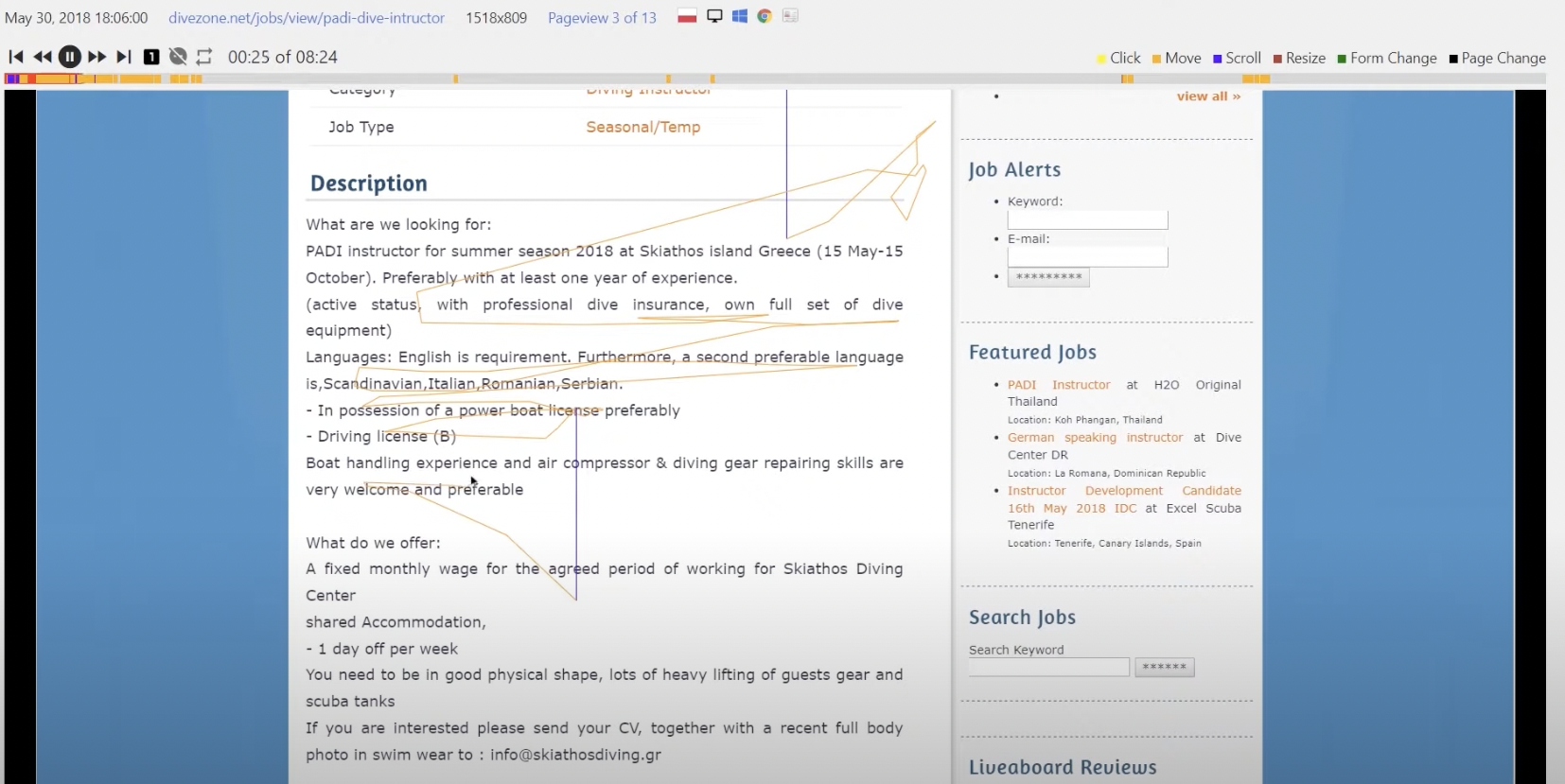
Matomo - open source GA alternative

Matomo is an open web analytics platform. Touted as an alternative to Google Analytics, Matomo is largely focused on understanding marketing website analytics. Session recording is available as an add-on via the on-premise marketplace.

Who is Matomo for?

Matomo is mainly built with marketing and content teams in mind, offering insights into website content engagement for optimization of user journeys. Features like session recording are part of a wider set of tools that are useful for product teams as well, but they aren't included in Matomo's open source release.

To learn more, read our PostHog vs Matomo comparison.

Key features

  • Web analytics: Traffic, referrers, goals, funnels, and acquisition analysis.
  • Session recording: Available as a paid add-on for self-hosted; included in cloud Business plan.
  • Heatmaps: Click and scroll heatmaps, also a paid add-on for self-hosted.
  • GDPR compliance: Built-in consent management and EU data hosting options.
  • Self-hosting: Full on-premise deployment with no data sent to third parties.

How much does Matomo cost?

Matomo On-Premise is free and open source – the core analytics platform costs nothing to self-host, with optional paid plugins available separately.

Matomo Cloud is priced by monthly hit volume: starting at $26/month for 50,000 hits, $42/month for 100,000 hits, $85/month for 300,000 hits, and scaling up to $399/month for 2 million hits and beyond.

All cloud plans include 150 session recordings and 1,500 heatmap pageviews per month, but it's unclear how this scales. Enterprise plans for very high volumes are available on request.

Bottom line

Matomo is the best option on this list if you primarily want website analytics and want session recording as a secondary add-on. The session recording feature is not included in the free open source release, which limits its appeal compared to tools where replay is a core feature.

  • Want an all-in-one platform with session replay, product analytics, feature flags, error tracking, and more? Go with PostHog.
  • Need a powerful self-hosted option with advanced DevTools, co-browsing, and strict data residency requirements? Choose OpenReplay.
  • Already using Sentry for error monitoring and want replay without adding another vendor? Stick with Sentry.
  • Want basic self-hosted recording and heatmaps with no monthly fees? UXWizz or UXlens are your best bets.
  • Need open source web analytics with session recording as part of the package? Try Matomo.

Is PostHog right for you?

Here's the (short) sales pitch.

We're biased, obviously, but we think PostHog is the best open source session replay tool if:

  • You want session replay tightly connected to product analytics, feature flags, and error tracking.
  • You need mobile replay (iOS, Android, React Native, Flutter) on all plans including free.
  • You want transparent, usage-based pricing with a generous free tier and no sales calls.
  • You want open source code you can audit, self-host, or contribute to.

It's completely free to get started – no credit card required. Our AI setup wizard handles configuration in minutes, or check out our docs to do it yourself.

What is open source session replay?

Open source session replay tools record how users interact with your website or app – clicks, scrolls, mouse movements, and form interactions – and let you replay those sessions to understand user behavior.

Unlike proprietary tools like Hotjar or FullStory, open source tools give you access to the source code, the ability to self-host, and full control over your data. This matters for teams with strict privacy requirements, data residency needs, or who simply want to avoid vendor lock-in.

What's the difference between open source and self-hosted session replay?

Open source means the source code is publicly available and you can audit, modify, or contribute to it.

Self-hosted means you run the tool on your own infrastructure rather than using a vendor's cloud.

Most open source session replay tools can be self-hosted, but not all self-hosted tools are open source. For example, Sentry uses a Business Source License (source-available, not fully open source) but can still be self-hosted for free.

Which open source session replay tool has the best free tier?

PostHog has the most generous free cloud tier: 5,000 web session replays, 2,500 mobile replays, and 1 million analytics events per month.

OpenReplay and Sentry offer free self-hosted versions with no usage limits if you're willing to manage your own infrastructure.

Which tools support mobile session replay?

PostHog is the strongest option for mobile, supporting iOS, Android, React Native, and Flutter with 2,500 free mobile recordings per month included on all plans. OpenReplay has added mobile support in recent releases (iOS and Android). Sentry supports session replay for mobile apps. Most other tools on this list are web-only.

Is Highlight.io still available?

Highlight.io was acquired by LaunchDarkly in March 2025. Existing accounts are being migrated to LaunchDarkly's observability platform; it is no longer recommended as a standalone tool for new deployments.

What happened to Hotjar?

Hotjar merged into Contentsquare. New customers sign up through Contentsquare, and existing Hotjar customers are being migrated to the Contentsquare platform.

The core Hotjar tools (session replay, heatmaps, surveys) still exist within Contentsquare's offering. See our guide to Hotjar alternatives for more.

What are the best session replay tools overall (not just open source)?

The top session replay tools in 2026 include:

  • PostHog – Best all-in-one for engineering teams with analytics, feature flags, and error tracking
  • Microsoft Clarity – Best completely free option with unlimited recordings
  • Smartlook – Best for mobile-first apps with crash reports
  • LogRocket – Best for frontend debugging with performance monitoring
  • FullStory – Best for frustration signal detection and UX analytics

See our full guide to the best session replay tools for more options.

Subscribe to our newsletter

Product for Engineers

Read by 100,000+ founders and builders

We'll share your email with Substack