





There it is. Staring at me. Sitting there. Goading me.
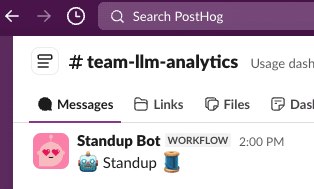
The day is nearly done. I've reviewed PRs, fixed bugs, hopped on quick calls, commanded my agents, and smashed that accept button all day!
And now I'm expected to fill in some stupid Slack thread with my standup updates?
Every time I manually copy-paste into our standup thread, a little part of me dies inside.
We just passed the Turing test and here I am copy-pasting GitHub issue URLs into a Slack thread like it's 2010. I'm pulling up tabs, hunting for PR links, navigating all over GitHub, trying to remember what I (my agents) actually did today, and formatting it all nicely in Slack.
After a few months of this, I snapped.
I work on AI Observability at PostHog. I spend my days helping people understand what their AI agents are doing. And yet here I am, manually summarizing my GitHub activity like some kind of caveman.
The irony was too much. I decided to build my own agent to beat the standup bot at its own game.
It helps too that this was also the perfect excuse to learn about and play around a little with the OpenAI Agents SDK.
The idea was simple:
And because I'm a shameless dogfooder, this was the perfect excuse to:
posthog-python
Let me show you how it all works.
🌶️ Hot take
Agents are the new scripts. We used to write bash scripts and cron jobs to automate tedious tasks. Now we write agents. Scripts follow rigid rules; agents are more flexible and often that's worth it.
I'll be honest - I didn't start here. My first version was a three-agent system: a Coordinator that orchestrated the workflow, a Data Gatherer that pulled from GitHub, and a Summarizer that turned it all into prose. I used the OpenAI Agents SDK's agents-as-tools pattern so the coordinator could delegate to the others.
It was a mess. Debugging handoffs between agents was painful. The coordinator would sometimes call the wrong sub-agent, or pass incomplete context. The summarizer couldn't see the raw tool call results - only what the coordinator decided to forward. And I needed three separate prompt templates, three model configs, and an on_handoff hook just to wire it all together. Way too much complexity for what is fundamentally a simple task.
So I ripped it all out - deleted the coordinator, data gatherer, and summarizer, and collapsed everything into a single agent with all 18 tools directly. The result was 300 fewer lines of code and something that actually worked reliably.
The agent has various tools organized by what they do:
Here's the actual agent definition:
The agent uses dynamic instructions that inject the current standup draft, so each refinement iteration has full context without blowing the token budget. A StandupContext object tracks collected data across tool calls without stuffing it all into the prompt.
The data gathering is powered by the gh CLI, which means:
gh auth login)This approach works great for a small personal agent running locally on your machine. If you were building something multi-user or running it as a service, you'd want proper GitHub API tokens and rate limit handling - but for a daily standup helper? The gh CLI is perfect.
Here's what the activity feed looks like when the agent queries it:
The agent starts with the activity feed to get an overview, then drills down into specific PRs or issues that need more context. It's smart about not fetching redundant data and caches results so subsequent questions don't hit GitHub again.
Example of what the agent actually sees (from a real run):
Here's where it gets interesting. Building an agent is one thing. Understanding what it's actually doing? That's where PostHog AI Observability comes in.
I instrumented the entire agent with our OpenAI Agents SDK integration. Fun fact — it was built during a one-day hackathon at a team onsite in Barcelona, where I also discovered Calçots (highly recommend).

That's me holding a Calçot. This is relevant to the blog post, I promise.
The integration was surprisingly quick to build thanks to the excellent tracing support that OpenAI baked into the Agents SDK. We just needed to extend their TracingProcessor to send spans to PostHog instead of their default backend.
That's it. One function call and suddenly I have full visibility into everything. (If you're handling sensitive data, you can enable privacy mode to exclude prompts and completions from being stored.)
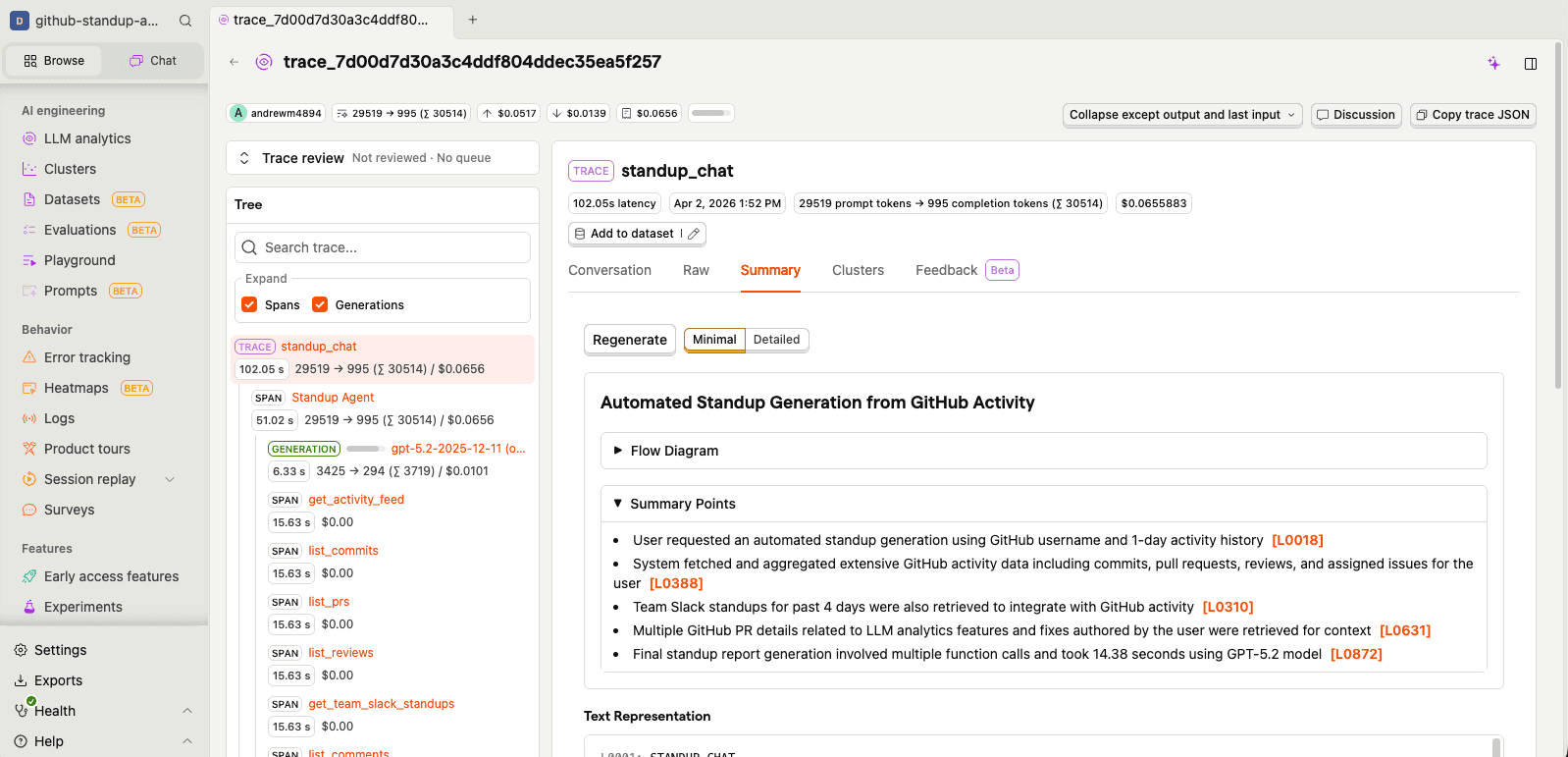
Every agent run creates a trace with spans for:
I can see exactly how the agent decided which tools to call, what data it gathered, and how it turned all of that into prose. Each trace also gets an AI-generated summary so you can quickly understand what happened without digging into every span:
One thing I quickly realized: hardcoding prompts in source code is a pain when you're iterating on tone and formatting. So I moved all my prompts into PostHog's prompt management. The agent pulls its instructions, style guide, and context templates from PostHog at runtime:
standup-agent-instructions - the main system prompt with workflow, formatting rules, and feedback detectioncustom-style - formatting rules that enforce Slack mrkdwn links and match team conventionscurrent-standup - injected dynamically with the latest draft during refinementchat-context - contextual template for chat mode sessionsgenerate-standup - the one-shot generation promptThis means I can tweak how the agent writes standups without redeploying anything. And because PostHog tracks prompt versions, I can see exactly which version of the instructions produced which standup - useful when something goes weird.
There's also the "prompts are IP" angle. You might have seen the recent Claude Code source map situation — a packaging mishap meant the full system prompts ended up in the npm release. These things happen (shipping is hard!), but it's a good reminder that if your prompts are in the source code, they're one accidental publish away from being public.
For my standup agent it doesn't matter (my half-baked vibecoded prompts are open source anyway), but if yours contain real secret sauce, a prompt store with a local cache is a nice safety net.
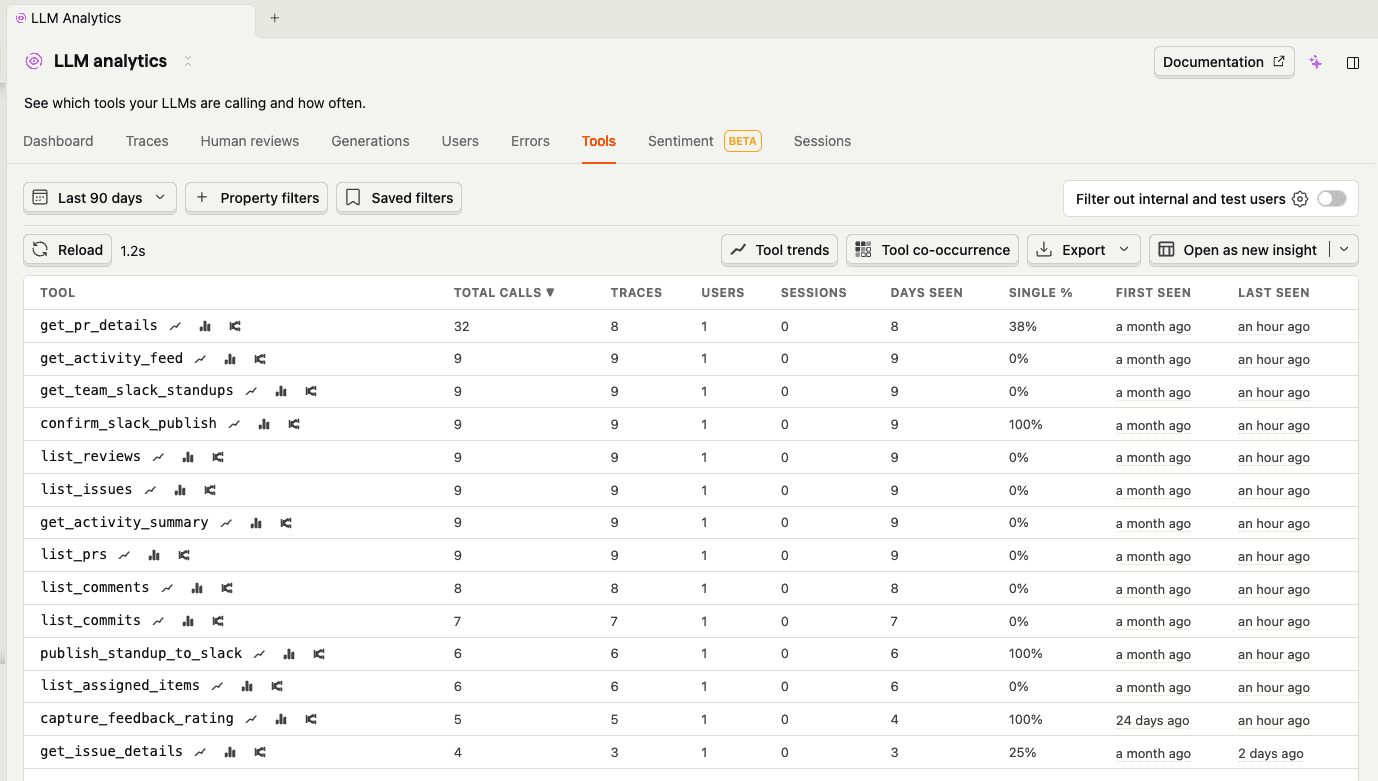
The tools tab shows me which tools the agent calls most and how long they take. Turns out get_pr_details and get_activity_feed dominate - you can see get_pr_details right at the top with the most calls. That was actually a surprise - the agent was drilling into way more PRs than it needed to. A quick prompt tweak ("only drill into PRs that look significant") cut unnecessary API calls.
Clustering automatically groups similar traces together. For a personal agent like this, the clusters are pretty simple - mostly "standard standup generation" vs "heavy iteration sessions" vs "quick copy-paste runs." But it's useful for spotting patterns in how I use the agent. If you're curious about how the clustering pipeline actually works under the hood, I wrote a deep dive on how we built it.
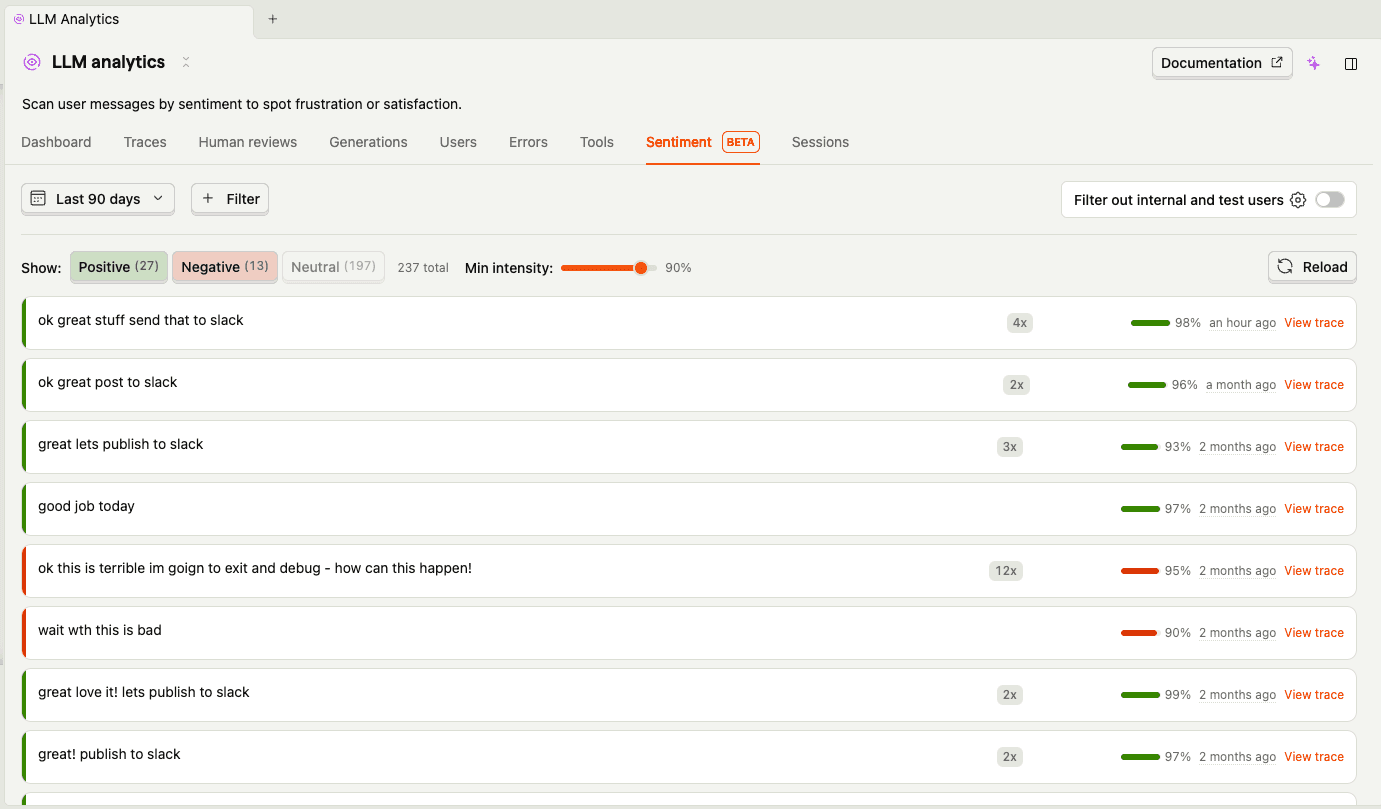
The sentiment tab is more fun. PostHog analyzes the tone of user messages, and looking at my negative ones is... humbling. Some highlights from my standup sessions:
In fairness, most of these are just me giving the agent iteration feedback ("drop all the merged words its a bit repetitive", "remove the ask, dont need it") rather than genuine rage. But sentiment analysis doesn't know the difference, and that's actually an interesting insight — what looks like negative user sentiment might just be a user who's actively engaged and iterating. The positive ones are more telling: "ok great stuff send that to slack" and "great love it lets publish to slack" tend to mean the agent actually nailed it first time.
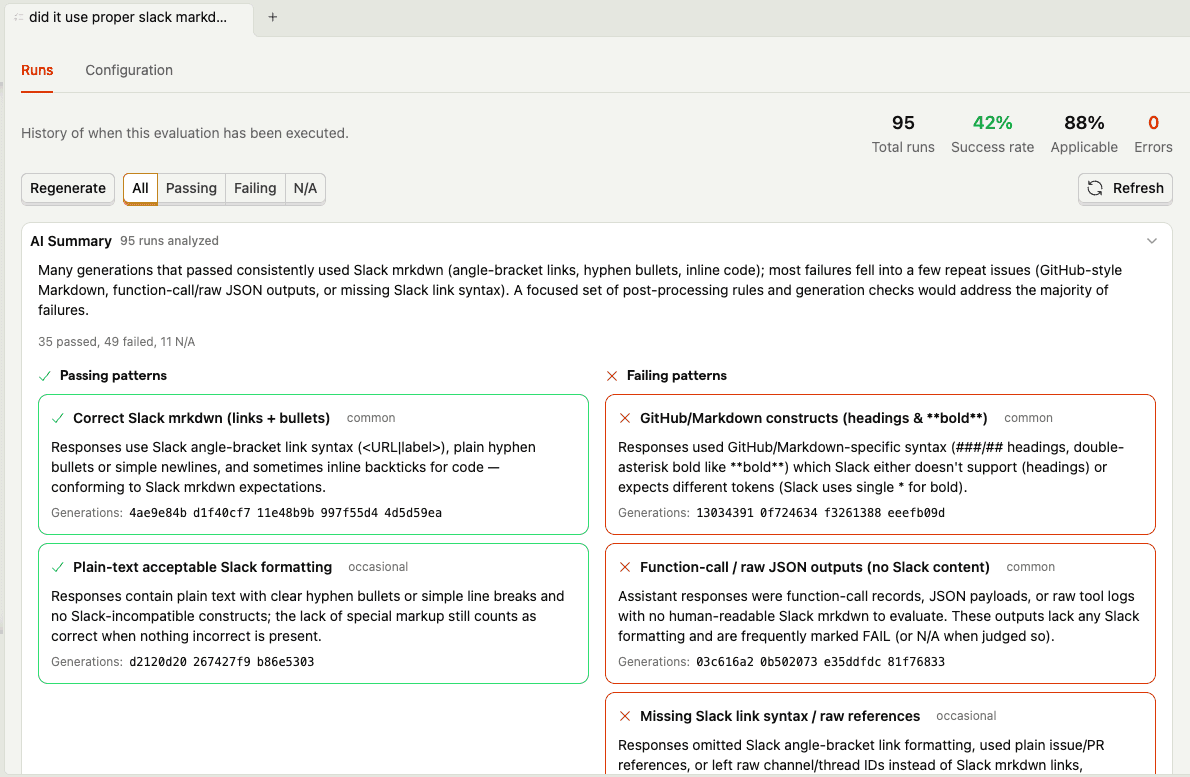
Here's where dogfooding gets real. The agent's biggest formatting headache is Slack's cursed mrkdwn syntax - it uses <url|text> instead of [text](url), and the agent constantly tries to slip back into regular markdown. So I set up an evaluation that automatically checks every generation: "did it use correct Slack-style markdown formatting?"
The eval results summary tells the whole story. Generations that pass tend to use correct Slack mrkdwn links, simple bullets, and plain text headers. The failures? The agent keeps trying to sneak in **bold** headers, [text](url) markdown links, and occasionally dumps raw JSON outputs. My favorite failure pattern: the agent would use <link|text> syntax for headings (correct for links, completely wrong for headers) — Slack doesn't even have heading syntax, so it just needs to use plain text like Did:.
You can also drill into individual runs to scan each generation's result and reasoning:
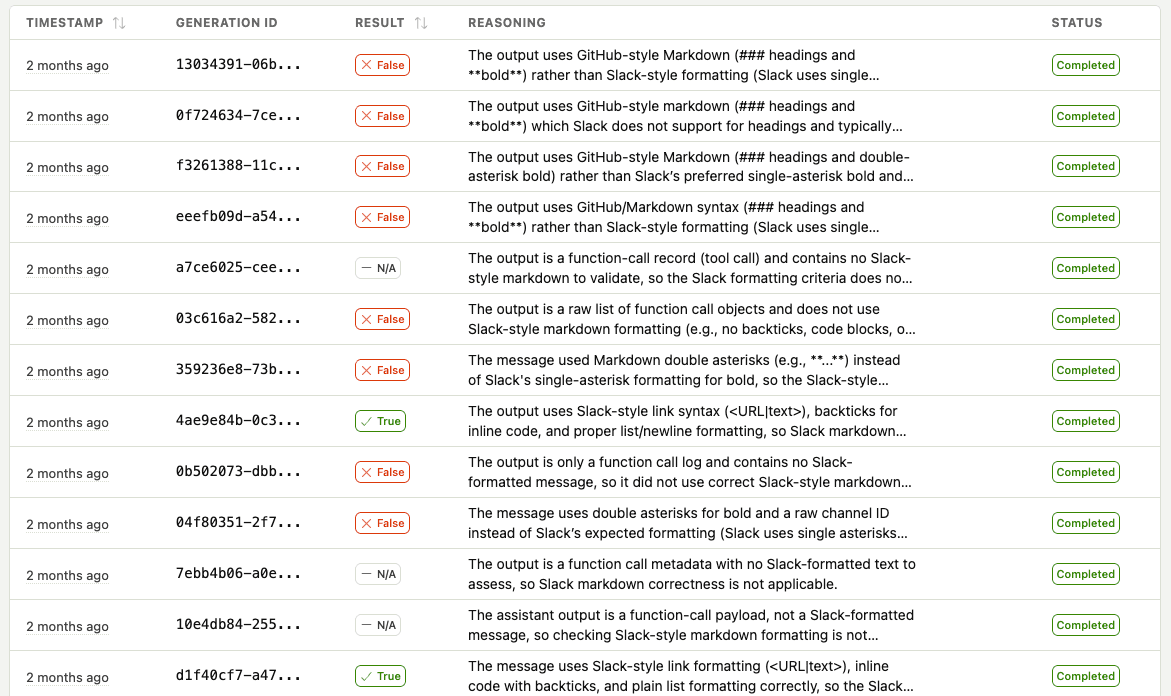
This is the kind of thing that's nearly impossible to catch systematically without automated evals. I'd notice the odd broken link in Slack, fix the prompt, and think I'd solved it — only for a different formatting issue to pop up the next day. The eval catches all of them and shows me the patterns so I can fix the root cause in the prompt, not just whack-a-mole individual failures.
This one is really just a regular posthog.capture() call exposed as a tool - plain old product analytics, nothing fancy. The interesting part is that the agent decides when to call it. I don't explicitly say "thumbs up" or "thumbs down" — the agent picks up on signals in my messages and fires the event itself:
When I say "ok great stuff send that to slack", the agent infers positive feedback and captures it before publishing. When I say "bad you are not following the examples", it captures negative feedback with my complaint as the comment. I never have to break out of the conversation flow to rate anything — the agent just reads the room.
That feedback is linked to the exact trace with $ai_trace_id, so I can go back and see what went wrong on bad runs. Over time, this builds a dataset for understanding what makes a good standup and which prompt versions produce better results.
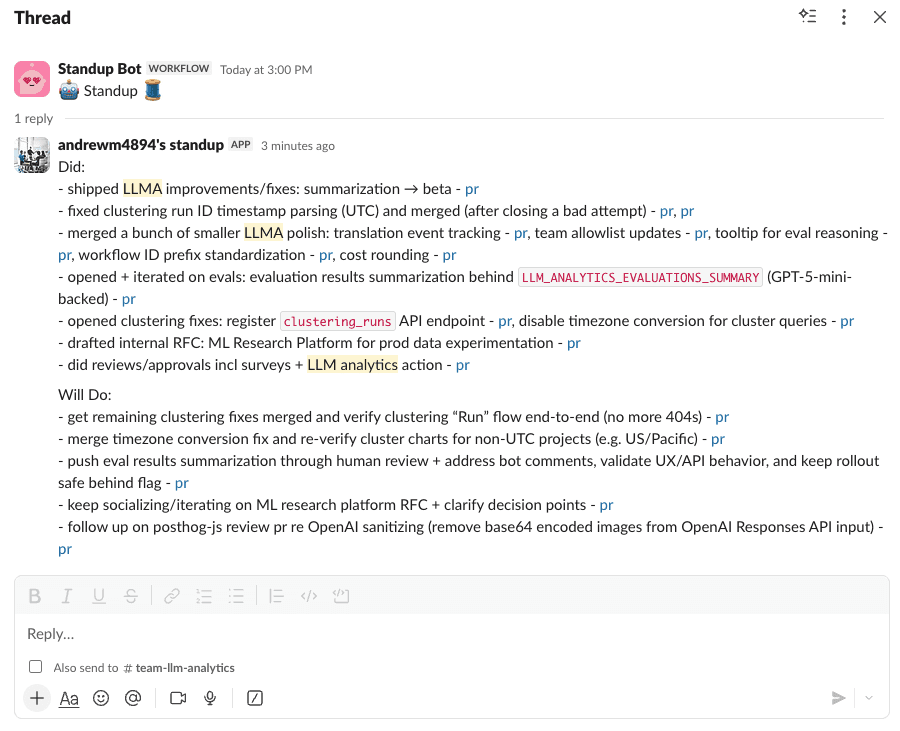
The final piece is actually posting to Slack. Because what's the point of automating standup generation if I still have to copy-paste?
The agent has Slack integration with a two-step confirmation flow (because posting to your team's Slack channel by accident would be... bad):
The agent automatically finds the latest standup thread in your configured channel and posts as a reply. No more hunting for the thread. No more copy-paste. Just vibes.
Did I save any time compared to just writing the standup myself? Debatable.
Might there be some AI slop in my updates that slipped through? Most definitely.
Did I get to use AI instead of doing it manually? Yes.
And isn't that all that really matters?
🌶️ Hot take
Human in the loop still matters. Here's the thing - as soon as I stop manually iterating and approving the standups my agent is generating, it flips into something weirdly anti-social. I'm just sending my teammates auto-generated text. Even if it's 90% accurate and I would have approved it anyway, something feels off about fully automating communication with other humans. The approval step isn't just quality control - it's me taking ownership of my words.
The agent is open source, go check it out or try it yourself:
You'll need:
gh auth login)The broader lesson here: if you're building AI features, instrument them from day one.
PostHog's AI Observability gives you:
The OpenAI Agents SDK integration is available in posthog-python. Check out our other integrations for LangChain, OpenAI, and many other frameworks.
I've been using this agent daily for a few weeks now. It's not perfect - sometimes it misses context or formats things weirdly. But that's the beauty of having full observability: I can see exactly what went wrong and iterate.
🌶️ Hot take
Why are we even doing standups? Honestly, summarization as a category feels crazy early. The fact that I have to manually aggregate my work across GitHub, Slack, Linear, and Google Docs is absurd. I should just be able to read the "headlines" of my work life each morning - a personalized digest of what matters, generated automatically from all my tools. No one has solved this yet. Maybe standups are just a symptom of our tools not talking to each other. The standup bot isn't the enemy - it's a coping mechanism for a fragmented toolchain.
The standup bot still messages me at 6 PM. But now I just smile, run standup generate, and let my agent do the talking.
F*$k you, standup bot. I win.
此内容由惯性聚合(RSS阅读器)自动聚合整理,仅供阅读参考。 原文来自 — 版权归原作者所有。