

惯性聚合 高效追踪和阅读你感兴趣的博客、新闻、科技资讯
阅读原文 在惯性聚合中打开

推荐订阅源

The GitHub Blog
The GitHub Blog
V2EX - 技术
V2EX - 技术
T
Threat Research - Cisco Blogs
Threat Intelligence Blog | Flashpoint
T
Tor Project blog
Project Zero
Project Zero
cs.CL updates on arXiv.org
C
Cybersecurity and Infrastructure Security Agency CISA
T
Tenable Blog
P
Privacy & Cybersecurity Law Blog
AWS News Blog
AWS News Blog
Scott Helme
Scott Helme
C
Cisco Blogs
Application and Cybersecurity Blog
O
OpenAI News
P
Privacy International News Feed
Google Online Security Blog
SecWiki News
SecWiki News
The Last Watchdog
The Last Watchdog
NISL@THU
NISL@THU
Attack and Defense Labs
G
GRAHAM CLULEY
Security Latest
Security Latest
Help Net Security
Help Net Security
C
Cyber Attacks, Cyber Crime and Cyber Security
Hugging Face - Blog
Hugging Face - Blog
月光博客
月光博客
让小产品的独立变现更简单 - ezindie.com
OSCHINA 社区最新新闻
OSCHINA 社区最新新闻
A
Arctic Wolf
Security Archives - TechRepublic
S
Security @ Cisco Blogs
腾讯CDC
S
Secure Thoughts
WordPress大学
WordPress大学
P
Proofpoint News Feed
H
Help Net Security
Simon Willison's Weblog
小众软件
小众软件
M
MIT News - Artificial intelligence
博客园 - 叶小钗
IT之家
IT之家
G
Google Developers Blog
博客园 - 聂微东
Google DeepMind News
Microsoft Security Blog
Hacker News - Newest:
Hacker News - Newest: "LLM"
Google DeepMind News
N
News and Events Feed by Topic
N
News and Events Feed by Topic

John Bokma's Hacking and Hiking

Failed to verify signature archive-contents.sig in Emacs Aquamacs 3.6 Hangs When Saving An Encrypted File PAR trouble How To Create a Bootable LibreELEC Installation using Mac OS Running pdflatex Using the Alpine Pandoc LaTeX Docker Image A Docker Image for Sass Timezones in Alpine Docker Containers A Tale of Three Docker Images Debugging a Perl Docker container Perl Time::Piece Unicode Issue Giving Docker Desktop for macOS a Second Chance Flashing another TP-Link TL-WDR4300 with OpenWrt firmware Rehousing two tarantulas Getting started with the Perl version of tumblelog on Ubuntu 18.04 LTS A visit to Avonturia De Vogelkelder Flashing a TP-Link TL-WDR4300 with OpenWrt firmware Wireless Headless Raspberry Pi - John Bokma A Matter of Time - John Bokma Hand coding an RSS 2.0 feed in Python RFC #822 and RFC #3339 dates in Perl RFC #822 and RFC #3339 dates in Python Hand coding an RSS 2.0 feed in Perl Nav Element with no Heading Rewriting CommonMark Nodes in Perl "right" this time
Mounting a VDI File in a Different VirtualBox Guest
John Bokma · 2019-10-18 · via John Bokma's Hacking and Hiking

October 17, 2019

Today I wanted to check if a specific file was on an old Linux virtual disk image (VDI) I had on an external backup disk. I had already an Ubuntu guest up and running so I wanted to mount the VDI file located on the external harddisk as an additional virtual harddisk and access it from within the Ubuntu guest.

First, I stopped the Ubuntu guest. Next, I opened the Virtual Media Manager, and added the VDI file.
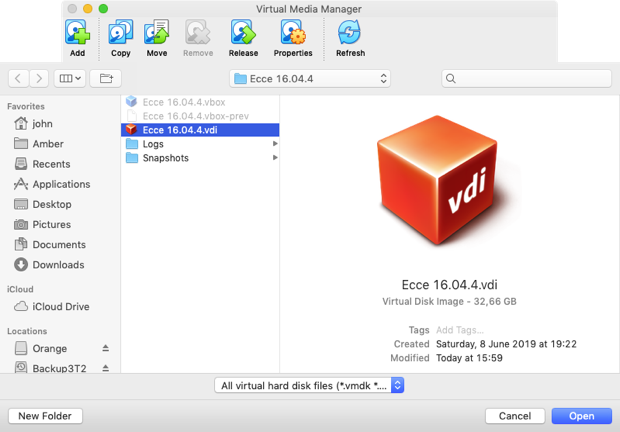
Adding a VDI file to the Virtual Media Manager

Next, I opened the settings for the Ubuntu guest and selected the storage tab. I selected the SATA controller and clicked the harddisk icon with a green plus symbol to add a new drive. In the dialog window I selected Choose existing disk.
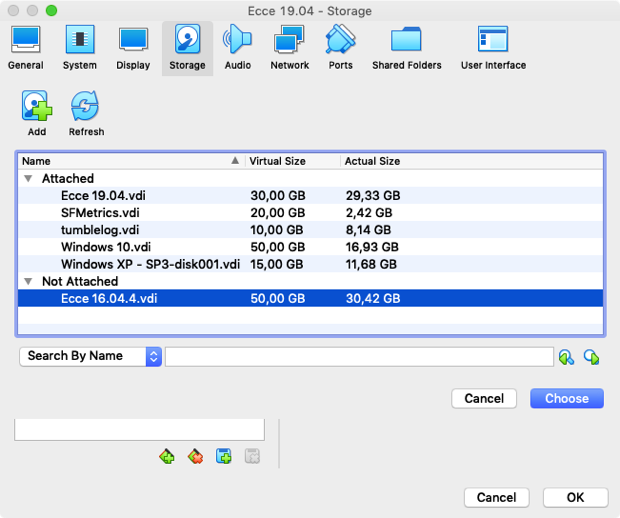
Choosing an existing disk to add to the SATA controller

Next, I started the Ubuntu virtual machine. I used the following command to find the name of the disk:

sudo fdisk -l | grep sd

This command gave the following output for my virtual machine:

Disk /dev/sda: 30 GiB, 32212254720 bytes, 62914560 sectors
/dev/sda1  *     2048 62912511 62910464  30G 83 Linux
Disk /dev/sdb: 50 GiB, 53687091200 bytes, 104857600 sectors
/dev/sdb1  *        2048  88082431 88080384  42G 83 Linux
/dev/sdb2       88084478 104855551 16771074   8G  5 Extended
/dev/sdb5       88084480 104855551 16771072   8G 82 Linux swap / Solaris

The drive added is /dev/sdb and the partition I needed to mount is /dev/sdb1 as /dev/sdb2 is an extended partition with /dev/sdb5 the swap partition.

So, I made a directory to mount the additional virtual harddrive under as follows:

sudo mkdir /old-hdd

Next, I used vi to modify /etc/fstab:

sudo vi /etc/fstab

And added the following to the end of this file:

/dev/sdb1    /old-hdd    ext4    defaults    0    0

After this I could mount the virtual harddisk using:

sudo mount /old-hdd

When I was done with the old virtual harddisk I unmounted it as follows:

sudo umount /old-hdd

And removed the directory I used as a mount point using:

sudo rmdir /old-hdd

And removed the last line from /etc/fstab using vi.

Next, I stopped the virtual machine running Ubuntu so I could remove the virtual harddisk. In the settings for the Ubuntu virtual machine I removed the VDI file from the SATA controller.
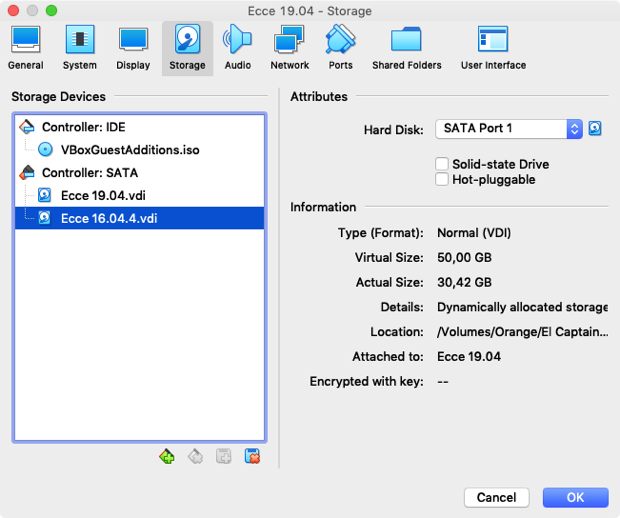
Removing the VDI file from the SATA controller

Next, I opened the Virtual Media Manager and with the right VDI file selected I clicked the Remove button. A dialog opened which asked if I wanted to Keep the VDI file or Delete it. As I want to keep this specific VDI around I selected Keep.
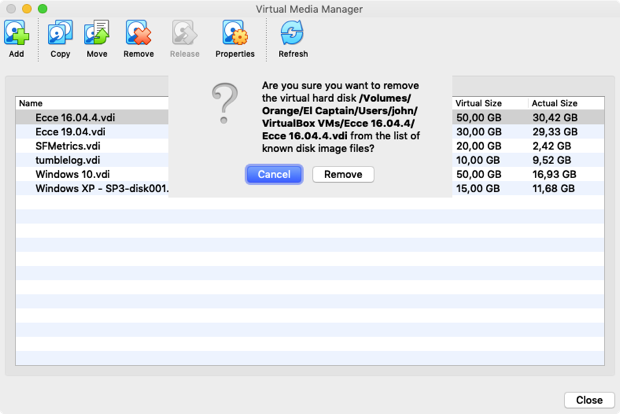
Removing the VDI file from the Virtual Media Manager
Removing the VDI file from the Virtual Media Manager.

Finally, I restarted the Ubuntu virtual machine.