












Thrive Suite version 10.8.8 is out, and this one is all about practical upgrades that give you more control over your data and more time back in your day. Three tools got meaningful upgrades: Thrive Quiz Builder, Thrive Leads, and Thrive Architect.
3 things worth knowing:
- Your quiz data is no longer stuck in WordPress. You can now export all quiz results as a CSV in one click, making it easy to segment leads, spot trends, and plug insights into your other tools.
- Building lead forms just got a lot less repetitive. One-click duplication in Thrive Leads means you can copy an entire form — including its rules, triggers, and integrations — and use it as a starting point for your next campaign.
- Thrive Architect's sidebar now shows text labels alongside icons, so you spend less time hovering and more time actually building.
If you've got two minutes, the full breakdown below is worth the read. Each update is purposeful, and together they add up to a noticeably smoother experience.
When I think about what truly moves the needle for online businesses, it often comes down to two things: making smarter decisions and not burning time on tasks that should be easier. That's what version 10.8.8 of Thrive Suite is built around.
We've been watching how you use the tools, listening to the feedback you share, and working through the smaller details that, when improved, make your day noticeably better.
The updates in this release touch Thrive Quiz Builder, Thrive Leads, and Thrive Architect. Each one is built to make your workflow faster, your data more accessible, and your campaigns easier to run.
Here's what's new.
1. Export Quiz Results as CSV (Thrive Quiz Builder)
Have you ever run a quiz, watched the responses roll in, and then wanted to actually use that data somewhere outside the Thrive dashboard? Now you can.
Head to your quiz's Reporting section, click "Export Results," and you get a CSV file with everything collected from every quiz taker — no developer, no database queries, no third-party plugins required. (This doc covers the process in detail)
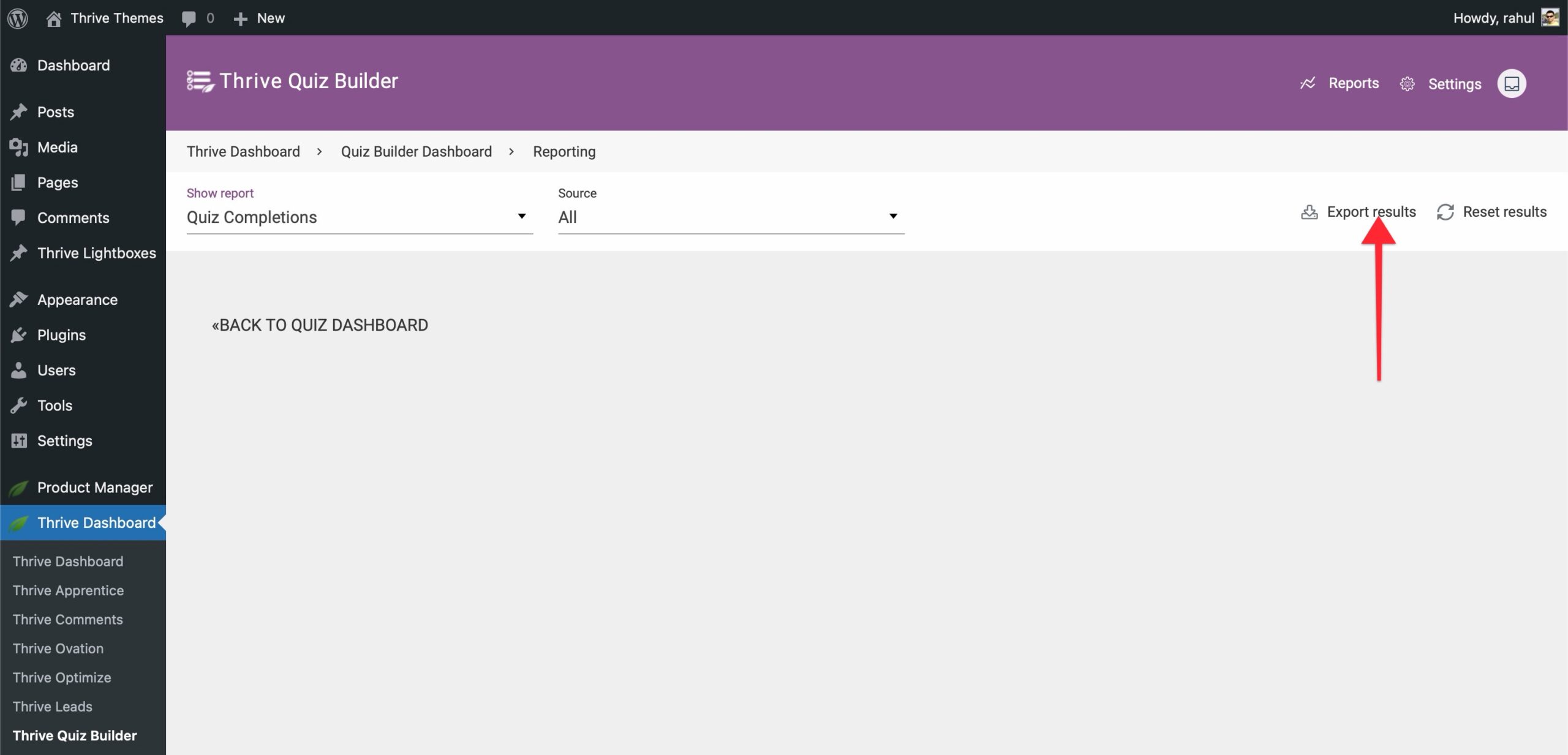
The export covers it all: names and emails (if collected), submission timestamps, the winning category, individual category scores, answers to every question including open-ended responses, and any custom fields you set up. It opens straight into Excel, Google Sheets, or any spreadsheet tool you're already using.
From there, you can:
- Analyze responses to spot trends, identify common pain points, and get a clearer read on what your audience actually thinks.
- Segment your leads with more precision. Everyone who scored high in "SEO knowledge" on your marketing quiz gets one follow-up sequence. Everyone who flagged a different challenge gets another.
- Share data with your team without having to screenshot dashboards or write up summaries.
- Import responses into other tools for automation, lead scoring, or building custom ad audiences.
- Refine your questions over time based on which ones actually surface useful answers.
A couple of things worth knowing: the export is Admin-only, so your data stays protected on multi-user sites. And if you have anonymization turned on, the CSV respects those settings — so it's GDPR-safe right out of the box.
2. Show Full Category Breakdown on Quiz Results Pages (Thrive Quiz Builder)
When someone completes a category-based quiz, they're not just looking for a label. They want to understand themselves.
Showing only the "winning" category — "You're a Content Marketer!" — tells part of the story, but not all of it. Someone might score 40% Content, 30% SEO, 20% Email, and 10% Social.
Until now, that fuller picture was calculated and stored but never shown to them.
You can now display a complete category breakdown on your results pages using simple shortcodes in the Thrive Architect editor. Show scores for every category, percentage breakdowns, mastery percentages, sorted rankings — however you want to present it, it's there. No coding, no custom development.
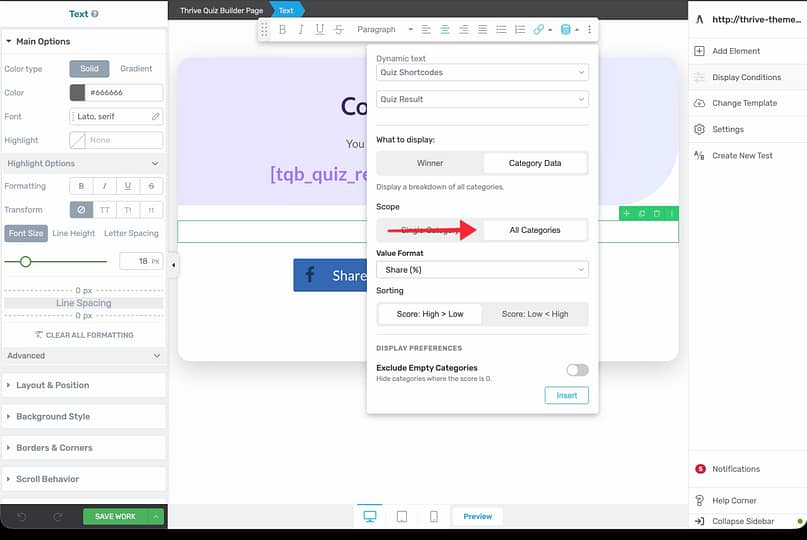
- More personal results: A "Marketing Skills" quiz that shows SEO: 42%, Content: 28%, Email: 16%, Social: 9% tells someone far more than "You're a Content Marketer." That kind of specificity is what makes a quiz feel worth finishing — and worth sharing.
- More time on your results page: People stick around longer when there's more to absorb. That's more time building a connection with your brand.
- Sharper follow-up: If someone scores low in SEO but strong in Content, you know exactly what kind of offer or resource to put in front of them next.
Existing quizzes are completely unaffected, this is purely additive. You opt in by adding the new shortcodes to your results page whenever you're ready.
3. One-Click Duplication in Thrive Leads
Building a lead form well takes real time — getting the design right, setting up display rules, configuring triggers, wiring in integrations. Once you've done it, you've got something worth reusing. Now you can.
A new Duplicate icon appears in the action menu next to every Lead Group, ThriveBox, and Lead Shortcode.
Click it, and an exact copy is created instantly — form design, display rules, triggers, integrations, animations, targeting settings, all of it.
Analytics reset to zero so you start fresh, and the duplicate launches in a disabled state so nothing goes live before you're ready.
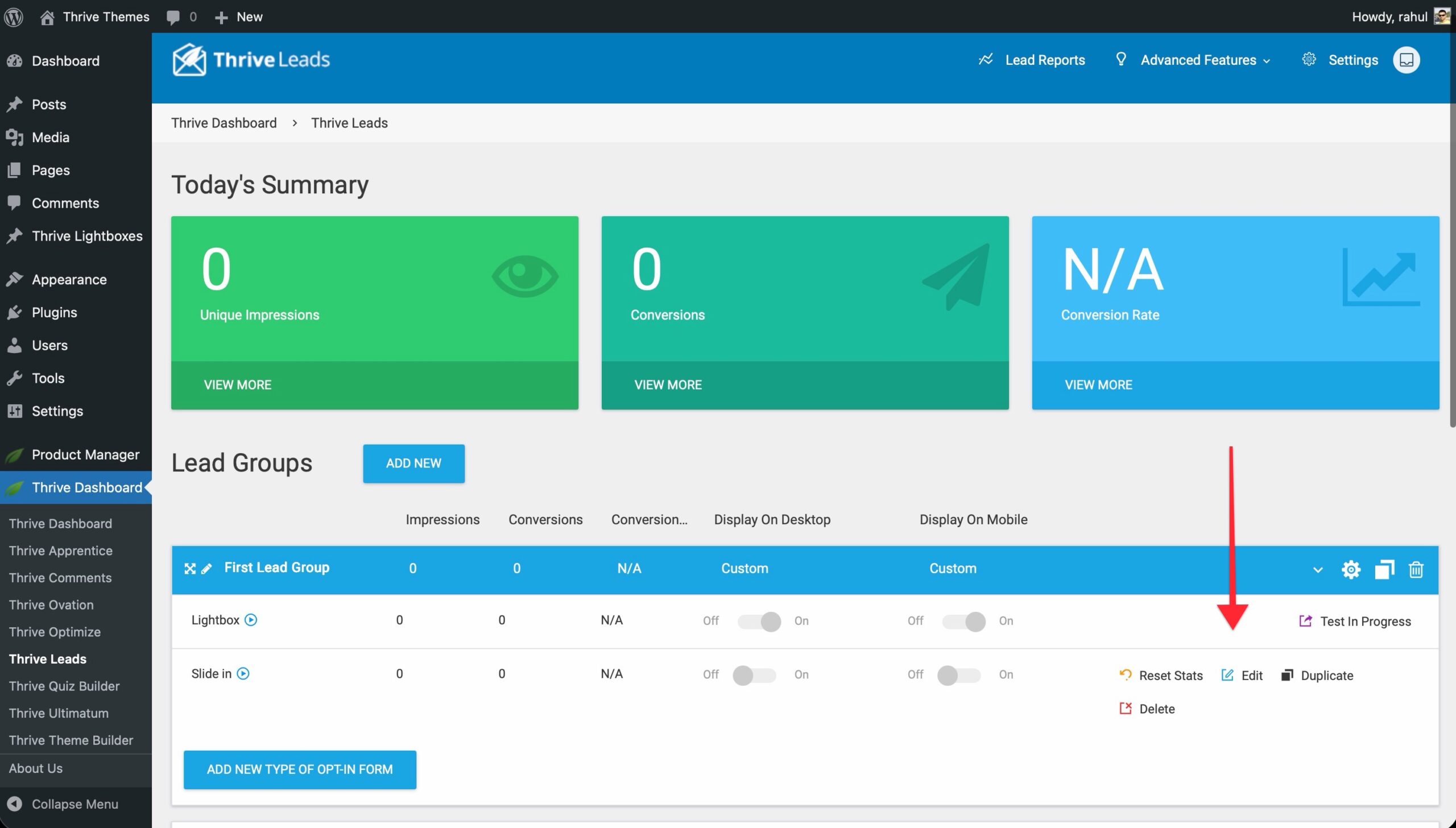
- Faster A/B testing: Duplicate a form, change the headline, run the test. That used to take an afternoon. Now it takes a few minutes.
- Quicker campaign setup: For seasonal promotions or product launches, pull a form that's already worked, update the copy, and you're done.
- Consistent design across your site: Reuse what works without rebuilding it every time.
- More room to experiment: When a variation only takes one click to set up, you're a lot more likely to actually test it.
There's also a cross-group option worth knowing about: when duplicating a form inside a Lead Group, you can choose to copy it into a different group entirely. It's a clean way to move proven designs across campaigns, audiences, or funnel stages without starting from scratch.
4. Expandable Sidebar in Thrive Architect
Powerful tools shouldn't be intimidating. The Thrive Architect sidebar has always been icon-only — useful once you know what everything does, but less than ideal when you're still learning, or when you just want to scan quickly without hovering over every icon.
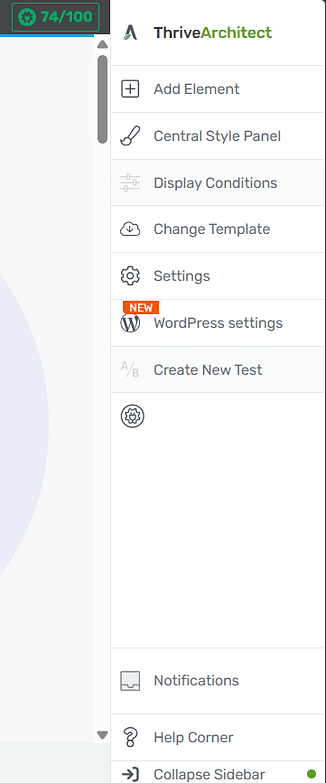
The sidebar can now expand to show both icons and text labels. Toggle between expanded view and icon-only with a single click — and it remembers your preference across sessions.
There's also a smart detail built in: when you open a panel like Settings or Add Element, the sidebar collapses automatically to give you more canvas space.
When you close the panel, it comes back to exactly how you had it. You get full clarity when you're navigating, full workspace when you're building.
- Clearer for new users: Clear labels mean less guessing and a gentler learning curve from day one.
- Faster for everyone: Text labels are quicker to scan than icons, especially when you're moving fast.
- Better feature discovery: Display Conditions, the Central Style Panel, A/B Testing — features that were easy to miss are now clearly labeled and easier to find.
- Consistent across Thrive Suite: This applies everywhere the Architect editor runs — Thrive Leads, Thrive Quiz Builder, and Thrive Ultimatum all get the same improved sidebar.
Update Your Thrive Suite Plugins Today
All four updates are live in Thrive Suite version 10.8.8. To get them, head to your WordPress dashboard, head to Plugins and update your Thrive Themes plugins. It takes a minute, and you'll have everything right away.
We're always working to make Thrive Suite a better platform for your business, and updates like these are exactly how we do it — one well-built improvement at a time.
— Angie & The Thrive Themes Team
- 0
About the author

Angie Meeker is the General Manager here at Thrive Themes. Remember, start with the end user's goals in mind and you'll never go wrong.
Disclosure: Our content is reader-supported. This means if you click on some of our links, then we may earn a commission. We only recommend products that we believe will add value to our readers.