


惯性聚合 高效追踪和阅读你感兴趣的博客、新闻、科技资讯
阅读原文 在惯性聚合中打开

推荐订阅源

WordPress大学
WordPress大学
cs.CV updates on arXiv.org
Spread Privacy
Spread Privacy
S
Schneier on Security
G
GRAHAM CLULEY
AWS News Blog
AWS News Blog
Cisco Talos Blog
Cisco Talos Blog
The Hacker News
The Hacker News
T
The Exploit Database - CXSecurity.com
P
Proofpoint News Feed
L
LINUX DO - 热门话题
C
CXSECURITY Database RSS Feed - CXSecurity.com
Security Latest
Security Latest
Exploit-DB.com RSS Feed
Google DeepMind News
H
Hacker News: Front Page
PCI Perspectives
PCI Perspectives
T
Tenable Blog
Recent Commits to openclaw:main
N
Netflix TechBlog - Medium
Application and Cybersecurity Blog
腾讯CDC
A
Arctic Wolf
www.infosecurity-magazine.com
Project Zero
Project Zero
NISL@THU
NISL@THU
K
KPMG report finds enterprise disconnect between AI and its ROI | CIO
V
Vulnerabilities – Threatpost
Cyberwarzone
Cyberwarzone
I
Intezer
Apple Machine Learning Research
T
Threat Research - Cisco Blogs
爱范儿
爱范儿
Webroot Blog
Webroot Blog
Forbes - Security
Forbes - Security
The Cloudflare Blog
T
Tailwind CSS Blog
C
CERT Recently Published Vulnerability Notes
freeCodeCamp Programming Tutorials: Python, JavaScript, Git & More
大猫的无限游戏
大猫的无限游戏
Microsoft Azure Blog
Know Your Adversary
Know Your Adversary
云风的 BLOG
云风的 BLOG
B
Blog
The Register - Security
T
Threatpost
C
Cybersecurity and Infrastructure Security Agency CISA
V2EX - 技术
V2EX - 技术
P
Privacy & Cybersecurity Law Blog
cs.CL updates on arXiv.org

MotoPress

Announcing a Trusted WordPress Service Provider Directory: Apply Now! - MotoPress WordPress Event Calendar Widget: Build Schedules & Timetables - MotoPress 10 Best & Reliable WordPress Coaching Plugin Picks - MotoPress Top 10 City Guide WordPress Themes for Travel Sites - MotoPress Top 8 WordPress Time Slot Booking Plugin Options - MotoPress WordPress Wellness Appointment Scheduling: How to Do It Right WordCamp 2026 in Kraków: Top Things We Loved (and a Few Regrets) Best Booking Software for Photographers to Automate Client Sessions Bookly Alternatives: Top 11 Affordable & Powerful Scheduling Plugins Best WordPress Gallery Plugins for Image & Video (Free & Premium) Stripe’s Authorize and Capture: Using Manual Funds Capture in MotoPress Hotel Booking Divi vs Elementor: Which WordPress Page Builder Wins in 2026? MotoPress Hotel Booking + Stripe: Unlock More Payment Methods Calendar Turns into Property Management Dashboard: Reviewing New Hotel Booking Plugin Menu Hotel Booking 6.0 Overview: Revamped Calendar, Place a Hold on Stripe Payment & More Use MotoPress Hotel Booking with Divi 5 (Divi Integration Add-on 2.0.0) SEO Guide for Event Marketing: How to Rank Higher for Calendar & Event Pages Astra Theme Alternatives: Top WordPress Themes for the New Generation Decide Which Events Show First on Your Calendar (MotoPress Events Calendar 2.3.0) Top 10 Holiday Home Online Booking Systems Creating a Hotel Cancellation Policy: What Guests Want to Know Modern WooCommerce Themes: Minimalist, Sleek, and Lightweight WP Simple Booking Calendar vs MotoPress Booking Calendar: In-Depth Comparison Which WordPress Calendar Schedule Plugin to Choose? 10 Robust Options Creating WordPress Hotel Booking Calendar: Hands-On Tutorial How to Find Out What WordPress Theme is That? 6 Best Sites WP Hotel Booking Plugin (by ThimPress) vs MotoPress Hotel Booking: Full Comparison 16 Best Driving School WordPress Themes: Accelerate Your Online Presence How to Create Elementor Blog Posts Grid & Carousel? TOP 11 WordPress Plugins for Event Management (And Why We Think They’re the Best) Submit Your Property to Google Hotels & Vacation Rentals through Hotel Booking 5.5.1 How to Handle WordPress Inventory Management for Rental Business What MotoPress Hotel Booking Plugin Can Do for Multi-Property Management
Reschedule Events with Drag-and-Drop: New in the Events Calendar 2.2.0
Author: Ann Taylor · 2026-03-27 · via MotoPress

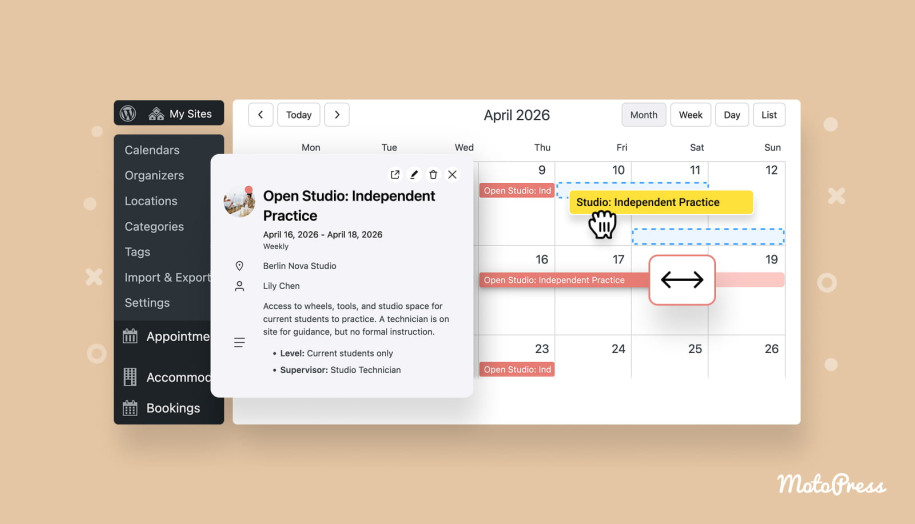
Events calendar with drag and drop.

The new MotoPress Events Calendar plugin version 2.2.0 update brings a major usability upgrade to your event management workflow.

You can now reschedule events and adjust their duration with simple drag-and-drop and resize actions – just like in Google Calendar. You don’t need to open individual events to make small changes to their time and date.

With a more interactive visual calendar builder, managing events is now faster, more intuitive, and far more flexible. Let’s walk through what’s new.

Work in multiple calendar views

The updated events management plugin gives you more control with three major working modes:

– Monthly view
– Weekly view
– Daily view

Each mode is optimized to make event editing with new options quick and visual, depending on how detailed you want your schedule to be. But there are a few nuances. Let’s take a look at them.

Month Calendar View
Simple as that, you can now use drag and drop to reschedule events in the calendar.
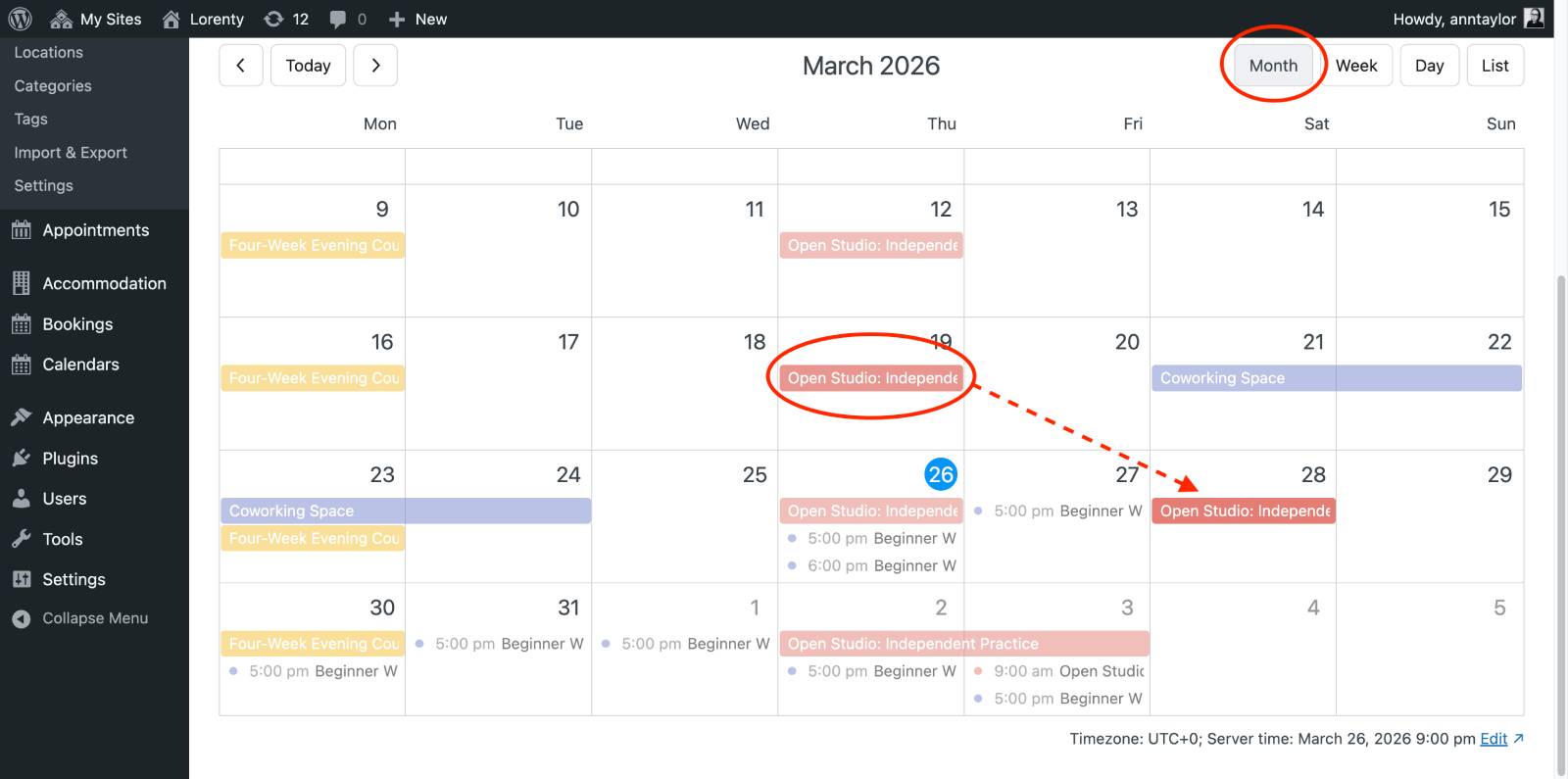
Dragging events in the calendar.
In the monthly view, rescheduling events is as simple as dragging them to a new date. This works for:

– Full-day events
– Events with specific times
– Multi-day events

Just click, drag, and drop – and your event is instantly rescheduled. Need to adjust how long an event lasts? Then use these actions:

– Hover over an event to reveal resize handles.
– Drag the edges left or right to extend or shorten it.

Important:

  • Works for full-day and multi-day events only.
  • Events with specific times cannot be resized in a monthly view.

While these features visually enhance your workflow, they perform the same function as manually editing an event’s date and time (when you click on the Edit event button). But it’s now much faster and more intuitive.

Week & Day Calendar Views
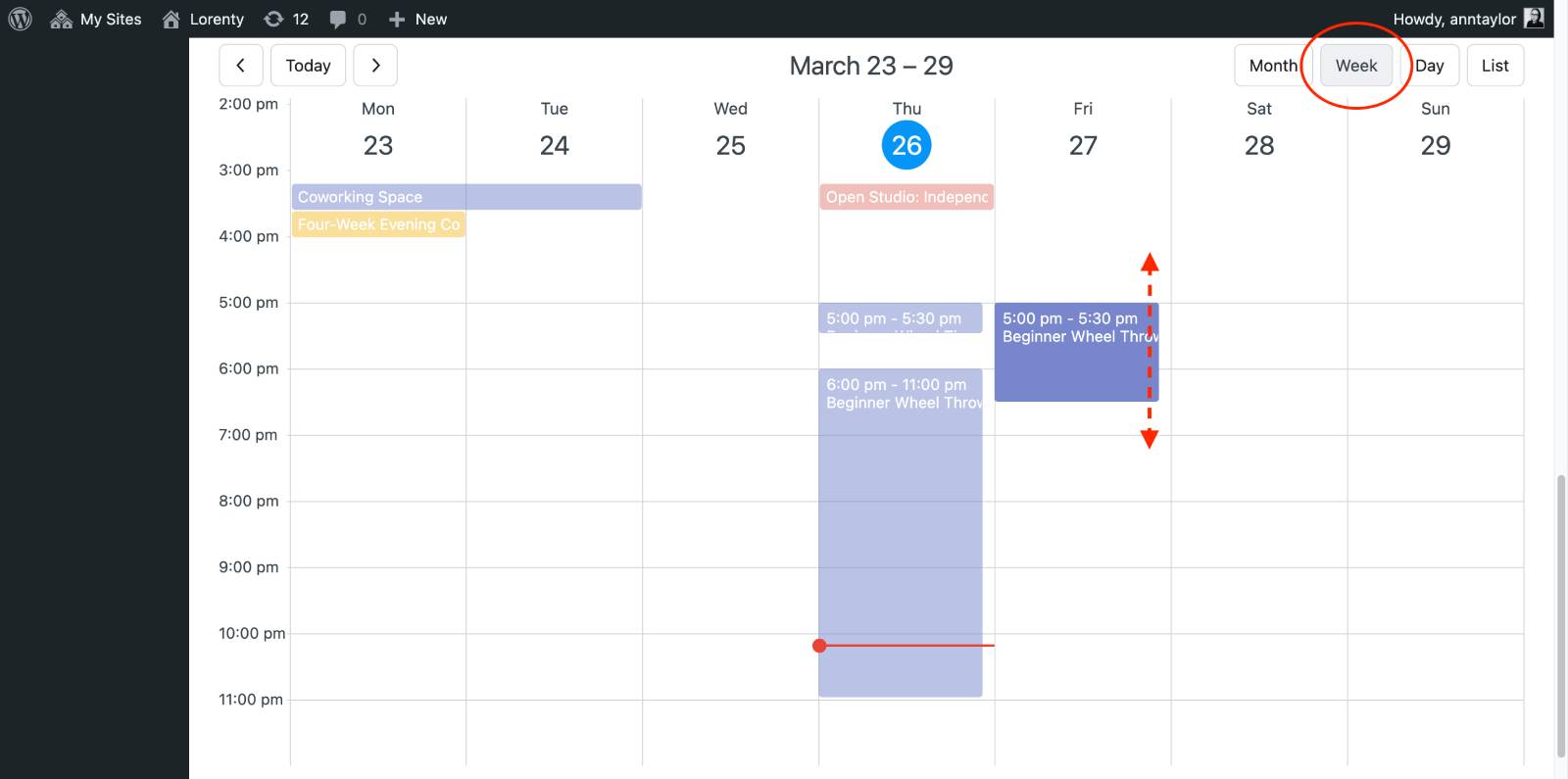
Weekly view in the events calendar.
For more detailed scheduling, switch to week or day view. Here, you can:

– Drag and drop events to change their time and date.
– Resize events vertically to adjust their duration.

Limitations:

In week and day calendar views, some events still require manual editing. More precisely, events that span across multiple days (cross-day events):

– Cannot be resized or moved via drag-and-drop.
– Must be edited via the Edit Event screen.

Interesting fact: you can also convert events to full-day events. For this, drag a timed event into the top (all-day) section to convert it into a full-day event.
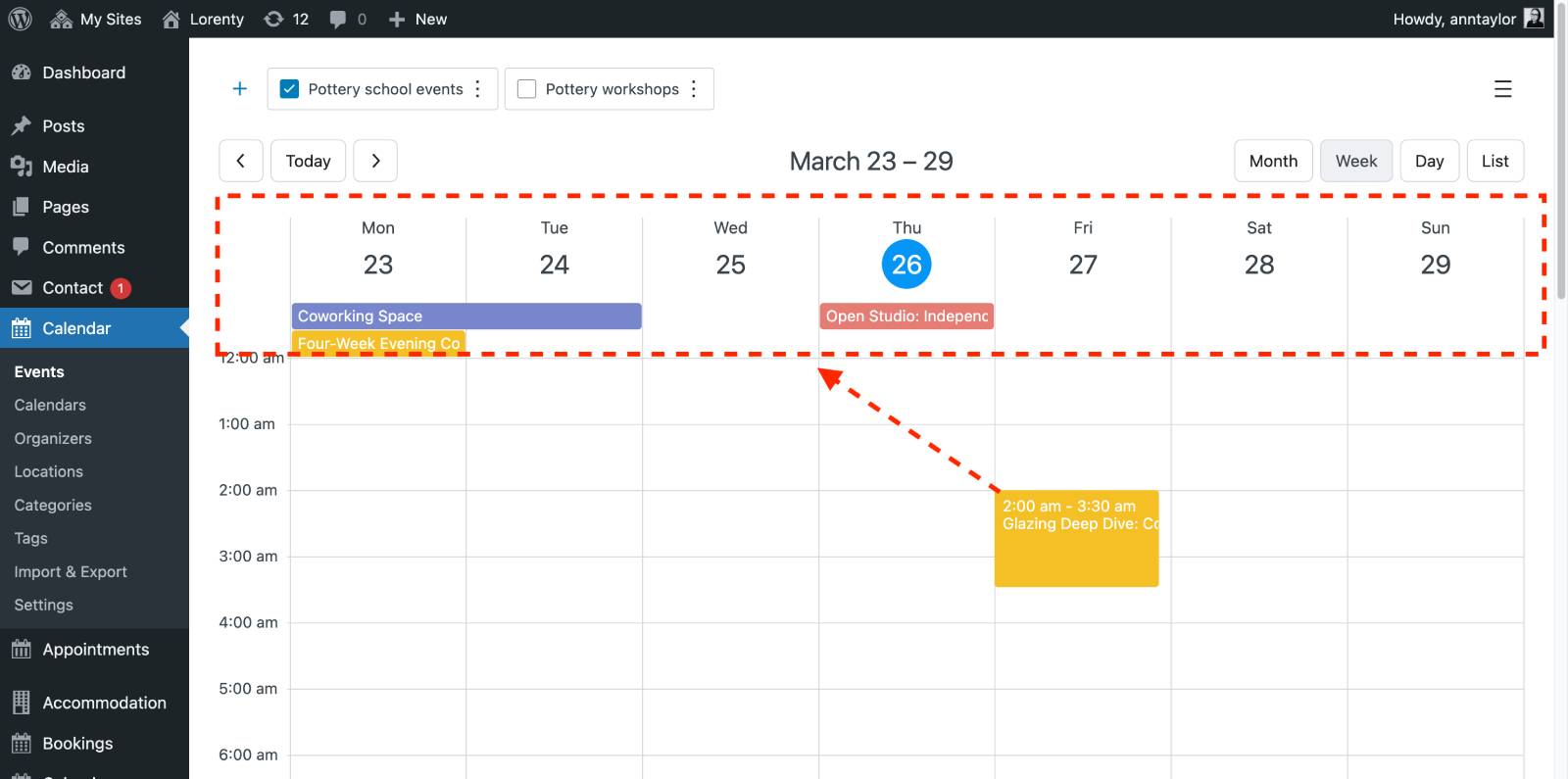
WordPress events calendar interface.
However, you cannot convert full-day events back into timed events using drag-and-drop.

List View
The list calendar view remains unchanged. Drag-and-drop and resize are not supported here and events can still be edited using the standard Edit event button.

Editing repeating events
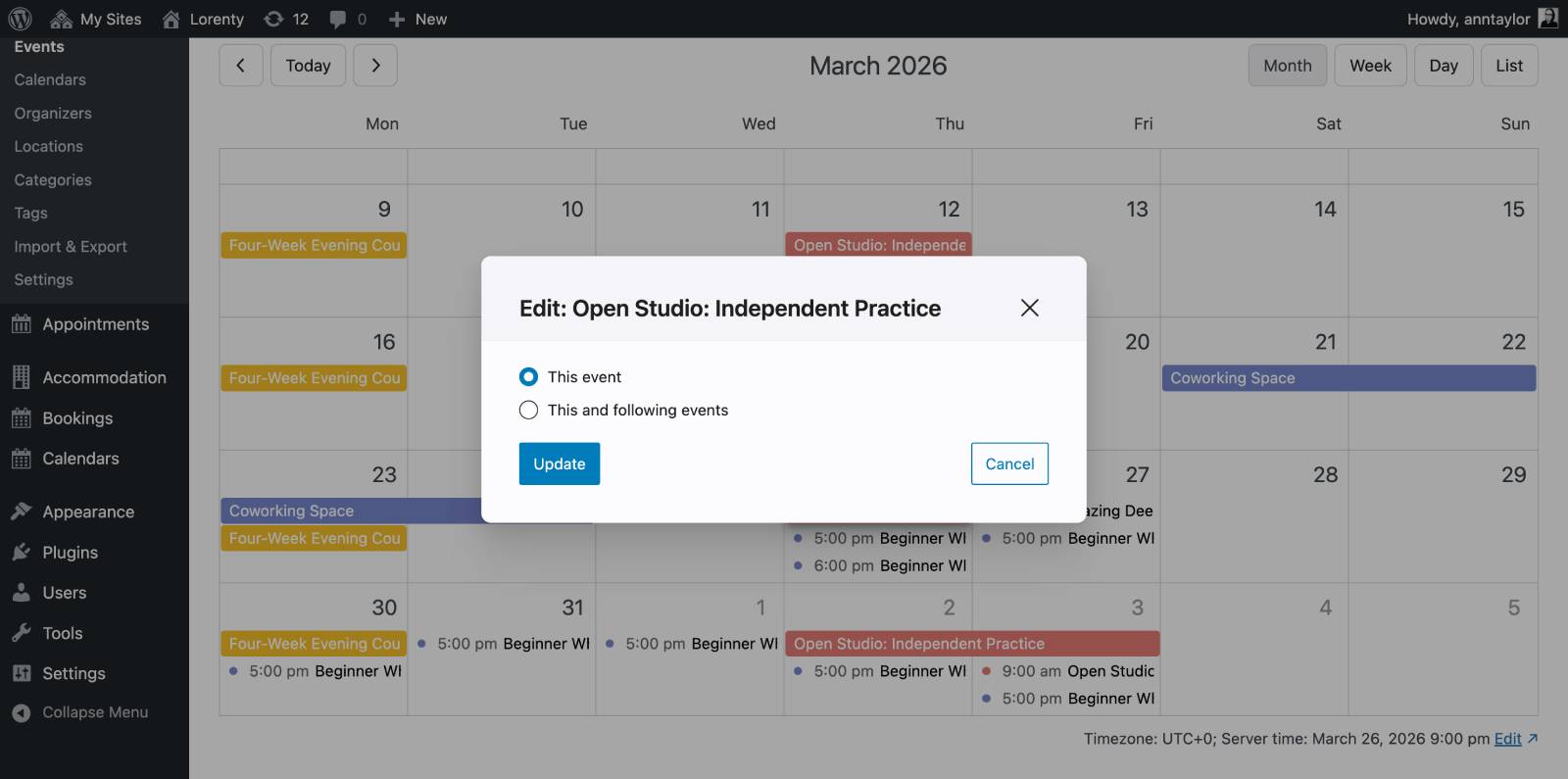
Editing repeating event.
When working with recurring events, you’ll now see additional options prompted when dragging or resizing:

– This event – update only the selected occurrence.
– This and following – apply changes to all future events in the series.

This gives you precise control over recurring schedules without breaking the entire sequence.

Final thoughts

The MotoPress Events Calendar version 2.2.0 focuses on one thing: speed and simplicity. With the new visual drag-and-drop controls and flexible calendar views, you can now:

– Reschedule events instantly just like in Google Calendar.
– Adjust event durations in a few clicks without opening settings.
– Manage recurring events faster.

All while working directly inside the events calendar WordPress plugin interface! Let us know whether you like the new event rescheduling workflow!

Was this article helpful?

Yes (3) No

You have already left your review.

Ann Taylor

Content Creator

Ann Taylor is an overall WordPress, open source, and dark folk music fan. She has been writing about WordPress since the times of TinyMCE.