



With Fitbit’s new personal health coach preview, I’ve been diving deeper into my health and fitness stats and getting more customized health and activity plans.
General summary
Fitbit's AI-powered personal health coach is now available in Public Preview for eligible U.S. Android Premium subscribers. You can use it as a fitness trainer, sleep coach, and wellness advisor. Try exploring past chats, adding details to activities, changing your goals, and relying on proactive insights to get the most out of it.
Summaries were generated by Google AI. Generative AI is experimental.
Bullet points
- "Hands on with Fitbit's personal health coach" explores Fitbit's new AI health and wellness tool.
- The AI coach gives personalized fitness, sleep, and wellness advice to Fitbit Premium users.
- You can easily find past chats with the coach to review recommendations and insights.
- The coach auto-populates details about your activities, making logging easier and more accurate.
- Tell the coach what's helpful to get more relevant insights and improve its recommendations.
Summaries were generated by Google AI. Generative AI is experimental.
Explore other styles:

Your browser does not support the audio element.
Listen to article
This content is generated by Google AI. Generative AI is experimental
[[duration]] minutes
Fitbit’s new AI-powered personal health coach is a fitness trainer, sleep coach and health and wellness advisor that work together to offer personalized recommendations and insights. All eligible Android Premium Fitbit subscribers in the U.S. can try it now in Public Preview, and offer feedback (iOS coming soon).
I’ve been using the personal health coach for the past month. I’ve tuned its workout suggestions for my goals (and even changed them), asked for insight and adjustments (especially when I caught a cold), took a few deep (really deep!) dives into my sleep data and more. There’s so much to learn with the personal health coach; here are five things to try to get even more out of it:
1. Find and reference past chats
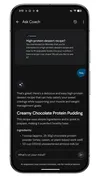
Under the “Ask Coach” prompt (which is where I can start a conversation with the coach at any time) there’s a rewind time icon, which takes me to my chat history. Here, I can revisit conversations from the past 30 days in full. This was extremely convenient: There’s so much information available in the personal health coach; if my entire chat history with the coach were available in the main feed I’d be scrolling forever, likely unable to find something specific. In the chat history section, conversations are labeled with the query that started them — for example, I knew that a couple of weeks ago, I’d asked the coach for some high-protein dessert ideas. I didn’t act on that information at the moment, but I was able to easily and quickly find it in my chat history. And if I feel a conversation isn’t relevant and I don’t want it to inform the coach anymore, I can delete it here, too.
2. Add details to activities
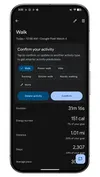
I don’t always remember to log every single workout, especially when it’s something like a quick walk. But my Pixel Watch 4 will log it with Fitbit using activity detection. Then the coach-enabled version of the app confirms my walk or whatever other activity I did, it auto-populates details from me to choose from so that it’s quick and easy to add all the info — which helps add to my fitness data so it can make recommendations and offer insights personalized to me and my activity.
3. Change your goals
When I first logged into the preview of personal health coach, I had an initial conversation about my fitness levels, health and wellness status and all of my associated goals. I started by saying my goals for this year were to run a marathon or 50K, not sure which or when, and get more sleep. But even just in the past month or so, I’ve found that’s changed: I still might run a big race, but I actually want to change my focus with my coach to strength training and improving my heart rate variability (HRV). This is super easy to do: I just started a chat telling the coach I wanted to adjust my goals and after another very brief conversation, I had a new workout schedule, saw new kinds of insights and more.
4. Rely on proactive insights
I love a snack — and I like it even better if it comes in the form of a gummy candy or covered in chocolate. But I’m also curious if I eat too much sugar, so I asked my coach. The coach offered me a few thoughts on this at the moment, but then also returned a few days later with another, unprompted insight about glucose and activity, telling me that my high activity and cardio levels (and my consistent vitals) suggested my body is processing sugars just fine. It’s also worth mentioning that nutrition logging hasn't been added yet, but it’s readily available in the current Fitbit app (and it’s very easy to switch between the two versions).
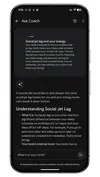
Another unprompted insight the coach offered — that social jet lag, or a notable shift in my sleep-wake schedule, was affecting my sleep quality — motivated me to head to bed earlier and keep my calendar a little light over the coming week.
5. Tell the coach what you find helpful
Because I found these proactive insights so useful, I told the coach exactly that (using the Thumbs Up in my tabs) and asked it to offer more insights like this based on things I’ve asked it about and my current health, fitness and sleep data. Because the personal health coach is in preview, this is the kind of information that’s incredibly useful — and is helping me get even more helpful information in the process. And of course, I can always switch between the standard Fitbit app and the preview version at anytime and continue to use the Public Preview.