







On Wednesday morning suddenly I wasn’t able to login in my dev environment, even though it was working in prod and it had worked the day before and I thought I hadn’t made any changes to my login code.
The error was really weird though – it was telling me that it was expecting a
provider column in my users table (for the OAuth provider), and there wasn’t
one! How could this be?? I was sure hadn’t made any changes to that table.
I felt really frustrated so I asked if someone wanted to pair with me on it. Mikkel agreed to pair with me, and in about 10 minutes we established that:
provider column and the dev database didn’tgit log -S provider showed that I had in fact deleted the
provider column from my dev schema a few hours before at some point, which I definitely did not remember doing, but, okI’m always amazed by how quickly pairing can turn “UGH THIS IS TERRIBLE” into solving the problem really quickly.
This was super easy to fix, I just added the offending columns back and everything was good. Hooray!
I’m still not 100% sure how/why this happened (I think something was wrong in my Rails migrations for
an unknown reason, and when I ran rake db:migrate to recreate my dev database
it broke my schema)
I ran git log -S provider to find every commit that had added/removed the
string provider and Mikkel was like WHAT IS THAT??? Pairing is magic!
On Zulip after we ended up discussing the difference
between git log -S and git log -G. I learned that git log -S doesn’t
actually search diffs to find diffs containing the string, instead it just
counts occurrences of the string and reports when the count was changed.
So I learned something too!
delta
I told Kamal about this git log -S thing, and he showed me some other
git thing on this computer where you can git log just changes to a specific
function. But I got distracted from what he was telling me because I noticed
that he had these INCREDIBLY BEAUTIFUL DIFFS in his terminal, that looked like
this:
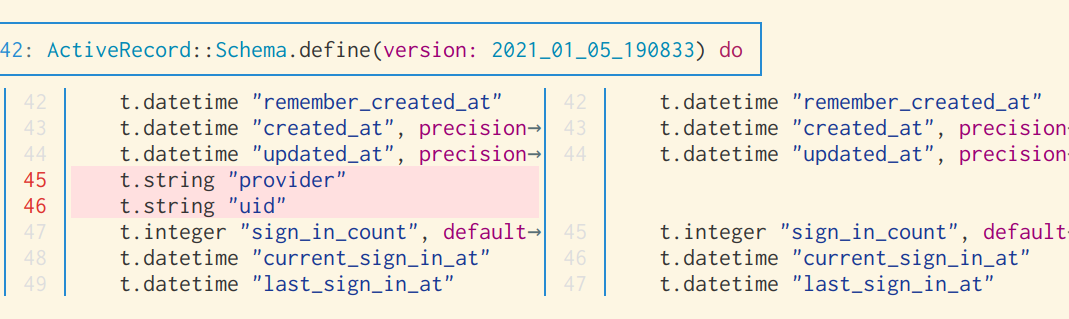
So I was like KAMAL WHAT IS THAT?!?!?!
This is called delta. It’s pretty easy
to install and I configured it by adding these things to my ~/.gitconfig. It
has a million options that I didn’t really look into but now my diffs are
BEAUTIFUL. (that screenshot is actually from my computer)
[core]
	attributesfile = ~/.gitattributes

[interactive]
    diffFilter = delta --color-only

[delta]
    features = side-by-side line-numbers
    whitespace-error-style = 22 reverse
syntax-theme = GitHub
I also learned that you can get a diff with your git log with git log --patch.
This was cool to know because I’ve been copying and pasting commit IDs from
git log and doing git show COMMIT_ID to look at a diff for like 7 years.
My actual goal for the day was to write a Python script to generate my
cloud-init.yaml file by syncing some files from a local directory.
This post is long enough already and it’s not too interesting, so I’ll just say that I learned about the pathlib module and I thought it was nice nice. A few things you can do with a path:
path = "/home/bork/"
textfile = path.joinpath('x.txt') # /home/bork/x.text
textfile.read_text() # read the contents as a string
textfile.read_bytes() # read the contents as binary
textfile.relative_to(path) # 'x.txt', lets you get the relative version of a path
In my Python script, I wanted to do a bunch of things where I changed to a directory, did some things, and then changed back. This felt like a context manager to me, so I googled “python working directory context manager” and found one in a github gist.
It always brings me a lot of joy when I think of a little bit of simple code that I want to exist and I can kind of just summon it with a Google search.
It was really simple so I just copied it into my code:
import os
from contextlib import contextmanager
@contextmanager
def working_directory(path):
    prev_cwd = os.getcwd()
    os.chdir(path)
    try:
        yield
    finally:
        os.chdir(prev_cwd)
and then I could use it:
with working_directory(directory.joinpath('files')):
    synced = sync_files(cloud_init_yaml['write_files'])
    cloud_init_yaml['write_files'] = list(synced)
此内容由惯性聚合(RSS阅读器)自动聚合整理,仅供阅读参考。 原文来自 — 版权归原作者所有。