
惯性聚合 高效追踪和阅读你感兴趣的博客、新闻、科技资讯
阅读原文 在惯性聚合中打开

推荐订阅源

J
Java Code Geeks
M
MIT News - Artificial intelligence
D
Docker
S
SegmentFault 最新的问题
B
Blog
Apple Machine Learning Research
博客园_首页
博客园 - 【当耐特】
让小产品的独立变现更简单 - ezindie.com
The GitHub Blog
The GitHub Blog
Y
Y Combinator Blog
腾讯CDC
阮一峰的网络日志
阮一峰的网络日志
U
Unit 42
C
Check Point Blog
GbyAI
GbyAI
美团技术团队
Recent Announcements
F
Fortinet All Blogs
量子位
OSCHINA 社区最新新闻
OSCHINA 社区最新新闻
V
Visual Studio Blog
钛媒体:引领未来商业与生活新知
钛媒体:引领未来商业与生活新知
G
Google Developers Blog

Compliance Solutions for Websites, Apps and Organizations | iubenda

AI can build your website. It can't manage your consent. | iubenda Browser signals and machine-readable consent: what they are and what the EU’s Digital Omnibus could change California Consumer Privacy Act (CCPA): Complete Guide How to increase your cookie banner opt-in rates: 5 mistakes to fix today | iubenda DPO Newsletter: Global Data Protection & Privacy News (issue #153) Why your consent management setup is a marketing performance question Everything you need to know about GDPR The redesigned cookie banner and configurator What nobody tells you about handing over the company you built European marketers are betting on retention. Privacy could be the edge they’re not using yet. The 5 best alternatives to Didomi in 2026: Pros, cons, pricing, and comparison Looking back on 15 years: what iubenda's founder would tell his 2011 self | iubenda The best cookie policy generator in 2026 DPO Newsletter: Global Data Protection & Privacy News (issue #152) | iubenda What publishers should expect from the EU’s Digital Omnibus proposal Uncertainty is the biggest blocker to AI adoption in marketing | iubenda Everything AI app builders need to know about vibecoding and privacy compliance | iubenda Introducing 1-Click Embedding for Google Tag Manager The Essential Small Business Terms and Conditions Template: What You Need to Know Terms of Use Template | iubenda IAB Europe Raises Concerns Over GDPR Procedural Regulation Draft Report | iubenda Learn from HelloFresh's Costly Mistake: Ensure Compliance with iubenda | iubenda Understanding the Spanish DPA Guide on Audience Measurement Cookies | iubenda The Austrian Data Protection Authority's FAQs on Cookies and Privacy | iubenda DPO Newsletter: Global Data Protection & Privacy News (issue #127) | iubenda Microsoft Ensuring European Data Stays Within the EU Cloud Boundary | iubenda Businesses Beware: ICO’s Record £14.3m in Fines for Data Misuse in 2023 Understanding the Risks and Responsibilities of Model-as-a-Service Companies in AI Development Facebook's New “Link History” Feature: A Blend of Convenience and Surveillance? | iubenda OpenAI’s Strategic Move in the EU: Aligning with Data Privacy Regulations
Standard YouTube License vs Creative Commons: Choosing th...
Juan Ruiz · 2023-03-21 · via Compliance Solutions for Websites, Apps and Organizations | iubenda

Hey, YouTube creators! Are you trying to figure out which license to use for your YouTube videos and wondering what to choose between “YouTube Standard License vs Creative Commons”? In short, these two types of licenses determine what other people can and cannot do with your content, and that’s why it’s important to choose the right one according to your specific needs.

In this article, we’re here to guide you through the key differences between the Standard YouTube License and Creative Commons. So, let’s get started! And see what each license entails. 👀
At a glance ⬇️

  • Standard YouTube License vs Creative Commons
    • Standard YouTube License
    • Creative Commons
  • How to Check a YouTube Video License Type
  • How to Find Creative Commons Videos on YouTube
  • Which is better Creative Commons or standard YouTube license?
  • Comparison: Standard YouTube License vs Creative Commons
  • How to Choose the Right License for Your YouTube Videos
  • What should you legally consider as a content creator?
Standard YouTube License vs Creative Commons

📌 What is Standard YouTube License vs Creative Commons

What does standard YouTube license mean?

The Standard YouTube License is the default licensing option for videos uploaded to the platform. When you upload a video to YouTube, it’s automatically covered by the Standard YouTube License unless you choose a different license. By choosing this license, YouTube users can view and share your videos, but you retain the copyright to your work.

For example, if you’re creating original content, the Standard YouTube License is probably the right choice for you. However, if you’re looking to share your work in a more collaborative way or want to allow others to remix and use your content freely, you may want to consider a Creative Commons license instead. Let’s have a look next.

What does Creative Commons license mean?

Creative Commons is the other available alternative to the Standard YouTube License that allows creators to share their work with others while retaining some control over how it’s used, or, in other words, more freely. Although, Creative Commons licenses provide a range of options that dictate what others can and cannot do with your content. For example, you can choose to allow others to remix and share your videos, but require attribution and prohibit commercial use.

Under a Creative Commons license, creators retain the copyright to their work, but they give others permission to use it in certain specific ways. This can be a great option for creators who want to share their work with others, but also want some flexibility over how it is used.

How to Check a YouTube Video License Type

Now that you’re familiar with the differences between the “Standard YouTube License” and “Creative Commons,” it’s essential to know how to check the license type of a YouTube video. Here’s a straightforward guide:
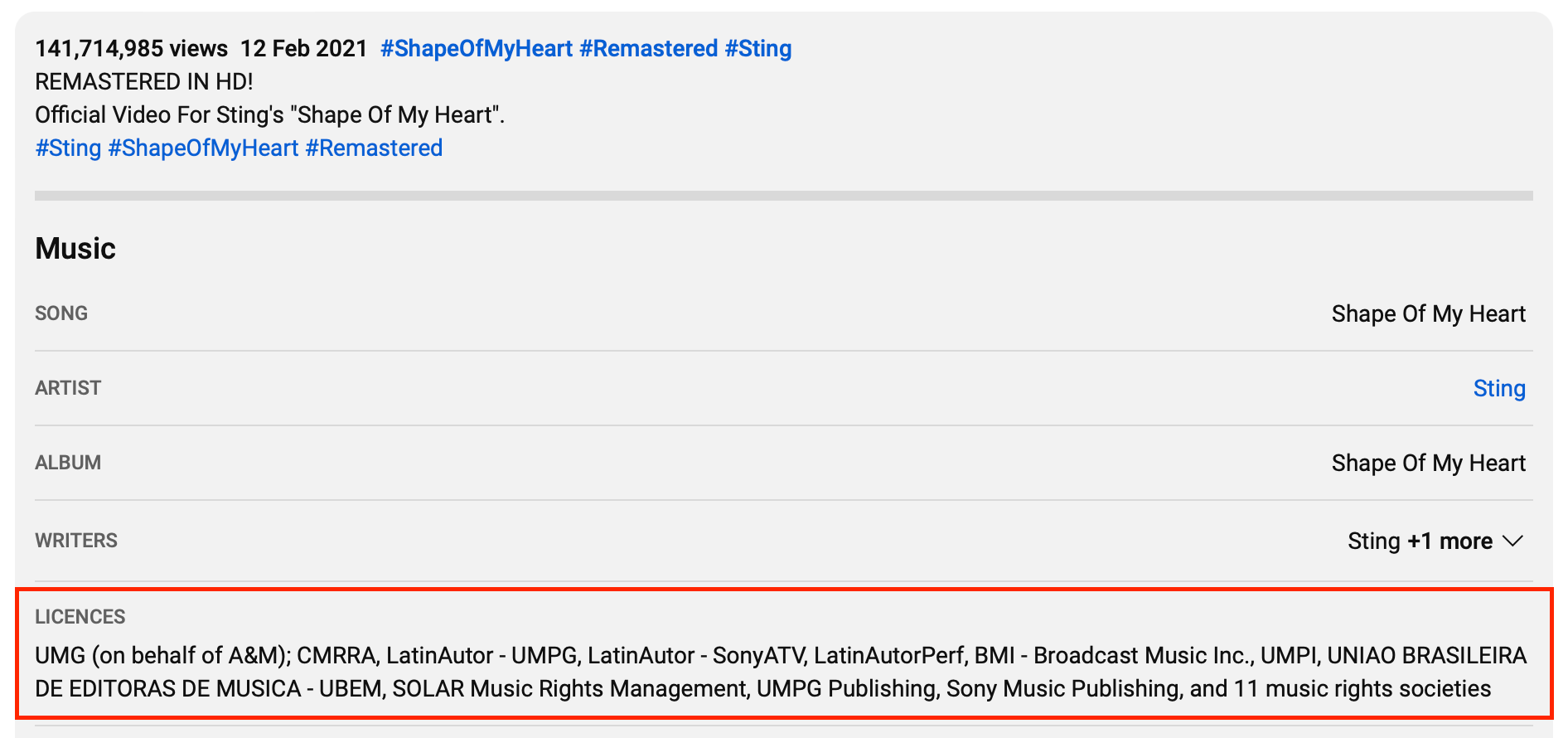
  1. Visit YouTube: Head to YouTube’s website.
  2. Search and Select the Video: Find the video you want to check and click on its title to play it.
  3. Go to the Description Box: Under the video, you’ll see a section with details about the video. This is the description box.
  4. Spot the License: In this box, there’s a section called “Licenses.” It will mention either “Standard YouTube License” or “Creative Commons Attribution license.”
How to Check Standard YouTube License or Creative Commons

And that’s it! Now, with this knowledge in hand, you can choose the right license for your videos.

How to Find Creative Commons Videos on YouTube

Want to find videos on YouTube that you can freely share and edit? Here’s a simple guide on how to spot them using Creative Commons:

  1. Open YouTube: First, go to YouTube’s website.
  2. Search for a Video: Think of a topic you’re interested in and type it into the YouTube search bar.
  3. Filter Your Results: After you get a list of videos, you’ll see a ‘Filters’ button just below the search bar. Click on it.
  4. Choose Creative Commons: In the list that pops up when you click ‘Filters,’ you’ll find an option labeled ‘Creative Commons‘ Click on that.
  5. Enjoy the Selection: Now, YouTube will show you only the videos that have the Creative Commons license. These videos allow you to use, share, and sometimes even change them, as long as you give credit to the original creator.

Remember, always double-check the video’s license details. Even under Creative Commons, some creators might have specific rules on how you can use their work.

Which is better Creative Commons or standard YouTube license?

Creative Commons allows you to use, share, and sometimes edit videos, but you must give credit to the original creator. The Standard YouTube License means only the original uploader can share or reuse the video. Which is better depends on your needs:

  • Want to share or edit? Choose Creative Commons.
  • Want your video exclusively on your channel? Go with the Standard YouTube License.

Turn your YouTube subscribers into loyal customers

Creating your own website is a great way to make sure that you keep and nurture the audience you build on YouTube—even if you lose access to your account!

Read this →

🔎 Comparison: Standard YouTube License vs Creative Commons

The key difference between the Standard YouTube License and Creative Commons is the level of control you have over your content. Let’s look at it in detail below:

What it entails

What creators can and cannot do

Appropriate for

Standard YouTube License

Default license for videos uploaded to YouTube. Creator retains copyright.

Monetize videos, control who can view and share the video. Cannot use copyrighted material without permission or fair use.

Most types of videos, especially original content.

Creative Commons

Allows creators to choose how others can use their work.

Allows others to use and remix the work, as long as attribution is given. Creator can still choose to monetize the work.

Collaborative work or content that you want others to be able to use and remix.

📌 How to Choose the Right License for Your YouTube Videos: Standard YouTube License vs Creative Commons

To choose the right license for your YouTube videos, you need to consider your goals and the type of content you create:

  • If you want to keep full usage control of your content, the Standard YouTube License is the best option.
  • If you want to share your work with others and give other creators more freedom and scope over your content, Creative Commons might be the best option.

When applying a license to your videos, make sure to read the terms carefully and understand your rights and responsibilities. If you’re using copyrighted material, ensure that you have obtained the necessary permissions or licenses to avoid legal consequences and disputes.

It’s important to note that while the Creative Commons license allows for more flexibility in how others can use your content, it also means you may have less control over how it’s used. Have you thought about Influencer Marketing? Here’s Why You Need One →

💡 Remember

Choosing the right license for your YouTube videos is an essential aspect of creating and sharing videos on YouTube. By choosing the right license, you can protect your content, achieve your goals, and share your work with others. So keep this in mind when you upload your next YouTube video!

📌 What should you legally consider as a content creator?

As a content creator, you need to keep in mind that there are many guidelines and laws regulating your business. And it can be hard to keep up!

Let’s look at what you should consider:

  • Transparency is of the utmost importance here. So if you’re a business using influencer marketing, or you’re a YouTube creator sponsoring a product, you always need to disclose that. Remember, a disclosure is always needed when you receive any type of benefit from a sponsorship;
  • Make your disclosures clear and hard to miss;
  • Check which other laws apply, too.

We can help you with that last part!

Just take this 1-minute quiz