
惯性聚合 高效追踪和阅读你感兴趣的博客、新闻、科技资讯
阅读原文 在惯性聚合中打开

推荐订阅源

Google DeepMind News
Martin Fowler
Martin Fowler
T
Threatpost
云风的 BLOG
云风的 BLOG
博客园 - 司徒正美
C
CERT Recently Published Vulnerability Notes
V
Vulnerabilities – Threatpost
Help Net Security
Help Net Security
Project Zero
Project Zero
博客园 - 聂微东
博客园_首页
T
Tor Project blog
Threat Intelligence Blog | Flashpoint
V
Visual Studio Blog
人人都是产品经理
人人都是产品经理
The Register - Security
Latest news
Latest news
K
Kaspersky official blog
L
LINUX DO - 热门话题
P
Proofpoint News Feed
钛媒体:引领未来商业与生活新知
钛媒体:引领未来商业与生活新知
美团技术团队
C
Cyber Attacks, Cyber Crime and Cyber Security
A
Arctic Wolf
aimingoo的专栏
aimingoo的专栏
J
Java Code Geeks
F
Full Disclosure
Recent Announcements
SecWiki News
SecWiki News
C
Cybersecurity and Infrastructure Security Agency CISA
F
Fortinet All Blogs
The Hacker News
The Hacker News
Apple Machine Learning Research
NISL@THU
NISL@THU
The GitHub Blog
The GitHub Blog
量子位
Hugging Face - Blog
Hugging Face - Blog
cs.CL updates on arXiv.org
P
Palo Alto Networks Blog
T
Troy Hunt's Blog
O
OpenAI News
T
Threat Research - Cisco Blogs
博客园 - Franky
Hacker News - Newest:
Hacker News - Newest: "LLM"
A
About on SuperTechFans
C
Check Point Blog
Hacker News: Ask HN
Hacker News: Ask HN
AWS News Blog
AWS News Blog
freeCodeCamp Programming Tutorials: Python, JavaScript, Git & More
T
Tenable Blog

Redis

Real-Time Fraud Detection: Latency, Features & Scale Context window in AI: why every token is a budget decision Connecting to Redis Cloud with AWS PrivateLink vs. VPC peering | Redis Redis Data Integration in Redis Cloud is now GA in AWS | Redis Why AI Misses Business Context & How Teams Fix It AI Reasoning Explained: Why Context Matters Semantic Layer vs Context Layer: Key Differences Redis array data type: How it works and when to use it Context Graphs vs. Vector Search: When RAG Falls Short What’s new in two – May 2026 edition Redis 8.8 performance improvements: Faster string, hash, streams, SCAN & more Redis 8.8: New array data structure & open source features How Conflict-free Replicated Data Types power active-active database replication Context Orchestration: What It Is & How It Works Context Compaction for AI Agents: A Complete Guide Prompt Bloat: Causes, Costs & Fixes for LLM Apps Agentic Retrieval Techniques: A Complete Guide Single-shot reliable consumers with XREADGROUP CLAIM in Redis 8.4 | Redis Long-Horizon AI Agents: Memory & State Infrastructure What is a context engine? What Is a Context Layer? AI Agent Infrastructure Context Retrieval for AI Agents: What It Is & Why It Matters Context Poisoning: How Bad Data Breaks Agent Reasoning Context is all you need: Introducing Redis Iris | Redis Context Engineering for AI: What It Is & How to Build It Dynamic endpoints: Migrate databases without changing your endpoint | Redis AI Shopping Assistants: How They Work & What to Build Endless Aisle Retail: Infrastructure & Real-Time Data LLM Speed Benchmarks: Metrics & Infrastructure Guide Context Pruning: Cut LLM Tokens Without Losing Quality What’s new in two – April 2026 edition Agentic AI Architecture: 5 Patterns Explained AI Agent vs Chatbot: Key Differences Explained Advantages of Building a Vector Search Solution API Latency in LLM Apps: Causes & How to Fix It Security advisory: [CVE‑2026‑23479] [CVE‑2026‑25243] [CVE-2026-25588] [CVE‑2026‑25589] [CVE-2026-23631] | Redis Edge Computing Latency: Causes & How to Reduce It AI Agents vs Workflows: When to Use Each Streaming LLM Responses: Make Your AI App Feel Fast Active-Active vs Active-Passive Database Architecture Prefill vs Decode: LLM Inference Phases Explained Long-Term Memory Architectures for AI Agents Time to First Byte Test: Tools, Causes & Fixes Speculative decoding: how it works & when to use it P95 Latency: What It Is & Why It Matters Why Multi-Agent LLM Systems Fail & How to Fix Them AI Human in the Loop: Production Oversight Patterns Client-side geographic failover for Redis Active-Active | Redis Use Redis with SQL | Redis Introducing Redis Feature Form Build Google ADK Agents with persistent, real-time memory on Redis | Redis Startup Spotlight: Neuron Systems API Throttling: Algorithms, Patterns & Mistakes Agentic AI Examples Across 6 Industries Best Chunking Strategies for RAG Pipelines Agentic AI Guardrails: Controls That Work Redis joins AWS at GDC to support the next generation of gaming | Redis Designing a semantic routing system: From static rules to dynamic intelligence with Redis and Java | Redis Real-Time Dispatch System: A Complete Guide P99 Latency: What It Means & How to Fix It Tokenization in LLMs: What AI App Devs Need to Know TTFT Meaning: What is Time to First Token? Atomic slot migration with Redis 8.4 Hybrid search benefits: Why your RAG system needs both keyword & vector search What’s new in two: March 2026 edition Vector embedding generators: How they work & how to use them Throughput-optimizing Redis for L2 KV Cache Reuse What is a data pipeline? Building AI agent pipelines that don't forget, fail, or fall apart Redis achieves Google Cloud Ready, Distributed Cloud status ahead of Google Cloud Next ‘26 | Redis Real-time network monitoring: what your data platform needs to keep up AI agent API: How agents connect to the real world What is multicloud infrastructure? A guide for 2026 What is a transaction monitoring system & how does it work? Why your AI agent fails in production & how tracing helps AI agent benchmarks: Where they fall short & why your infrastructure matters What is a JSON database (and when should you use one)? Introducing the Redis Partner Network: A new foundation for real-time innovation How real-time customer segmentation works in retail Payment orchestration & vault architecture in retail Agentic systems vs. GenAI: when generation isn't enough What is fuzzy matching? Semantic caching & routing: two powerful patterns for vector classification Redis alternatives: Why there are no exact substitutes Connect to Azure Managed Redis with Redis Insight 3.2.0 How to tame the thundering herd problem Redis to Manage Storage Replication | Redis How hierarchical navigable small world (HNSW) algorithms can improve search | Redis How leading financial institutions use Redis to drive growth | Redis What’s new in two: May 2025 | Redis Introducing Model Context Protocol (MCP) for Redis | Redis Redis vs. Elasticsearch: What’s faster for GenAI & vector search? | Redis Build fast, production-worthy AI apps with Spring AI and Redis | Redis Azure Managed Redis is GA today | Redis Redis then & now: Adapting with developers through every era | Redis Supercharge Your AI with OpenShift AI and Redis: Unleash speed and scalability | Redis What’s new in two: April 2025 | Redis Redis 8 is now GA, loaded with new features and more than 30 performance improvements | Redis What is a data strategy? 6 key components explained Data replication explained: types, examples & use cases
Native OpenTelemetry metrics for Redis client libraries | Redis
Redis · 2026-04-21 · via Redis

When Redis server metrics look healthy but an application isn’t performing adequately (for instance, service time outs or p99 latency climbing for no obvious reason) the explanation is often not inside Redis at all. These symptoms frequently trace back to the client layer: connection pools can get under strain, requests can start queuing for an available connection, or retries could silently inflate the latency that users experience.

Server-side monitoring was never designed to capture this. It tells you a lot about what Redis is doing internally (memory consumption, replication lag, command throughput, persistence behavior) but very little about how each app process is interacting with it. That gap matters more than it sounds, because the client is where app problems are felt. Without visibility into that layer, debugging tends to come down to inference and elimination rather than direct observation.

That’s the gap we set out to close.

We are introducing native OpenTelemetry metrics support in Redis client libraries as the first phase of a broader Redis client observability initiative.

This feature doesn’t replace server-side monitoring. It makes the client side visible enough that engineers can see what’s happening inside their application: how connections are behaving, which errors occur, how connections are created, where pool pressure builds, what’s the stream message processing lag, client-side caching and pub-sub stats and more.

This release focuses on metrics - the first piece of client-side observability.

The current scope is intentionally focused:

  • Native OpenTelemetry metrics in Redis client libraries (currently available in redis-py v7.3.0+, go-redis v9.18.0+ and node-redis v5.12.0+).
  • Export through the standard OpenTelemetry pipeline
  • Dashboarding and filtering built around practical troubleshooting workflows

Design principles

Disabled by default

Observability is disabled by default. When it is enabled, the instrumentation code paths are still there, but they resolve to empty stubs via the OpenTelemetry SDK's no-op implementation. When disabled, overhead stays well under 1% in all tested scenarios. This was a non-functional requirement from the start, and we validated it explicitly as part of the benchmark work. Enabling observability is done by deliberate choice; leaving it off is essentially free.

Process-wide OpenTelemetry integration

The client libraries do not instantiate OpenTelemetry providers on their own. Instead, they plug into the process-wide OpenTelemetry SDK model. Apps initialize observability once, and Redis client metrics are emitted through that existing telemetry setup.
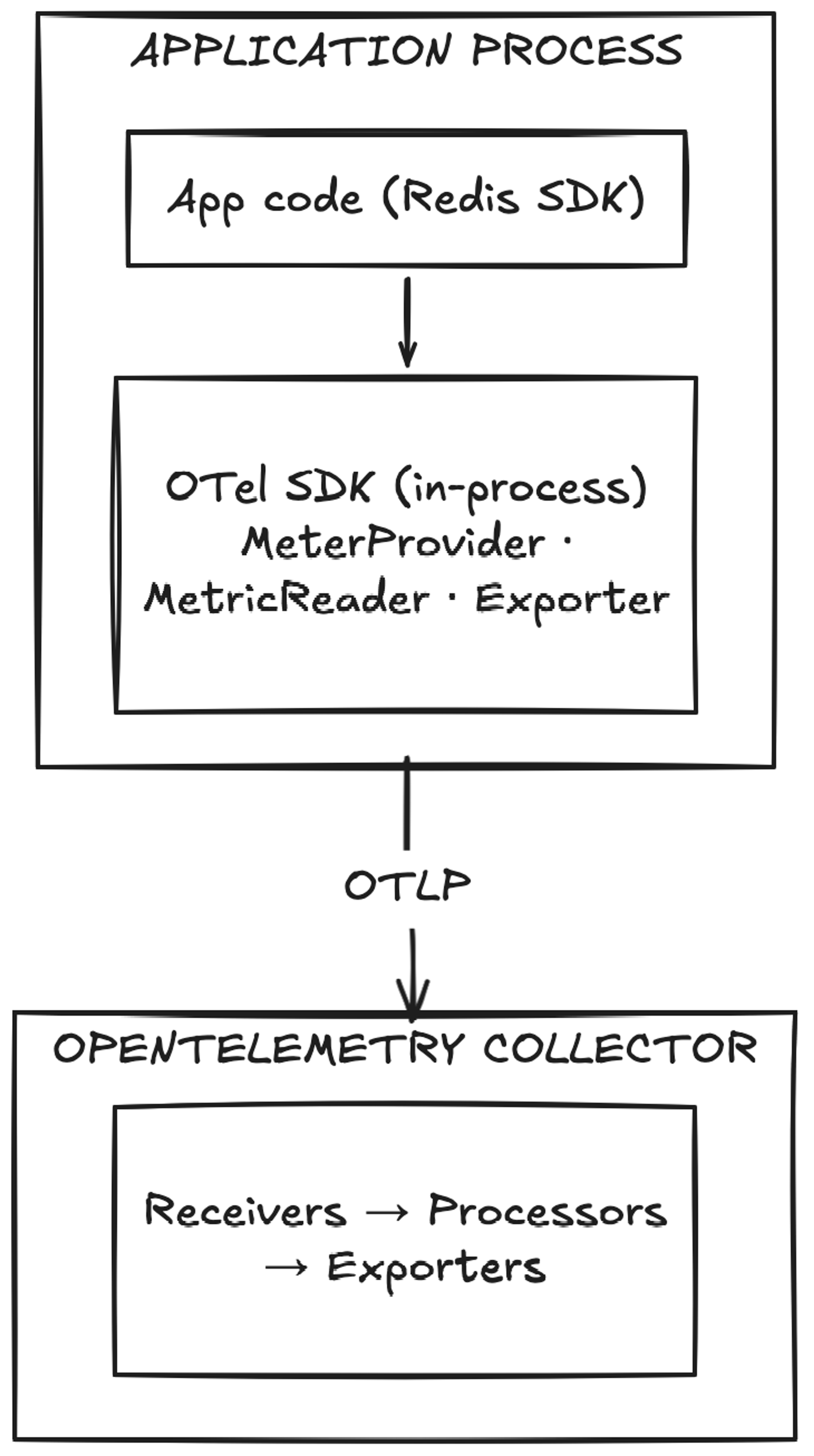
Redis Application Process

How Redis client metrics flow through the OpenTelemetry pipeline

This avoids a common integration problem where libraries try to manage telemetry lifecycle independently and end up conflicting with the application’s own observability stack.

Aligned with OpenTelemetry semantic conventions

Where OTel Semantic Conventions already define the right shape, the metric names follow them directly. Names like db.client.operation.duration and db.client.connection.count, for example, aren’t Redis-specific inventions — they are part of the OTel standard for how database clients report telemetry. For those metrics, existing dashboards and alerting rules built around OTel SemConv conventions will work naturally without Redis-specific adaptations.

For Redis-specific signals that aren’t covered by the standard, the spec introduces metrics under the redis.client.* namespace. Examples include redis.client.errors (with error category and internal/user-visible classification), redis.client.maintenance.notifications (tracking server-side maintenance events), redis.client.geofailover.failovers, and the full set of client-side caching metrics like redis.client.csc.requests and redis.client.csc.evictions. These are Redis-defined extensions and will need a Redis-aware dashboard configuration.

Low overhead intent with explicit controls

We benchmarked aggressively, and the results weren’t uniform across clients. In go-redis the overhead is negligible even when all metrics are enabled - well under 0.2% at default settings. node-redis is similarly lightweight in normal operation, with the caveat that a saturated event loop amplifies the costs noticeably. redis-py is the outlier: the overhead of the most common metrics stays around 0.5%, but the command latency metric alone adds roughly 7–8%. These numbers are what shaped the metric groups model. A 7–8% hit from a single signal is only acceptable if it's opt-in, and that's exactly how it works. Each group is controlled independently, so teams can decide which overhead is worth paying for and which isn't.

The same logic applies to the metric storage layer: fewer enabled groups mean fewer active series and lower storage and query costs on the backend.

Configuration also includes command allow/block lists and options to suppress stream or channel names when cardinality needs to be constrained.

The metrics model: Grouped for signal, performance & cardinality control

The currently defined groups are:

  • resiliency - different error counts, server-side maintenance notifications, etc.
  • connection-basic - number of idle/active connections, connection time, etc.
  • connection-advanced - time to obtain a connection from the pool, total closed connections etc
  • command - command latency
  • client-side-caching
  • pubsub
  • streaming

By default, only resiliency and connection-basic are enabled, a default that’s conservative on purpose. It covers the most common debugging needs without forcing every signal on from the start.

It also helps manage two things that always matter in observability: overhead and cardinality. The more granular the signal, the more important it becomes to make conscious choices about where it’s worth collecting.

Each group maps to a specific class of question you might ask when debugging client behavior: connection health, command latency, cache efficiency, pub/sub throughput, stream lag. The full breakdown of what each group covers is in the observability docs.

A minimal initialization example

The intended setup is intentionally simple. Apps initialize observability once and choose the metric groups they want.

For Python, the OTel extras need to be installed first:

Then observability is initialized once at application startup:

A practical rollout path is to start with the default groups or something close to them, establish a baseline, and then enable additional groups only where they answer a real operational question.

For example:

  • start with resiliency and connection-basic
  • add command if command latency is important to your debugging workflow
  • add connection-advanced when pool wait time and pending requests matter
  • add client-side-caching, pubsub, or streaming if your application uses those features heavily

That staged approach is usually better than enabling everything immediately and sorting out the costs later.

We also provide a Grafana dashboard with Prometheus as the data source if you want a starting point for visualizing the metrics, along with full initialization examples for Python and Go, with Node.js coming soon.

Native metrics vs. external wrappers

External instrumentation libraries exist, and some teams are already using them. They typically work by monkey-patching the Redis client at runtime, which gets you some visibility, but only at the call boundary. Signals that live deeper inside the client, like connection pool state, handoff timing, retry-aware command duration, client-side cache eviction triggers, aren't reachable from outside. That's the gap native instrumentation fills.

Try it

Available now in go-redis v9.18.0, redis-py v7.3.0 and node-redis v5.12.0. Start with the default metric groups and enable more only where they answer a real question. If something useful is missing, or something adds too much overhead, we want to know, so please open an issue in the relevant repository: