


惯性聚合 高效追踪和阅读你感兴趣的博客、新闻、科技资讯
阅读原文 在惯性聚合中打开

推荐订阅源

The GitHub Blog
The GitHub Blog
Martin Fowler
Martin Fowler
Vercel News
Vercel News
U
Unit 42
Engineering at Meta
Engineering at Meta
aimingoo的专栏
aimingoo的专栏
MyScale Blog
MyScale Blog
Y
Y Combinator Blog
阮一峰的网络日志
阮一峰的网络日志
爱范儿
爱范儿
Apple Machine Learning Research
博客园_首页
钛媒体:引领未来商业与生活新知
钛媒体:引领未来商业与生活新知
B
Blog RSS Feed
N
Netflix TechBlog - Medium
GbyAI
GbyAI
F
Fortinet All Blogs
MongoDB | Blog
MongoDB | Blog
大猫的无限游戏
大猫的无限游戏
C
Check Point Blog
M
MIT News - Artificial intelligence
D
Docker
IT之家
IT之家
Stack Overflow Blog
Stack Overflow Blog

Runpod Blog.

New Runpod datacenter now live: AP-IN-1 Track GPU spend across your team with Cost Centers The GPU supply supercycle is here. Here’s what AI builders need to know. Community Spotlight: One-click AI image and video generation on Runpod with SwarmUI | Runpod Blog Community Spotlight: LoRA Pilot Data Prep to Inference Introducing the Runpod Assistant: Manage Your Cloud GPU Resources with Natural Language OpenAI's Parameter Golf: Train the Best Language Model That Fits in 16MB on Runpod LLM inference optimization: techniques that actually reduce latency and cost Pruna P-Video and Vidu Q3 public endpoints now available on Runpod Runpod brand spelling guide Quickstart - Runpod Documentation The AI market looks nothing like the narrative Training StyleGAN3 with Vision-Aided GAN on Runpod KoboldAI – The Other Roleplay Front End, And Why You May Want to Use It How to Connect Cursor to LLM Pods on Runpod for Seamless AI Dev Community Spotlight: How AnonAI Scaled Its Private Chatbot Platform with Runpod Prompt Scheduling with Disco Diffusion on Runpod Runpod's Latest Innovation: Dockerless CLI for Streamlined AI Development Run Your Own AI from Your iPhone Using Runpod Introducing Flash: Run GPU workloads on Runpod Serverless: No Docker required Use Claude Code with your own model on Runpod: No Anthropic account required Avoid Errors by Selecting the Proper Resources for Your Pod What hackers built on Runpod at TreeHacks 2026 Easily Back Up and Restore Your Pod with Cloud Sync + Backblaze B2 The Complete Guide to GPU Requirements for LLM Fine-Tuning AI Guides, Tutorials & GPU Infrastructure Insights | Runpod Your first Claude Code project within Runpod: a complete setup guide 10 billion Serverless requests and counting Building for resilience: Runpod’s response to the AWS us-east-1 outage How to Connect Google Colab to Runpod
How to Run Basaran on Runpod: An Open-Source Alternative ...
Madiator2011 · 2023-03-08 · via Runpod Blog.

Introduction: Basaran is an open-source alternative to the OpenAI text completion API - Repo. It is a powerful tool that can help you generate text based on a given input. In this simple guide, we will show you how to run Basaran on Runpod using a predefined template. As a bonus, we will also teach you how to change the model by editing the MODEL environment variable at pod creation if you want to use a different model than the default bigscience/bloomz-560m.

Step 1: Open the Runpod Template Click on the following link to open the Runpod template for Basaran: https://runpod.io/gsc?template=7ito7h393l&ref=vfker49t

Step 2: Create pod and let it pull the image.

Step 3: Edit the MODEL Environment Variable (Optional) If you want to use a different model than the default bigscience/bloomz-560m, you can change the MODEL environment variable. To do this go to edit pod setting, find the "Environment Variables" section in the pod edit interface. Locate the variable named "MODEL" and replace its value with the identifier of the model you wish to use. For example, you could replace bigscience/bloomz-560m with user/repo.

Note: Make sure to use a valid model identifier that is compatible with Basaran.
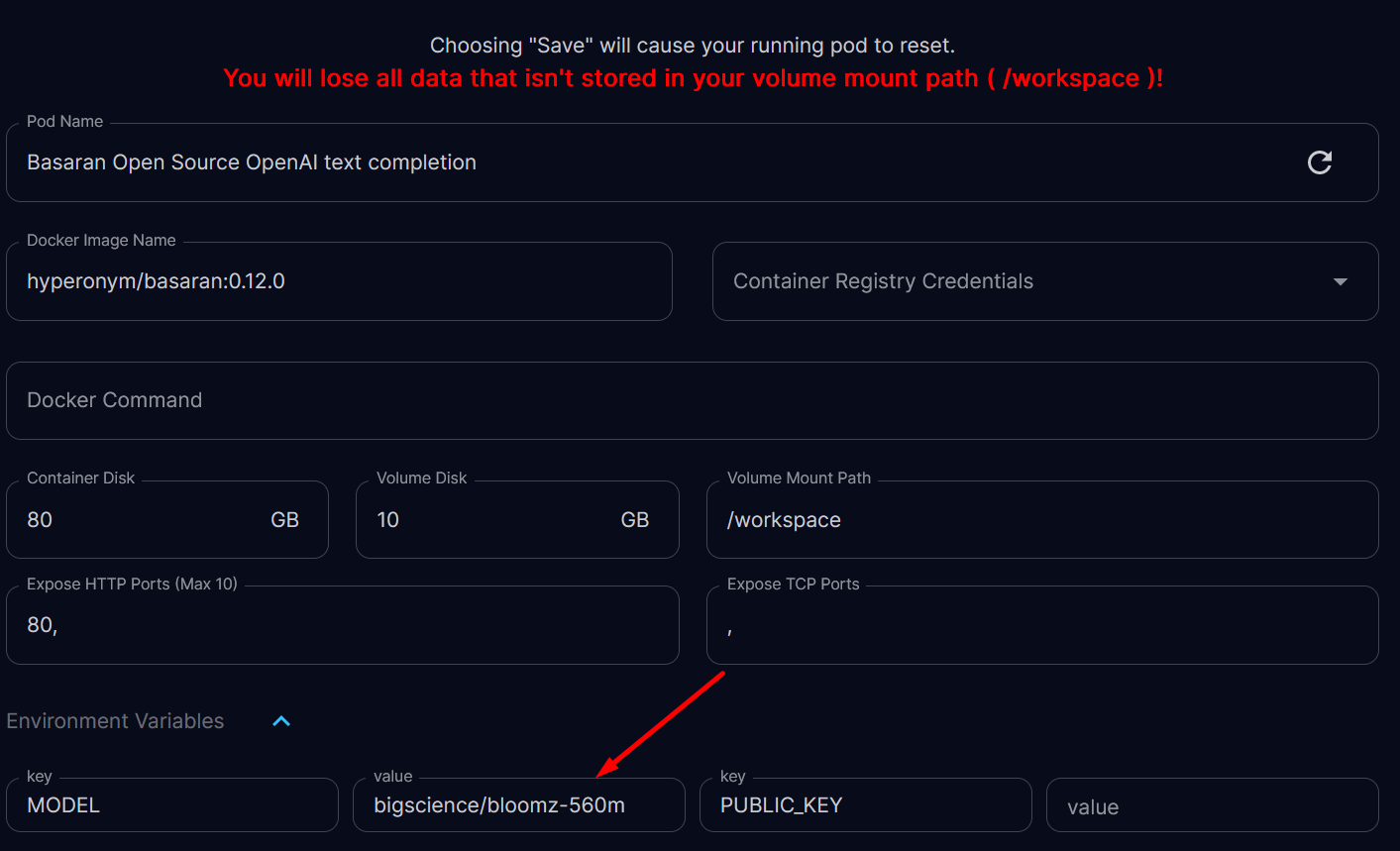
Replace it to use custom model after that reset pod

Replace it to use custom model after that reset pod

Step 4: After you've made any desired changes to the environment variables, reset the pod to apply new model.
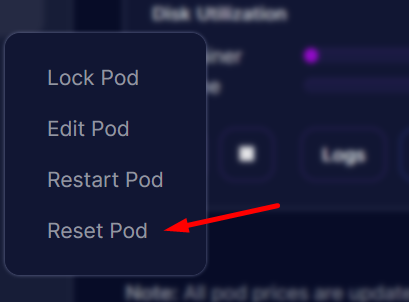
Reset Pod will clear container storage and download custom model

Reset Pod will clear container storage and download custom model

Step 5: Access the Basaran Interface Once your pod is running, click on the "Connect via HTTP [Port 80]" button to access the Basaran web interface. From here, you can start using Basaran to generate text completions based on your input.
Note: You can also use API by adding /v1/completions at the end of your proxy URL.
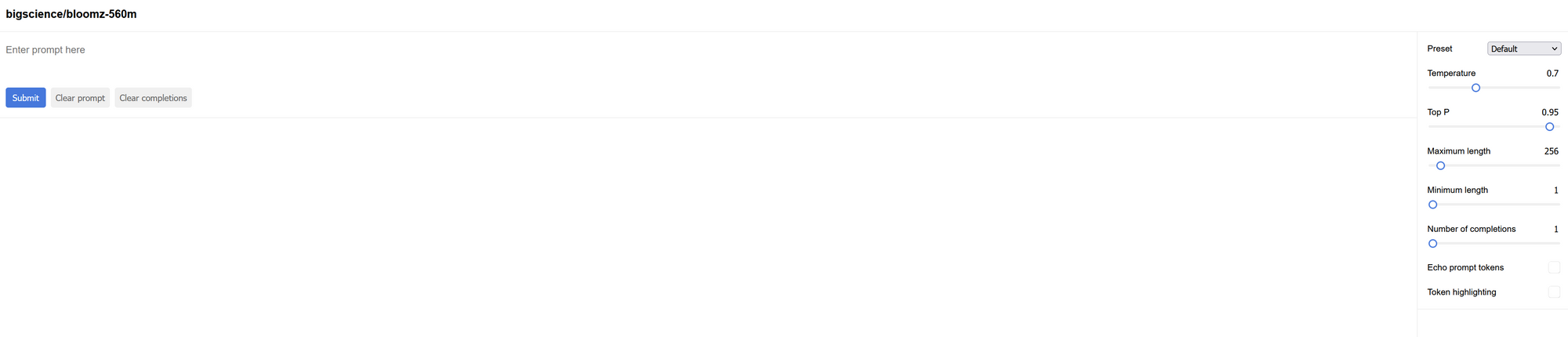
Basaran web playground for bigscience/bloomz-560m with a prompt box and generation settings panel

Conclusion: That's it! You've successfully set up and launched Basaran on Runpod using the provided template. Now you can enjoy using this open-source alternative to OpenAI's text completion API. Remember that you can always change the model by editing the MODEL environment variable during pod creation.
Happy text generating!

Hopefully, this blog post has given you a better understanding of how to use the Fast Stable template. If you have any questions or need help, don't hesitate to send message on Runpod's Discord or other communities for support.

Author profile: Madiator2011