


惯性聚合 高效追踪和阅读你感兴趣的博客、新闻、科技资讯
阅读原文 在惯性聚合中打开

推荐订阅源

博客园_首页
B
Blog RSS Feed
Microsoft Azure Blog
J
Java Code Geeks
Cyber Security Advisories - MS-ISAC
Google DeepMind News
F
Fortinet All Blogs
V
V2EX
freeCodeCamp Programming Tutorials: Python, JavaScript, Git & More
Engineering at Meta
Engineering at Meta
月光博客
月光博客
阮一峰的网络日志
阮一峰的网络日志
M
MIT News - Artificial intelligence
IT之家
IT之家
博客园 - 【当耐特】
U
Unit 42
云风的 BLOG
云风的 BLOG
L
LangChain Blog
小众软件
小众软件
Microsoft Security Blog
B
Blog
H
Hackread – Cybersecurity News, Data Breaches, AI and More
宝玉的分享
宝玉的分享
N
Netflix TechBlog - Medium

Runpod Blog.

New Runpod datacenter now live: AP-IN-1 Track GPU spend across your team with Cost Centers The GPU supply supercycle is here. Here’s what AI builders need to know. Community Spotlight: One-click AI image and video generation on Runpod with SwarmUI | Runpod Blog Community Spotlight: LoRA Pilot Data Prep to Inference Introducing the Runpod Assistant: Manage Your Cloud GPU Resources with Natural Language OpenAI's Parameter Golf: Train the Best Language Model That Fits in 16MB on Runpod LLM inference optimization: techniques that actually reduce latency and cost Pruna P-Video and Vidu Q3 public endpoints now available on Runpod Runpod brand spelling guide Quickstart - Runpod Documentation The AI market looks nothing like the narrative Training StyleGAN3 with Vision-Aided GAN on Runpod KoboldAI – The Other Roleplay Front End, And Why You May Want to Use It How to Connect Cursor to LLM Pods on Runpod for Seamless AI Dev Community Spotlight: How AnonAI Scaled Its Private Chatbot Platform with Runpod Prompt Scheduling with Disco Diffusion on Runpod Runpod's Latest Innovation: Dockerless CLI for Streamlined AI Development Run Your Own AI from Your iPhone Using Runpod Introducing Flash: Run GPU workloads on Runpod Serverless: No Docker required Use Claude Code with your own model on Runpod: No Anthropic account required Avoid Errors by Selecting the Proper Resources for Your Pod What hackers built on Runpod at TreeHacks 2026 Easily Back Up and Restore Your Pod with Cloud Sync + Backblaze B2 The Complete Guide to GPU Requirements for LLM Fine-Tuning AI Guides, Tutorials & GPU Infrastructure Insights | Runpod Your first Claude Code project within Runpod: a complete setup guide 10 billion Serverless requests and counting Building for resilience: Runpod’s response to the AWS us-east-1 outage How to Connect Google Colab to Runpod
Intro to WebSocket Streaming with Runpod Serverless
Brendan McKeag · 2025-02-19 · via Runpod Blog.

In this followup to our 'Hello World' tutorial, we'll create a serverless endpoint that processes base64-encoded files and streams back the results. This will demonstrate how you can work with file input/output over our serverless environment by encoding the file as data within a JSON payload.

Prerequisites

As before, this tutorial will be aimed at OSX developers.

Step 1: Creating the Project

Create your development environment.

Step 2: Creating the Handler

Create a new file called handler.py. Remember that the handler loop is how code gets executed when a worker is active. In this example, this handler will simulate image processing. Since this tutorial is to demonstrate the serverless environment more than process images, we will have it just create a static, blank image as the payload.

Step 3: Creating the Dockerfile and requirements.txt

As with the previous tutorial, we'll need to provide the Dockerfile and requirements.txt to build and push the image.

Step 4: Build and Push to DockerHub

As before, build and push your image to DockerHub, and then pull it into your endpoint.
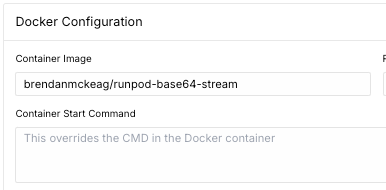
Runpod Docker configuration form with container image brendanmckeag/Runpod-base64-stream

Step 5: Running the Endpoint in Code

Here, we'll provide an example of how to interact with the endpoint in code. You'll need to provide your Runpod API key and Endpoint ID in the variables up top. Let's call this test_endpoint.py.

What this code will do is send a request to the endpoint you've created, let it process and return base64 data in a JSON payload, and return it to your script for further local processing and saving.

Run the test:

You should see output like this, along with a base64 JSON payload saved in the folder you ran the script in.

Conclusion

You've now learned how to create a Runpod serverless endpoint that can process base64-encoded files and stream results back to the client. This pattern can be extended to handle various types of file processing tasks while providing real-time feedback to users.

Author profile: Brendan McKeag