惯性聚合 高效追踪和阅读你感兴趣的博客、新闻、科技资讯
阅读原文 在惯性聚合中打开

推荐订阅源

D
Docker
B
Blog RSS Feed
Microsoft Security Blog
Y
Y Combinator Blog
N
Netflix TechBlog - Medium
M
MIT News - Artificial intelligence
奇客Solidot–传递最新科技情报
奇客Solidot–传递最新科技情报
B
Blog
钛媒体:引领未来商业与生活新知
钛媒体:引领未来商业与生活新知
C
Check Point Blog
The GitHub Blog
The GitHub Blog
让小产品的独立变现更简单 - ezindie.com
P
Proofpoint News Feed
Martin Fowler
Martin Fowler
大猫的无限游戏
大猫的无限游戏
GbyAI
GbyAI
博客园_首页
A
About on SuperTechFans
Blog — PlanetScale
Blog — PlanetScale
人人都是产品经理
人人都是产品经理
T
Tailwind CSS Blog
aimingoo的专栏
aimingoo的专栏
T
The Blog of Author Tim Ferriss
The Cloudflare Blog

Runpod Blog.

New Runpod datacenter now live: AP-IN-1 Track GPU spend across your team with Cost Centers The GPU supply supercycle is here. Here’s what AI builders need to know. Community Spotlight: One-click AI image and video generation on Runpod with SwarmUI | Runpod Blog Community Spotlight: LoRA Pilot Data Prep to Inference Introducing the Runpod Assistant: Manage Your Cloud GPU Resources with Natural Language OpenAI's Parameter Golf: Train the Best Language Model That Fits in 16MB on Runpod LLM inference optimization: techniques that actually reduce latency and cost Pruna P-Video and Vidu Q3 public endpoints now available on Runpod Runpod brand spelling guide Quickstart - Runpod Documentation The AI market looks nothing like the narrative Training StyleGAN3 with Vision-Aided GAN on Runpod KoboldAI – The Other Roleplay Front End, And Why You May Want to Use It How to Connect Cursor to LLM Pods on Runpod for Seamless AI Dev Community Spotlight: How AnonAI Scaled Its Private Chatbot Platform with Runpod Prompt Scheduling with Disco Diffusion on Runpod Runpod's Latest Innovation: Dockerless CLI for Streamlined AI Development Run Your Own AI from Your iPhone Using Runpod Introducing Flash: Run GPU workloads on Runpod Serverless: No Docker required Use Claude Code with your own model on Runpod: No Anthropic account required Avoid Errors by Selecting the Proper Resources for Your Pod What hackers built on Runpod at TreeHacks 2026 Easily Back Up and Restore Your Pod with Cloud Sync + Backblaze B2 The Complete Guide to GPU Requirements for LLM Fine-Tuning AI Guides, Tutorials & GPU Infrastructure Insights | Runpod Your first Claude Code project within Runpod: a complete setup guide 10 billion Serverless requests and counting Building for resilience: Runpod’s response to the AWS us-east-1 outage How to Connect Google Colab to Runpod
Hybridize Images With Image Mixer Before Running Through ...
Brendan McKeag · 2023-04-01 · via Runpod Blog.

Stable Diffusion has a powerful feature (img2img) that allows you to generate images using another image as a prompt. However, it has a weakness in that you can only supply a single image to use in that prompt – so if you want to include facets of a group of images, you'll need to use some sort of a workaround to accomplish this. Fortunately, Image Mixer is here to the rescue to help us create a hybridized image that we can then use as a prompt in img2img!

The installation is relatively quick and easy, and you'll be ready to start hybridizing images within a few minutes.

Installation

You'll need to create a pod with a healthy amount of VRAM to avoid potential errors. In my testing, I ran into out of memory errors on instances with 8GB and 12GB of VRAM, but didn't see any once I went up to 16GB. So something like an RTX A4000 should work nicely. You'll also want to up the container size to 20GB to ensure you have enough room to install the mixer.
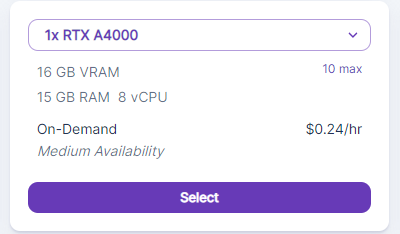
Runpod GPU selection card for 1x RTX A4000 with 16 GB VRAM at $0.24/hr on-demand

Then, create the instance for Stable Diffusion as detailed in this article.

Once the Stable Diffusion instance has been created, then you can open up a Terminal in your pod and run the following commands as per Image Mixer's readme (you can just copy and paste the whole block in at once):

The installation will run through all but the last line automatically. Once it gets that far, you can just hit Enter again for the final step.  Once that completes, there will be a link to a Gradio site that you can click on to run the mixer. Though the site is hosted externally, it will be using the compute power of your instance to run the model.  

Let's say you want to create a prompt in Stable Diffusion with a new, never before-seen multiple species of bird comprised of real-world examples. In this case, I've chosen images of a cardinal and an osprey to work with:
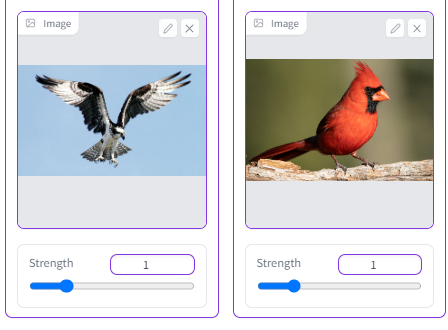
Image Mixer interface with two input photos, an osprey in flight and a cardinal, each with strength sliders

It's just a matter of plugging your images into the mixer and adjusting their strength, which is the primary weight behind how much each image is represented in the final product. I've found that for realistic images, you actually want to keep the strength value fairly low (1.5 or lower.) Despite the bar going much higher than that, you tend to get much more abstract images after that point.

The final results are pretty striking – for the supplied prompts, it ended up creating combinations of the cardinal's body with the osprey's markings (while still retaining the cardinal's crest color.)
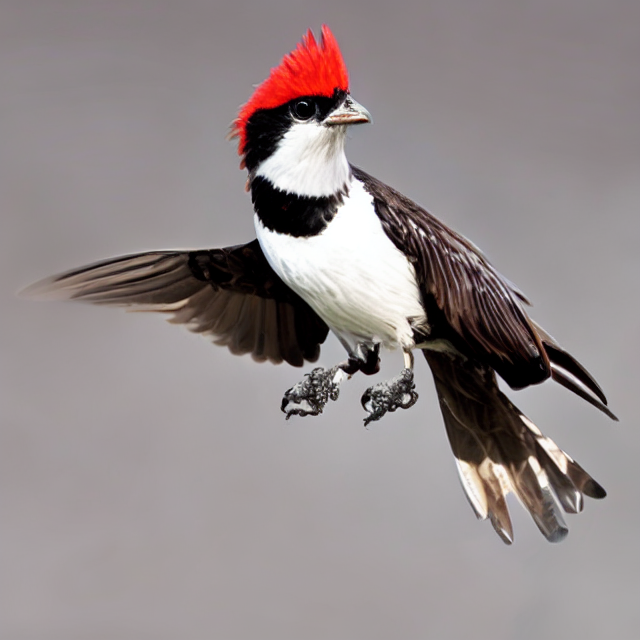
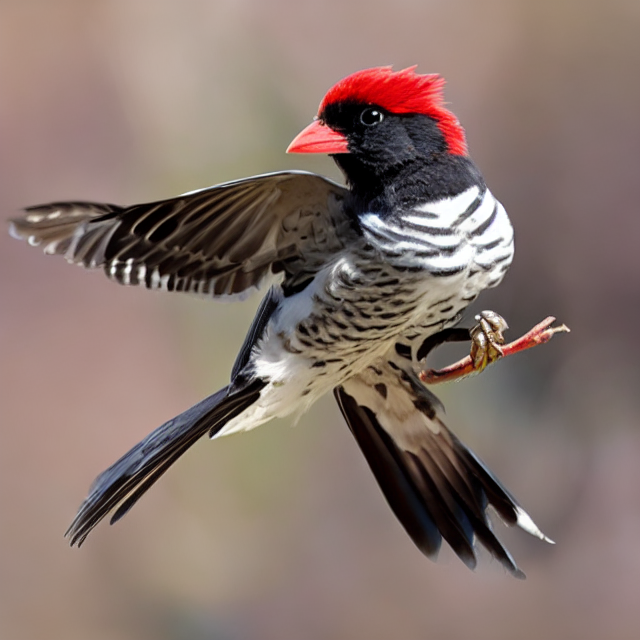
AI-generated hybrid bird with red crest and black-and-white plumage in flight, blending cardinal and osprey traits

AI-generated bird with red cap and speckled black-and-white plumage in flight, mixing cardinal and osprey features

AI-generated cardinal-osprey hybrid bird with tall red crest perched on a branch

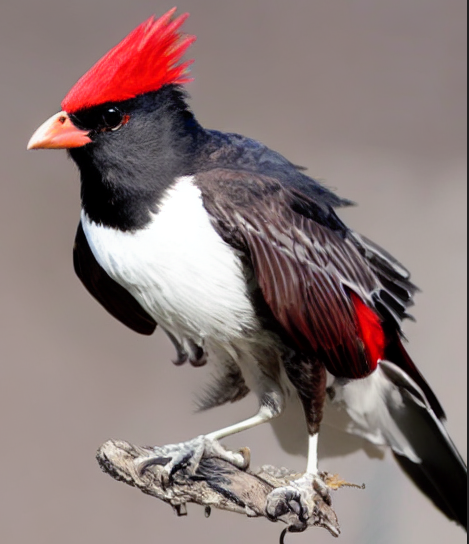
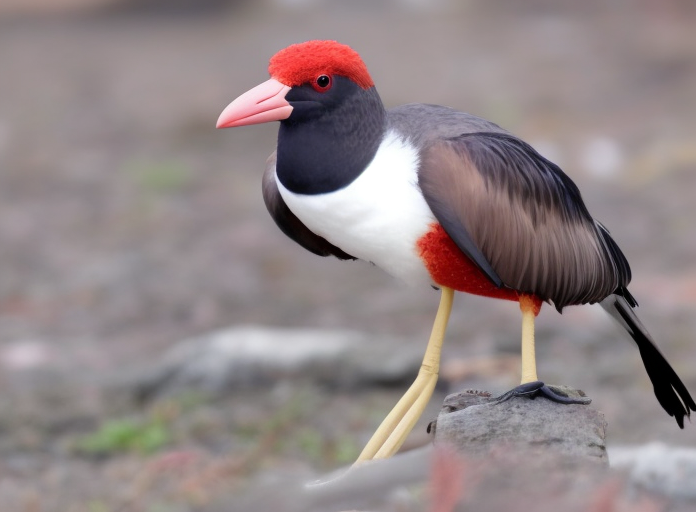
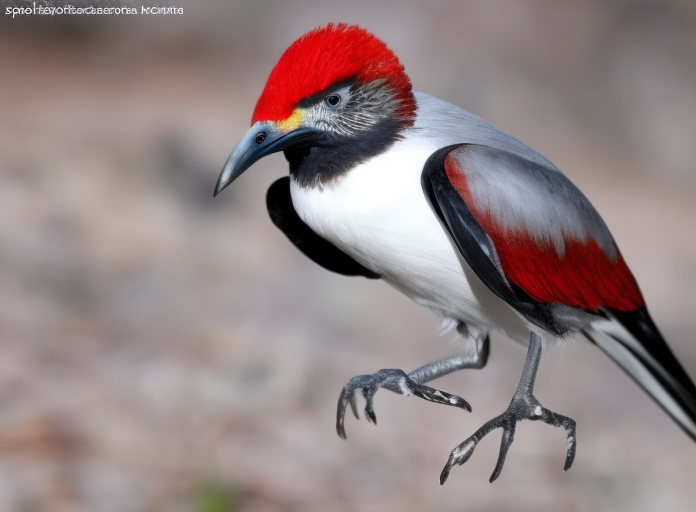
Now that we have our cardprey.. or our osinal.. (whatever you like) we have several options to use him as a prompt to create further versions using the greater flexibility that img2img has.  Using him as a prompt image, you can then use the text prompt of img2img to extrapolate your base image into different taxonomic avian groups, and all you need to do is simply enter their Latin order name as a prompt. For example:

Accipitriformes:
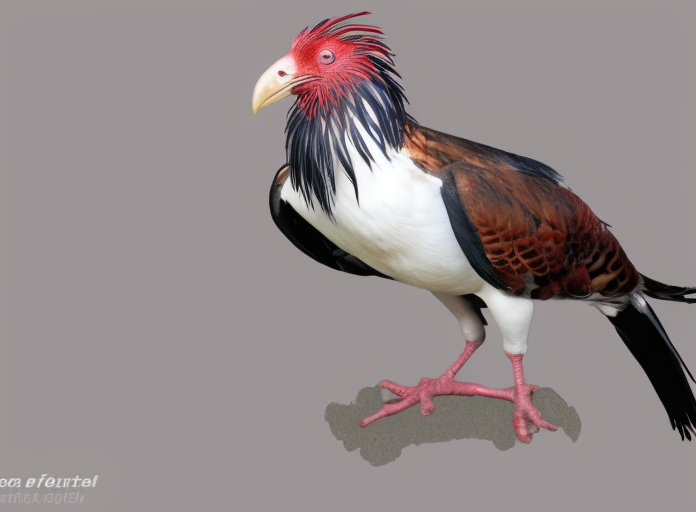
AI-generated hybrid bird with spiky red crest, white breast, and brown wings standing against a gray background

Anseriformes:

AI-generated hybrid bird with red head, white breast, and long pale legs standing on rocky ground

Sphenisciformes

AI-generated hybrid bird with red crown and gray-and-red wings leaping with talons extended

So, there you have it. Image Mixer allows you to easily combine aspects of two images into one, and then use that as a base to extrapolate further. If you think of your hybridized images from the mixer as the trunk of the tree and further img2img prompting as the branches, it should become a lot clearer as to just how expansive the combination of these two tools can be.

Author profile: Brendan McKeag