




Demand for accelerated compute has outpaced supply across the entire industry, and like everyone else, we feel it. This is why we're rolling out Multi-Instance GPU (MIG) on Runpod.
Multi-Instance GPU (MIG) technology divides the GPU into smaller, isolated instances for better resource utilization. This lets you rent exactly the amount of GPU you need instead of paying for a monster card to run a workload that only needs a fraction of it.
Here's what that means, why it matters, and how we're using it to put more compute in more hands.
It’s been long-standing good practice for resource management that you don’t use more GPU than you need for the task at hand; you really just want to be sure that you have the VRAM you need without OOMing, but when your available GPU specs are limited due to supply you can feel stuck between a rock and a hard place. If all you want to run is a small LLM, you don’t want to rent an H200 for it; even if it works technically it isn’t sustainable practice.
A lot of workloads simply don't need a full high-end GPU. Think about what you're actually running:
If the only thing on the menu is the whole card, you end up renting far more than you need, paying for idle capacity, and—during a supply crunch—taking a scarce full GPU off the board that someone with a genuinely large job could have used.
That's bad for you and bad for the ecosystem. Right-sizing fixes both sides of it.
Multi-Instance GPU is an NVIDIA technology that partitions a single physical GPU into multiple independent instances. According to NVIDIA, MIG can split a supported GPU into as many as seven instances, each fully isolated with its own high-bandwidth memory, cache, and compute cores.
The key word is isolated. This isn't time-slicing, where jobs take turns on the same hardware and step on each other. With MIG, each instance gets a dedicated slice of compute, memory, and memory bandwidth. NVIDIA notes that this delivers guaranteed quality of service and fault isolation, meaning a failure in an application running on one instance doesn't affect applications on the others. Your slice behaves like its own standalone GPU.
A few properties make this genuinely useful rather than just a neat trick:
Real isolation, not contention. Without partitioning, multiple jobs on one GPU compete for the same resources—a memory-hungry job can starve its neighbors and blow past latency targets. NVIDIA's whole pitch for MIG is that each instance runs in parallel with dedicated resources, so performance is predictable.
No code changes. Each MIG instance presents itself to your application like an ordinary GPU. NVIDIA confirms there's no change to the CUDA platform required, and MIG instances work with containers the same way a full GPU does. Your existing stack just sees a GPU and runs.
Flexible sizing. A card can be carved into different-sized instances depending on the need. As NVIDIA describes it, an administrator can provision the right-sized instance for each workload to maximize utilization.
Note that we will never time-slice or segment a GPU without being completely up front that we are doing it. If you pay for the whole card, you get the whole card, full stop.
Here's our specific implementation. We're taking the NVIDIA RTX 6000 Pro, a high-memory, high-performance card, and segmenting it into 24 GB chunks using MIG.
Why 24 GB? Because that's a sweet spot for an enormous range of real workloads. A 24 GB slice comfortably handles:
For these jobs, a 24 GB MIG slice gives you a dedicated, isolated GPU instance including your own memory and your own compute at a fraction of the cost and footprint of a full card. And because each slice is genuinely partitioned, you get the predictable performance of dedicated hardware, not a noisy shared environment.
This is exactly the use case NVIDIA points to: for smaller workloads, rather than renting a full instance, you can use MIG to securely isolate a portion of a GPU. It improves flexibility for providers to address smaller customer needs, and that's the gap we're bridging.
To be clear, MIG slices aren't the answer to everything. If you're training a large model, running a job that needs the full memory and bandwidth of a top-end card, or doing anything that benefits from the entire GPU at once, you should still rent the full GPU, and we'll keep offering those. The point of MIG isn't to push everyone onto slices. It's to make sure that the people who don't need a full card aren't forced to take one, which leaves more full cards available for the people who do.
As of right now, we are implementing MIG for Serverless endpoints, which will bolster the supply in the highly sought after 24 GB spec. If you end up using a Pro 6000 MIG worker, you’ll be billed the same as if you used any other worker in that category. If for some reason you’d prefer to opt out of using these workers, you can make the change under Advanced in your endpoint configuration by unchecking the box for this spec.
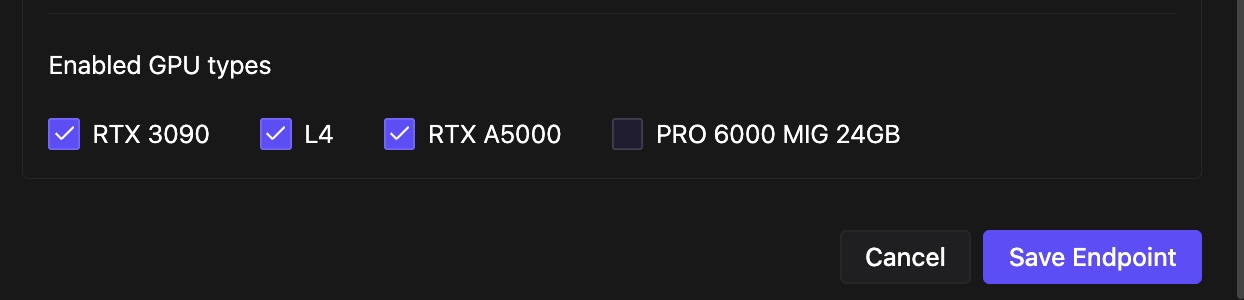
Going forward, we hope to also roll this out for pods soon as well, but Serverless was the first priority due to the more ephemeral nature of the workloads; we just get more bang for the virtual buck with this use case.
We think this is a smarter way through the supply crunch: not rationing scarce hardware, but reshaping it to fit what people actually need. Try a slice on your next inference or development workload and see how little GPU it really takes to get the job done.
Create a Serverless endpoint →
Author profile: Brendan McKeag
此内容由惯性聚合(RSS阅读器)自动聚合整理,仅供阅读参考。 原文来自 — 版权归原作者所有。