惯性聚合 高效追踪和阅读你感兴趣的博客、新闻、科技资讯
阅读原文 在惯性聚合中打开

推荐订阅源

博客园 - 三生石上(FineUI控件)
WordPress大学
WordPress大学
S
SegmentFault 最新的问题
小众软件
小众软件
T
Tailwind CSS Blog
博客园 - 聂微东
OSCHINA 社区最新新闻
OSCHINA 社区最新新闻
人人都是产品经理
人人都是产品经理
V
Visual Studio Blog
罗磊的独立博客
有赞技术团队
有赞技术团队
奇客Solidot–传递最新科技情报
奇客Solidot–传递最新科技情报
让小产品的独立变现更简单 - ezindie.com
Jina AI
Jina AI
量子位
云风的 BLOG
云风的 BLOG
Recent Announcements
Hugging Face - Blog
Hugging Face - Blog
P
Proofpoint News Feed
N
Netflix TechBlog - Medium
GbyAI
GbyAI
钛媒体:引领未来商业与生活新知
钛媒体:引领未来商业与生活新知
腾讯CDC
美团技术团队

Runpod Blog.

New Runpod datacenter now live: AP-IN-1 Track GPU spend across your team with Cost Centers The GPU supply supercycle is here. Here’s what AI builders need to know. Community Spotlight: One-click AI image and video generation on Runpod with SwarmUI | Runpod Blog Community Spotlight: LoRA Pilot Data Prep to Inference Introducing the Runpod Assistant: Manage Your Cloud GPU Resources with Natural Language OpenAI's Parameter Golf: Train the Best Language Model That Fits in 16MB on Runpod LLM inference optimization: techniques that actually reduce latency and cost Pruna P-Video and Vidu Q3 public endpoints now available on Runpod Runpod brand spelling guide Quickstart - Runpod Documentation The AI market looks nothing like the narrative Training StyleGAN3 with Vision-Aided GAN on Runpod KoboldAI – The Other Roleplay Front End, And Why You May Want to Use It How to Connect Cursor to LLM Pods on Runpod for Seamless AI Dev Community Spotlight: How AnonAI Scaled Its Private Chatbot Platform with Runpod Prompt Scheduling with Disco Diffusion on Runpod Runpod's Latest Innovation: Dockerless CLI for Streamlined AI Development Run Your Own AI from Your iPhone Using Runpod Introducing Flash: Run GPU workloads on Runpod Serverless: No Docker required Use Claude Code with your own model on Runpod: No Anthropic account required Avoid Errors by Selecting the Proper Resources for Your Pod What hackers built on Runpod at TreeHacks 2026 Easily Back Up and Restore Your Pod with Cloud Sync + Backblaze B2 The Complete Guide to GPU Requirements for LLM Fine-Tuning AI Guides, Tutorials & GPU Infrastructure Insights | Runpod Your first Claude Code project within Runpod: a complete setup guide 10 billion Serverless requests and counting Building for resilience: Runpod’s response to the AWS us-east-1 outage How to Connect Google Colab to Runpod
How to Configure Basic Terminal Access on Runpod
Zhen Lu · 2022-05-16 · via Runpod Blog.

How to Configure Basic Terminal Access on Runpod

The fastest way to get access to a custom pod is to use our basic terminal access feature. This works with any custom container that you want to run on Runpod, whether or not it has a built in SSH daemon or exposed ports. Do be aware that there are limitations to this method of access, including lack of SCP support, which may impede your ability to do stuff. This access type is mostly for if you just want to run some quick terminal commands. If this sounds like your use case, read on!

Note that this gives you a bash shell, but it is not true SSH. If you need true SSH, see this blog post.

I'm not going to bore you with a long intro in this one. Here are the goods.

1. Create a key pair in a terminal window as follows:

Save it wherever you want, but remember the path! If this is your first/only SSH key, feel free to use the default path by pressing Enter without entering a custom path.

2. Get your public key (you can use the following command if you used the defaults)

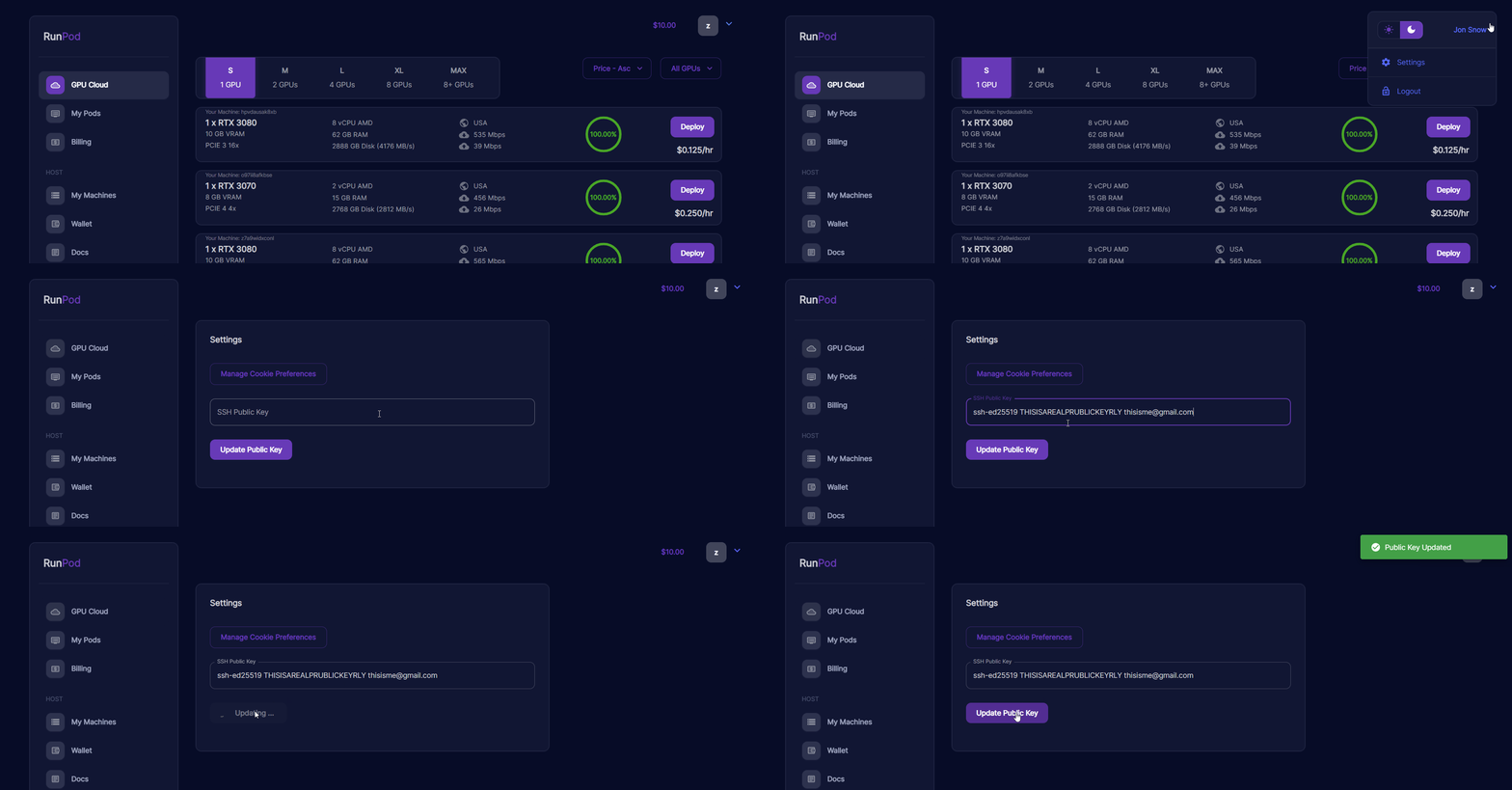
3. Copy your SSH key to the server. For Runpod, you can find the menu in your settings in the top right corner.

Terminal access animation screenshot

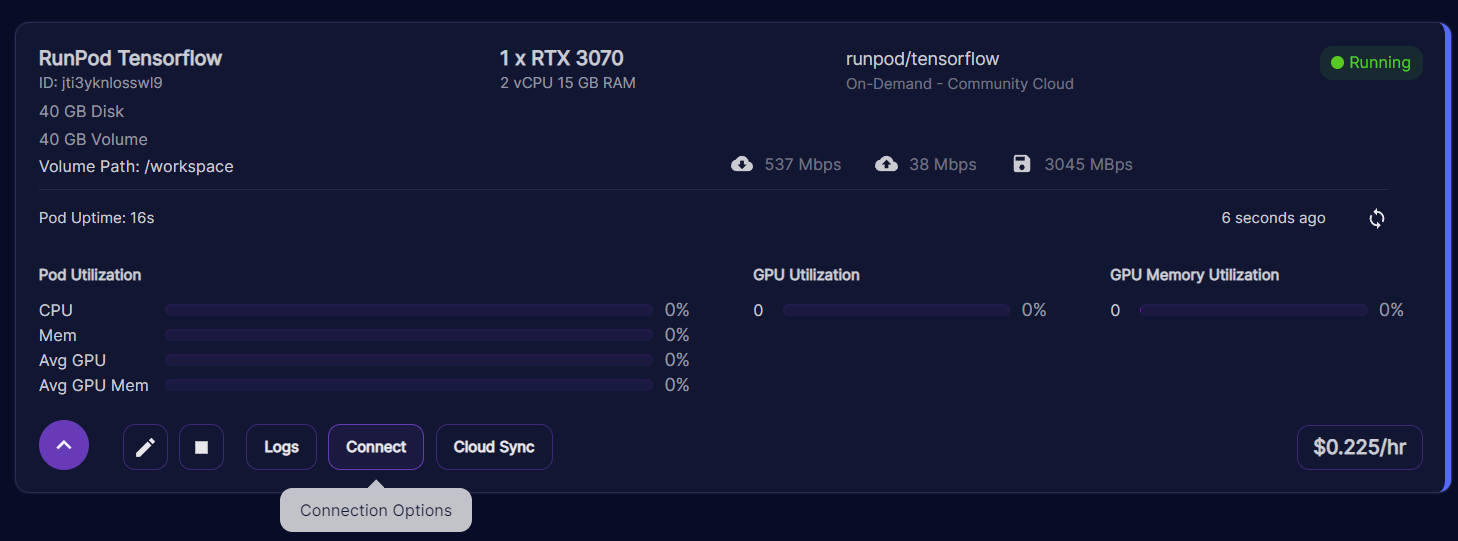
4. Find your server address. You can find it in the "Connect" menu under your "My Pods" dashboard.

Runpod pod card for a running TensorFlow pod with the Connect button and connection options tooltip

5. Copy the second SSH command (SSH command with private key file) and make sure the path points to the private key you generated in step 1.

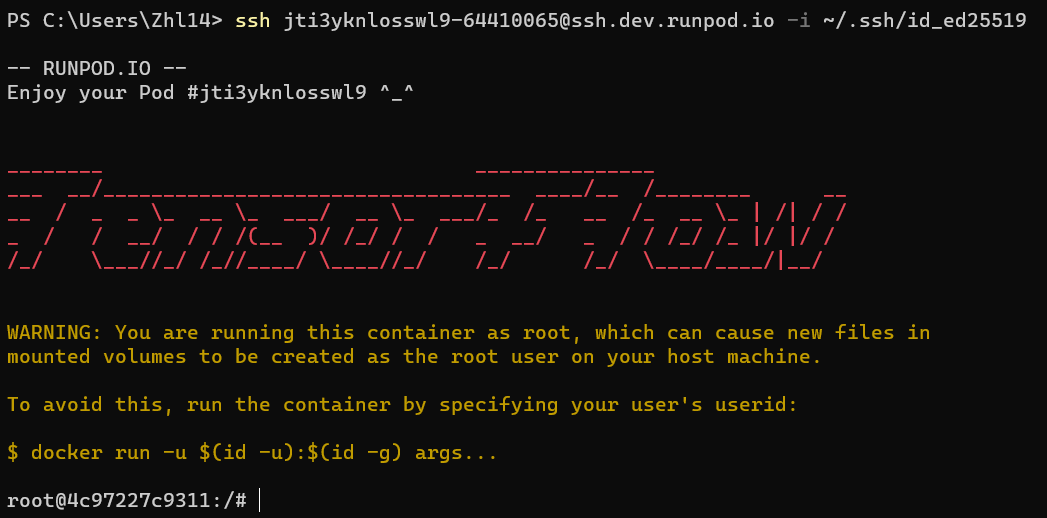
6. Open a terminal window and run the command that you copied.

Terminal showing SSH login to a Runpod pod with a TensorFlow ASCII art banner and root shell prompt

Happy Hacking!

Author profile: Zhen Lu

The Chips Got Faster. The Stack Didn't.

The Chips Got Faster. The Stack Didn't.

Explore why faster chips have shifted the bottleneck to AI infrastructure, and what that means for teams running production workloads.

All

Multi-Instance GPUs on Runpod: Stop Paying for Compute You Don't Need

Multi-Instance GPUs on Runpod: Stop Paying for Compute You Don't Need

With MIG, we can partition RTX 6000 Pro cards into isolated 24 GB instances. Here's when it makes sense for your workloads.

All

OpenAI Parameter Golf: what 1,100 researchers built in six weeks

OpenAI Parameter Golf: what 1,100 researchers built in six weeks

How 1,100 researchers beat OpenAI's own baseline with 16 megabytes and 10 minutes.

All

Build what’s next.

Build, train, and scale AI workloads on Runpod with cloud GPUs, Serverless, and Clusters.