






Runpod is pleased to announce its launch of our Global Networking feature, which allows for cross-data center communication between pods. When a pod with the feature is deployed, your pods can communicate with each other over a virtual internal network facilitated by Runpod. This means that you can have pods talk to each other without opening TCP or HTTP ports to the Internet, as well as share data and run client-server apps over multiple pods in real time.
This feature is currently live for the following data centers, with a 100mbps link limit to start, with new expansions planned in the near future. 'CA-MTL-3', 'US-GA-1', 'US-GA-2', 'US-KS-2'
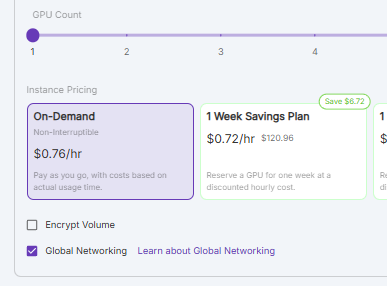
You can enable Global Networking in your pod by checking the Global Networking checkbox under the Instance Pricing option while deploying your pod.
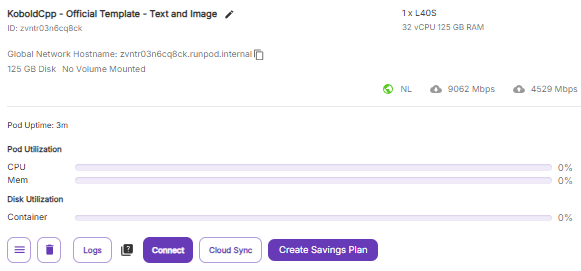
When the pod is created, it will assign a virtual Global Network Hostname that can be communicated with via any other Secure Cloud pods that were also created with Global Networking, regardless of which data center they reside in.
As a quick test and demonstration, communication between pods can be tested with ping (run apt-get update, apt-get install iputils-ping if it's not already set up in your pod.)
Here's a quick proof of concept of how to accomplish this in Python. Run this script in both pods that you want to test the feature in:
Change the bottom line to rank 0 for your 'master' node, and then rank 1 for your 'worker' node. Set the master_ip and master_addr to be the Global Networking hostname for both pods.
You should see the following to show that it was successful.
This is just merely an example, of course, and you could build any number of applications that utilize resources on more than one pod. If you want to share files between pods, you could utilize something like NFS to do this at the operating system level on one pod:
On the other:
Remember, all pods enabled with Global Networking have internal TCP/IP connectivity that is not exposed to the outside world, and communicate on the *.runpod.internal network. Although you are certainly free to open up ports as needed for your use case, no open ports are required for pods to talk to each other with Global Networking. Another option would be to set up a file server internally to share files, and with no exposed TCP or HTTP ports you can feel confident that this server has no link to the wider Internet.
This feature has been a long time coming, and we are thrilled to finally launch it, especially since we realize that previously being locked to a specific data center for a network volume can feel extremely limiting.
If you have any questions on how to best utilize this feature, please reach out to our support team or Discord for further guidance!
Author profile: Brendan McKeag
此内容由惯性聚合(RSS阅读器)自动聚合整理,仅供阅读参考。 原文来自 — 版权归原作者所有。