





Google tools like AI Mode in Search, Maps, Waze and the Gemini app can help guide you from the first whistle to the final goal.
Your browser does not support the audio element.
Listen to article
This content is generated by Google AI. Generative AI is experimental
[[duration]] minutes
As the popular soccer tournament kicks off across North America, Google is making it easier for you to follow every moment no matter where you are. Whether you’re searching for the latest scores, navigating your way to a match or looking for a recap of the day's biggest plays, Search, Maps, Waze and the Gemini app can help bring you closer to the action.
1. Get real-time info on Search.
Now, when you search for soccer, it’s even easier to quickly access real-time information about the game, like visuals for live scores, lineups, standings, brackets, stories and social content. For example, if you’re looking up Mexico vs. South Africa mid-match, you can see each team's score, standings and a carousel of other live match info. You can even pin a match’s live score to your iOS or Android device’s lock screen by following a specific match or team. You’ll receive live updates before and after each game.
2. Dive deep into the details with AI Mode in Search.
You can use AI Mode in Search for everything from agentic ticket booking to asking complex questions around rules, players, teams and more.
Say you’re trying to learn about different types of soccer formations and when coaches might use each one. You can ask AI Mode to create an interactive visual that’s tailored to your specific question. These generative UI capabilities are currently available for AI Mode Pro and Ultra subscribers and will be available for everyone in Search this summer, free of charge.
3. Make game-time decisions with Maps and Waze.
Google Maps and Waze will have the latest information about traffic, road closures, pedestrian zones, transit routes and more so you can feel confident navigating the games. We even updated Street View imagery of many stadiums that are hosting matches, so you can visualize the area before you get there. And for the first time on Waze, you can see live score updates at a glance whenever your car is stopped.
If you don't have tickets to the stadium, Google Maps can help you track down the perfect viewing party nearby. Just Ask Maps something like, “Find me a reservation for 4 at 7:30 p.m., somewhere I can watch the World Cup match and meet other fans."
4. Take your fandom further with Gemini.
The Gemini app can now reference match information about live soccer games and news providing the latest scores, highlights, standings and more as the action unfolds. For certain topics, Gemini can generate new visual elements — such as stats, images and videos highlighting up-to-date information on the latest action across soccer games — transforming standard text responses into a visual, dynamic matchday hub.
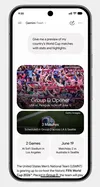
You can even turn yourself into a player on your favorite team with new Nano Banana templates designed to let fans put themselves directly into the action. Just upload a photo to these custom scenes to picture yourself celebrating in the stadium or scoring an incredible goal while wearing your country’s colors or official jersey. These templates are rolling out globally in the coming days in Gemini. Find them in the new Images tab on the navigation menu or from your Gemini homescreen when clicking the + then “Create image” in the prompt bar. 1
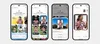
If you're a Plus, Pro or Ultra subscriber, you can use Scheduled Actions in the Gemini app to get caught up on the action with a morning briefing on international soccer news. You can customize this daily digest to focus on your teams and favorite players, then receive match updates, scores and an overall summary automatically at a time and frequency you choose.
To set it up, just click “Settings” within Gemini, open “Scheduled actions” and head to the soccer news digest template. It’s an easy way to make sure you never miss a moment of the tournament.
Done. Just one step more.
Check your inbox to confirm your subscription.
You are already subscribed to our newsletter.
You can also subscribe with a