惯性聚合 高效追踪和阅读你感兴趣的博客、新闻、科技资讯
阅读原文 在惯性聚合中打开

推荐订阅源

博客园 - Franky
N
Netflix TechBlog - Medium
Google Online Security Blog
月光博客
月光博客
量子位
酷 壳 – CoolShell
酷 壳 – CoolShell
V
V2EX
腾讯CDC
OSCHINA 社区最新新闻
OSCHINA 社区最新新闻
博客园 - 聂微东
让小产品的独立变现更简单 - ezindie.com
M
MIT News - Artificial intelligence
Vercel News
Vercel News
The GitHub Blog
The GitHub Blog
Hugging Face - Blog
Hugging Face - Blog
博客园 - 【当耐特】
Apple Machine Learning Research
aimingoo的专栏
aimingoo的专栏
博客园 - 三生石上(FineUI控件)
CTFtime.org: upcoming CTF events
MongoDB | Blog
MongoDB | Blog
H
Help Net Security
The Cloudflare Blog
Blog — PlanetScale
Blog — PlanetScale
F
Full Disclosure
G
Google Developers Blog
罗磊的独立博客
Jina AI
Jina AI
钛媒体:引领未来商业与生活新知
钛媒体:引领未来商业与生活新知
Y
Y Combinator Blog
H
Hackread – Cybersecurity News, Data Breaches, AI and More
J
Java Code Geeks
A
About on SuperTechFans
IT之家
IT之家
大猫的无限游戏
大猫的无限游戏
S
SegmentFault 最新的问题
有赞技术团队
有赞技术团队
GbyAI
GbyAI
雷峰网
雷峰网
T
The Blog of Author Tim Ferriss
The Register - Security
U
Unit 42
D
Docker
Martin Fowler
Martin Fowler
L
LINUX DO - 热门话题
NISL@THU
NISL@THU
阮一峰的网络日志
阮一峰的网络日志
C
Cybersecurity and Infrastructure Security Agency CISA
博客园_首页
Google DeepMind News

马浩飞丨博客

ROS实现多机话题通信 Cloudflare R2 个人图床 Isaac Sim 机械臂逆运动学控制 ROS2_Rviz2显示URDF模型 ROS2基本命令总结 使用zsh创建更高效的shell环境 Isaac Sim 仿真环境使用简介 Ubuntu设置定时任务 审稿意见撰写流程 Ubuntu 固定USB设备端口名(ttyUSB0->自定义) Git+Github的代码备份与多设备同步 【设备使用】法奥意威 FR5 机械臂 Python 控制 【设备使用】omega.7主手配置与使用方法 【论文笔记】ACT 使用低成本硬件的双手操作模仿学习 HDF5数据文件格式 【仿真实验】robomimic项目复现 【课程笔记】Stanford CS25 V2 - Robotics and Imitation Learning Ubuntu与Window双主机共用一套键鼠 Windows与Ubuntu双系统绑定同一个蓝牙设备(无需重新配对)
Python识别图片中文字和数字_easyocr
马浩飞 · 2024-04-09 · via 马浩飞丨博客

[!abstract]
项目需要实现一个识别图片中文字、数字的小功能,因此找了比较好用的开源库 easyocr,本文介绍其使用方法。

EasyOCR 介绍

EasyOCR 是一个可以直接使用的开源项目,目前在 Github 上已经有 20k+ 的 star,支持 80 多种语言的识别,精度非常高。

项目地址:https://github.com/JaidedAI/EasyOCR

EasyOCR 安装

注意:本实验默认在 Ubuntu 上进行测试,Windows 理论上可以同样操作。

(1)环境搭建

为了避免 python 包混乱冲突,一般先创建一个 conda 环境,参考此文章配置 anaconda。

1
conda create -n easyocr python=3.9

(2)安装 PyTorch

EasyOCR 依赖于 PyTorch,因此需要在环境中安装 PyTorch,此处以 1.12 版本为例,其他版本的安装命令可以从此处查看

1
2
conda activate easyocr
conda install pytorch==1.12.1 torchvision==0.13.1 torchaudio==0.12.1 cudatoolkit=11.6 -c pytorch -c conda-forge

(3)安装 EasyOCR

安装 EasyOCR 非常简单,执行以下命令即可

1
pip install easyocr

EasyOCR 基本使用

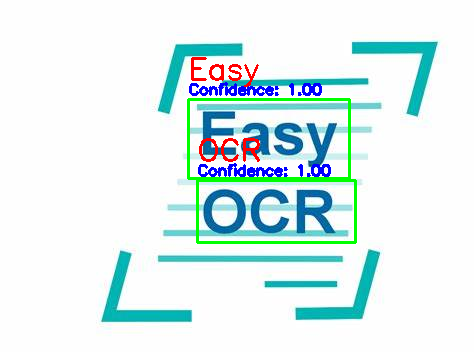
Easy 使用示例代码如下:

1
2
3
4
5
6
7
8
9
10
11
12
13
14
15
16
17
18
19
20
21
22
23
24
25
26
27
28
29
30
31
32
33
34
35

import os
import easyocr
import cv2
import numpy as np


image_path = './src/digital_recognition/image/digit/2000-1400-Trans.png'


reader = easyocr.Reader(['en'])
result = reader.readtext(image_path)
print(result)


image = cv2.imread(image_path)
for detection in result:

(bbox, text, prob) = detection

bbox = np.array(bbox).astype(int)

cv2.rectangle(image, (bbox[0][0], bbox[0][1]), (bbox[2][0], bbox[2][1]), (0, 255, 0), 2)

text_position = (bbox[0][0], bbox[0][1] - 20)
confidence_position = (bbox[0][0], bbox[0][1] - 5)
cv2.putText(image, text, text_position, cv2.FONT_HERSHEY_SIMPLEX, 1, (0, 0, 255), 2)
cv2.putText(image, f"Confidence: {prob:.2f}", confidence_position, cv2.FONT_HERSHEY_SIMPLEX, 0.5, (255, 0, 0), 2)


cv2.imshow("OCR Result", image)
cv2.waitKey(0)
cv2.destroyAllWindows()

image.png

打赏

  • 微信支付

    微信支付

  • 支付宝

    支付宝